


Tag-Connect, LLC
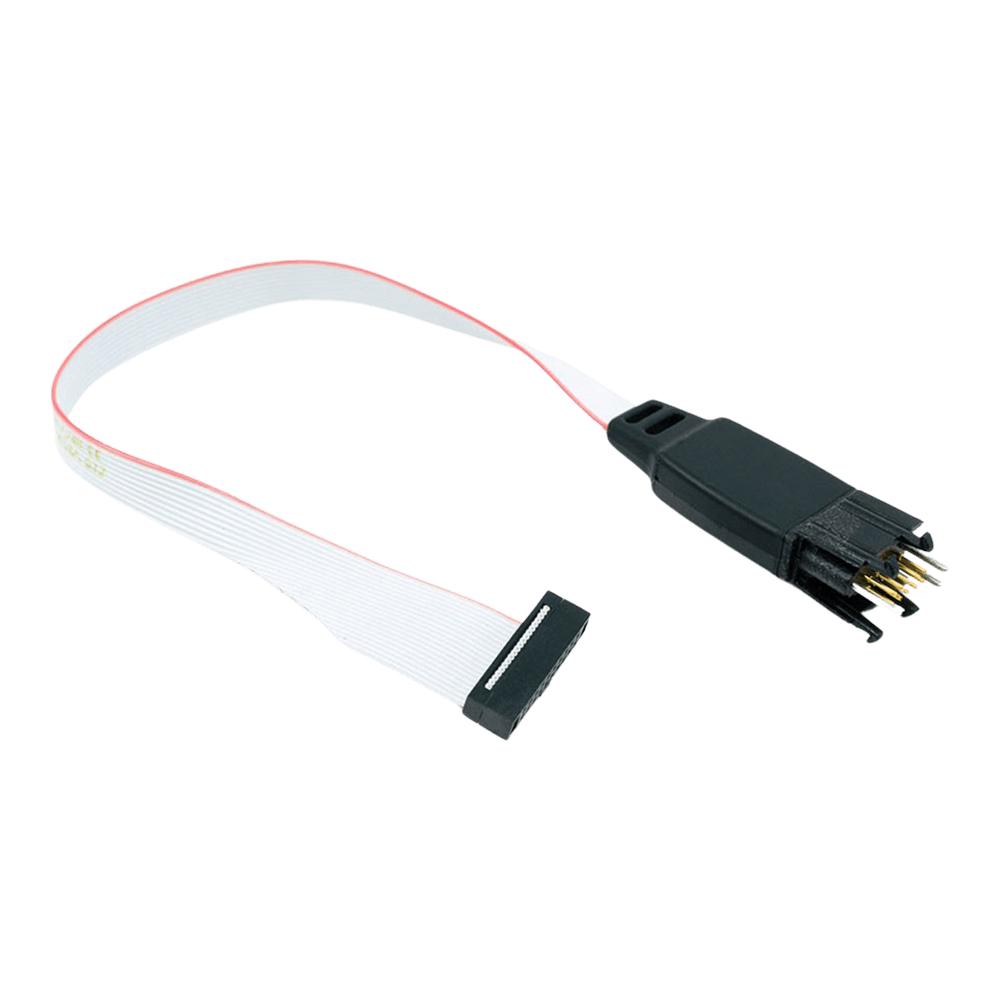
Tag-Connect TC2050-IDC-050 10-Pin Plug-of-Nails Cable for 0.05 in Cortex Debug (Legged or No Legs)
Tag-Connect TC2050-IDC-050 10-Pin Plug-of-Nails Cable for 0.05 in Cortex Debug (Legged or No Legs)
SKU: TC2050-IDC-050
£70.00 exc VAT
Four legs clip into latch holes on the board, so the cable stays in place hands-free. Best for development and debugging.
Fits a smaller footprint (about 0.03 sq in) with no leg latch holes. For production programming, and for debugging when held in place with a TC2050-CLIP or in a fixture.
Ribbon connector fitted in the standard orientation for the 10-pin 0.05 in Cortex Debug header.
Ribbon connector fitted reversed (LEMTA), the orientation Tag-Connect uses to correct the reversed pin numbering of the Atmel-ICE. No Legs version only. For the Atmel-ICE, Tag-Connect recommends the TC2050-IDC-050-ALL in the LEMTA orientation; check this version's wiring with us before ordering.
Suggested Add-Ons
Optional. Tick any you need. One of each is added to your cart with this item, whatever the quantity.
Check and Add to Cart
Confirm the price and stock for your selection, set the quantity, then press Add to Cart.
Payment methods
- Bank transfer
Couldn't load pickup availability


Key Features
Overview
The Tag-Connect TC2050-IDC-050 links a probe with the 10-pin 0.05 in Cortex Debug header, such as the Keil ULINK2, to ten pads on your PCB. Spring pins contact the pads, so the board carries no debug header. Pins 5 and 9 are not connected.
Choose Legged or No Legs, and the standard or LEMTA ribbon, in the options above.
The Legged version clips into the footprint and stays in place without a fixture. The No Legs version needs about 0.03 sq in and is held by hand, with a TC2050-CLIP or in a fixture. If you need pins 5 and 9 connected, or you use an Atmel-ICE, choose the TC2050-IDC-050-ALL.
Downloads
10-Pin Plug-of-Nails Cable for the 10-Pin 0.05 in Cortex Debug Connector
The Tag-Connect TC2050-IDC-050 connects a debugger with the 10-pin 0.05 in (1.27 mm) Cortex Debug header, the Samtec FTSH-105 style micro-header found on the Keil ULINK2 and similar probes, to a 10-pad TC2050 footprint on your PCB. No connector is fitted to the board. The wiring is 1-to-1 except that pins 5 and 9 are not connected.
Options
| Option | Choice | Detail |
|---|---|---|
| Head | Legged | Four legs latch into holes in the PCB, so the cable holds itself in place (TC2050-IDC-050) |
| Head | No Legs | No leg holes; footprint about 0.03 sq in; hold by hand, with a TC2050-CLIP or in a fixture (TC2050-IDC-NL-050) |
| Ribbon | Standard | Ribbon connector fitted in the standard orientation, pin 1 to pin 1 |
| Ribbon | LEMTA | Ribbon connector fitted reversed, the orientation Tag-Connect uses to correct the reversed pin numbering of the Atmel-ICE; No Legs only (TC2050-IDC-NL-050-LEMTA) |
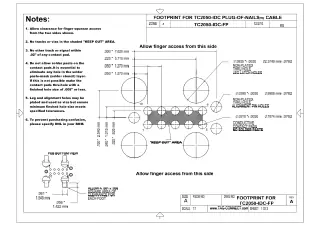
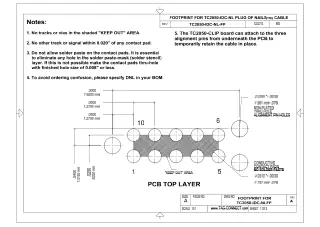
PCB footprint: the same ten-pad TC2050 footprint as the TC2050-IDC: ten contact pads at 0.05 in pitch with three alignment holes; the Legged footprint adds four leg latch holes. No solder paste on the contact pads. The footprint drawings are on sheet 1 of the TC2050-IDC and TC2050-IDC-NL datasheets under Downloads. Sheet 2 of each shows the 0.1 in TC2050-IDC cable, not this one. See also our Tag-Connect cable guide.
Pin Assignment
TC2050 pad n goes to connector pin n, except pads 5 and 9. Signals follow the Arm 10-pin Cortex Debug connector:
| Pad and Pin | Signal | Pad and Pin | Signal |
|---|---|---|---|
| 1 | VTref | 2 | SWDIO / TMS |
| 3 | GND | 4 | SWCLK / TCK |
| 5 | Not connected (GND on the header) | 6 | SWO / TDO |
| 7 | Key (no signal) | 8 | TDI |
| 9 | Not connected (GNDDetect on the header) | 10 | nRESET |
Pins 5 and 9
On the 10-pin Cortex Debug header, pins 5 and 9 are ground and ground-detect. This cable leaves them unconnected, similar to the wiring of the TC2050-ARM2010 adapter. If your probe or target needs pins 5 and 9 connected, use the TC2050-IDC-050-ALL instead.
Spring-Pin Contacts
Tag-Connect quotes over 100,000 operations for the spring pins. The 0.05 in connector uses fine-pitch ribbon with thin conductors, which Tag-Connect says can break over time with repeated flexing. For a debugger with a 0.1 in header, the TC2050-IDC uses heavier ribbon and is the more durable choice.
Who It's For
Engineers who debug or program Arm Cortex-M boards over SWD or JTAG from a probe with the 10-pin 0.05 in Cortex Debug header, and want no debug header on the PCB.
| Device Family | Debugger or Programmer | Connection |
|---|---|---|
| Arm Cortex-M devices, for example STM32, NXP LPC and Kinetis, Microchip SAM and Nordic nRF, SWD or JTAG | Keil ULINK2 and other probes with the 10-pin 0.05 in Cortex Debug (FTSH-105) header | Direct |
When to Choose a Different Cable
For pins 5 and 9 connected, or for the Microchip Atmel-ICE, use the TC2050-IDC-050-ALL (Tag-Connect recommends it in the LEMTA orientation for the Atmel-ICE). For a 20-pin 0.05 in Cortex probe use the TC2050-IDC-050-ALL-20. For a debugger with a 20-pin 0.1 in Arm JTAG header use the TC2050-IDC with the TC2050-ARM2010 adapter.
Compare the Versions
| Part Number | Head | Ribbon | Best For |
|---|---|---|---|
| TC2050-IDC-050 | Legged | Standard | Development and debugging: clips in and stays connected hands-free |
| TC2050-IDC-NL-050 | No Legs | Standard | Production programming, or debugging with a TC2050-CLIP; smallest footprint |
| TC2050-IDC-NL-050-LEMTA | No Legs | LEMTA (reversed) | Ribbon connector reversed (LEMTA). For the Atmel-ICE, Tag-Connect recommends the TC2050-IDC-050-ALL in LEMTA. |
All three versions use the same ten-pad contact pattern. TC2050-IDC-050 and TC2050-IDC-NL-050 leave pins 5 and 9 unconnected; check the LEMTA version's wiring with us before ordering.
Which cable fits your debugger? See our Tag-Connect cable guide.
| Ordering information | |
|---|---|
| Part number (SKU) | TC2050-IDC-050 |
| Manufacturer | Tag-Connect, LLC |
| EAN | 5055383665457 |
| Warranty | 6 months |
| Shipping weight | 0.1 kg |
- 1 ×Tag-Connect TC2050-IDC-050 cable, in the version you select (Legged or No Legs; standard or LEMTA ribbon)
Cable only. No debugger, adapter, retaining clip or fixture is included. On No Legs versions, the TC2050-CLIP retaining clip and the TC-MOUNT-10 fixture bracket are offered as add-ons.
Questions and Answers
-
What PCB Footprint Does This Cable Require?
The TC2050 footprint: ten contact pads at 0.05 in pitch and three alignment holes. The Legged version also needs four leg latch holes; the No Legs footprint is about 0.03 sq in. No solder paste on the contact pads. The drawings are in the TC2050-IDC and TC2050-IDC-NL datasheets under Downloads.
-
How Does This Compare to Traditional Debug Headers?
Tag-Connect cables remove the cost and board space of a fitted header. The TC2050 footprint is pads and holes only, so Tag-Connect puts its cost per board at zero, and the No Legs footprint takes about 0.03 sq in. You keep the same SWD or JTAG connection; in this cable pins 5 and 9 are not wired.
-
Is the Cable Compatible with Atmel-ICE Debuggers?
Not this cable. For the Atmel-ICE Tag-Connect recommends the TC2050-IDC-050-ALL ordered in the LEMTA (reversed ribbon connector) orientation, because the Atmel-ICE 10-pin header has reversed pin numbering.
-
What's the Maximum Target Voltage Supported?
Tag-Connect publishes no voltage rating for this cable. It is a passive cable, so in practice the working range is that of your debugger. Pin 1 carries the target reference voltage to the debugger.
-
Can I Use This Cable for Non-Arm Microcontrollers?
It can be, but it is built for the Arm Cortex Debug pinout. The cable is passive and wired 1-to-1 apart from pins 5 and 9, and pin 7 is the key position on the Cortex Debug header, so check your probe's pinout against the footprint first. For other 10-pin uses the TC2050-IDC is the general-purpose cable.
-
What Debugging Protocols Does the TC2050-IDC-050 Support?
It supports JTAG and SWD for Arm Cortex microcontrollers. For SWD-only use in the smallest space, Tag-Connect offers the 6-pin TC2030-CTX.
-
Is This Cable Compatible with Other Debuggers Besides the ULINK2?
Yes. Tag-Connect says it suits the Keil ULINK2 and similar debuggers that use the Samtec FTSH-105-01 style 10-pin 0.05 in micro-header. Check your probe's connector before ordering. For the Atmel-ICE use the TC2050-IDC-050-ALL in LEMTA.
-
Why Are Pins 5 and 9 Not Connected in This Version?
Tag-Connect leaves pins 5 and 9 unconnected so that this cable behaves like its TC2050-ARM2010 adapter used with a TC2050-IDC cable. On that adapter pins 5 and 9 are connected only when you fit a solder bridge. If you need all ten pins connected, choose the TC2050-IDC-050-ALL.
-
What's the Difference Between Legged and No Legs Versions?
The Legged cable latches into the PCB with four legs for hands-free debugging; the No Legs version (TC2050-IDC-NL-050, chosen in the options above) has a smaller footprint.
TC2050-IDC-050 (Legged) TC2050-IDC-NL-050 (No Legs) Hold on the PCB Four legs latch into the board Held by hand, or with a clip or fixture Footprint Larger (four extra leg holes) Smaller, about 0.03 sq in Tag-Connect suggests it for Development needing a secure connection Production programming, especially short one-off operations -
Can I Use This Cable for Production Programming?
Yes. Tag-Connect quotes over 100,000 operations for the spring pins. It generally recommends the TC2050-IDC (0.1 in ribbon) for durability, because the fine ribbon on 0.05 in cables can break with repeated flexing. For production, choose No Legs in the options above and hold the cable with a TC2050-CLIP or in a fixture.


No questions match your search.
