
USB 3 (SuperSpeed USB)
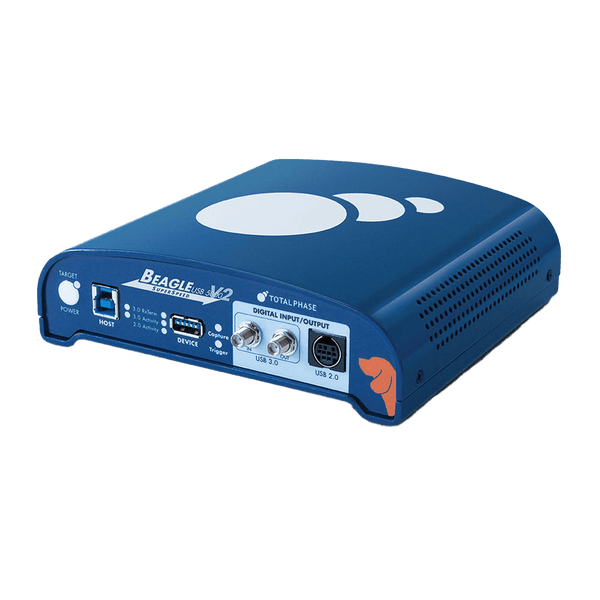
USB 3 adds SuperSpeed signalling to USB: separate transmit and receive pairs carry data in both directions at once, at 5 Gbit/s (USB 3.2 Gen 1, originally USB 3.0) and faster in later generations, while the USB 2.0 pair stays in the same cable for backward compatibility. To capture and decode a 5 Gbit/s link, use the Total Phase Beagle USB 5000 v2 Ultimate, which records SuperSpeed and USB 2.0 traffic at the same time, including link training and power states.
How USB 3 Is Wired
A USB 3 cable keeps the four USB 2.0 wires and adds two shielded differential pairs: SSTX from host to device and SSRX from device to host. Because each direction has its own pair, SuperSpeed is full duplex, unlike USB 2.0, which shares one pair and takes turns. A USB 3 host talks to a USB 3 device over the SuperSpeed pairs and falls back to the USB 2.0 pair for older devices; a USB 3 hub contains a USB 2.0 hub alongside its SuperSpeed hub for the same reason.
| Name | Also Called | Signalling Rate |
|---|---|---|
| USB 3.2 Gen 1 | USB 3.0, USB 3.1 Gen 1, USB 5Gbps (formerly SuperSpeed USB 5Gbps) | 5 Gbit/s |
| USB 3.2 Gen 2 | USB 3.1 Gen 2, USB 10Gbps (formerly SuperSpeed USB 10Gbps) | 10 Gbit/s |
| USB 3.2 Gen 2x2 | USB 20Gbps (formerly SuperSpeed USB 20Gbps), USB-C only | 20 Gbit/s |
The naming has changed more than once, so product listings often mix the terms. Check the signalling rate, not the version number. USB4 is a separate architecture that runs over USB-C and tunnels USB 3, DisplayPort and PCIe traffic.
How USB 3 Links and Transfers Work
- Link training: when a device connects, both ends detect each other, train their receivers and enter U0. If training fails, the host retries and may fall back to USB 2.0.
- Packets: the link carries transaction packets for handshakes and flow control, data packets, link management packets and isochronous timestamp packets.
- No polling: unlike USB 2.0, the host does not keep asking an idle device for data. A device that is not ready answers NRDY and later sends ERDY when it is, so idle links can sleep in U1 or U2.
- Encoding: Gen 1 uses 8b/10b encoding; Gen 2 uses more efficient 128b/132b encoding.
Above the link, USB 3 keeps the USB 2.0 device model: descriptors, endpoints, control, bulk, interrupt and isochronous transfers, and the same classes. Bulk endpoints can also use streams, which UASP storage devices rely on.
Where USB 3 Is Used
- Storage: external SSDs and drive docks, usually using UASP.
- Cameras and video capture: USB3 Vision industrial cameras, webcams and capture cards.
- Docks and hubs: USB-C docking stations that combine USB 3, display and charging.
- Test and data acquisition: high-rate digitisers and instruments that stream to a PC.
Common USB 3 Faults and How to Find Them
| Symptom | Likely Cause | What to Check |
|---|---|---|
| Device enumerates only at USB 2.0 speed | SuperSpeed link training failed, often a signal integrity or cable problem | Capture the link training sequence and look for repeated retries or fallback |
| Random disconnects under load | Link errors or failed exits from U1 or U2 | Watch link state changes and error counts against the traffic |
| Throughput far below the link rate | Small transfers, missing UASP, or a device that keeps answering NRDY | Check transfer sizes and how often the device is not ready |
| Works on one port, not another | Port or hub firmware, or marginal signal quality | Compare captures from both ports, including the USB 2.0 side |
| Video frames dropped | Isochronous bandwidth not reserved or packets late | Check isochronous timestamp packets and endpoint bandwidth |
Tools for Analysing and Decoding USB 3
Watch tools sit inline and record the link without changing it. For SuperSpeed you need an analyser built for it: a USB 2.0 analyser only sees the USB 2.0 pair.
| Product | Role | Capability | Price ex VAT |
|---|---|---|---|
| Total Phase Beagle USB 5000 v2 SuperSpeed Analyser, Ultimate | Watch | 5 Gbit/s USB 3 and USB 2.0 captured at the same time (part TP322610); 4 GB on-board memory; 2 ns timing resolution on USB 3; link training and LTSSM state visibility; state-based triggers on both; real-time class decoding; Windows, Linux and macOS | £5,580 |
The Beagle USB 5000 v2 covers 5 Gbit/s links. For 10 Gbit/s and 20 Gbit/s links, ask us about current options.
Accessories
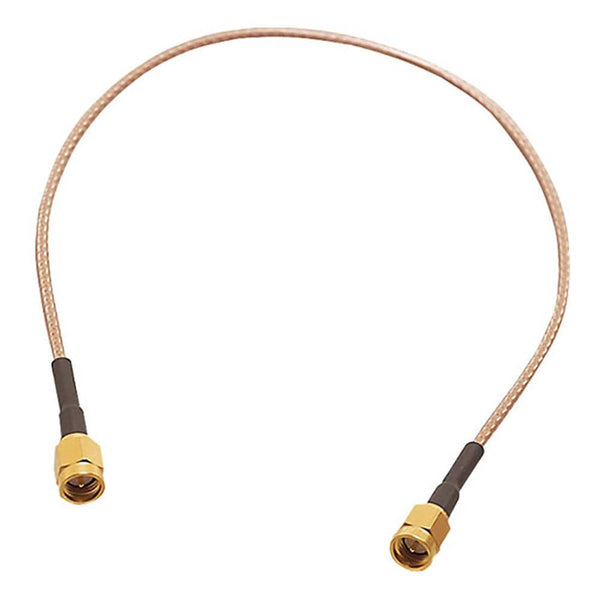
- Total Phase SMA Cable TP321510 for Beagle USB 5000 (£35): 2 ft (610 mm) 50 ohm coaxial cable for the analyser's SMA digital input and output, used to trigger a capture from external equipment or to trigger an oscilloscope or logic analyser on a USB 3 event.
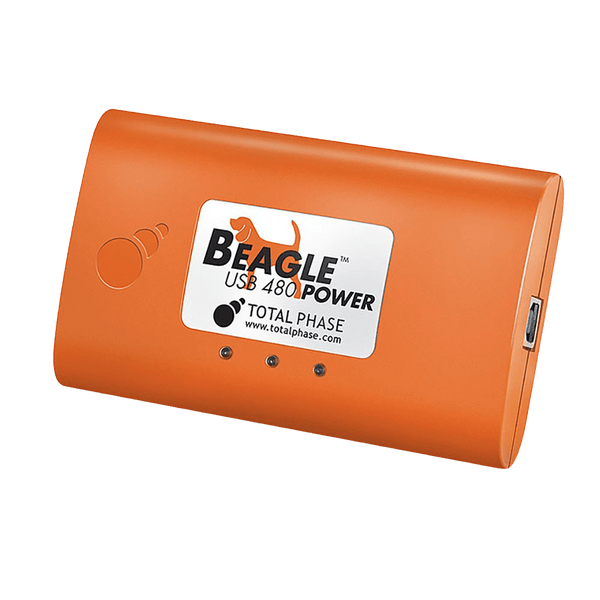
For USB 2.0 devices, and for VBUS current measurement alongside traffic, see the USB 2.0 page and the Beagle USB 480 Power (TP323610). Browse every tool in our protocol decoders collection.
Frequently Asked Questions
Is USB 3.0 the Same as USB 3.2 Gen 1?
Yes. Both mean SuperSpeed at 5 Gbit/s. USB 3.1 Gen 1 is the same thing again. The USB-IF renamed the generations twice, so check the stated rate.
Do I Need a USB 3 Analyser for a USB 3 Port?
Only if the traffic you care about runs at SuperSpeed. Many devices on USB 3 and USB-C ports, such as keyboards and microcontroller boards, use only the USB 2.0 pair, and a USB 2.0 analyser is enough.
Why Does My USB 3 Device Run at USB 2.0 Speed?
The SuperSpeed link did not train, so the host fell back to USB 2.0. Common causes are a USB 2.0 cable or hub in the path, a damaged connector, or poor signal integrity on the SuperSpeed pairs.
Can an Analyser Capture USB 3 and USB 2.0 Together?
The Beagle USB 5000 v2 records both at once, which matters because a USB 3 device can switch between them, and some devices use both at the same time through a hub.
Where to Start with USB 3
More Protocols
By John Legg CEng, Director, Debug Store. Updated 3 November 2026.
