
Array Electronic Co Ltd
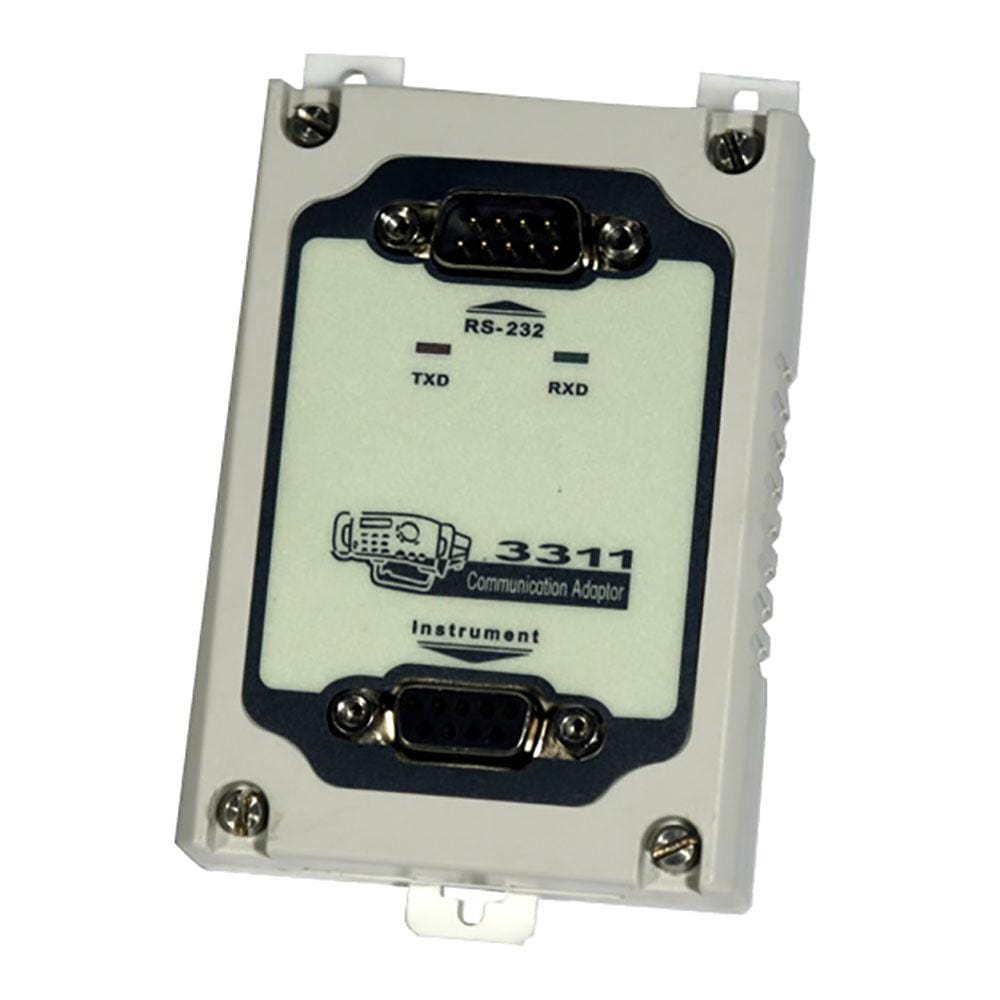
Array 3311 RS-232C to TTL Adapter for Array 364X/371X
Array 3311 RS-232C to TTL Adapter for Array 364X/371X
SKU: 3311
Couldn't load pickup availability
Key Features
Overview
Array Electronic 3311 RS-232C to TTL Adapter provides the correct level-shifting to control Array instruments that expose a TTL-level serial port. Use it to connect a PC’s RS-232C port to Array 364X programmable DC power supplies and Array 371X DC electronic loads for SCPI-style automation and logging.
The adapter is recommended in Array user manuals and is used widely in bench automation workflows. If your PC lacks RS-232, consider the USB variant Array 3312 USB-to-TTL Adapter. For multi-drop networks or longer cable runs, see Array 3313 RS-232C-to-RS-485 Converter and 3314 RS-485-to-TTL Converter. For GPIB systems, Array 3315 GPIB Interface is available.
Why consider 3311?
Array’s 364X/371X instruments communicate at TTL levels internally; connecting PC RS-232 directly risks errors. The 3311 ensures signal integrity and correct logic thresholds between your COM port and the instrument, enabling reliable control from Python, LabVIEW, or other serial tools.
Compatibility
Designed for Array 3644A/3645A/3646A power supplies and 3710A/3711A/3715A electronic loads. Typical use: instrument setup, automated sweeps, and long-term logging where a deterministic serial link is preferred.
Downloads
Why Engineers Choose the Array 3311 RS-232C to TTL Adapter for Array 364X/371X
Recommended Interface For Array Instruments
Fast Integration
Deterministic, Driverless Link
Overview
Array instruments expose a TTL-level serial port. The 3311 translates PC RS-232C to TTL, ensuring correct logic levels and robust communication for scripting, automation and data logging.
Where It Fits
- 3644A/3645A/3646A Array 364X PSU series
- 3710A/3711A/3715A Array 371X DC loads
Why It Matters
| Feature | Why It’s Important | What You Gain |
|---|---|---|
| Correct Level Translation | RS-232C uses bipolar signalling; Array ports expect TTL. | Reliable framing, fewer comms errors, safe operation. |
| Array-Specific Pin-Out | Matches instrument wiring and addressing conventions. | Drop-in setup; no custom harnesses. |
| Binary Command Frames | Simple 26-byte frames for control and readback. | Deterministic timing and easy parsing. |
| DB9 Connectivity | Standard cabling with strain relief. | Good EMI immunity and serviceability. |
Choosing Alternatives in the Series
For multi-drop or long runs, use 3313 (RS-232↔RS-485) with 3314 (RS-485↔TTL). For GPIB racks, see 3315.
Competitive Landscape
| Type | Example | Notes | When To Prefer 3311 |
|---|---|---|---|
| Brand-specific RS-232↔TTL | Array 3311 | Matches Array manuals and pin-outs. | Controlling 364X/371X without rewiring. |
| Generic RS-232↔TTL | MAX32xx-based converters | May need custom wiring; variable quality. | When you need guaranteed Array compatibility. |
| Other brand adapters | e.g., Maynuo, B&K kits | Sometimes isolated; different pin-outs. | Use 3311 unless isolation or other brand required. |
Getting Started
- Set instrument address and baud (e.g., 9600 8-N-1) via the instrument menu.
- Use a straight-through DB9 RS-232 cable PC ⇄ 3311. The 3311 connects to the instrument’s TTL-level port.
- Send a status query frame to confirm communication, then enable remote control and output/load as needed.
Wiring Quick-Start (364X & 371X)
Minimum Signals You Need
| PC (DB9 DTE) | Signal Direction | Through 3311 | Instrument Port (TTL) | Notes |
|---|---|---|---|---|
| Pin 3 (TXD) | PC → Instrument | Level-shifted | RXD (TTL) | Transmit from PC arrives at instrument RXD. |
| Pin 2 (RXD) | Instrument → PC | Level-shifted | TXD (TTL) | Instrument TXD returns to PC RXD. |
| Pin 5 (GND) | Common | — | GND | Shared reference; keep cables short and shielded. |
RTS/DTR hardware flow control is not used by these models; leave it disabled in software. If you get no replies, swap to a null-modem RS-232 cable only on the PC⇄3311 leg and retest.
Serial Defaults (Factory)
| Model Family | Baud | Data | Parity | Stop | Address Range |
|---|---|---|---|---|---|
| 364X Power Supplies | 9600 (menu-selectable 4800–38400) | 8 | None | 1 | 0–31 |
| 371X Electronic Loads | 9600 | 8 | None | 1 | 0–254 |
Command Frames & Code Snippets
These models use a simple 26-byte binary frame (header 0xAA, address, command, payload, checksum). Checksum is the unsigned sum of bytes 1–25 (mod 256). Below are safe “first actions” you can send to verify comms and toggle control.
364X Power Supplies — Read Status & Enable Output
- Query status: Command 0x81 (26-byte frame). Returns V, I, P and flags.
- Set control: Command 0x82 with Byte4 bits: b1=1 Remote, b0=1 Output ON.
# Python 3 + pyserial
import serial

def make_frame(addr, cmd, payload=b""):
    frame = bytearray(26)
    frame[0] = 0xAA
    frame[1] = addr & 0xFE          # instrument address
    frame[2] = cmd & 0xFF
    payload = (payload or b"")[:22] # bytes 4..25 available
    frame[3:3+len(payload)] = payload
    frame[25] = sum(frame[:25]) & 0xFF
    return bytes(frame)

def send_recv(port, frame):
    with serial.Serial(port, 9600, bytesize=8, parity='N', stopbits=1, timeout=1) as s:
        s.write(frame)
        return s.read(26)

ADDR = 0x00  # default
# 1) Read PSU status
resp = send_recv("COM3", make_frame(ADDR, 0x81))
# bytes 4..11 carry I (mA), V (mV), P (mW) little-endian groups
I_mA = resp[3] | (resp[4] & 0xFF) << 8
V_mV = (resp[5] | (resp[6] & 0xFF) << 8 | (resp[7] & 0xFF) << 16 | (resp[8] & 0xFF) << 24)
P_mW = resp[9] | (resp[10] & 0xFF) << 8

# 2) Remote + Output ON (Byte4 = 0b00000011)
resp = send_recv("COM3", make_frame(ADDR, 0x82, bytes([0x03])))
print("PSU status read; output enabled.")
To set limits and a voltage setpoint, use command 0x80 (max current, max voltage, max power, Vset). Start by reading status first to confirm framing and checksum handling.
371X Electronic Loads — Read Status & Turn Load On
- Query status: Command 0x91 (returns I, V, P and limit fields).
- Set control: Command 0x92 with Byte4 bits: b1=1 Remote, b0=1 Load ON.
# Read 371X status then enable load
ADDR = 0x01  # example non-default address
resp = send_recv("COM3", make_frame(ADDR, 0x91))
I_mA = resp[3] | (resp[4] & 0xFF) << 8
# Voltage is reconstructed little-endian 32-bit then scaled
V_mV = (resp[5] | (resp[6] & 0xFF) << 8 | (resp[7] & 0xFF) << 16 | (resp[8] & 0xFF) << 24)
P_mW = resp[9] | (resp[10] & 0xFF) << 8

# Remote + ON
resp = send_recv("COM3", make_frame(ADDR, 0x92, bytes([0x03])))
print("Load status read; load enabled.")
Typical Troubleshooting
- No response: Confirm baud, address, straight-through cable on PC⇄3311, and shared GND. Try a different COM port.
- Framing errors: Replace cable with shielded DB9; keep total run short; ensure only one level shifter (the 3311) is in the path.
- Wrong instrument responds: Each unit has an address; set unique addresses via the front panel.
Why This Helps You Ship Faster
With the 3311 handling level translation and the example frames above, you can verify communications in minutes, then wrap higher-level control in your preferred language or NI-VISA workflow for regression tests, sweeps and long-duration logging.
| General Information | |
|---|---|
Part Number (SKU) |
3311
|
Manufacturer |
|
| Physical and Mechanical | |
Weight |
0.5 kg
|
| Other | |
EAN |
5055383600618
|
Questions and Answers
-
Can I Script Control From Python or LabVIEW?
Array supplies PC software for its instruments (PowerMS for 364X supplies, ElectronicLoad for 371X loads), and for 364X supplies ActiveX and DLL tools for VB, VC++, Delphi and LabVIEW. Array does not publish a command set for the 364X or 371X, so control from other languages such as Python is not documented.
-
Why Do I Need the 3311 Rather Than a Direct RS-232 Connection?
The instrument's serial port works at TTL levels, while a PC's RS-232C port uses higher voltages. The 3311 translates between the two; a direct connection without translation will not communicate and can damage the ports.
-
What If My PC Has No RS-232C Port?
Use a quality USB-to-RS-232 adapter upstream, or choose the native Array 3312 USB-to-TTL Adapter.
-
Is This Suitable for Multi-Instrument Control?
For one-to-one RS-232 control, use the Array 3311. For multi-drop networks or long distances, RS-485 is better: use the 3313 RS-232C-to-RS-485 converter at the PC and a 3314 at each instrument.
-
How Do I Confirm Communication?
Start Array's PC software (PowerMS for 364X supplies, ElectronicLoad for 371X loads) and check that the COM port, baud rate and address match the settings on the instrument.
-
Will This Adapter Work with My Array 3644A/3645A/3646A PSU?
Yes. It's the recommended RS-232C-to-TTL interface for 364X power supplies. If you prefer USB control, see the Array 3312 USB-to-TTL Adapter.
-
Is It Compatible with Array 3710A/3711A Electronic Loads?
Yes. It provides the RS-232 interface option for 371X loads. For multi-drop, use the Array 3313 RS-232C-to-RS-485 converter with a 3314 RS-485-to-TTL adapter connected to each instrument.
-
What Cable Do I Need Between the PC and the 3311?
Array does not publish cable or pinout details for the 3311. If you get no response, check the TX/RX orientation and try a null-modem cable, or ask us for help.
-
Is Galvanic Isolation Provided?
Yes. Array describes the 3311 as an isolated TTL to RS-232 adaptor. The isolation rating is not published, so if your application needs a specified isolation level, add a rated isolator.
-
What Baud Rates Are Supported?
The instrument offers 4800, 9600, 19200 or 38400 baud, set on the instrument; the 371X loads default to 38400. Array does not document the data format. Keep cable runs short and use shielded RS-232 cables.


No questions match your search.