

SEGGER Microcontroller GmbH
SEGGER Target Supply Adapter - Adjustable Power Supply for J-Link Debug Probes
SEGGER Target Supply Adapter - Adjustable Power Supply for J-Link Debug Probes
SKU: 8.06.18
Formas de pago
- Bank transfer
No se pudo cargar la disponibilidad de retiro

Características principales
Overview
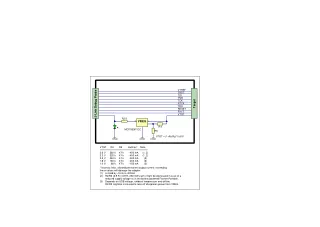
The Target Supply Adapter powers a target board with an adjustable voltage from 0.8V to 3.6V, set to 3.3V by default, at up to 400mA at 3.3V and 3.6V. It fits between a J-Link or Flasher and the debug cable and passes all debug signals through 1:1. It suits bring-up and programming of low-voltage boards that have no supply of their own on the bench.
Por qué los ingenieros eligen SEGGER Target Supply Adapter - Adjustable Power Supply for J-Link Debug Probes
Eliminates External Power Supplies
Flexible Voltage Requirements
Professional Debugging Reliability
The SEGGER Target Supply Adapter (part number 8.06.18) powers a target board with an adjustable voltage from 0.8V to 3.6V, set to 3.3V by default, at up to 400mA at 3.3V and 3.6V. It fits between a J-Link or Flasher and the debug cable, with a 20-pin 0.1" socket on the probe side and a 20-pin 0.1" header on the target side, and passes all debug signals through 1:1. It suits bring-up and programming of low-voltage boards that have no supply of their own on the bench.
Adjustable 0.8V to 3.6V Target Supply from the Debug Connector
The output voltage is set by a single SMD 0805 resistor, so changing it from the 3.3V default means soldering in a different value. Available current falls with the output voltage: 400mA at 3.6V and 3.3V, 300mA at 2.5V, 200mA at 1.8V and 150mA at 1.0V. SEGGER states that exceeding these values will damage the adapter, so check your board's current draw at its supply voltage before connecting it.
Both sides use the standard J-Link 20-pin 0.1" connector found on most J-Link models. Pin assignments and adapter options are in our SEGGER J-Link 20-pin connector pinout guide.
Works with J-Link and Flasher
SEGGER lists the J-Link PRO PoE, J-Link PRO, J-Link Ultra, J-Link WiFi, J-Link PLUS Classic and Compact, and J-Link BASE Classic and Compact, plus the Flasher PRO, Flasher PRO XL, Flasher Compact and Flasher Portable PLUS.
What's Included
SEGGER publishes no box list for this adapter. The order is for the Target Supply Adapter itself.
Specifications
| Probe-side connector | 20-pin 0.1" socket |
|---|---|
| Target-side connector | 20-pin 0.1" header |
| Signal routing | 1:1 for all debug signals |
| Target supply voltage | 0.8V to 3.6V, adjustable |
| Default supply voltage | 3.3V |
| Maximum output current | 400mA at 3.6V and 3.3V; 300mA at 2.5V; 200mA at 1.8V; 150mA at 1.0V |
| Voltage adjustment | Single resistor, SMD 0805, soldering required |
| Compatible J-Link models | PRO PoE, PRO, Ultra, WiFi, PLUS Classic and Compact, BASE Classic and Compact |
| Compatible Flasher models | PRO, PRO XL, Compact, Portable PLUS |
Limitations
- There is no switch or jumper; a voltage other than 3.3V needs a resistor change by soldering.
- Current capability drops at lower voltages, to 150mA at 1.0V. Exceeding the rated values damages the adapter.
- The range ends at 3.6V. For a fixed 5V target supply, use the 5V Target Supply Adapter.
Target Supply Adapter Compared with Related SEGGER Adapters
| Adapter | Function | Output | Price ex VAT |
|---|---|---|---|
| Target Supply Adapter (this product) | Adjustable target supply, debug signals 1:1 | 0.8V to 3.6V, 3.3V default, up to 400mA | £84 |
| 5V Target Supply Adapter | Fixed target supply, debug signals 1:1 | 5V ±5% | £130 |
| Supply Adapter | Fixed VTref I/O voltage, so the target need not supply pin 1 | 1.2V to 5.0V, set by resistor change | £81 |
| Test Farm Power Adapter | Remote on/off of target power over USB | 5V, around 250mA from J-Link; 1A and more with an external supply | £110 |
Order the Target Supply Adapter for £84 ex VAT. Check your board's current at its supply voltage against the ratings above, or ask us for a formal quotation. See the full range in our SEGGER debug probes collection.
Last reviewed 16/11/2026.
Sources (3 manufacturer pages)
| General | |
|---|---|
| Maximum output current | 400mA at 3.6V and 3.3V; 300mA at 2.5V; 200mA at 1.8V; 150mA at 1.0V |
| Voltage adjustment | Single resistor, SMD 0805, soldering required |
| Host and Target Interface | |
| Probe-side connector | 20-pin 0.1" socket |
| Target-side connector | 20-pin 0.1" header |
| Signal routing | 1:1 for all debug signals |
| Power | |
| Target supply voltage | 0.8V to 3.6V, adjustable |
| Default supply voltage | 3.3V |
| Software and Compatibility | |
| Compatible J-Link models | PRO PoE, PRO, Ultra, WiFi, PLUS Classic and Compact, BASE Classic and Compact |
| Compatible Flasher models | PRO, PRO XL, Compact, Portable PLUS |
| Ordering information | |
| Part number (SKU) | 8.06.18 |
| Manufacturer | SEGGER Microcontroller GmbH |
| EAN | 5055383613700 |
| Warranty | 12 months |
| Shipping weight | 0.02 kg |
-
1 ×
 SEGGER Target Supply Adapter - Adjustable Power Supply for J-Link Debug Probes

Contact us to confirm the full contents of the box.
Preguntas y respuestas
-
Can I Change the Output Voltage Without Soldering?
No. The voltage is set by one SMD 0805 resistor, and changing it means replacing that resistor. Out of the box the adapter supplies 3.3V.
-
How Much Current Can It Supply at 1.8V?
200mA. SEGGER rates the adapter at 400mA at 3.3V and 3.6V, 300mA at 2.5V and 150mA at 1.0V, and states that exceeding these values will damage it.
-
Does It Work with Flasher as Well as J-Link?
Yes. SEGGER lists the Flasher PRO, PRO XL, Compact and Portable PLUS alongside the current J-Link models.
-
Can I Use This Adapter with Battery-Powered J-Link Probes?
No J-Link probe is battery powered. The adapter is listed for Flasher Portable PLUS; SEGGER notes that for the Flasher Portable the voltage-setting resistor is an SMD 1206 part rather than 0805.
-
Is Any Configuration Software Required for the Adapter?
SEGGER does not document any software for the adapter. It is placed between your J-Link or Flasher and the debug cable.
-
Does the Adapter Have a Status LED?
SEGGER does not document a status LED on this adapter.
-
What Connector Type Does the Adapter Use?
Standard 20-pin 0.1" (2.54mm) IDC connectors: a socket for the J-Link connection and a header for the target connection.
-
Can This Adapter Power Multiple Target Boards Simultaneously?
The adapter is designed for single-target use. For multiple targets, use individual adapters or the fixed-voltage 5V Target Supply Adapter (500mA) where the target accepts 5V.
-
What Voltage Does the Target Supply Adapter Provide by Default?
The adapter provides 3.3V at up to 400mA by default, suitable for most ARM Cortex-M and similar microcontroller applications.
-
How Do I Adjust the Output Voltage for Different Target Requirements?
Replace a single SMD 0805 resistor on the adapter. The output range is 0.8V to 3.6V, with current limits that vary across that range.
-
Which J-Link Debug Probes Are Compatible with This Adapter?
It works with the J-Link and Flasher models SEGGER lists:
- J-Link PRO
- J-Link ULTRA+
- J-Link PRO PoE and J-Link WiFi
- J-Link PLUS Classic and Compact, and BASE Classic and Compact
- Flasher PRO, PRO XL, Compact and Portable PLUS
-
Does the Adapter Affect Debug Signal Quality or Timing?
No. The adapter passes all debug signals straight through with 1:1 connectivity, so JTAG, SWD and SWO are unaffected.
-
What Is the Maximum Current Capability at Lower Voltages?
Maximum current falls as voltage drops: 200mA at 1.8V and 150mA at 1.0V. Exceeding these limits will damage the adapter.


No questions match your search.
