
Array Electronic Co Ltd
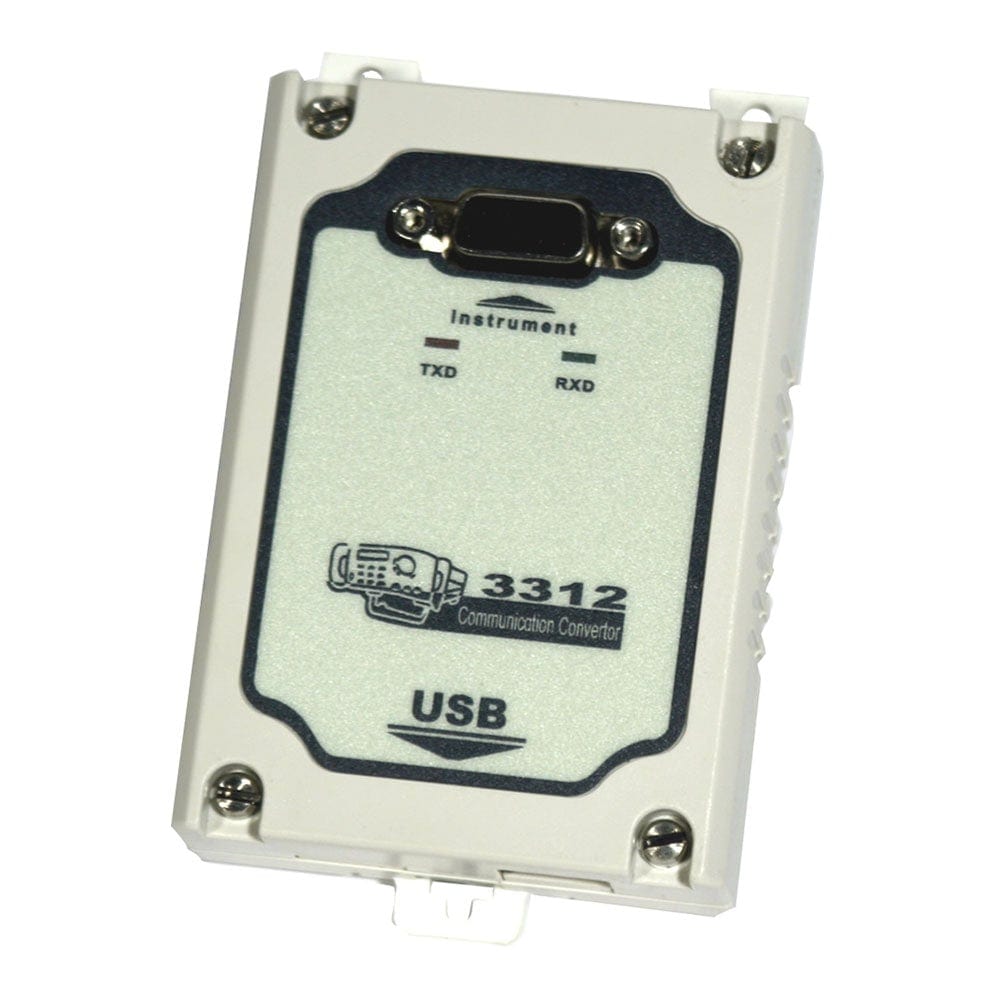
Array Electronic 3312 USB to TTL Adapter
Array Electronic 3312 USB to TTL Adapter
SKU: 3312
Couldn't load pickup availability
Key Features
Overview
Downloads
Why Engineers Choose the Array Electronic 3312 USB to TTL Adapter
Instrument Control
Modern Connectivity
Professional Reliability
Professional Interface Solution
The Array Electronic 3312 USB to TTL Adapter represents a purpose-built solution for modern computer connectivity to Array's professional test instrument range. This adapter eliminates the compatibility challenges faced when connecting Array 364X programmable power supplies and 371X electronic loads to contemporary computers lacking RS-232 serial ports.Signal Conversion Technology
The adapter employs robust signal conversion circuitry to translate USB protocol data into TTL-level serial communication. Unlike generic USB to serial converters, the 3312 is optimised specifically for Array instrument communication protocols, ensuring reliable data transmission and instrument response.Compatible Instruments
| Instrument Series | Models | Primary Application |
|---|---|---|
| 364X Power Supplies | 3644A, 3645A, 3646A | Programmable DC power sources |
| 371X Electronic Loads | 3710A, 3711A | DC electronic load testing |
Wiring Quick-Start
// Example communication test AT+ADDR=001 // Set instrument address to 1 AT+VOLT=12.5 // Set voltage to 12.5V AT+CURR=2.0 // Set current to 2.0A AT+OUT=ON // Enable output Communication Protocol
The 3312 adapter supports Array's proprietary SCPI-like command structure with ASCII formatting. Communication parameters include:Software Integration
Array provides comprehensive software support including: Stand-alone instrument control application ActiveX controls for custom application development DLL libraries for C++, Visual Basic, and Delphi integration LabVIEW drivers for measurement automationInstallation Requirements
| Requirement | Specification |
|---|---|
| Operating System | Windows 7/8/10 (32/64-bit) |
| USB Port | USB 2.0 Type-A (backward compatible) |
| Driver Installation | Administrator privileges required |
| Power Consumption | Bus-powered from USB (no external supply) |
Technical Advantages
The Array 3312 offers several benefits over generic USB-serial adapters: Optimised signal timing for Array instrument compatibility Robust connector construction for laboratory environments Tested and validated with Array instrument firmware Comprehensive software package included Professional technical support from Array Electronic| General Information | |
|---|---|
Part Number (SKU) |
3312
|
Manufacturer |
|
| Physical and Mechanical | |
Weight |
0.5 kg
|
| Other | |
EAN |
5055383600625
|
Questions and Answers
-
How Do I Connect the 3312 Adapter to My Array Instrument?
Connect the 3312 to the communication port on your Array power supply or electronic load, and the USB end to your computer. Then install and run Array's PC software from the CD supplied with the adapter (PowerMS for 364X supplies, ElectronicLoad for 371X loads).
-
What Is the Maximum Communication Distance with the 3312 Adapter?
Array does not publish a maximum cable length for the 3312; it is intended for a direct connection to one instrument. For longer runs, use RS-485: the Array 3313 converter at the PC and a 3314 TTL-to-RS-485 adapter at each instrument.
-
Can Multiple Instruments Be Controlled Through One 3312 Adapter?
The 3312 is intended for a direct link to one instrument. For several instruments, use RS-485 networking: the Array 3313 at the PC and a 3314 at each instrument, each set to its own address (0 to 31 on 364X supplies, 0 to 254 on 371X loads).
-
What Software and Operating Systems Does the 3312 Work With?
The CD supplied with the adapter carries Array's PowerMS (364X) or ElectronicLoad (371X) software. Array does not state which Windows versions are supported, so ask us if you use a recent version.
-
Is the 3312 Adapter Suitable for Automated Test Environments?
Yes, for 364X power supplies: Array supplies ActiveX and DLL tools for VB, VC++, Delphi and LabVIEW. 371X loads ship with the ElectronicLoad application.
-
Which Array Electronic Instruments Are Compatible with the 3312 Adapter?
The 3312 USB to TTL adapter is compatible with Array 3644A, 3645A and 3646A programmable power supplies, and Array 3710A and 3711A DC electronic loads. It is the USB interface option for these instruments.
-
What Is the Difference Between USB to TTL and USB to RS-232 Adapters?
USB to TTL adapters like the 3312 (which Array describes as isolated) convert USB signals to TTL voltage levels (typically 0-5V), whilst RS-232 uses higher voltage swings (±12V). TTL serial is common on modern instruments and microcontrollers and suits short connections. RS-232's larger swing gives better noise immunity over longer cables.
-
What Software Comes with the 3312?
Array's PC software comes on a CD with the adapter: PowerMS for 364X power supplies and ElectronicLoad for 371X loads. For 364X supplies, Array also provides ActiveX and DLL tools for automation.
-
Can I Use Generic USB to TTL Converters Instead of the Array 3312?
Generic adapters may give basic connectivity, but Array does not document their use. Array lists the 3312 as an isolated TTL to USB adaptor for these instruments, so we recommend it.
-
What Communication Settings Does the 3312 Use?
The Array manuals do not give protocol details. The instruments offer baud rates of 4800, 9600, 19200 or 38400 bps, set on the instrument, and the PC software must use the same setting.


No questions match your search.