


Tag-Connect, LLC
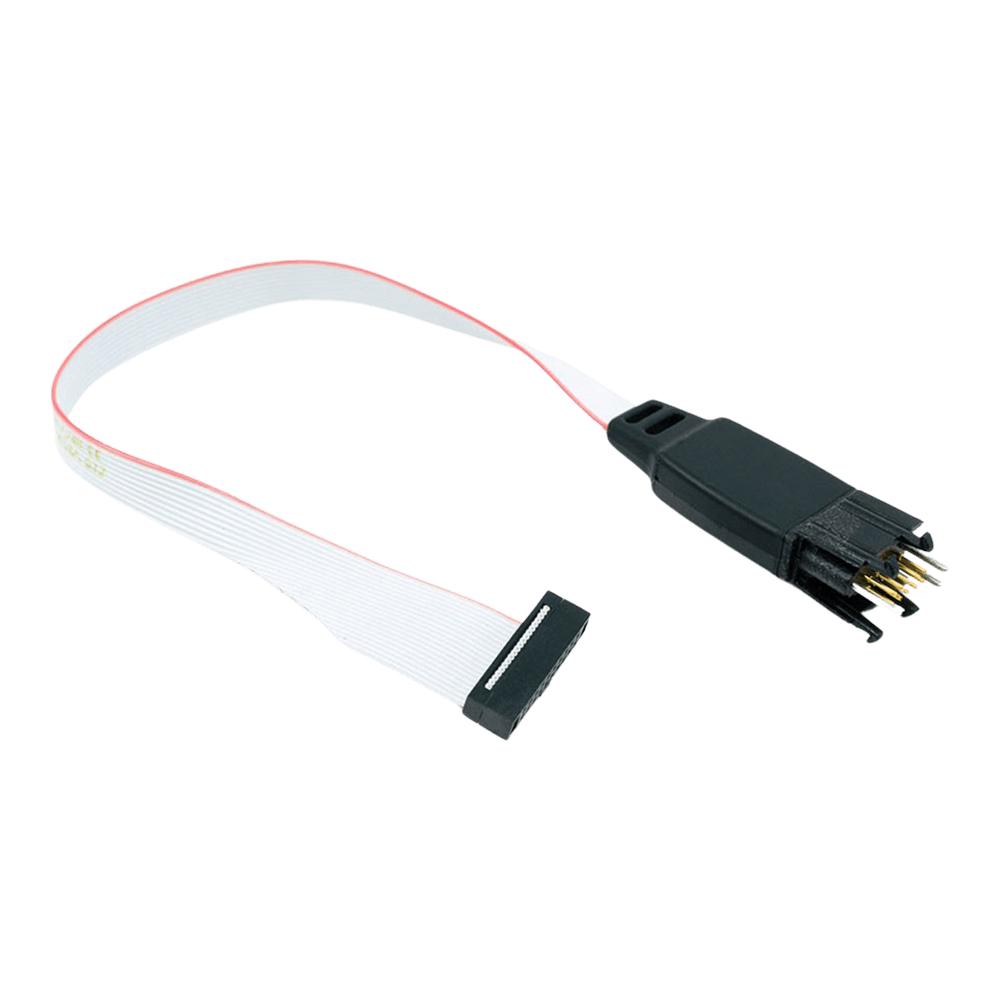
Tag-Connect TC2050-IDC-050 10-poliges Plug-of-Nails-Kabel für Cortex Debug 0,05 Zoll (mit oder ohne Rastbeine)
Tag-Connect TC2050-IDC-050 10-poliges Plug-of-Nails-Kabel für Cortex Debug 0,05 Zoll (mit oder ohne Rastbeine)
SKU: TC2050-IDC-050
€87,95 EUR exc tax
Suggested Add-Ons
Optional. Tick any you need. One of each is added to your cart with this item, whatever the quantity.
Check and Add to Cart
Confirm the price and stock for your selection, set the quantity, then press Add to Cart.
Zahlungsmethoden
- Banküberweisung
Verfügbarkeit für Abholungen konnte nicht geladen werden


Key Features
Overview
The Tag-Connect TC2050-IDC-050 links a probe with the 10-pin 0.05 in Cortex Debug header, such as the Keil ULINK2, to ten pads on your PCB. Spring pins contact the pads, so the board carries no debug header. Pins 5 and 9 are not connected.
Choose Legged or No Legs, and the standard or LEMTA ribbon, in the options above.
The Legged version clips into the footprint and stays in place without a fixture. The No Legs version needs about 0.03 sq in and is held by hand, with a TC2050-CLIP or in a fixture. If you need pins 5 and 9 connected, or you use an Atmel-ICE, choose the TC2050-IDC-050-ALL.
Downloads
10-poliges Plug-of-Nails-Kabel für den 10-poligen Cortex-Debug-Anschluss im 0,05-Zoll-Raster
Das Tag-Connect TC2050-IDC-050 verbindet einen Debugger mit 10-poligem Cortex-Debug-Anschluss im 0,05-Zoll-Raster (1,27 mm), dem Mikro-Header im Samtec-FTSH-105-Stil des Keil ULINK2 und ähnlicher Probes, mit einem 10-Pad-TC2050-Footprint auf Ihrer Leiterplatte. Auf der Leiterplatte wird kein Steckverbinder bestückt. Die Verdrahtung ist 1:1, nur die Pins 5 und 9 sind nicht beschaltet.
Optionen
| Option | Auswahl | Details |
|---|---|---|
| Kopf | Mit Rastbeinen | Vier Rastbeine rasten in Löcher der Leiterplatte ein, sodass das Kabel von selbst hält (TC2050-IDC-050) |
| Kopf | Ohne Rastbeine | Keine Rastlöcher; Footprint etwa 0,03 Quadratzoll; von Hand, mit einem TC2050-CLIP oder in einer Vorrichtung halten (TC2050-IDC-NL-050) |
| Flachbandstecker | Standard | Flachbandstecker in Standardausrichtung, Pin 1 auf Pin 1 |
| Flachbandstecker | LEMTA | Flachbandstecker umgekehrt montiert, die Ausrichtung, mit der Tag-Connect die umgekehrte Pin-Nummerierung des Atmel-ICE ausgleicht; nur ohne Rastbeine (TC2050-IDC-NL-050-LEMTA) |
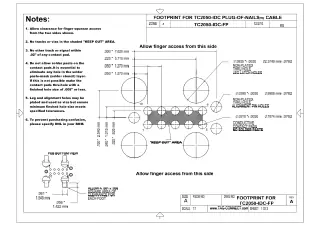
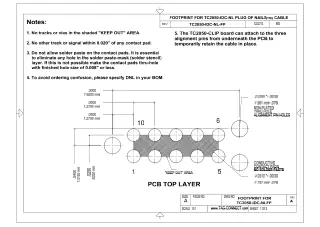
Leiterplatten-Footprint: derselbe 10-Pad-TC2050-Footprint wie beim TC2050-IDC: zehn Kontaktpads im 0,05-Zoll-Raster mit drei Ausrichtlöchern; der Footprint mit Rastbeinen hat zusätzlich vier Rastlöcher. Keine Lotpaste auf die Kontaktpads. Die Footprint-Zeichnungen finden Sie auf Blatt 1 der Datenblätter zu TC2050-IDC und TC2050-IDC-NL unter Downloads. Blatt 2 zeigt jeweils das 0,1-Zoll-Kabel TC2050-IDC, nicht dieses Kabel. Siehe auch unseren Tag-Connect-Kabelratgeber.
Pinbelegung
TC2050-Pad n führt auf Steckerpin n, außer den Pads 5 und 9. Die Signale folgen dem 10-poligen Arm-Cortex-Debug-Anschluss:
| Pad und Pin | Signal | Pad und Pin | Signal |
|---|---|---|---|
| 1 | VTref | 2 | SWDIO / TMS |
| 3 | GND | 4 | SWCLK / TCK |
| 5 | Nicht beschaltet (GND am Header) | 6 | SWO / TDO |
| 7 | Kodierung (kein Signal) | 8 | TDI |
| 9 | Nicht beschaltet (GNDDetect am Header) | 10 | nRESET |
Pins 5 und 9
Am 10-poligen Cortex-Debug-Anschluss sind die Pins 5 und 9 Masse und Masse-Erkennung. Dieses Kabel lässt sie unbeschaltet, ähnlich der Verdrahtung des Adapters TC2050-ARM2010. Wenn Ihre Probe oder Ihr Zielsystem die Pins 5 und 9 benötigt, verwenden Sie stattdessen das TC2050-IDC-050-ALL.
Federkontakte
Tag-Connect gibt für die Federkontaktstifte über 100.000 Steckvorgänge an. Der 0,05-Zoll-Stecker nutzt ein Flachbandkabel mit feinem Raster und dünnen Leitern, die laut Tag-Connect bei wiederholtem Biegen mit der Zeit brechen können. Für einen Debugger mit 0,1-Zoll-Anschluss ist das TC2050-IDC mit kräftigerem Flachbandkabel die haltbarere Wahl.
Für wen es gedacht ist
Für Entwickler, die Arm-Cortex-M-Leiterplatten über SWD oder JTAG mit einer Probe mit 10-poligem Cortex-Debug-Anschluss im 0,05-Zoll-Raster debuggen oder programmieren und keinen Debug-Header auf der Leiterplatte wollen.
| Bausteinfamilie | Debugger oder Programmiergerät | Anschluss |
|---|---|---|
| Arm-Cortex-M-Bausteine, zum Beispiel STM32, NXP LPC und Kinetis, Microchip SAM und Nordic nRF, SWD oder JTAG | Keil ULINK2 und andere Probes mit 10-poligem Cortex-Debug-Anschluss im 0,05-Zoll-Raster (FTSH-105) | Direkt |
Wann ein anderes Kabel die bessere Wahl ist
Wenn die Pins 5 und 9 beschaltet sein müssen oder für den Microchip Atmel-ICE verwenden Sie das TC2050-IDC-050-ALL (Tag-Connect empfiehlt es für den Atmel-ICE in der LEMTA-Ausrichtung). Für eine Cortex-Probe mit 20-poligem Anschluss im 0,05-Zoll-Raster verwenden Sie das TC2050-IDC-050-ALL-20. Für einen Debugger mit 20-poligem Arm-JTAG-Anschluss im 0,1-Zoll-Raster verwenden Sie das TC2050-IDC mit dem Adapter TC2050-ARM2010.
Versionen im Vergleich
| Teilenummer | Kopf | Flachbandstecker | Am besten für |
|---|---|---|---|
| TC2050-IDC-050 | Mit Rastbeinen | Standard | Entwicklung und Debugging: rastet ein und bleibt freihändig verbunden |
| TC2050-IDC-NL-050 | Ohne Rastbeine | Standard | Serienprogrammierung oder Debugging mit einem TC2050-CLIP; kleinster Footprint |
| TC2050-IDC-NL-050-LEMTA | Ohne Rastbeine | LEMTA (umgekehrt) | Flachbandstecker umgekehrt montiert (LEMTA). Für den Atmel-ICE empfiehlt Tag-Connect das TC2050-IDC-050-ALL in LEMTA. |
Alle drei Versionen nutzen dasselbe Kontaktmuster mit zehn Pads. TC2050-IDC-050 und TC2050-IDC-NL-050 lassen die Pins 5 und 9 unbeschaltet; klären Sie die Verdrahtung der LEMTA-Version vor der Bestellung mit uns.
Welches Kabel passt zu Ihrem Debugger? Siehe unseren Tag-Connect-Kabelratgeber.
| Ordering information | |
|---|---|
| Part number (SKU) | TC2050-IDC-050 |
| Manufacturer | Tag-Connect, LLC |
| EAN | 5055383665457 |
| Warranty | 6 Monate |
| Shipping weight | 0.1 kg |
- 1 ×Tag-Connect TC2050-IDC-050 cable, in the version you select (Legged or No Legs; standard or LEMTA ribbon)
Cable only. No debugger, adapter, retaining clip or fixture is included. On No Legs versions, the TC2050-CLIP retaining clip and the TC-MOUNT-10 fixture bracket are offered as add-ons.
Questions and Answers
-
What PCB Footprint Does This Cable Require?
The TC2050 footprint: ten contact pads at 0.05 in pitch and three alignment holes. The Legged version also needs four leg latch holes; the No Legs footprint is about 0.03 sq in. No solder paste on the contact pads. The drawings are in the TC2050-IDC and TC2050-IDC-NL datasheets under Downloads.
-
How Does This Compare to Traditional Debug Headers?
Tag-Connect cables remove the cost and board space of a fitted header. The TC2050 footprint is pads and holes only, so Tag-Connect puts its cost per board at zero, and the No Legs footprint takes about 0.03 sq in. You keep the same SWD or JTAG connection; in this cable pins 5 and 9 are not wired.
-
Is the Cable Compatible with Atmel-ICE Debuggers?
Not this cable. For the Atmel-ICE Tag-Connect recommends the TC2050-IDC-050-ALL ordered in the LEMTA (reversed ribbon connector) orientation, because the Atmel-ICE 10-pin header has reversed pin numbering.
-
What's the Maximum Target Voltage Supported?
Tag-Connect publishes no voltage rating for this cable. It is a passive cable, so in practice the working range is that of your debugger. Pin 1 carries the target reference voltage to the debugger.
-
Can I Use This Cable for Non-Arm Microcontrollers?
It can be, but it is built for the Arm Cortex Debug pinout. The cable is passive and wired 1-to-1 apart from pins 5 and 9, and pin 7 is the key position on the Cortex Debug header, so check your probe's pinout against the footprint first. For other 10-pin uses the TC2050-IDC is the general-purpose cable.
-
What Debugging Protocols Does the TC2050-IDC-050 Support?
It supports JTAG and SWD for Arm Cortex microcontrollers. For SWD-only use in the smallest space, Tag-Connect offers the 6-pin TC2030-CTX.
-
Is This Cable Compatible with Other Debuggers Besides the ULINK2?
Yes. Tag-Connect says it suits the Keil ULINK2 and similar debuggers that use the Samtec FTSH-105-01 style 10-pin 0.05 in micro-header. Check your probe's connector before ordering. For the Atmel-ICE use the TC2050-IDC-050-ALL in LEMTA.
-
Why Are Pins 5 and 9 Not Connected in This Version?
Tag-Connect leaves pins 5 and 9 unconnected so that this cable behaves like its TC2050-ARM2010 adapter used with a TC2050-IDC cable. On that adapter pins 5 and 9 are connected only when you fit a solder bridge. If you need all ten pins connected, choose the TC2050-IDC-050-ALL.
-
What's the Difference Between Legged and No Legs Versions?
The Legged cable latches into the PCB with four legs for hands-free debugging; the No Legs version (TC2050-IDC-NL-050, chosen in the options above) has a smaller footprint.
TC2050-IDC-050 (Legged) TC2050-IDC-NL-050 (No Legs) Hold on the PCB Four legs latch into the board Held by hand, or with a clip or fixture Footprint Larger (four extra leg holes) Smaller, about 0.03 sq in Tag-Connect suggests it for Development needing a secure connection Production programming, especially short one-off operations -
Can I Use This Cable for Production Programming?
Yes. Tag-Connect quotes over 100,000 operations for the spring pins. It generally recommends the TC2050-IDC (0.1 in ribbon) for durability, because the fine ribbon on 0.05 in cables can break with repeated flexing. For production, choose No Legs in the options above and hold the cable with a TC2050-CLIP or in a fixture.


No questions match your search.
