# Title: Vibro Motor 3 Click Board™
## Description: How Does The Vibro Motor 3 Click Board™ Work? The Vibro Motor 3 Click Board™ is based on the G0832022D, a coin-sized linear resonant actuator that generates vibration/haptic feedback in the Z plane, perpendicular to the motor's surface from Jinlong Machinery & Electronics, Inc. The G0832022D draws only 19mA at 0.6V while producing a G force of 0.55 GRMS and makes an excellent choice for applications requiring crisp haptic feedback and low power consumption. For haptic feedback applications, fast rise and fall times are critical for achieving the optimal user experience. Driven by the DRV2605, a flexible Haptic/Vibra driver from Texas Instruments, this Click board™ is designed to provide extremely-flexible haptic control over a standard I2C 2-Wire interface with a maximum clock frequency of 400kHz. It possesses enabling function, routed on the CS pin of the mikroBUS™ socket labeled as the EN, and comes up with an extensive integrated library of over 100 licensed effects that eliminates the need to design haptics waveforms. It also contains a smart-loop architecture, which allows effortless auto resonant drive for LRA motor drive. This feedback provides automatic overdrive and braking, which creates a simplified input waveform paradigm as well as reliable motor control and consistent motor performance. Additionally, the DRV2605 can also operate in the PWM Mode and accept the PWM signal from the PWM pin of the mikroBUS™ socket. In this mode, the DRV2605 device drives the actuator continuously until the user sets the DRV2605 to a Standby Mode or enters another interface mode. In PWM Mode, the strength of vibration is controlled by the duty cycle, and for the LRA motor, the DRV2605 automatically tracks the resonance frequency unless the LRA_OPEN_LOOP bit in register 0x1D is set. If the LRA_OPEN_LOOP bit is set, then the LRA motor is driven according to the frequency of the PWM input signal. More information about the operating modes of the DRV2605 can be found in the attached datasheet. This Click board™ is designed to operate with both 3.3V and 5V logic voltage levels selected via the VCC SEL jumper. It allows for both 3.3V and 5V capable MCUs to use the I2C communication lines properly. However, the Click board™ comes equipped with a library that contains easy to use functions and an example code which can be used, as a reference, for further development. SPECIFICATIONS Type Haptic Applications Can be used for applications with limited battery capacity and for users where crisp haptic feedback and low power consumption are required. On-board modules Vibro Motor 3 Click is based on the G0832022D, a coin-sized linear resonant actuator that generates vibration/haptic feedback in the Z plane, perpendicular to the motor's surface from Jinlong Machinery & Electronics, Inc. Key Features Low power consumption, vibration force in Z-axis, high reliability, excellent choice for devices with limited battery capacity, and more. Interface I2C,PWM Compatibility mikroBUS Click board size M (42.9 x 25.4 mm) Input Voltage 3.3V or 5V PINOUT DIAGRAM This table shows how the pinout on Vibro Motor 3 Click corresponds to the pinout on the mikroBUS™ socket (the latter shown in the two middle columns). Notes Pin Pin Notes NC 1 AN PWM 16 PWM PWM Signal NC 2 RST INT 15 NC Enable EN 3 CS RX 14 NC NC 4 SCK TX 13 NC NC 5 MISO SCL 12 SCL I2C Clock NC 6 MOSI SDA 11 SDA I2C Data Power Supply 3.3V 7 3.3V 5V 10 5V Power Supply Ground GND 8 GND GND 9 GND Ground ONBOARD SETTINGS AND INDICATORS Label Name Default Description LD1 PWR - Power LED Indicator JP1 VCC SEL Left Power Supply Voltage Selection 3V3/5V: Left position 3V3, Right position 5V VIBRO MOTOR 3 CLICK ELECTRICAL SPECIFICATIONS Description Min Typ Max Unit Supply Voltage VCC -0.3 - 5.5 V LRA Operating Voltage 0.1 1.2 1.9 V AC Maximum Rated Current - 58 80 mA Resonant Vibration Frequency - 235 - Hz Vibration G Force - 1.40 - GRMS Operating Temperature Range -20 - 60 °C SOFTWARE SUPPORT We provide a library for the Vibro Motor 3 Click on our LibStock page, as well as a demo application (example), developed using MikroElektronika compilers. The demo can run on all the main MikroElektronika development boards. Library Description The library covers all the necessary functions to control Vibro Motor 3 Click board™. Library holds the drivers for writeing and reading, for enable/diasble the device, trigger the device, sets desired mode function, resets all register, for getting status, start or stop the motor, etc. Key functions: void vibromotor3_set_mode ( uint8_t mode_sel ); - Function is used to apply the desired mode. void vibromotor3_start_motor ( uint8_t state ); - The function is used to start or stop the motor. void vibromotor3_set_lra_mode ( uint8_t state ); - The function is used to sets the device in LRA mode. Examples description The application is composed of three sections : System Initialization - Initializes I2C, GPIO and LOG structures, and sets CS and PWM pins as output, and start to write log. Application Initialization - Initializes I2C driver, PWM driver and configures Vibro Motor 3 Click board™. Application Task - This example shows the capabilities of the Vibro Motor 3 Click board™ by changing duty cycle applied in order to get different vibrations. void application_task ( ) { pwm_duty_cycle += 1000; mikrobus_logWrite( "Duty cycle applied: ", _LOG_TEXT ); WordToStr( pwm_duty_cycle, log_txt ); Ltrim( log_txt ); mikrobus_logWrite( log_txt, _LOG_LINE ); vibromotor3_pwm_set_duty( pwm_duty_cycle ); if ( pwm_duty_cycle > pwm_max_duty ) { pwm_duty_cycle = 0; vibromotor3_pwm_stop( ); Delay_ms( 2000 ); vibromotor3_pwm_start( ); } Delay_ms( 100 ); } The full application code, and ready to use projects can be found on our LibStock page. Other mikroE Libraries used in the example: I2C UART PWM Conversions Additional notes and information Depending on the development board you are using, you may need USB UART click, USB UART 2 click or RS232 click to connect to your PC, for development systems with no UART to USB interface available on the board. The terminal available in all MikroElektronika compilers, or any other terminal application of your choice, can be used to read the message. MIKROSDK This Click board™ is supported with mikroSDK - MikroElektronika Software Development Kit. To ensure proper operation of mikroSDK compliant Click board™ demo applications, mikroSDK should be downloaded from the LibStock and installed for the compiler you are using.
## Product type: Click Board
## Vendor: Mikroelektronika d.o.o.
## Tags: Click Board, Haptic, HMI, Jinlong, MikroE
## Price range: 20.3 - 20.3 GBP
## Link: https://thedebugstore.com/products/vibro-motor-3-click-board-mikroe-4356-uk
## Compare-at price range: 29.0 - 29.0 GBP
## Options
- Title: Default Title
## Collections
- [New Products](https://thedebugstore.com/a/llms/collections/new-products-debug-store)
- [Mikroelektronika d.o.o. (MikroE)](https://thedebugstore.com/a/llms/collections/mikroelektronika-catalogue-uk)
- [Jinlong Machinery & Electronics Device Support: Vibration Motors and DC Motors](https://thedebugstore.com/a/llms/collections/devices-jinlong-machinery-electronics)
- [HMI Interface Click Boards™](https://thedebugstore.com/a/llms/collections/hmi-interface-click-boards-catalogue-uk)
- [MikroE Click Boards™](https://thedebugstore.com/a/llms/collections/mikroe-click-boards-catalogue-uk)
- [Haptic HMI Click Boards™](https://thedebugstore.com/a/llms/collections/haptic-hmi-click-boards-catalogue-uk)
- [Click Boards™ Summer Sale](https://thedebugstore.com/a/llms/collections/inventory-sale)
- [MikroE Sale](https://thedebugstore.com/a/llms/collections/mikroe-sale)
- [MIKROE Stock](https://thedebugstore.com/a/llms/collections/mikroe-products-in-stock-sale)
## Variants
- Default Title, SKU: MIKROE-4356, Available: yes, Inventory: 1
## Metafields
- full_description: How Does The Vibro Motor 3 Click Board™ Work?
The Vibro Motor 3 Click Board™ is based on the G0832022D, a coin-sized linear resonant actuator that generates vibration/haptic feedback in the Z plane, perpendicular to the motor's surface from Jinlong Machinery & Electronics, Inc. The G0832022D draws only 19mA at 0.6V while producing a G force of 0.55 GRMS and makes an excellent choice for applications requiring crisp haptic feedback and low power consumption. For haptic feedback applications, fast rise and fall times are critical for achieving the optimal user experience.
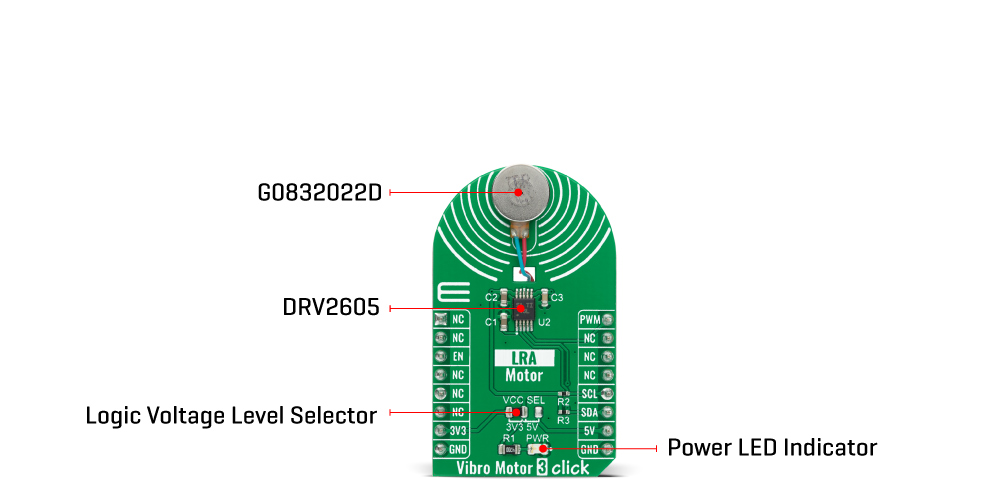
Driven by the DRV2605, a flexible Haptic/Vibra driver from Texas Instruments, this Click board™ is designed to provide extremely-flexible haptic control over a standard I2C 2-Wire interface with a maximum clock frequency of 400kHz. It possesses enabling function, routed on the CS pin of the mikroBUS™ socket labeled as the EN, and comes up with an extensive integrated library of over 100 licensed effects that eliminates the need to design haptics waveforms. It also contains a smart-loop architecture, which allows effortless auto resonant drive for LRA motor drive. This feedback provides automatic overdrive and braking, which creates a simplified input waveform paradigm as well as reliable motor control and consistent motor performance.
Additionally, the DRV2605 can also operate in the PWM Mode and accept the PWM signal from the PWM pin of the mikroBUS™ socket. In this mode, the DRV2605 device drives the actuator continuously until the user sets the DRV2605 to a Standby Mode or enters another interface mode. In PWM Mode, the strength of vibration is controlled by the duty cycle, and for the LRA motor, the DRV2605 automatically tracks the resonance frequency unless the LRA_OPEN_LOOP bit in register 0x1D is set. If the LRA_OPEN_LOOP bit is set, then the LRA motor is driven according to the frequency of the PWM input signal. More information about the operating modes of the DRV2605 can be found in the attached datasheet.
This Click board™ is designed to operate with both 3.3V and 5V logic voltage levels selected via the VCC SEL jumper. It allows for both 3.3V and 5V capable MCUs to use the I2C communication lines properly. However, the Click board™ comes equipped with a library that contains easy to use functions and an example code which can be used, as a reference, for further development.
SPECIFICATIONS
| Type |
Haptic |
| Applications |
Can be used for applications with limited battery capacity and for users where crisp haptic feedback and low power consumption are required. |
| On-board modules |
Vibro Motor 3 Click is based on the G0832022D, a coin-sized linear resonant actuator that generates vibration/haptic feedback in the Z plane, perpendicular to the motor's surface from Jinlong Machinery & Electronics, Inc. |
| Key Features |
Low power consumption, vibration force in Z-axis, high reliability, excellent choice for devices with limited battery capacity, and more. |
| Interface |
I2C,PWM |
| Compatibility |
mikroBUS |
| Click board size |
M (42.9 x 25.4 mm) |
| Input Voltage |
3.3V or 5V |
PINOUT DIAGRAM
This table shows how the pinout on Vibro Motor 3 Click corresponds to the pinout on the mikroBUS™ socket (the latter shown in the two middle columns).
| Notes |
Pin |
 |
Pin |
Notes |
| NC |
1 |
AN |
PWM |
16 |
PWM |
PWM Signal |
| NC |
2 |
RST |
INT |
15 |
NC |
| Enable |
EN |
3 |
CS |
RX |
14 |
NC |
| NC |
4 |
SCK |
TX |
13 |
NC |
| NC |
5 |
MISO |
SCL |
12 |
SCL |
I2C Clock |
| NC |
6 |
MOSI |
SDA |
11 |
SDA |
I2C Data |
| Power Supply |
3.3V |
7 |
3.3V |
5V |
10 |
5V |
Power Supply |
| Ground |
GND |
8 |
GND |
GND |
9 |
GND |
Ground |
ONBOARD SETTINGS AND INDICATORS
| Label |
Name |
Default |
Description |
| LD1 |
PWR |
- |
Power LED Indicator |
| JP1 |
VCC SEL |
Left |
Power Supply Voltage Selection 3V3/5V: Left position 3V3, Right position 5V |
VIBRO MOTOR 3 CLICK ELECTRICAL SPECIFICATIONS
| Description |
Min |
Typ |
Max |
Unit |
| Supply Voltage VCC |
-0.3 |
- |
5.5 |
V |
| LRA Operating Voltage |
0.1 |
1.2 |
1.9 |
V AC |
| Maximum Rated Current |
- |
58 |
80 |
mA |
| Resonant Vibration Frequency |
- |
235 |
- |
Hz |
| Vibration G Force |
- |
1.40 |
- |
GRMS |
| Operating Temperature Range |
-20 |
- |
60 |
°C |
SOFTWARE SUPPORT
We provide a library for the Vibro Motor 3 Click on our LibStock page, as well as a demo application (example), developed using MikroElektronika compilers. The demo can run on all the main MikroElektronika development boards.
Library Description
The library covers all the necessary functions to control Vibro Motor 3 Click board™. Library holds the drivers for writeing and reading, for enable/diasble the device, trigger the device, sets desired mode function, resets all register, for getting status, start or stop the motor, etc.
Key functions:
void vibromotor3_set_mode ( uint8_t mode_sel ); - Function is used to apply the desired mode.void vibromotor3_start_motor ( uint8_t state ); - The function is used to start or stop the motor.void vibromotor3_set_lra_mode ( uint8_t state ); - The function is used to sets the device in LRA mode.
Examples description
The application is composed of three sections :
- System Initialization - Initializes I2C, GPIO and LOG structures, and sets CS and PWM pins as output, and start to write log.
- Application Initialization - Initializes I2C driver, PWM driver and configures Vibro Motor 3 Click board™.
- Application Task - This example shows the capabilities of the Vibro Motor 3 Click board™ by changing duty cycle applied in order to get different vibrations.
void application_task ( )
{
 pwm_duty_cycle += 1000;
 mikrobus_logWrite( "Duty cycle applied: ", _LOG_TEXT );
 WordToStr( pwm_duty_cycle, log_txt );
 Ltrim( log_txt );
 mikrobus_logWrite( log_txt, _LOG_LINE );
 vibromotor3_pwm_set_duty( pwm_duty_cycle );
 if ( pwm_duty_cycle > pwm_max_duty )
 {
 pwm_duty_cycle = 0;
 vibromotor3_pwm_stop( );
 Delay_ms( 2000 );
 vibromotor3_pwm_start( );
 }
 Delay_ms( 100 );
}
The full application code, and ready to use projects can be found on our LibStock page.
Other mikroE Libraries used in the example:
Additional notes and information
Depending on the development board you are using, you may need USB UART click, USB UART 2 click or RS232 click to connect to your PC, for development systems with no UART to USB interface available on the board. The terminal available in all MikroElektronika compilers, or any other terminal application of your choice, can be used to read the message.
MIKROSDK
This Click board™ is supported with mikroSDK - MikroElektronika Software Development Kit. To ensure proper operation of mikroSDK compliant Click board™ demo applications, mikroSDK should be downloaded from the LibStock and installed for the compiler you are using.
- description_tag: Buy your MikroE Vibro Motor 3 Click Board™ from MikroE's UK specialist. UK Stock with Free Shipping.
- title_tag: MikroE Vibro Motor 3 Click Board™ (MIKROE-4356)
- manufacturer: Mikroelektronika d.o.o.
- warranty: 12 months
- amazon_enable: TRUE
- amazon_title: Vibro Motor 3 Click Board
- amazon_product_type: computercomponent
- amazon_block: FALSE
- amazon_prime_enable: FALSE
- amazon_search: MikroElektronika Microelectronica MIKROE-1100
- amazon_uk_price: 10.56
- amazon_uk_currency: GBP
- amazon_de_currency: EUR
- amazon_de_price: 11.9328
- amazon_fr_currency: EUR
- amazon_fr_price: 11.9328
- amazon_es_currency: EUR
- amazon_es_price: 11.9328
- amazon_nl_currency: EUR
- amazon_nl_price: 11.9328
- amazon_it_currency: EUR
- amazon_it_price: 11.9328
- amazon_se_curency: SEK
- amazon_se_price: 120.384
- amazon_product_id: 8606018711932
- amazon_product_id_type: EAN
- amazon_update: Update
- amazon_short_description: The Vibro Motor 3 Click Board™ is a compact add-on board that makes an ideal solution for adding simple haptic feedback in any design. This board features the G0832022D, a coin-sized linear resonant actuator (LRA) that generates vibration/haptic feedback in the Z plane, perpendicular to the motor's surface from Jinlong Machinery & Electronics, Inc. Driven by a flexible Haptic/Vibra driver the DRV2605, the G0832022D vibrates in the Z-axis, which is perpendicular to the face of the vibration motor. It draws only 19mA at 0.6V while producing a G force of 0.55 GRMS, making it ideal for battery-powered wearables. This Click board™ makes an excellent choice for devices with limited battery capacity and for users where crisp haptic feedback and low power consumption are required.Vibro Motor 3 Click is supported by a mikroSDK compliant library, which includes functions that simplify software development. This Click board™ comes as a fully tested product, ready to be used on a system equipped with the mikroBUS™ socket.
- amazon_long_description: The Vibro Motor Click features a compact size Eccentric Rotating Mass (ERM) motor, labelled as C1026B002F. This type of motor is often used for haptic feedback on many small handheld devices, such as the cellphones, pagers, RFID scanners and similar devices. This motor contains a small eccentric weight on its rotor, so while rotating it also produces vibration effect. This kind of motors is sometimes referred to as coin motors, due to its shape.
Besides the vibration motor, the Click is also equipped with the DMG3420U, a small MOSFET, which is used to drive the motor. The Vibro Motor Click is an ideal solution for adding a simple, one pin driven haptic feedback on any design.
How Does it Work?
The Click uses the DMG3420U MOSFET to drive the ERM motor, since the MCU itself cannot provide enough power for the motor driving. The circuit also contains a protection diode, which is used to protect the transistor from the reverse voltage, since the motor represents an inductive load and turning off its current can produce a kickback voltage that can damage the transistor.
 .
.
The gate of the MOSFET is driven by the PWM signal, routed through the PWM pin of the mikroBUS. The PWM signal toggles the gate of the MOSFET with the pulses of a certain width. As a result, the current through the motor is varied depending on the pulse width of the PWM signal, which directly affects the speed of the motor, effectively controlling the vibration force that way. The small, eccentric weight attached to the rotor of the coin motor, generates the centrifugal force while it rotates, which in turn results with the wobbling effect of the motor itself. The faster the rotation is, the bigger the force gets. Controlling the motor speed allows for the vibration intensity to be controlled.
MikroElektronika library contains functions that are used to easily drive the motor by changing the PWM pulse width, saving time for the application firmware development.
- amazon_main_image: https://www.thedebugstore.com/images/product/lg-vibro-motor-click-board-front.jpg
- amazon_other_image_1: https://www.thedebugstore.com/images/product/lg-vibro-motor-click-board-back.jpg
- amazon_other_image_2: https://www.thedebugstore.com/images/product/lg-vibro-motor-click-board-in-situ.jpg
- amazon_other_image_3: https://www.thedebugstore.com/images/product/lg-vibro-motor-click-board-in-situ.jpg
- amazon_browse_node: 428655031
- related_products: MIKROE-3713
- mpn: MIKROE-4356
- backorder_label: If no stock shown above, check availability
- attachment_url_1: https://www.thedebugstore.com/files/attachments/14402/vibro-motor-3-schematic-v101.pdf&&https://www.thedebugstore.com/files/attachments/14402/G0832022D_datasheet.pdf&&https://www.thedebugstore.com/files/attachments/14402/DRV2605_datasheet.pdf
- attachment_title_1: Vibro Motor 3 Schematic&&Jinlong G0832022D Haptic Motor Datasheet&&Texas Instruments DRV2605 Haptic Driver Datasheet
- badge: No reviews
- widget:
- google_product_category: 222
- condition: new
- custom_product: false
- mpn: MIKROE-4356
- google_product_category: Electronics
- custom_label_0: Click Board
- device_vendor: Texas Instruments
- device_type: DRV2605LDGST
- warranty: 12 months
- brand: MikroE
- key_feature_1: Haptic Feedback Motor
- manufacturer: Mikroelektronika d.o.o.
- target_keyword: Vibro Motor 3 Click Board
- brands: gid://shopify/Metaobject/56256004319
- breadcrumbs: ["gid://shopify/Collection/447955239135","gid://shopify/Collection/241680580797","gid://shopify/Collection/241545019581"]
- customhs_code: 847330
- detailed_description: {"type":"root","children":[{"type":"heading","level":3,"children":[{"type":"text","value":"How Does The Vibro Motor 3 Click Board™ Work?"}]},{"type":"paragraph","children":[{"type":"text","value":"The "},{"type":"text","value":"Vibro Motor 3 Click Board™","bold":true,"italic":true},{"type":"text","value":" is based on the G0832022D, a coin-sized linear resonant actuator that generates vibration/haptic feedback in the Z plane, perpendicular to the motor's surface from Jinlong Machinery & Electronics, Inc. The G0832022D draws only 19mA at 0.6V while producing a G force of 0.55 GRMS and makes an excellent choice for applications requiring crisp haptic feedback and low power consumption. For haptic feedback applications, fast rise and fall times are critical for achieving the optimal user experience."}]},{"type":"paragraph","children":[{"type":"text","value":""}]},{"type":"paragraph","children":[{"type":"text","value":"Driven by the DRV2605, a flexible Haptic/Vibra driver from Texas Instruments, this Click board™ is designed to provide extremely-flexible haptic control over a standard I2C 2-Wire interface with a maximum clock frequency of 400kHz. It possesses enabling function, routed on the CS pin of the mikroBUS™ socket labeled as the EN, and comes up with an extensive integrated library of over 100 licensed effects that eliminates the need to design haptics waveforms. It also contains a smart-loop architecture, which allows effortless auto resonant drive for LRA motor drive. This feedback provides automatic overdrive and braking, which creates a simplified input waveform paradigm as well as reliable motor control and consistent motor performance."}]},{"type":"paragraph","children":[{"type":"text","value":"Additionally, the DRV2605 can also operate in the PWM Mode and accept the PWM signal from the PWM pin of the mikroBUS™ socket. In this mode, the DRV2605 device drives the actuator continuously until the user sets the DRV2605 to a Standby Mode or enters another interface mode. In PWM Mode, the strength of vibration is controlled by the duty cycle, and for the LRA motor, the DRV2605 automatically tracks the resonance frequency unless the LRA_OPEN_LOOP bit in register 0x1D is set. If the LRA_OPEN_LOOP bit is set, then the LRA motor is driven according to the frequency of the PWM input signal. More information about the operating modes of the DRV2605 can be found in the attached datasheet."}]},{"type":"paragraph","children":[{"type":"text","value":"This Click board™ is designed to operate with both 3.3V and 5V logic voltage levels selected via the VCC SEL jumper. It allows for both 3.3V and 5V capable MCUs to use the I2C communication lines properly. However, the Click board™ comes equipped with a library that contains easy to use functions and an example code which can be used, as a reference, for further development."}]},{"type":"heading","level":3,"children":[{"type":"text","value":"SPECIFICATIONS"}]},{"type":"paragraph","children":[{"type":"text","value":"Type\nHaptic\nApplications\nCan be used for applications with limited battery capacity and for users where crisp haptic feedback and low power consumption are required.\nOn-board modules\nVibro Motor 3 Click is based on the G0832022D, a coin-sized linear resonant actuator that generates vibration/haptic feedback in the Z plane, perpendicular to the motor's surface from Jinlong Machinery & Electronics, Inc.\nKey Features\nLow power consumption, vibration force in Z-axis, high reliability, excellent choice for devices with limited battery capacity, and more.\nInterface\nI2C,PWM\nCompatibility\nmikroBUS\nClick board size\nM (42.9 x 25.4 mm)\nInput Voltage\n3.3V or 5V"}]},{"type":"heading","level":3,"children":[{"type":"text","value":"PINOUT DIAGRAM"}]},{"type":"paragraph","children":[{"type":"text","value":"This table shows how the pinout on Vibro Motor 3 Click corresponds to the pinout on the mikroBUS™ socket (the latter shown in the two middle columns)."}]},{"type":"paragraph","children":[{"type":"text","value":"Notes\nPin\nPin\nNotes\nNC\n1\nAN\nPWM\n16\nPWM\nPWM Signal\nNC\n2\nRST\nINT\n15\nNC\nEnable\nEN\n3\nCS\nRX\n14\nNC\nNC\n4\nSCK\nTX\n13\nNC\nNC\n5\nMISO\nSCL\n12\nSCL\nI2C Clock\nNC\n6\nMOSI\nSDA\n11\nSDA\nI2C Data\nPower Supply\n3.3V\n7\n3.3V\n5V\n10\n5V\nPower Supply\nGround\nGND\n8\nGND\nGND\n9\nGND\nGround"}]},{"type":"heading","level":3,"children":[{"type":"text","value":"ONBOARD SETTINGS AND INDICATORS"}]},{"type":"paragraph","children":[{"type":"text","value":"Label\nName\nDefault\n Description\nLD1\nPWR\n-\nPower LED Indicator\nJP1\nVCC SEL\nLeft\nPower Supply Voltage Selection 3V3/5V: Left position 3V3, Right position 5V"}]},{"type":"heading","level":3,"children":[{"type":"text","value":"VIBRO MOTOR 3 CLICK ELECTRICAL SPECIFICATIONS"}]},{"type":"paragraph","children":[{"type":"text","value":"Description\nMin\nTyp\nMax\nUnit\nSupply Voltage VCC\n-0.3\n-\n5.5\nV\nLRA Operating Voltage\n0.1\n1.2\n1.9\nV AC\nMaximum Rated Current\n-\n58\n80\nmA\nResonant Vibration Frequency\n-\n235\n-\nHz\nVibration G Force\n-\n1.40\n-\nGRMS\nOperating Temperature Range\n-20\n-\n60\n°C"}]},{"type":"heading","level":3,"children":[{"type":"text","value":"SOFTWARE SUPPORT"}]},{"type":"paragraph","children":[{"type":"text","value":"We provide a library for the Vibro Motor 3 Click on our LibStock page, as well as a demo application (example), developed using MikroElektronika compilers. The demo can run on all the main MikroElektronika development boards."}]},{"type":"paragraph","children":[{"type":"text","value":"Library Description","bold":true}]},{"type":"paragraph","children":[{"type":"text","value":"The library covers all the necessary functions to control Vibro Motor 3 Click board™. Library holds the drivers for writeing and reading, for enable/diasble the device, trigger the device, sets desired mode function, resets all register, for getting status, start or stop the motor, etc."}]},{"type":"paragraph","children":[{"type":"text","value":"Key functions:"}]},{"type":"list","listType":"unordered","children":[{"type":"list-item","children":[{"type":"text","value":"void vibromotor3_set_mode ( uint8_t mode_sel );"},{"type":"text","value":" - Function is used to apply the desired mode."}]},{"type":"list-item","children":[{"type":"text","value":"void vibromotor3_start_motor ( uint8_t state );"},{"type":"text","value":" - The function is used to start or stop the motor."}]},{"type":"list-item","children":[{"type":"text","value":"void vibromotor3_set_lra_mode ( uint8_t state );"},{"type":"text","value":" - The function is used to sets the device in LRA mode."}]}]},{"type":"paragraph","children":[{"type":"text","value":"Examples description","bold":true}]},{"type":"paragraph","children":[{"type":"text","value":"The application is composed of three sections :"}]},{"type":"list","listType":"unordered","children":[{"type":"list-item","children":[{"type":"text","value":"System Initialization - Initializes I2C, GPIO and LOG structures, and sets CS and PWM pins as output, and start to write log."}]},{"type":"list-item","children":[{"type":"text","value":"Application Initialization - Initializes I2C driver, PWM driver and configures Vibro Motor 3 Click board™."}]},{"type":"list-item","children":[{"type":"text","value":"Application Task - This example shows the capabilities of the Vibro Motor 3 Click board™ by changing duty cycle applied in order to get different vibrations."}]}]},{"type":"paragraph","children":[{"type":"text","value":"void application_task ( )\n{\n pwm_duty_cycle += 1000;\n mikrobus_logWrite( \"Duty cycle applied: \", _LOG_TEXT );\n WordToStr( pwm_duty_cycle, log_txt );\n Ltrim( log_txt );\n mikrobus_logWrite( log_txt, _LOG_LINE );\n vibromotor3_pwm_set_duty( pwm_duty_cycle );\n if ( pwm_duty_cycle > pwm_max_duty )\n {\n pwm_duty_cycle = 0;\n vibromotor3_pwm_stop( );\n Delay_ms( 2000 );\n vibromotor3_pwm_start( );\n }\n Delay_ms( 100 );\n}"}]},{"type":"paragraph","children":[{"type":"text","value":"The full application code, and ready to use projects can be found on our LibStock page."}]},{"type":"paragraph","children":[{"type":"text","value":"Other mikroE Libraries used in the example:"}]},{"type":"list","listType":"unordered","children":[{"type":"list-item","children":[{"type":"text","value":"I2C"}]},{"type":"list-item","children":[{"type":"text","value":"UART"}]},{"type":"list-item","children":[{"type":"text","value":"PWM"}]},{"type":"list-item","children":[{"type":"text","value":"Conversions"}]}]},{"type":"paragraph","children":[{"type":"text","value":"Additional notes and information","bold":true}]},{"type":"paragraph","children":[{"type":"text","value":"Depending on the development board you are using, you may need USB UART click, USB UART 2 click or RS232 click to connect to your PC, for development systems with no UART to USB interface available on the board. The terminal available in all MikroElektronika compilers, or any other terminal application of your choice, can be used to read the message."}]},{"type":"heading","level":3,"children":[{"type":"text","value":"MIKROSDK"}]},{"type":"paragraph","children":[{"type":"text","value":"This Click board™ is supported with mikroSDK - MikroElektronika Software Development Kit. To ensure proper operation of mikroSDK compliant Click board™ demo applications, mikroSDK should be downloaded from the LibStock and installed for the compiler you are using."}]}]}
- summary: The Vibro Motor 3 Click Board™ is a compact add-on board that makes an ideal solution for adding simple haptic feedback in any design. This board features the G0832022D, a coin-sized linear resonant actuator (LRA) that generates vibration/haptic feedback in the Z plane, perpendicular to the motor's surface from Jinlong Machinery & Electronics, Inc. Driven by a flexible Haptic/Vibra driver the DRV2605, the G0832022D vibrates in the Z-axis, which is perpendicular to the face of the vibration motor. It draws only 19mA at 0.6V while producing a G force of 0.55 GRMS, making it ideal for battery-powered wearables. This Click Board™ makes an excellent choice for devices with limited battery capacity and for users where crisp haptic feedback and low power consumption are required.
Vibro Motor 3 Click is supported by a mikroSDK compliant library, which includes functions that simplify software development. This Click Board™ comes as a fully tested product, ready to be used on a system equipped with the mikroBUS™ socket.
 .
.