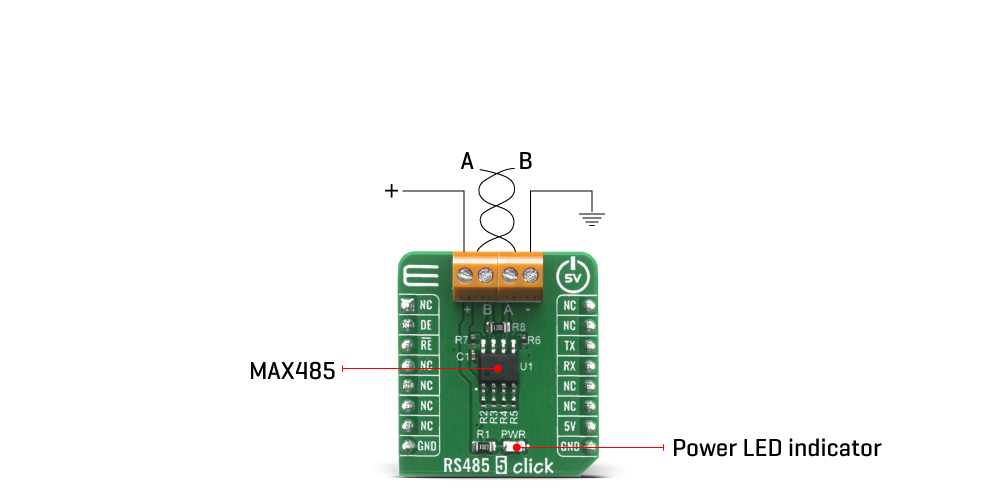
The RS485 5 Click Board™ is based around the MAX485 transceiver which draw between 120µA and 500µA of supply current when unloaded or fully loaded with disabled drivers. All parts operate from a single 5V supply. Driver is short-circuit current limited and is protected against excessive power dissipation by thermal shutdown circuitry that places the driver outputs into a high-impedance state. The receiver input has a fail-safe feature that guarantees a logic-high output if the input is open circuit.
The MAX485 slew rates are not limited, allowing it to transmit up to 2.5Mbps and half-duplex communication. In general, the maximal transfer speed is determined by the bus length, longer bus lines will result in less transfer speed. The RS485/422 line should be terminated at both ends in its characteristic impedance and stub lengths off the main line should be kept as short as possible to minimize the reflections. The RS-485/RS-422 standard covers line lengths up to 1220 meters (4000 feet).
Excessive output current and power dissipation caused by faults or by bus contention are prevented by two mechanisms. A foldback current limit on the output stage provides immediate protection against short circuits over the whole common-mode voltage range. In addition, a thermal shutdown circuit forces the driver outputs into a high-impedance state if the temperature rises excessively.
There are two 2-pole screw terminals on board (+, B, A, -) for connecting RS422/485 bus twisted pair cable, along with the GND and VCC. The terminal inputs labeled as "A" and "B" are used to connect the bus wires. GND and VCC rails can be used to provide the power supply for another node. Note that the VCC terminal is directly routed to the 5V rail of the mikroBUS™.
Pins used for communication are next:
The RS485 5 Click Board™ is designed to be operated only with 5V logic level. A proper logic voltage level conversion should be performed before the Click board™ is used with MCUs with logic levels of 3V3.
| Type | RS485 |
| Applications | Transceiver RS422/RS485 communication bus over UART interface for various automation systems, controllers, sensors and small embedded devices that can all share the same bus. |
| On-board modules | MAX485, low-power transceiver for RS-485 and RS-422 communication |
| Key Features | Transceiver draw between 120µA and 500µA of supply current when unloaded or fully loaded with disabled drivers. Driver is short-circuit current limited and is protected against excessive power dissipation by thermal shutdown circuitry. The receiver input has a fail-safe feature that guarantees a logic-high output if the input is open circuit. |
| Interface | GPIO,UART |
| Compatibility | mikroBUS |
| Click board size | S (28.6 x 25.4 mm) |
| Input Voltage | 5V |
This table shows how the pinout on the RS485 5 Click Board™ corresponds to the pinout on the mikroBUS™ socket (the latter shown in the two middle columns).
| Notes | Pin |  |
Pin | Notes | |||
|---|---|---|---|---|---|---|---|
| NC | 1 | AN | PWM | 16 | NC | ||
| Receiver Output | DE | 2 | RST | INT | 15 | NC | |
| Drive Output | RE | 3 | CS | RX | 14 | TX | UART data transmit |
| NC | 4 | SCK | TX | 13 | RX | UART data receive | |
| NC | 5 | MISO | SCL | 12 | NC | ||
| NC | 6 | MOSI | SDA | 11 | NC | ||
| NC | 7 | 3.3V | 5V | 10 | 5V | Power Supply | |
| Ground | GND | 8 | GND | GND | 9 | GND | Ground |
| Label | Name | Default | Description |
|---|---|---|---|
| LD1 | PWR | - | Power LED Indicator |
We provide a library for the RS485 5 Click Board™ on our LibStock page, as well as a demo application (example), developed using MikroElektronika compilers. The demo can run on all the main MikroElektronika development boards.
Library Description
Library provides functions for communication over UART module with the device, controlling RE( Receiver Output Enable ) and DE( Driver Output Enable ) pins state.
Key functions:
void rs4855_write_byte ( uint8_t input ) - Function for writing data via UART module.uint8_t rs4855_read_byte( ) - Function for reading data via UART module.void rs4855_set_de_state( uint8_t state ) - Function for setting DE pin state.void rs4855_set_re_state( uint8_t state ) - Function for setting RE pin state.Examples description
The application is composed of three sections :
void application_task ( )
{
    char tmp;
    uint8_t drdy_flag;

    if ( app_mode == APP_MODE_RECEIVER )
    {
        // RECEIVER - UART polling

        drdy_flag = rs4855_byte_ready( );

        if ( 1 == drdy_flag )
        {
            tmp = rs4855_read_byte( );
            mikrobus_logWrite( &tmp, _LOG_BYTE );
        }
    }
    else
    {
        // TRANSMITER - TX each 2 sec

        for ( tmp = 0; tmp < 9; tmp++ )
        {
            rs4855_write_byte( demo_message_data[ tmp ] );
            mikrobus_logWrite( ">> MESSAGE SENT <<", _LOG_LINE );
        }
        Delay_ms(2000);
    }
}
The full application code, and ready to use projects can be found on our LibStock page.
Other mikroE Libraries used in the example:
Additional notes and information
Depending on the development board you are using, you may need USB UART click, USB UART 2 click or RS232 click to connect to your PC, for development systems with no UART to USB interface available on the board. The terminal available in all MikroElektronika compilers, or any other terminal application of your choice, can be used to read the message.
The RS485 5 Click Board™ is supported with mikroSDK - MikroElektronika Software Development Kit. To ensure proper operation of mikroSDK compliant Click board™ demo applications, mikroSDK should be downloaded from the LibStock and installed for the compiler you are using.
- description_tag: The RS485 5 Click Board™ is equipped with the MAX485, low-power, slew-rate-limited transceiver for RS-485 and RS-422 communication, from Maxim Integrated. Available from Debug Store UK. - title_tag: MikroE RS485 5 Click Board™ (MIKROE-4156) - manufacturer: Mikroelektronika d.o.o. - warranty: 12 months - amazon_enable: TRUE - amazon_title: RS485 5 Click Board - amazon_product_type: computercomponent - amazon_block: FALSE - amazon_prime_enable: FALSE - amazon_search: MikroElektronika Microelectronica MIKROE-1100 - amazon_uk_price: 14.08 - amazon_uk_currency: GBP - amazon_de_currency: EUR - amazon_de_price: 15.9104 - amazon_fr_currency: EUR - amazon_fr_price: 15.9104 - amazon_es_currency: EUR - amazon_es_price: 15.9104 - amazon_nl_currency: EUR - amazon_nl_price: 15.9104 - amazon_it_currency: EUR - amazon_it_price: 15.9104 - amazon_se_curency: SEK - amazon_se_price: 160.512 - amazon_product_id: 8606018717590 - amazon_product_id_type: EAN - amazon_update: Update - amazon_short_description: The RS485 5 Click Board™ is equipped with the MAX485, low-power, slew-rate-limited transceiver for RS-485 and RS-422 communication, from Maxim Integrated. This device supports half-duplex RS-485 communication and can be used as an interface between the TTL level UART and the RS485 communication bus. Thanks to the low power consumption and reduced slew-rate drivers that minimize EMI and reduce reflections caused by improperly terminated cables, error-free data transmission up to 250kbps is suported. The RS485 5 Click Board™ Board is perfectly suitable for EMI-Sensitive Applications, such as industrial-control local area networks, building automation, HVAC systems, and many more. - amazon_long_description:The RS485 5 Click Board™ is based around the MAX485 transceiver which draw between 120µA and 500µA of supply current when unloaded or fully loaded with disabled drivers. All parts operate from a single 5V supply. Driver is short-circuit current limited and is protected against excessive power dissipation by thermal shutdown circuitry that places the driver outputs into a high-impedance state. The receiver input has a fail-safe feature that guarantees a logic-high output if the input is open circuit.

The MAX485 slew rates are not limited, allowing it to transmit up to 2.5Mbps and half-duplex communication. In general, the maximal transfer speed is determined by the bus length, longer bus lines will result in less transfer speed. The RS485/422 line should be terminated at both ends in its characteristic impedance and stub lengths off the main line should be kept as short as possible to minimize the reflections. The RS-485/RS-422 standard covers line lengths up to 1220 meters (4000 feet).
Excessive output current and power dissipation caused by faults or by bus contention are prevented by two mechanisms. A foldback current limit on the output stage provides immediate protection against short circuits over the whole common-mode voltage range. In addition, a thermal shutdown circuit forces the driver outputs into a high-impedance state if the temperature rises excessively.
There are two 2-pole screw terminals on board (+, B, A, -) for connecting RS422/485 bus twisted pair cable, along with the GND and VCC. The terminal inputs labeled as “A” and “B” are used to connect the bus wires. GND and VCC rails can be used to provide the power supply for another node. Note that the VCC terminal is directly routed to the 5V rail of the mikroBUS™.
Pins used for communication are next:
This Click Board™ is designed to be operated only with 5V logic level. A proper logic voltage level conversion should be performed before the Click board™ is used with MCUs with logic levels of 3V3.
This table shows how the pinout on RS485 5 Click corresponds to the pinout on the mikroBUS™ socket (the latter shown in the two middle columns).
| Notes | Pin |  | Pin | Notes | |||
|---|---|---|---|---|---|---|---|
| NC | 1 | AN | PWM | 16 | NC | ||
| Receiver Output | DE | 2 | RST | INT | 15 | NC | |
| Drive Output | RE | 3 | CS | RX | 14 | TX | UART data transmit |
| NC | 4 | SCK | TX | 13 | RX | UART data receive | |
| NC | 5 | MISO | SCL | 12 | NC | ||
| NC | 6 | MOSI | SDA | 11 | NC | ||
| NC | 7 | 3.3V | 5V | 10 | 5V | Power Supply | |
| Ground | GND | 8 | GND | GND | 9 | GND | Ground |
| Label | Name | Default | Description |
|---|---|---|---|
| LD1 | PWR | - | Power LED Indicator |
We provide a library for the RS485 5 Click Board™ on our LibStock page, as well as a demo application (example), developed using MikroElektronika compilers. The demo can run on all the main MikroElektronika development boards.
Library provides functions for communication over UART module with the device, controlling RE( Receiver Output Enable ) and DE( Driver Output Enable ) pins state.
void rs4855_write_byte ( uint8_t input ) - Function for writing data via UART module.uint8_t rs4855_read_byte( ) - Function for reading data via UART module.void rs4855_set_de_state( uint8_t state ) - Function for setting DE pin state.void rs4855_set_re_state( uint8_t state ) - Function for setting RE pin state.The application is composed of three sections :
void application_task ( )
{
    char tmp;
    uint8_t drdy_flag;

    if ( app_mode == APP_MODE_RECEIVER )
    {
        // RECEIVER - UART polling

        drdy_flag = rs4855_byte_ready( );

        if ( 1 == drdy_flag )
        {
            tmp = rs4855_read_byte( );
            mikrobus_logWrite( &tmp, _LOG_BYTE );
        }
    }
    else
    {
        // TRANSMITER - TX each 2 sec

        for ( tmp = 0; tmp < 9; tmp++ )
        {
            rs4855_write_byte( demo_message_data[ tmp ] );
            mikrobus_logWrite( ">> MESSAGE SENT <<", _LOG_LINE );
        }
        Delay_ms(2000);
    }
}
The full application code, and ready to use projects can be found on our LibStock page.
Other mikroE Libraries used in the example:
Depending on the development board you are using, you may need USB UART click, USB UART 2 click or RS232 click to connect to your PC, for development systems with no UART to USB interface available on the board. The terminal available in all MikroElektronika compilers, or any other terminal application of your choice, can be used to read the message.
The RS485 5 Click Board™ is supported with mikroSDK - MikroElektronika Software Development Kit. To ensure proper operation of mikroSDK compliant Click board™ demo applications, mikroSDK should be downloaded from the LibStock and installed for the compiler you are using.
- attachments: [{"download_file":[{"download_file":"RS485 5 Click Board™ Schematic"}],"download_filetype":[{"download_filetype":"pdf"}]},{"download_file":[{"download_file":"Maxim MAX485 RS422/485 Transceiver Datasheet"}],"download_filetype":[{"download_filetype":"pdf"}]}] - condition: new - custom_product: false - mpn: MIKROE-4156 - google_product_category: Electronics - custom_label_0: Click Board - device_vendor: Maxim Integrated - device_type: MAX485CSA+T - warranty: 12 months - brand: MikroE - manufacturer: Mikroelektronika d.o.o. - target_keyword: RS485 5 Click Board - brands: gid://shopify/Metaobject/56256004319 - breadcrumbs: ["gid://shopify/Collection/447955239135","gid://shopify/Collection/241680580797","gid://shopify/Collection/241546100925"] - customhs_code: 847330 - detailed_description: {"type":"root","children":[{"type":"heading","level":3,"children":[{"type":"text","value":"How Does The RS485 5 Click Board™ Work?"}]},{"type":"paragraph","children":[{"type":"text","value":"The "},{"type":"text","value":"RS485 5 Click Board™","bold":true,"italic":true},{"type":"text","value":" is based around the MAX485 transceiver which draw between 120µA and 500µA of supply current when unloaded or fully loaded with disabled drivers. All parts operate from a single 5V supply. Driver is short-circuit current limited and is protected against excessive power dissipation by thermal shutdown circuitry that places the driver outputs into a high-impedance state. The receiver input has a fail-safe feature that guarantees a logic-high output if the input is open circuit."}]},{"type":"paragraph","children":[{"type":"text","value":""}]},{"type":"paragraph","children":[{"type":"text","value":"The MAX485 slew rates are not limited, allowing it to transmit up to 2.5Mbps and half-duplex communication. In general, the maximal transfer speed is determined by the bus length, longer bus lines will result in less transfer speed. The RS485/422 line should be terminated at both ends in its characteristic impedance and stub lengths off the main line should be kept as short as possible to minimize the reflections. The RS-485/RS-422 standard covers line lengths up to 1220 meters (4000 feet)."}]},{"type":"paragraph","children":[{"type":"text","value":"Excessive output current and power dissipation caused by faults or by bus contention are prevented by two mechanisms. A foldback current limit on the output stage provides immediate protection against short circuits over the whole common-mode voltage range. In addition, a thermal shutdown circuit forces the driver outputs into a high-impedance state if the temperature rises excessively."}]},{"type":"paragraph","children":[{"type":"text","value":"There are two 2-pole screw terminals on board (+, B, A, -) for connecting RS422/485 bus twisted pair cable, along with the GND and VCC. The terminal inputs labeled as \"A\" and \"B\" are used to connect the bus wires. GND and VCC rails can be used to provide the power supply for another node. Note that the VCC terminal is directly routed to the 5V rail of the mikroBUS™."}]},{"type":"paragraph","children":[{"type":"text","value":"Pins used for communication are next:"}]},{"type":"list","listType":"unordered","children":[{"type":"list-item","children":[{"type":"text","value":"DI (Data In) Data on DI pin (marked as RX on click's mikroBUS™) is transmitted on A & B lines when the module is in transmit mode. To set module in transmit mode make DE=1 and RE=1. DI pin is connected to Tx pin of Host Microcontroller UART."}]},{"type":"list-item","children":[{"type":"text","value":"RE (Receive Enable) RE pin is Used to configure the module in Receive Mode."}]},{"type":"list-item","children":[{"type":"text","value":"DE (Data Enable) DE pin is Used to Configure the module in Transmit Mode"}]},{"type":"list-item","children":[{"type":"text","value":"RO (Receive Out) Data Received on A & B pin is given to RO pin (marked as TX on click's mikroBUS™). RO pin is connected to Rx pin of the microcontroller."}]}]},{"type":"paragraph","children":[{"type":"text","value":"The "},{"type":"text","value":"RS485 5 Click Board™","bold":true},{"type":"text","value":" is designed to be operated only with 5V logic level. A proper logic voltage level conversion should be performed before the Click board™ is used with MCUs with logic levels of 3V3."}]},{"type":"heading","level":3,"children":[{"type":"text","value":"Specifications"}]},{"type":"paragraph","children":[{"type":"text","value":"Type\nRS485\nApplications\nTransceiver RS422/RS485 communication bus over UART interface for various automation systems, controllers, sensors and small embedded devices that can all share the same bus.\nOn-board modules\nMAX485, low-power transceiver for RS-485 and RS-422 communication\nKey Features\nTransceiver draw between 120µA and 500µA of supply current when unloaded or fully loaded with disabled drivers. Driver is short-circuit current limited and is protected against excessive power dissipation by thermal shutdown circuitry. The receiver input has a fail-safe feature that guarantees a logic-high output if the input is open circuit.\nInterface\nGPIO,UART\nCompatibility\nmikroBUS\nClick board size\nS (28.6 x 25.4 mm)\nInput Voltage\n5V"}]},{"type":"heading","level":3,"children":[{"type":"text","value":"Pinout diagram"}]},{"type":"paragraph","children":[{"type":"text","value":"This table shows how the pinout on the "},{"type":"text","value":"RS485 5 Click Board™","bold":true},{"type":"text","value":" corresponds to the pinout on the mikroBUS™ socket (the latter shown in the two middle columns)."}]},{"type":"paragraph","children":[{"type":"text","value":"Notes\nPin\nPin\nNotes\nNC\n1\nAN\nPWM\n16\nNC\nReceiver Output\nDE\n2\nRST\nINT\n15\nNC\nDrive Output\nRE\n3\nCS\nRX\n14\nTX\nUART data transmit\nNC\n4\nSCK\nTX\n13\nRX\nUART data receive\nNC\n5\nMISO\nSCL\n12\nNC\nNC\n6\nMOSI\nSDA\n11\nNC\nNC\n7\n3.3V\n5V\n10\n5V\nPower Supply\nGround\nGND\n8\nGND\nGND\n9\nGND\nGround"}]},{"type":"heading","level":3,"children":[{"type":"text","value":"Onboard settings and indicators"}]},{"type":"paragraph","children":[{"type":"text","value":"Label\nName\nDefault\n Description\nLD1\nPWR\n-\nPower LED Indicator"}]},{"type":"heading","level":3,"children":[{"type":"text","value":"Software Support"}]},{"type":"paragraph","children":[{"type":"text","value":"We provide a library for the "},{"type":"text","value":"RS485 5 Click Board™","bold":true},{"type":"text","value":" on our LibStock page, as well as a demo application (example), developed using MikroElektronika compilers. The demo can run on all the main MikroElektronika development boards."}]},{"type":"paragraph","children":[{"type":"text","value":"Library Description","bold":true}]},{"type":"paragraph","children":[{"type":"text","value":"Library provides functions for communication over UART module with the device, controlling RE( Receiver Output Enable ) and DE( Driver Output Enable ) pins state."}]},{"type":"paragraph","children":[{"type":"text","value":"Key functions:"}]},{"type":"list","listType":"unordered","children":[{"type":"list-item","children":[{"type":"text","value":"void rs4855_write_byte ( uint8_t input ) "},{"type":"text","value":"- Function for writing data via UART module."}]},{"type":"list-item","children":[{"type":"text","value":"uint8_t rs4855_read_byte( ) "},{"type":"text","value":"- Function for reading data via UART module."}]},{"type":"list-item","children":[{"type":"text","value":"void rs4855_set_de_state( uint8_t state ) "},{"type":"text","value":"- Function for setting DE pin state."}]},{"type":"list-item","children":[{"type":"text","value":"void rs4855_set_re_state( uint8_t state ) "},{"type":"text","value":"- Function for setting RE pin state."}]}]},{"type":"paragraph","children":[{"type":"text","value":"Examples description","bold":true}]},{"type":"paragraph","children":[{"type":"text","value":"The application is composed of three sections :"}]},{"type":"list","listType":"unordered","children":[{"type":"list-item","children":[{"type":"text","value":"System Initialization - Intializes UART module"}]},{"type":"list-item","children":[{"type":"text","value":"Application Initialization - Driver intialization"}]},{"type":"list-item","children":[{"type":"text","value":"Application Task - Choose one mode (read or write) of task. If you reading it checks if data is ready to be read and then reads one byte and if you are wiriting send data via UART."}]}]},{"type":"paragraph","children":[{"type":"text","value":"void application_task ( )\n{\n char tmp;\n uint8_t drdy_flag;\n\n if ( app_mode == APP_MODE_RECEIVER )\n {\n // RECEIVER - UART polling \n\n drdy_flag = rs4855_byte_ready( );\n\n if ( 1 == drdy_flag )\n {\n tmp = rs4855_read_byte( );\n mikrobus_logWrite( &tmp, _LOG_BYTE );\n }\n }\n else\n {\n // TRANSMITER - TX each 2 sec\n \n for ( tmp = 0; tmp < 9; tmp++ )\n {\n rs4855_write_byte( demo_message_data[ tmp ] );\n mikrobus_logWrite( \">> MESSAGE SENT <<\", _LOG_LINE );\n }\n Delay_ms(2000);\n }\n}"}]},{"type":"paragraph","children":[{"type":"text","value":"The full application code, and ready to use projects can be found on our LibStock page."}]},{"type":"paragraph","children":[{"type":"text","value":"Other mikroE Libraries used in the example:"}]},{"type":"list","listType":"unordered","children":[{"type":"list-item","children":[{"type":"text","value":"UART"}]}]},{"type":"paragraph","children":[{"type":"text","value":"Additional notes and information","bold":true}]},{"type":"paragraph","children":[{"type":"text","value":"Depending on the development board you are using, you may need USB UART click, USB UART 2 click or RS232 click to connect to your PC, for development systems with no UART to USB interface available on the board. The terminal available in all MikroElektronika compilers, or any other terminal application of your choice, can be used to read the message."}]},{"type":"heading","level":3,"children":[{"type":"text","value":"mikroSDK"}]},{"type":"paragraph","children":[{"type":"text","value":"The "},{"type":"text","value":"RS485 5 Click Board™","bold":true},{"type":"text","value":" is supported with mikroSDK - MikroElektronika Software Development Kit. To ensure proper operation of mikroSDK compliant Click board™ demo applications, mikroSDK should be downloaded from the LibStock and installed for the compiler you are using."}]}]} - summary:The RS485 5 Click Board™ is equipped with the MAX485, low-power, slew-rate-limited transceiver for RS-485 and RS-422 communication, from Maxim Integrated. This device supports half-duplex RS-485 communication and can be used as an interface between the TTL level UART and the RS485 communication bus.
Thanks to the low power consumption and reduced slew-rate drivers that minimize EMI and reduce reflections caused by improperly terminated cables, error-free data transmission up to 250kbps is supported.
The RS485 5 Click Board™ is perfectly suitable for EMI-Sensitive Applications, such as industrial-control local area networks, building automation, HVAC systems, and many more.