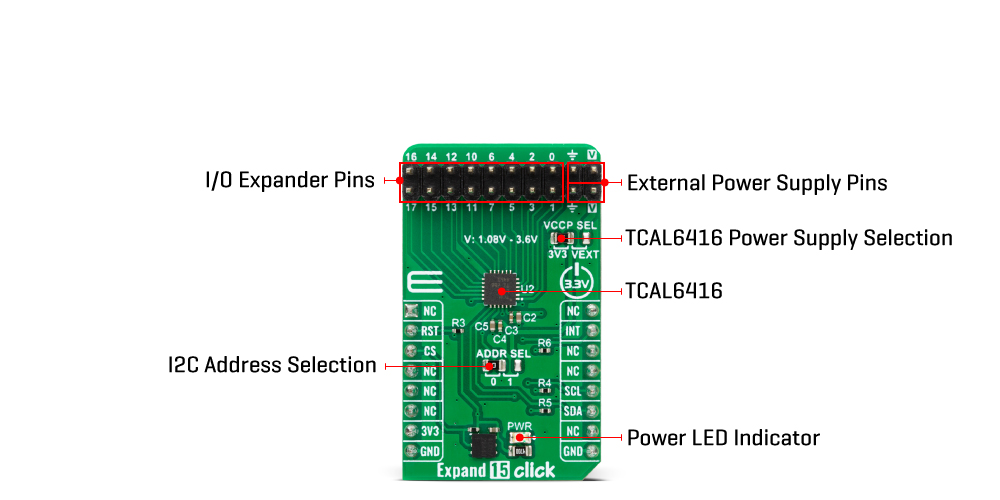
The Expand 15 Click Board™ is based on the TCAL6416, a general-purpose I/O expander from Texas Instruments. The TCAL6416 comes in one P-port configuration and allows easy addition of I/O through a standard I2C serial interface. Its digital core consists of 8-bit data registers, allowing users to configure the I/O port characteristics. The I/Os are configured as inputs at Power-On or after a Reset condition. However, the host controller can configure the I/Os as either inputs or outputs by writing to the Configuration registers. The data for each input or output is kept in the corresponding Input Port or Output Port register, with the possibility to invert the polarity of the Input Port with the Polarity Inversion register. The P-port channels configured as outputs can sink up to 25mA for directly driving LEDs, but the current must be limited externally with additional resistance.
Additionally, the TCAL6416 has Agile I/O functionality specifically targeted to enhance the I/O ports, including programmable output drive strength, programmable pull-up and pull-down resistors, latchable inputs, maskable interrupts, interrupt status register, and programmable open-drain or push-pull outputs. These configuration registers improve the I/O by increasing flexibility and allowing users to optimize their power consumption, speed, and EMI design.
This Click board™ communicates with MCU using the standard I2C 2-Wire interface to read data and configure settings with a maximum frequency of 1MHz. Also, the TCAL6416 allows choosing the least significant bits (LSB) of its I2C slave address using the SMD jumper labelled ADDR SEL. It also possesses a general reset signal routed on the RST pin of the mikroBUS™ socket to reset the TCAL6416, and an additional interrupt signal, routed on the INT pin of the mikroBUS™ socket whenever an input port changes state.
The Expand 15 Click Board™ can only be operated with a 3.3V logic voltage level. Additionally, there is a possibility for the TCAL6416 power supply selection via jumper labelled VCCP SEL to supply the TCAL6416 from 1.08V to 3.6V external power supply (V pin) or with 3V3 mikroBUS™ power rail. The board must perform appropriate logic voltage level conversion before using MCUs with different logic levels. However, the Click board™ comes equipped with a library containing easy-to-use functions and an example code that can be used, as a reference, for further development.
| Type | Port expander |
| Applications | It provides a simple solution when additional I/Os are needed for switches, sensors, push-buttons, LEDs, fans, and more. |
| On-board modules | TCAL6416 - I/O expander from Texas Instruments |
| Key Features | Allows bidirectional voltage-level translation and GPIO expansion, low power consumption, fast I2C interface, selectable I2C address, reset and interrupt features, polarity inversion register, various programmable features like output drive strength, pull resistors, and more |
| Interface | I2C |
| Compatibility | mikroBUS |
| Click board size | M (42.9 x 25.4 mm) |
| Input Voltage | 3.3V,External |
This table shows how the pinout of the Expand 15 Click Board™ corresponds to the pinout on the mikroBUS™ socket (the latter shown in the two middle columns).
| Notes | Pin |  |
Pin | Notes | |||
|---|---|---|---|---|---|---|---|
| NC | 1 | AN | PWM | 16 | NC | ||
| Reset | RST | 2 | RST | INT | 15 | INT | Interrupt |
| NC | 3 | CS | RX | 14 | NC | ||
| NC | 4 | SCK | TX | 13 | NC | ||
| NC | 5 | MISO | SCL | 12 | SCL | I2C Clock | |
| NC | 6 | MOSI | SDA | 11 | SDA | I2C Data | |
| Power Supply | 3.3V | 7 | 3.3V | 5V | 10 | NC | |
| Ground | GND | 8 | GND | GND | 9 | GND | Ground |
| Label | Name | Default | Description |
|---|---|---|---|
| LD1 | PWR | - | Power LED Indicator |
| JP1 | VCCP SEL | Left | TCAL6416 Power Supply Selection 3V3/VEXT: Left position 3V3, Right position VEXT |
| JP2 | ADDR SEL | Left | I2C Address Selection 0/1: Left position 0, Right position 1 |
| Description | Min | Typ | Max | Unit |
|---|---|---|---|---|
| Supply Voltage | - | 3.3 | - | V |
| External Power Supply VEXT | 1.08 | - | 3.6 | V |
We provide a library for the Expand 15 Click Board™ and a demo application (example), developed using MikroE compilers. The demo can run on all the main MikroE development boards.
The package can be downloaded/installed directly from NECTO Studio The package Manager (recommended), downloaded from our LibStock™ or found on the MikroE Github account.
Library Description
This library contains API for the Expand 15 Click Board™ driver.
Key functions
expand15_hw_reset Expand 15 hardware reset function.
expand15_get_in_pin_state Expand 15 get input pin state function.
expand15_set_out_pin_state Expand 15 set output pin state function.
Example Description
This example demonstrates the use of Expand 15 Click board™ by setting and reading the ports state.
void application_task ( void )
{
    uint8_t output_pin_state;
    uint8_t input_pin_state;

    // Setting port0 output pin ( P00, P02, P04 and P06 ) to high
    output_pin_state = EXPAND15_PIN_00_MASK | EXPAND15_PIN_02_MASK | EXPAND15_PIN_04_MASK | EXPAND15_PIN_06_MASK;
    expand15_set_out_pin_state( &expand15, EXPAND15_PORT_0, output_pin_state );
    Delay_ms( 10 );

    // Checking state of the input pins on port0
    expand15_get_in_pin_state( &expand15, EXPAND15_PORT_0, &input_pin_state );
    log_printf( &logger, "OUTPUT PINS HIGH rn" );
    log_printf( &logger, "INPUT PINS |" );
    log_printf( &logger, " P01 : %c |", ( ( input_pin_state & EXPAND15_PIN_01_MASK ) ? 'H' : 'L' ) );
    log_printf( &logger, " P03 : %c |", ( ( input_pin_state & EXPAND15_PIN_03_MASK ) ? 'H' : 'L' ) );
    log_printf( &logger, " P05 : %c |", ( ( input_pin_state & EXPAND15_PIN_05_MASK ) ? 'H' : 'L' ) );
    log_printf( &logger, " P07 : %c rn", ( ( input_pin_state & EXPAND15_PIN_07_MASK ) ? 'H' : 'L' ) );
    Delay_ms( 500 );

    // Setting port0 output pin ( P00, P02, P04 and P06 ) to low
    output_pin_state = EXPAND15_ALL_PINS_OFF;
    expand15_set_out_pin_state( &expand15, EXPAND15_PORT_0, output_pin_state );
    Delay_ms( 10 );

    // Checking state of the input pins on port0
    expand15_get_in_pin_state( &expand15, EXPAND15_PORT_0, &input_pin_state );
    log_printf( &logger, "OUTPUT PINS LOW rn" );
    log_printf( &logger, "INPUT PINS |" );
    log_printf( &logger, " P01 : %c |", ( ( input_pin_state & EXPAND15_PIN_01_MASK ) ? 'H' : 'L' ) );
    log_printf( &logger, " P03 : %c |", ( ( input_pin_state & EXPAND15_PIN_03_MASK ) ? 'H' : 'L' ) );
    log_printf( &logger, " P05 : %c |", ( ( input_pin_state & EXPAND15_PIN_05_MASK ) ? 'H' : 'L' ) );
    log_printf( &logger, " P07 : %c rn", ( ( input_pin_state & EXPAND15_PIN_07_MASK ) ? 'H' : 'L' ) );
    log_printf( &logger, "- - - - - - - - - - - - - - - - - - - - - - - - - - rn" );
    Delay_ms( 2000 );

    // Setting port1 output pin ( P10, P12, P14 and P01 ) to high
    output_pin_state = EXPAND15_PIN_10_MASK | EXPAND15_PIN_12_MASK | EXPAND15_PIN_14_MASK | EXPAND15_PIN_16_MASK;
    expand15_set_out_pin_state( &expand15, EXPAND15_PORT_1, output_pin_state );
    Delay_ms( 10 );

    // Checking state of the input pins on port1
    expand15_get_in_pin_state( &expand15, EXPAND15_PORT_1, &input_pin_state );
    log_printf( &logger, "OUTPUT PINS HIGH rn" );
    log_printf( &logger, "INPUT PINS |" );
    log_printf( &logger, " P11 : %c |", ( ( input_pin_state & EXPAND15_PIN_11_MASK ) ? 'H' : 'L' ) );
    log_printf( &logger, " P13 : %c |", ( ( input_pin_state & EXPAND15_PIN_13_MASK ) ? 'H' : 'L' ) );
    log_printf( &logger, " P15 : %c |", ( ( input_pin_state & EXPAND15_PIN_15_MASK ) ? 'H' : 'L' ) );
    log_printf( &logger, " P17 : %c rn", ( ( input_pin_state & EXPAND15_PIN_17_MASK ) ? 'H' : 'L' ) );
    Delay_ms( 500 );

    // Setting port1 output pin ( P10, P12, P14 and P16 ) to low
    output_pin_state = EXPAND15_ALL_PINS_OFF;
    expand15_set_out_pin_state( &expand15, EXPAND15_PORT_1, output_pin_state );
    Delay_ms( 10 );

    // Checking state of the input pins on port1
    expand15_get_in_pin_state( &expand15, EXPAND15_PORT_1, &input_pin_state );
    log_printf( &logger, "OUTPUT PINS LOW rn" );
    log_printf( &logger, "INPUT PINS |" );
    log_printf( &logger, " P11 : %c |", ( ( input_pin_state & EXPAND15_PIN_11_MASK ) ? 'H' : 'L' ) );
    log_printf( &logger, " P13 : %c |", ( ( input_pin_state & EXPAND15_PIN_13_MASK ) ? 'H' : 'L' ) );
    log_printf( &logger, " P15 : %c |", ( ( input_pin_state & EXPAND15_PIN_15_MASK ) ? 'H' : 'L' ) );
    log_printf( &logger, " P17 : %c rn", ( ( input_pin_state & EXPAND15_PIN_17_MASK ) ? 'H' : 'L' ) );
    log_printf( &logger, "- - - - - - - - - - - - - - - - - - - - - - - - - - rn" );
    Delay_ms( 2000 );
}
The full application code, and ready to use projects can be installed directly from NECTO Studio The package Manager (recommended), downloaded from our LibStock™ or found on MikroE Github account.
Other MikroE Libraries used in the example:
Additional Notes and Information
Depending on the development board you are using, you may need USB UART Click Board™, USB UART 2 Click or RS232 Click to connect to your PC, for development systems with no UART to USB interface available on the board. UART terminal is available in all MikroE compilers.
The Expand 15 Click Board™ is supported with mikroSDK - MikroE Software Development Kit, that needs to be downloaded from the LibStock and installed for the compiler you are using to ensure proper operation of mikroSDK compliant Click board™ demo applications.
- manufacturer: Mikroelektronika d.o.o. - warranty: 12 months - backorder_label: If no stock shown above, check availability - attachments: [{"download_file":[{"download_file":"Expand 15 Click Board™ Schematic"}],"download_filetype":[{"download_filetype":"pdf"}]},{"download_file":[{"download_file":"Texas Instruments TCAL6416 I/O Expander"}],"download_filetype":[{"download_filetype":"pdf"}]}] - device_vendor: Texas Instruments - device_type: TCAL6416RTWR - warranty: 12 months - brand: MikroE - manufacturer: Mikroelektronika d.o.o. - target_keyword: Expand 15 Click Board - brands: gid://shopify/Metaobject/56256004319 - breadcrumbs: ["gid://shopify/Collection/447955239135","gid://shopify/Collection/241680580797","gid://shopify/Collection/279382950077","gid://shopify/Collection/279383179453"] - mpn: MIKROE-5679 - customhs_code: 847330 - detailed_description: {"type":"root","children":[{"type":"heading","level":3,"children":[{"type":"text","value":"How Does The Expand 15 Click Board™ Work?"}]},{"type":"paragraph","children":[{"type":"text","value":"The Expand 15 Click Board™ is based on the TCAL6416, a general-purpose I/O expander from Texas Instruments. The TCAL6416 comes in one P-port configuration and allows easy addition of I/O through a standard I2C serial interface. Its digital core consists of 8-bit data registers, allowing users to configure the I/O port characteristics. The I/Os are configured as inputs at Power-On or after a Reset condition. However, the host controller can configure the I/Os as either inputs or outputs by writing to the Configuration registers. The data for each input or output is kept in the corresponding Input Port or Output Port register, with the possibility to invert the polarity of the Input Port with the Polarity Inversion register. The P-port channels configured as outputs can sink up to 25mA for directly driving LEDs, but the current must be limited externally with additional resistance."}]},{"type":"paragraph","children":[{"type":"text","value":""}]},{"type":"paragraph","children":[{"type":"text","value":"Additionally, the TCAL6416 has Agile I/O functionality specifically targeted to enhance the I/O ports, including programmable output drive strength, programmable pull-up and pull-down resistors, latchable inputs, maskable interrupts, interrupt status register, and programmable open-drain or push-pull outputs. These configuration registers improve the I/O by increasing flexibility and allowing users to optimize their power consumption, speed, and EMI design."}]},{"type":"paragraph","children":[{"type":"text","value":"This Click board™ communicates with MCU using the standard I2C 2-Wire interface to read data and configure settings with a maximum frequency of 1MHz. Also, the TCAL6416 allows choosing the least significant bits (LSB) of its I2C slave address using the SMD jumper labelled ADDR SEL. It also possesses a general reset signal routed on the RST pin of the mikroBUS™ socket to reset the TCAL6416, and an additional interrupt signal, routed on the INT pin of the mikroBUS™ socket whenever an input port changes state."}]},{"type":"paragraph","children":[{"type":"text","value":"The Expand 15 Click Board™ can only be operated with a 3.3V logic voltage level. Additionally, there is a possibility for the TCAL6416 power supply selection via jumper labelled VCCP SEL to supply the TCAL6416 from 1.08V to 3.6V external power supply (V pin) or with 3V3 mikroBUS™ power rail. The board must perform appropriate logic voltage level conversion before using MCUs with different logic levels. However, the Click board™ comes equipped with a library containing easy-to-use functions and an example code that can be used, as a reference, for further development."}]},{"type":"heading","level":3,"children":[{"type":"text","value":"SPECIFICATIONS"}]},{"type":"paragraph","children":[{"type":"text","value":"Type\nPort expander\nApplications\nIt provides a simple solution when additional I/Os are needed for switches, sensors, push-buttons, LEDs, fans, and more.\nOn-board modules\nTCAL6416 - I/O expander from Texas Instruments\nKey Features\nAllows bidirectional voltage-level translation and GPIO expansion, low power consumption, fast I2C interface, selectable I2C address, reset and interrupt features, polarity inversion register, various programmable features like output drive strength, pull resistors, and more\nInterface\nI2C\nCompatibility\nmikroBUS\nClick board size\nM (42.9 x 25.4 mm)\nInput Voltage\n3.3V,External"}]},{"type":"heading","level":3,"children":[{"type":"text","value":"PINOUT DIAGRAM"}]},{"type":"paragraph","children":[{"type":"text","value":"This table shows how the pinout of the Expand 15 Click Board™ corresponds to the pinout on the mikroBUS™ socket (the latter shown in the two middle columns)."}]},{"type":"paragraph","children":[{"type":"text","value":"Notes\nPin\nPin\nNotes\nNC\n1\nAN\nPWM\n16\nNC\nReset\nRST\n2\nRST\nINT\n15\nINT\nInterrupt\nNC\n3\nCS\nRX\n14\nNC\nNC\n4\nSCK\nTX\n13\nNC\nNC\n5\nMISO\nSCL\n12\nSCL\nI2C Clock\nNC\n6\nMOSI\nSDA\n11\nSDA\nI2C Data\nPower Supply\n3.3V\n7\n3.3V\n5V\n10\nNC\nGround\nGND\n8\nGND\nGND\n9\nGND\nGround"}]},{"type":"heading","level":3,"children":[{"type":"text","value":"ONBOARD SETTINGS AND INDICATORS"}]},{"type":"paragraph","children":[{"type":"text","value":"Label\nName\nDefault\nDescription\nLD1\nPWR\n-\nPower LED Indicator\nJP1\nVCCP SEL\nLeft\nTCAL6416 Power Supply Selection 3V3/VEXT: Left position 3V3, Right position VEXT\nJP2\nADDR SEL\nLeft\nI2C Address Selection 0/1: Left position 0, Right position 1"}]},{"type":"heading","level":3,"children":[{"type":"text","value":"EXPAND 15 CLICK ELECTRICAL SPECIFICATIONS"}]},{"type":"paragraph","children":[{"type":"text","value":"Description\nMin\nTyp\nMax\nUnit\nSupply Voltage\n-\n3.3\n-\nV\nExternal Power Supply VEXT\n1.08\n-\n3.6\nV"}]},{"type":"heading","level":3,"children":[{"type":"text","value":" "}]}]} - summary:Unleash the potential of your microcontroller with the Expand 15 Click Board™, a compact and versatile multi-channel I/O expander. This powerful add-on board features the TCAL6416, a high-quality general-purpose I/O expansion designed by Texas Instruments, compatible with most microcontroller families. Unlock unparalleled convenience and flexibility by easily adding I/O through the standard I2C serial interface.
The user-configurable P-port ensures seamless integration with your project's needs, allowing you to choose between logic input or output by adjusting the I/O configuration register bits. The Expand 15 Click Board™ boasts various additional features, including programmable output drive strength, pull-up and pull-down resistors, latchable inputs, maskable interrupt, interrupt status register, and programmable open-drain or push-pull outputs. It's the perfect solution for expanding your I/O capabilities for switches, sensors, push buttons, LEDs, fans, and more.
Streamline your software development process with the Expand 15 Click Board™, supported by a mikroSDK-compliant library. This library includes user-friendly functions that make software development a breeze. As a fully tested product, the Expand 15 Click Board™ is ready for immediate use on any system equipped with the mikroBUS™ socket. Enhance your projects and extend your microcontroller's capabilities with the Expand 15 Click Board™ today!