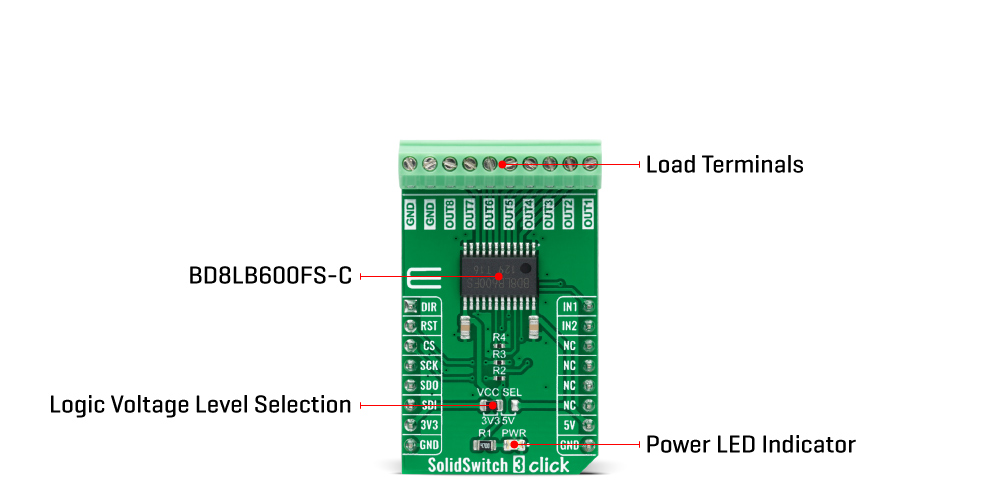
The SolidSwitch 3 Click Board™ is based on the BD8LB600FS-C, an automotive eight-channel low-side load switch from Rohm Semiconductor. Every switch is controlled through a serial peripheral interface and includes an N-channel MOSFET that supports a maximum current of 1A. The BD8LB600FS-C offers flexible protection boundaries for systems against input voltage up to 5V and limits the output load current making this device ideal for driving resistive, inductive, and capacitive loads.
The SolidSwitch 3 Click Board™ communicates with MCU through a standard SPI interface and operates at clock rates up to 5MHz, providing data in digital format of 16-bits. It also uses the Reset feature labelled as RST and routed to the RST pin of the mikroBUS™ socket. In addition to these pins, there are a few more like DIR and two input pins, IN1 and IN2 pins, routed to the AN, PWM, and INT pins of the mikroBUS™ socket. The DIR signal represents a transition to a direct mode activated by setting this pin to a high logic level.
Depending on the set logic state on the DIR pin, pins IN1 and IN2 can be used to control the given output channels; IN1 represents the control of channels 1 and 5 when the DIR is at a low logic state, while IN2 defines the management of channels 2 and 6 when the DIR is at a low logic state. When the DIR is set to high logic state, then IN1 represents control of only channel 5 and IN2 only of channel 6.
As mentioned before, the BD8LB600FS-C also has built-in protection circuits, namely the overcurrent, the thermal shutdown, the open-load detection, and the voltage lock-out circuits. Moreover, this device also possesses a diagnostic output function during abnormal detection.
The SolidSwitch 3 Click Board™ can operate with both 3.3V and 5V logic voltage levels selected via the VCC SEL jumper. This way, it is allowed for both 3.3V and 5V capable MCUs to use the communication lines properly. However, the Click board™ comes equipped with a library containing easy-to-use functions and an example code that can be used, as a reference, for further development.
| Type | Relay |
| Applications | Can be used for driving resistive, inductive, and capacitive loads |
| On-board modules | BD8LB600FS-C - automotive eight-channel low-side load switch from Rohm Semiconductor |
| Key Features | Eight channel load switch, 16-bit SPI interface for diagnostics and control, built-in protection features, 1A maximum output current, and more |
| Interface | SPI |
| Compatibility | mikroBUS |
| Click board size | M (42.9 x 25.4 mm) |
| Input Voltage | 3.3V or 5V |
This table shows how the pinout of the SolidSwitch 3 Click Board™k corresponds to the pinout on the mikroBUS™ socket (the latter shown in the two middle columns).
| Notes | Pin |  |
Pin | Notes | |||
|---|---|---|---|---|---|---|---|
| Direct Mode | DIR | 1 | AN | PWM | 16 | IN1 | 1/5 Channel Control |
| Reset | RST | 2 | RST | INT | 15 | IN2 | 2/6 Channel Control |
| SPI Chip Select | CS | 3 | CS | RX | 14 | NC | |
| SPI Clock | SCK | 4 | SCK | TX | 13 | NC | |
| SPI Data OUT | SDO | 5 | MISO | SCL | 12 | NC | |
| SPI Data IN | SDI | 6 | MOSI | SDA | 11 | NC | |
| Power Supply | 3.3V | 7 | 3.3V | 5V | 10 | 5V | Power Supply |
| Ground | GND | 8 | GND | GND | 9 | GND | Ground |
| Label | Name | Default | Description |
|---|---|---|---|
| LD1 | PWR | - | Power LED Indicator |
| JP1 | VCC SEL | Left | Logic Level Voltage Selection 3V3/5V: Left position 3V3, Right position 5V |
| Description | Min | Typ | Max | Unit |
|---|---|---|---|---|
| Supply Voltage | 3.3 | - | 5 | V |
| Maximum Output Current | - | - | 1 | A |
| Operating Temperature Range | -40 | +25 | +120 | °C |
We provide a library for the SolidSwitch 3 Click Board™ as well as a demo application (example), developed using MikroElektronika compilers. The demo can run on all the main MikroElektronika development boards.
The package can be downloaded/installed directly from NECTO Studio The package Manager (recommended), downloaded from our LibStock™ or found on MikroE Github account.
Library Description
This library contains API for the SolidSwitch 3 Click Board™ driver.
Key functions
solidswitch3_enable_output This function enables the specified output channel.
solidswitch3_disable_output This function disables the specified output channel.
solidswitch3_reset This function resets the device by toggling the reset pin.
Example Description
This example demonstrates the use of the SolidSwitch 3 Click Board™ by controlling the output state.
void application_task ( void )
 {
     for ( uint16_t cnt = SOLIDSWITCH3_CH_OUT1; cnt <= SOLIDSWITCH3_CH_OUT8; cnt <<= 1 )
     {
         if ( SOLIDSWITCH3_OK == solidswitch3_enable_output ( &solidswitch3, cnt ) )
         {
             solidswitch3_display_enabled_channels( &solidswitch3 );
             Delay_ms ( 1000 );
         }
     }

     if ( SOLIDSWITCH3_OK == solidswitch3_disable_output ( &solidswitch3, SOLIDSWITCH3_ALL_CHANNELS ) )
     {
         solidswitch3_display_enabled_channels( &solidswitch3 );
         Delay_ms ( 3000 );
     }
 }
The full application code, and ready to use projects can be installed directly from NECTO Studio The package Manager (recommended), downloaded from our LibStock™ or found on MikroE Github account.
Other MikroE Libraries used in the example:
Additional Notes and Information
Depending on the development board you are using, you may need USB UART click, USB UART 2 Click or RS232 Click to connect to your PC, for development systems with no UART to USB interface available on the board. UART terminal is available in all MikroElektronika compilers.
The SolidSwitch 3 Click Board™ is supported with mikroSDK - MikroElektronika Software Development Kit. To ensure proper operation of mikroSDK compliant Click board™ demo applications, mikroSDK should be downloaded from the LibStock and installed for the compiler you are using.
- examples:We provide a library for the SolidSwitch 3 Click Board™ as well as a demo application (example), developed using MikroElektronika compilers. The demo can run on all the main MikroElektronika development boards.
The package can be downloaded/installed directly from NECTO Studio The package Manager (recommended), downloaded from our LibStock™ or found on MikroE Github account.
This library contains API for the SolidSwitch 3 Click Board™ driver.
Key functions
solidswitch3_enable_output This function enables the specified output channel.
solidswitch3_disable_output This function disables the specified output channel.
solidswitch3_reset This function resets the device by toggling the reset pin.
This example demonstrates the use of the SolidSwitch 3 Click Board™ by controlling the output state.
void application_task ( void )
 {
     for ( uint16_t cnt = SOLIDSWITCH3_CH_OUT1; cnt <= SOLIDSWITCH3_CH_OUT8; cnt <<= 1 )
     {
         if ( SOLIDSWITCH3_OK == solidswitch3_enable_output ( &solidswitch3, cnt ) )
         {
             solidswitch3_display_enabled_channels( &solidswitch3 );
             Delay_ms ( 1000 );
         }
     }

     if ( SOLIDSWITCH3_OK == solidswitch3_disable_output ( &solidswitch3, SOLIDSWITCH3_ALL_CHANNELS ) )
     {
         solidswitch3_display_enabled_channels( &solidswitch3 );
         Delay_ms ( 3000 );
     }
 }
The full application code, and ready to use projects can be installed directly from NECTO Studio The package Manager (recommended), downloaded from our LibStock™ or found on MikroE Github account.
Other MikroE Libraries used in the example:
Depending on the development board you are using, you may need USB UART click, USB UART 2 Click or RS232 Click to connect to your PC, for development systems with no UART to USB interface available on the board. UART terminal is available in all MikroElektronika compilers.
The SolidSwitch 3 Click Board™ is supported with mikroSDK - MikroElektronika Software Development Kit. To ensure proper operation of mikroSDK compliant Click board™ demo applications, mikroSDK should be downloaded from the LibStock and installed for the compiler you are using.
- manufacturer: Mikroelektronika d.o.o. - warranty: 12 months - backorder_label: If no stock shown above, check availability - subtitle: Automotive 8-Channel Low-Side Switch - feature_1: Based on the BD8LB600FS-C, an automotive eight-channel low-side switch from Rohm Semiconductor - feature_2: Built-in protection and Diagnostic Output function - feature_3: Can be used for driving resistive, inductive, and capacitive loads - attachments: [{"download_file":[{"download_file":"SolidSwitch 3 Click Board™ Schematic"}],"download_filetype":[{"download_filetype":"pdf"}]},{"download_file":[{"download_file":"Rohm Semiconductor BD8LB600FS-C 8-Channel Low-side Switch Datasheet"}],"download_filetype":[{"download_filetype":"pdf"}]}] - mpn: MIKROE-5079 - mpn: MIKROE-5079 - custom_label_0: Click Board - google_product_category: Electronics - condition: new - custom_product: false - device_vendor: Rohm Semiconductor - device_type: BD8LB600FS-CE2 - warranty: 12 months - brand: MikroE - manufacturer: Mikroelektronika d.o.o. - target_keyword: SolidSwitch 3 Click Board - brands: gid://shopify/Metaobject/56256004319 - breadcrumbs: ["gid://shopify/Collection/447955239135","gid://shopify/Collection/241680580797","gid://shopify/Collection/241546559677"] - customhs_code: 847330 - detailed_description: {"type":"root","children":[{"type":"heading","level":3,"children":[{"type":"text","value":"How Does The SolidSwitch 3 Click Board™ Work?"}]},{"type":"paragraph","children":[{"type":"text","value":"The "},{"type":"text","value":"SolidSwitch 3 Click Board™","bold":true,"italic":true},{"type":"text","value":" is based on the BD8LB600FS-C, an automotive eight-channel low-side load switch from Rohm Semiconductor. Every switch is controlled through a serial peripheral interface and includes an N-channel MOSFET that supports a maximum current of 1A. The BD8LB600FS-C offers flexible protection boundaries for systems against input voltage up to 5V and limits the output load current making this device ideal for driving resistive, inductive, and capacitive loads."}]},{"type":"paragraph","children":[{"type":"text","value":""}]},{"type":"paragraph","children":[{"type":"text","value":"The "},{"type":"text","value":"SolidSwitch 3 Click Board™","bold":true},{"type":"text","value":" communicates with MCU through a standard SPI interface and operates at clock rates up to 5MHz, providing data in digital format of 16-bits. It also uses the Reset feature labelled as RST and routed to the RST pin of the mikroBUS™ socket. In addition to these pins, there are a few more like DIR and two input pins, IN1 and IN2 pins, routed to the AN, PWM, and INT pins of the mikroBUS™ socket. The DIR signal represents a transition to a direct mode activated by setting this pin to a high logic level."}]},{"type":"paragraph","children":[{"type":"text","value":"Depending on the set logic state on the DIR pin, pins IN1 and IN2 can be used to control the given output channels; IN1 represents the control of channels 1 and 5 when the DIR is at a low logic state, while IN2 defines the management of channels 2 and 6 when the DIR is at a low logic state. When the DIR is set to high logic state, then IN1 represents control of only channel 5 and IN2 only of channel 6."}]},{"type":"paragraph","children":[{"type":"text","value":"As mentioned before, the BD8LB600FS-C also has built-in protection circuits, namely the overcurrent, the thermal shutdown, the open-load detection, and the voltage lock-out circuits. Moreover, this device also possesses a diagnostic output function during abnormal detection."}]},{"type":"paragraph","children":[{"type":"text","value":"The "},{"type":"text","value":"SolidSwitch 3 Click Board™","bold":true},{"type":"text","value":" can operate with both 3.3V and 5V logic voltage levels selected via the VCC SEL jumper. This way, it is allowed for both 3.3V and 5V capable MCUs to use the communication lines properly. However, the Click board™ comes equipped with a library containing easy-to-use functions and an example code that can be used, as a reference, for further development."}]},{"type":"heading","level":3,"children":[{"type":"text","value":"SPECIFICATIONS"}]},{"type":"paragraph","children":[{"type":"text","value":"Type\nRelay\nApplications\nCan be used for driving resistive, inductive, and capacitive loads\nOn-board modules\nBD8LB600FS-C - automotive eight-channel low-side load switch from Rohm Semiconductor\nKey Features\nEight channel load switch, 16-bit SPI interface for diagnostics and control, built-in protection features, 1A maximum output current, and more\nInterface\nSPI\nCompatibility\nmikroBUS\nClick board size\nM (42.9 x 25.4 mm)\nInput Voltage\n3.3V or 5V"}]},{"type":"heading","level":3,"children":[{"type":"text","value":"PINOUT DIAGRAM"}]},{"type":"paragraph","children":[{"type":"text","value":"This table shows how the pinout of the "},{"type":"text","value":"SolidSwitch 3 Click Board™","bold":true},{"type":"text","value":"k corresponds to the pinout on the mikroBUS™ socket (the latter shown in the two middle columns)."}]},{"type":"paragraph","children":[{"type":"text","value":"Notes\nPin\nPin\nNotes\nDirect Mode\nDIR\n1\nAN\nPWM\n16\nIN1\n1/5 Channel Control\nReset\nRST\n2\nRST\nINT\n15\nIN2\n2/6 Channel Control\nSPI Chip Select\nCS\n3\nCS\nRX\n14\nNC\nSPI Clock\nSCK\n4\nSCK\nTX\n13\nNC\nSPI Data OUT\nSDO\n5\nMISO\nSCL\n12\nNC\nSPI Data IN\nSDI\n6\nMOSI\nSDA\n11\nNC\nPower Supply\n3.3V\n7\n3.3V\n5V\n10\n5V\nPower Supply\nGround\nGND\n8\nGND\nGND\n9\nGND\nGround"}]},{"type":"heading","level":3,"children":[{"type":"text","value":"ONBOARD SETTINGS AND INDICATORS"}]},{"type":"paragraph","children":[{"type":"text","value":"Label\nName\nDefault\nDescription\nLD1\nPWR\n-\nPower LED Indicator\nJP1\nVCC SEL\nLeft\nLogic Level Voltage Selection 3V3/5V: Left position 3V3, Right position 5V"}]},{"type":"heading","level":3,"children":[{"type":"text","value":"SOLIDSWITCH 3 CLICK ELECTRICAL SPECIFICATIONS"}]},{"type":"paragraph","children":[{"type":"text","value":"Description\nMin\nTyp\nMax\nUnit\nSupply Voltage\n3.3\n-\n5\nV\nMaximum Output Current\n-\n-\n1\nA\nOperating Temperature Range\n-40\n+25\n+120\n°C"}]},{"type":"heading","level":3,"children":[{"type":"text","value":"Software Support"}]},{"type":"paragraph","children":[{"type":"text","value":"We provide a library for the "},{"type":"text","value":"SolidSwitch 3 Click Board™ ","bold":true},{"type":"text","value":"as well as a demo application (example), developed using MikroElektronika compilers. The demo can run on all the main MikroElektronika development boards."}]},{"type":"paragraph","children":[{"type":"text","value":"The package can be downloaded/installed directly from NECTO Studio The package Manager (recommended), downloaded from our LibStock™ or found on MikroE Github account."}]},{"type":"paragraph","children":[{"type":"text","value":"Library Description","bold":true}]},{"type":"paragraph","children":[{"type":"text","value":"This library contains API for the "},{"type":"text","value":"SolidSwitch 3 Click Board™","bold":true},{"type":"text","value":" driver."}]},{"type":"paragraph","children":[{"type":"text","value":"Key functions"}]},{"type":"list","listType":"unordered","children":[{"type":"list-item","children":[{"type":"text","value":" "},{"type":"text","value":"solidswitch3_enable_output"},{"type":"text","value":" This function enables the specified output channel."},{"type":"text","value":" "}]},{"type":"list-item","children":[{"type":"text","value":" "},{"type":"text","value":"solidswitch3_disable_output"},{"type":"text","value":" This function disables the specified output channel."},{"type":"text","value":" "}]},{"type":"list-item","children":[{"type":"text","value":" "},{"type":"text","value":"solidswitch3_reset"},{"type":"text","value":" This function resets the device by toggling the reset pin."},{"type":"text","value":" "}]}]},{"type":"paragraph","children":[{"type":"text","value":"Example Description","bold":true}]},{"type":"paragraph","children":[{"type":"text","value":"This example demonstrates the use of the "},{"type":"text","value":"SolidSwitch 3 Click Board™","bold":true},{"type":"text","value":" by controlling the output state."}]},{"type":"paragraph","children":[{"type":"text","value":"void application_task ( void ) \n { \n for ( uint16_t cnt = SOLIDSWITCH3_CH_OUT1; cnt <= SOLIDSWITCH3_CH_OUT8; cnt <<= 1 ) \n { \n if ( SOLIDSWITCH3_OK == solidswitch3_enable_output ( &solidswitch3, cnt ) ) \n { \n solidswitch3_display_enabled_channels( &solidswitch3 ); \n Delay_ms ( 1000 ); \n } \n } \n\n if ( SOLIDSWITCH3_OK == solidswitch3_disable_output ( &solidswitch3, SOLIDSWITCH3_ALL_CHANNELS ) ) \n { \n solidswitch3_display_enabled_channels( &solidswitch3 ); \n Delay_ms ( 3000 ); \n } \n }"}]},{"type":"paragraph","children":[{"type":"text","value":"The full application code, and ready to use projects can be installed directly from NECTO Studio The package Manager (recommended), downloaded from our LibStock™ or found on MikroE Github account."}]},{"type":"paragraph","children":[{"type":"text","value":"Other MikroE Libraries used in the example:"}]},{"type":"list","listType":"unordered","children":[{"type":"list-item","children":[{"type":"text","value":"MikroSDK.Board"}]},{"type":"list-item","children":[{"type":"text","value":"MikroSDK.Log"}]},{"type":"list-item","children":[{"type":"text","value":"Click.SolidSwitch3"}]}]},{"type":"paragraph","children":[{"type":"text","value":"Additional Notes and Information","bold":true}]},{"type":"paragraph","children":[{"type":"text","value":"Depending on the development board you are using, you may need USB UART click, USB UART 2 Click or RS232 Click to connect to your PC, for development systems with no UART to USB interface available on the board. UART terminal is available in all MikroElektronika compilers."}]},{"type":"heading","level":3,"children":[{"type":"text","value":"MIKROSDK"}]},{"type":"paragraph","children":[{"type":"text","value":"The "},{"type":"text","value":"SolidSwitch 3 Click Board™","bold":true},{"type":"text","value":" is supported with mikroSDK - MikroElektronika Software Development Kit. To ensure proper operation of mikroSDK compliant Click board™ demo applications, mikroSDK should be downloaded from the LibStock and installed for the compiler you are using."}]}]} - summary:The SolidSwitch 3 Click Board™ is a compact add-on board that contains a load switching device. This board features the BD8LB600FS-C, an automotive eight-channel low-side switch from Rohm Semiconductor. Every switch is controlled via an SPI interface and includes an N-channel MOSFET that supports a maximum current of 1A. The BD8LB600FS-C also has built-in protection circuits, namely the overcurrent, the thermal shutdown, the open-load detection, and the voltage lock-out circuits. Moreover, this device also possesses a diagnostic output function during abnormal detection. This Click board™ is suitable for driving resistive, inductive, and capacitive loads.
The SolidSwitch 3 Click Board™ is supported by a mikroSDK compliant library, which includes functions that simplify software development. This Click board™ comes as a fully tested product, ready to be used on a system equipped with the mikroBUS™ socket.