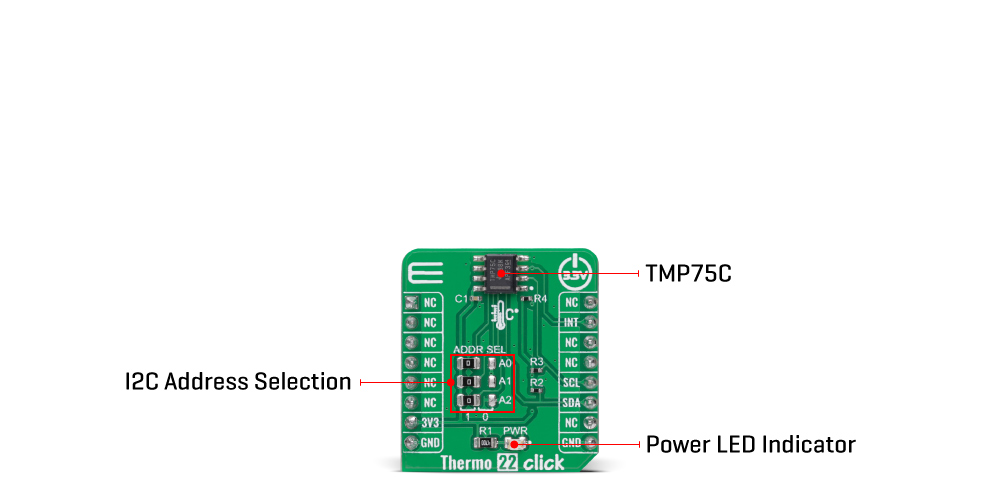
The Thermo 22 Click Board™ is based on the TMP75C, a digital temperature sensor optimal for thermal management and thermal protection applications from Texas Instruments. This temperature sensor is characterized by high accuracy; temperature range of 0°C to +70°C provides typical ±0.25°C accuracy. The temperature sensing device for the TMP75C is the chip itself. A bipolar junction transistor inside the chip is used in a band-gap configuration to produce a voltage proportional to the chip temperature. The voltage is digitized and converted to a 12-bit temperature result in degrees Celsius, with a resolution of 0.0625°C.
The default operational mode of the TMP75C is Continuous-Conversion mode (CC), where the ADC performs continuous temperature conversions and stores each result to the temperature register, overwriting the result from the previous conversion. After the Power-Up cycle, the TMP75C immediately starts a conversion. Alongside CC mode, it also has Shutdown and One-shot modes, which reduces power consumption in the TMP75C when continuous temperature monitoring is not required, typically less than 0.3μA.
The Thermo 22 Click Board™ communicates with MCU using the standard I2C 2-Wire interface to read data and configure settings. Besides, it also allows the choice of the least significant bit of its I2C slave address by positioning the SMD jumpers labelled as ADDR SEL to an appropriate position marked as 0 and 1. This way, the TMP75C provides the opportunity of the eight possible different I2C addresses by positioning the SMD jumper to an appropriate position. In addition to I2C communication, it also uses an interrupt pin routed to the INT pin of the mikroBUS™ socket, representing the programmable temperature limit feature and alert that allows the sensor to operate as a stand-alone thermostat or an overtemperature alarm for system shutdown.
The Thermo 22 Click Board™ can be operated only with a 3.3V logic voltage level. The board must perform appropriate logic voltage level conversion before using MCUs with different logic levels. However, the Click board™ comes equipped with a library containing functions and an example code that can be used, as a reference, for further development.
| Type | Temperature & humidity |
| Applications | The Thermo 22 Click Board™ can be used for thermal management and protection of various consumer, industrial, and environmental applications |
| On-board modules | TMP75C - digital temperature sensor from Texas Instruments |
| Key Features | Low power consumption, high precision, overtemperature alert with programmable trip values, shutdown and one-shot mode, high accuracy, and more |
| Interface | I2C |
| Compatibility | mikroBUS |
| Click board size | S (28.6 x 25.4 mm) |
| Input Voltage | 3.3V |
This table shows how the pinout of the Thermo 22 Click Board™ corresponds to the pinout on the mikroBUS™ socket (the latter shown in the two middle columns).
| Notes | Pin |  |
Pin | Notes | |||
|---|---|---|---|---|---|---|---|
| NC | 1 | AN | PWM | 16 | NC | ||
| NC | 2 | RST | INT | 15 | INT | Interrupt | |
| NC | 3 | CS | RX | 14 | NC | ||
| NC | 4 | SCK | TX | 13 | NC | ||
| NC | 5 | MISO | SCL | 12 | SCL | I2C Clock | |
| NC | 6 | MOSI | SDA | 11 | SDA | I2C Data | |
| Power Supply | 3.3V | 7 | 3.3V | 5V | 10 | NC | |
| Ground | GND | 8 | GND | GND | 9 | GND | Ground |
| Label | Name | Default | Description |
|---|---|---|---|
| LD1 | PWR | - | Power LED Indicator |
| JP1-JP3 | ADDR SEL | Left | I2C Address Selection 1/0: Left position 1, Right position 0 |
| Description | Min | Typ | Max | Unit |
|---|---|---|---|---|
| Supply Voltage | - | 3.3 | - | V |
| Temperature Accuracy | - | ±0.25 | ±1 | °C |
| Temperature Resolution | - | 0.0625 | - | °C |
| Operating Temperature Range | -55 | +25 | +120 | °C |
We provide a library for the Thermo 22 Click Board™ as well as a demo application (example), developed using MikroElektronika compilers. The demo can run on all the main MikroElektronika development boards.
The package can be downloaded/installed directly from NECTO Studio The package Manager (recommended), downloaded from our LibStock™ or found on MikroE Github account.
This library contains API for the Thermo 22 Click Board™ driver.
Key functions
thermo22_read_temperature This function reads the temperature data in Celsius.
thermo22_set_temperature_high_limit This function sets the temperature high limit at which the overtemperature alert flag is being set.
thermo22_get_int_pin This function returns the INT pin logic state which indicates the overtemperature alert.
This example demonstrates the use of the Thermo 22 Click Board™ by reading and displaying the temperature measurements.
void application_task ( void )
 {
     float temperature;
     if ( THERMO22_OK == thermo22_read_temperature ( &thermo22, &temperature ) )
     {
         log_printf ( &logger, " Temperature: %.2f C rnn", temperature );
         if ( !thermo22_get_int_pin ( &thermo22 ) )
         {
             log_printf ( &logger, " Over temperature alert! rnn" );
         }
         Delay_ms ( 200 );
     }
 }
The full application code, and ready to use projects can be installed directly from NECTO Studio The package Manager (recommended), downloaded from our LibStock™ or found on MikroE Github account.
Other MikroE Libraries used in the example:
Depending on the development board you are using, you may need USB UART click, USB UART 2 Click or RS232 Click to connect to your PC, for development systems with no UART to USB interface available on the board. UART terminal is available in all MikroElektronika compilers.
The Thermo 22 Click Board™ is supported with mikroSDK - MikroElektronika Software Development Kit. To ensure proper operation of mikroSDK compliant Click board™ demo applications, mikroSDK should be downloaded from the LibStock and installed for the compiler you are using.
- manufacturer: Mikroelektronika d.o.o. - warranty: 12 months - backorder_label: If no stock shown above, check availability - attachments: [{"download_file":[{"download_file":"Thermo 22 Click Board™ Schematic"}],"download_filetype":[{"download_filetype":"pdf"}]},{"download_file":[{"download_file":"Texas Instruments TMP75C Digital Temperature Sensor Datasheet"}],"download_filetype":[{"download_filetype":"pdf"}]}] - condition: new - custom_product: false - mpn: MIKROE-5068 - google_product_category: Electronics - custom_label_0: Click Board - mpn: MIKROE-5068 - device_vendor: Texas Instruments - device_type: TMP75CIDR - warranty: 12 months - brand: MikroE - manufacturer: Mikroelektronika d.o.o. - target_keyword: Thermo 22 Click Board - brands: gid://shopify/Metaobject/56256004319 - breadcrumbs: ["gid://shopify/Collection/447955239135","gid://shopify/Collection/241680580797","gid://shopify/Collection/241545969853"] - customhs_code: 847330 - detailed_description: {"type":"root","children":[{"type":"heading","level":3,"children":[{"type":"text","value":"How Does The Thermo 22 Click Board™ Work?"}]},{"type":"paragraph","children":[{"type":"text","value":"The "},{"type":"text","value":"Thermo 22 Click Board™","bold":true,"italic":true},{"type":"text","value":" is based on the TMP75C, a digital temperature sensor optimal for thermal management and thermal protection applications from Texas Instruments. This temperature sensor is characterized by high accuracy; temperature range of 0°C to +70°C provides typical ±0.25°C accuracy. The temperature sensing device for the TMP75C is the chip itself. A bipolar junction transistor inside the chip is used in a band-gap configuration to produce a voltage proportional to the chip temperature. The voltage is digitized and converted to a 12-bit temperature result in degrees Celsius, with a resolution of 0.0625°C."}]},{"type":"paragraph","children":[{"type":"text","value":""}]},{"type":"paragraph","children":[{"type":"text","value":"The default operational mode of the TMP75C is Continuous-Conversion mode (CC), where the ADC performs continuous temperature conversions and stores each result to the temperature register, overwriting the result from the previous conversion. After the Power-Up cycle, the TMP75C immediately starts a conversion. Alongside CC mode, it also has Shutdown and One-shot modes, which reduces power consumption in the TMP75C when continuous temperature monitoring is not required, typically less than 0.3μA."}]},{"type":"paragraph","children":[{"type":"text","value":"The "},{"type":"text","value":"Thermo 22 Click Board™","bold":true},{"type":"text","value":" communicates with MCU using the standard I2C 2-Wire interface to read data and configure settings. Besides, it also allows the choice of the least significant bit of its I2C slave address by positioning the SMD jumpers labelled as ADDR SEL to an appropriate position marked as 0 and 1. This way, the TMP75C provides the opportunity of the eight possible different I2C addresses by positioning the SMD jumper to an appropriate position. In addition to I2C communication, it also uses an interrupt pin routed to the INT pin of the mikroBUS™ socket, representing the programmable temperature limit feature and alert that allows the sensor to operate as a stand-alone thermostat or an overtemperature alarm for system shutdown."}]},{"type":"paragraph","children":[{"type":"text","value":"The "},{"type":"text","value":"Thermo 22 Click Board™","bold":true},{"type":"text","value":" can be operated only with a 3.3V logic voltage level. The board must perform appropriate logic voltage level conversion before using MCUs with different logic levels. However, the Click board™ comes equipped with a library containing functions and an example code that can be used, as a reference, for further development."}]},{"type":"heading","level":3,"children":[{"type":"text","value":"SPECIFICATIONS"}]},{"type":"paragraph","children":[{"type":"text","value":"Type\nTemperature & humidity\nApplications\nThe Thermo 22 Click Board™ can be used for thermal management and protection of various consumer, industrial, and environmental applications\nOn-board modules\nTMP75C - digital temperature sensor from Texas Instruments\nKey Features\nLow power consumption, high precision, overtemperature alert with programmable trip values, shutdown and one-shot mode, high accuracy, and more\nInterface\nI2C\nCompatibility\nmikroBUS\nClick board size\nS (28.6 x 25.4 mm)\nInput Voltage\n3.3V"}]},{"type":"heading","level":3,"children":[{"type":"text","value":"PINOUT DIAGRAM"}]},{"type":"paragraph","children":[{"type":"text","value":"This table shows how the pinout of the "},{"type":"text","value":"Thermo 22 Click Board™","bold":true},{"type":"text","value":" corresponds to the pinout on the mikroBUS™ socket (the latter shown in the two middle columns)."}]},{"type":"paragraph","children":[{"type":"text","value":"Notes\nPin\nPin\nNotes\nNC\n1\nAN\nPWM\n16\nNC\nNC\n2\nRST\nINT\n15\nINT\nInterrupt\nNC\n3\nCS\nRX\n14\nNC\nNC\n4\nSCK\nTX\n13\nNC\nNC\n5\nMISO\nSCL\n12\nSCL\nI2C Clock\nNC\n6\nMOSI\nSDA\n11\nSDA\nI2C Data\nPower Supply\n3.3V\n7\n3.3V\n5V\n10\nNC\nGround\nGND\n8\nGND\nGND\n9\nGND\nGround"}]},{"type":"heading","level":3,"children":[{"type":"text","value":"ONBOARD SETTINGS AND INDICATORS"}]},{"type":"paragraph","children":[{"type":"text","value":"Label\nName\nDefault\nDescription\nLD1\nPWR\n-\nPower LED Indicator\nJP1-JP3\nADDR SEL\nLeft\nI2C Address Selection 1/0: Left position 1, Right position 0"}]},{"type":"heading","level":3,"children":[{"type":"text","value":"THERMO 22 CLICK ELECTRICAL SPECIFICATIONS"}]},{"type":"paragraph","children":[{"type":"text","value":"Description\nMin\nTyp\nMax\nUnit\nSupply Voltage\n-\n3.3\n-\nV\nTemperature Accuracy\n-\n±0.25\n±1\n°C\nTemperature Resolution\n-\n0.0625\n-\n°C\nOperating Temperature Range\n-55\n+25\n+120\n°C"}]},{"type":"heading","level":3,"children":[{"type":"text","value":" "}]}]} - summary:The Thermo 22 Click Board™ is a compact add-on board that provides an accurate temperature measurement. This board features the TMP75C, a high-precision digital temperature sensor from Texas Instruments. The TMP75C houses an integrated digital temperature sensor with a 12-bit analog-to-digital converter (ADC), a reference circuit, and serial interface logic functions in one package. Characterized by its high accuracy (up to ±0.25°C typical) and high resolution of 0.0625°C, this temperature sensor provides temperature data to the host controller with a configurable I2C interface. This Click board™ is appropriate for thermal management and protection of various consumer, industrial, and environmental applications.
The Thermo 22 Click Board™ is supported by a mikroSDK compliant library, which includes functions that simplify software development. This Click board™ comes as a fully tested product, ready to be used on a system equipped with the mikroBUS™ socket.