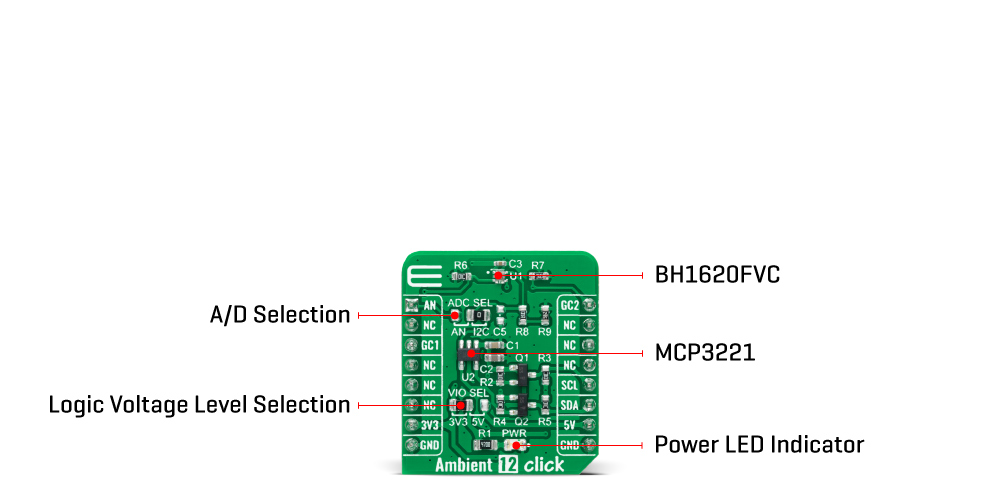
The Ambient 12 Click Board™ is based on the BH1620FVC, an analog current-output type ambient light sensor from Rohm Semiconductor. The BH1620FVC is composed of photodiodes, amplifiers, and current mirror circuits, where the output current, in proportion to brightness, is converted to the voltage value by an external resistor. It is characterized by spectral sensitivity close to human eyes sensitivity with low sensitivity variations of +/-15%.
It also has four configurable modes of operation, shutdown mode associated with three gain modes: high-gain mode with an illuminance detection range of 1000lx, medium-gain mode up to 10.000lx, and low-gain mode up to 100.000lx. The desire gain mode is selected through CS and PWM pins of the mikroBUS™ socket labelled as GC1 and GC2.
The output voltage of the BH1620FVC can be converted to a digital value using MCP3221, a successive approximation A/D converter with a 12-bit resolution from Microchip, using a 2-wire I2C compatible interface, or can be sent directly to an analog pin of the mikroBUS™ socket labelled as AN. Selection can be performed by onboard SMD jumper labelled as A/D SEL to an appropriate position marked as AN and ADC.
The Ambient 12 Click Board™ can operate with both 3.3V and 5V logic voltage levels selected via the VIO SEL jumper. This way, it is allowed for both 3.3V and 5V capable MCUs to use the communication lines properly. However, the Click board™ comes equipped with a library containing easy-to-use functions and an example code that can be used, as a reference, for further development.
| Type | Optical |
| Applications | The Ambient 12 Click Board™ can be used for obtaining ambient light data for adjusting brightness in applications that require power saving and better visibility |
| On-board modules | BH1620FVC - analog current-output type ambient light sensor from Rohm Semiconductor |
| Key Features | Low power consumption, spectral sensitivity close to human eyes sensitivity, output current in proportion to brightness, built-in shutdown function, configurable gain mode, low sensitivity variation, and more |
| Interface | Analog,I2C |
| Compatibility | mikroBUS |
| Click board size | S (28.6 x 25.4 mm) |
| Input Voltage | 3.3V or 5V |
This table shows how the pinout of the Ambient 12 Click Board™ corresponds to the pinout on the mikroBUS™ socket (the latter shown in the two middle columns).
| Notes | Pin |  |
Pin | Notes | |||
|---|---|---|---|---|---|---|---|
| Analog Signal | AN | 1 | AN | PWM | 16 | GC2 | Gain Control Signal 2 |
| NC | 2 | RST | INT | 15 | NC | ||
| Gain Control Signal 1 | GC1 | 3 | CS | RX | 14 | NC | |
| NC | 4 | SCK | TX | 13 | NC | ||
| NC | 5 | MISO | SCL | 12 | SCL | I2C Clock | |
| NC | 6 | MOSI | SDA | 11 | SDA | I2C Data | |
| Power Supply | 3.3V | 7 | 3.3V | 5V | 10 | 5V | Power Supply |
| Ground | GND | 8 | GND | GND | 9 | GND | Ground |
| Label | Name | Default | Description |
|---|---|---|---|
| LD1 | PWR | - | Power LED Indicator |
| JP1 | VIO SEL | Left | Logic Level Voltage Selection 3V3/5V: Left position 3V3, Right position 5V |
| JP2 | ADC SEL | Right | Output Voltage A/D Selection AN/I2C: Left position AN, Right position I2C |
| Description | Min | Typ | Max | Unit |
|---|---|---|---|---|
| Supply Voltage | 3.3 | - | 5 | V |
| Maximum Output Current | - | - | 7.5 | mA |
| Peak Wavelength | - | 560 | - | nm |
| Operating Temperature Range | -40 | +25 | +85 | °C |
We provide a library for the Ambient 12 Click Board™ as well as a demo application (example), developed using MikroElektronika compilers. The demo can run on all the main MikroElektronika development boards.
The package can be downloaded/installed directly from NECTO Studio The package Manager (recommended), downloaded from our LibStock™ or found on MikroE Github account.
This library contains API for Ambient 12 Click driver.
ambient12_cfg_setup - Config Object Initialization function.ambient12_init - Initialization function.This example demonstrates the use of the Ambient 12 Click Board™.
void application_task ( void )
{
    float voltage = 0;

    if ( AMBIENT12_OK == ambient12_read_adc_voltage ( &ambient12, &voltage ) )
    {
        log_printf( &logger, " Illuminance : %ld Luxrnn", ambient12_voltage_to_lux( &ambient12, voltage ) );
    }

    Delay_ms( 1000 );
}
The full application code, and ready to use projects can be installed directly from NECTO Studio The package Manager (recommended), downloaded from our LibStock™ or found on MikroE Github account.
Other MikroE Libraries used in the example:
Depending on the development board you are using, you may need a USB UART click, USB UART 2 click or RS232 click to connect to your PC, for development systems with no UART to USB interface available on the board. The terminal available in all MikroElektronika compilers, or any other terminal application of your choice, can be used to read the message.
The Ambient 12 Click Board™ is supported with mikroSDK - MikroElektronika Software Development Kit. To ensure proper operation of mikroSDK compliant Click board™ demo applications, mikroSDK should be downloaded from the LibStock and installed for the compiler you are using.
- attachments: [{"download_file":[{"download_file":"Ambient 12 Click Board™ Schematic"}],"download_filetype":[{"download_filetype":"pdf"}]},{"download_file":[{"download_file":"Rohm Semiconductor BH1620FVC Ambient Light Sensor Datasheet"}],"download_filetype":[{"download_filetype":"pdf"}]}] - device_vendor: Rohm Semiconductor - device_type: BH1620FVC-TR - warranty: 12 months - brand: MikroE - manufacturer: Mikroelektronika d.o.o. - target_keyword: Ambient 12 Click Board - brands: gid://shopify/Metaobject/56256004319 - breadcrumbs: ["gid://shopify/Collection/447955239135","gid://shopify/Collection/241680580797","gid://shopify/Collection/241545969853"] - customhs_code: 847330 - detailed_description: {"type":"root","children":[{"type":"heading","level":3,"children":[{"type":"text","value":"How Does The Ambient 12 Click Board™ Work?"}]},{"type":"paragraph","children":[{"type":"text","value":"The "},{"type":"text","value":"Ambient 12 Click Board™","bold":true,"italic":true},{"type":"text","value":" is based on the BH1620FVC, an analog current-output type ambient light sensor from Rohm Semiconductor. The BH1620FVC is composed of photodiodes, amplifiers, and current mirror circuits, where the output current, in proportion to brightness, is converted to the voltage value by an external resistor. It is characterized by spectral sensitivity close to human eyes sensitivity with low sensitivity variations of +/-15%."}]},{"type":"paragraph","children":[{"type":"text","value":""}]},{"type":"paragraph","children":[{"type":"text","value":"It also has four configurable modes of operation, shutdown mode associated with three gain modes: high-gain mode with an illuminance detection range of 1000lx, medium-gain mode up to 10.000lx, and low-gain mode up to 100.000lx. The desire gain mode is selected through CS and PWM pins of the mikroBUS™ socket labelled as GC1 and GC2."}]},{"type":"paragraph","children":[{"type":"text","value":"The output voltage of the BH1620FVC can be converted to a digital value using MCP3221, a successive approximation A/D converter with a 12-bit resolution from Microchip, using a 2-wire I2C compatible interface, or can be sent directly to an analog pin of the mikroBUS™ socket labelled as AN. Selection can be performed by onboard SMD jumper labelled as A/D SEL to an appropriate position marked as AN and ADC."}]},{"type":"paragraph","children":[{"type":"text","value":"The "},{"type":"text","value":"Ambient 12 Click Board™","bold":true},{"type":"text","value":" can operate with both 3.3V and 5V logic voltage levels selected via the VIO SEL jumper. This way, it is allowed for both 3.3V and 5V capable MCUs to use the communication lines properly. However, the Click board™ comes equipped with a library containing easy-to-use functions and an example code that can be used, as a reference, for further development."}]},{"type":"heading","level":3,"children":[{"type":"text","value":"SPECIFICATIONS"}]},{"type":"paragraph","children":[{"type":"text","value":"Type\nOptical\nApplications\nThe Ambient 12 Click Board™ can be used for obtaining ambient light data for adjusting brightness in applications that require power saving and better visibility\nOn-board modules\nBH1620FVC - analog current-output type ambient light sensor from Rohm Semiconductor\nKey Features\nLow power consumption, spectral sensitivity close to human eyes sensitivity, output current in proportion to brightness, built-in shutdown function, configurable gain mode, low sensitivity variation, and more\nInterface\nAnalog,I2C\nCompatibility\nmikroBUS\nClick board size\nS (28.6 x 25.4 mm)\nInput Voltage\n3.3V or 5V"}]},{"type":"heading","level":3,"children":[{"type":"text","value":"PINOUT DIAGRAM"}]},{"type":"paragraph","children":[{"type":"text","value":"This table shows how the pinout of the "},{"type":"text","value":"Ambient 12 Click Board™","bold":true},{"type":"text","value":" corresponds to the pinout on the mikroBUS™ socket (the latter shown in the two middle columns)."}]},{"type":"paragraph","children":[{"type":"text","value":"Notes\nPin\nPin\nNotes\nAnalog Signal\nAN\n1\nAN\nPWM\n16\nGC2\nGain Control Signal 2\nNC\n2\nRST\nINT\n15\nNC\nGain Control Signal 1\nGC1\n3\nCS\nRX\n14\nNC\nNC\n4\nSCK\nTX\n13\nNC\nNC\n5\nMISO\nSCL\n12\nSCL\nI2C Clock\nNC\n6\nMOSI\nSDA\n11\nSDA\nI2C Data\nPower Supply\n3.3V\n7\n3.3V\n5V\n10\n5V\nPower Supply\nGround\nGND\n8\nGND\nGND\n9\nGND\nGround"}]},{"type":"heading","level":3,"children":[{"type":"text","value":"ONBOARD SETTINGS AND INDICATORS"}]},{"type":"paragraph","children":[{"type":"text","value":"Label\nName\nDefault\nDescription\nLD1\nPWR\n-\nPower LED Indicator\nJP1\nVIO SEL\nLeft\nLogic Level Voltage Selection 3V3/5V: Left position 3V3, Right position 5V\nJP2\nADC SEL\nRight\nOutput Voltage A/D Selection AN/I2C: Left position AN, Right position I2C"}]},{"type":"heading","level":3,"children":[{"type":"text","value":"AMBIENT 12 CLICK ELECTRICAL SPECIFICATIONS"}]},{"type":"paragraph","children":[{"type":"text","value":"Description\nMin\nTyp\nMax\nUnit\nSupply Voltage\n3.3\n-\n5\nV\nMaximum Output Current\n-\n-\n7.5\nmA\nPeak Wavelength\n-\n560\n-\nnm\nOperating Temperature Range\n-40\n+25\n+85\n°C"}]},{"type":"heading","level":3,"children":[{"type":"text","value":" "}]}]} - summary:The Ambient 12 Click Board™ is a compact add-on board used to sense the amount of the present ambient light. This board features the BH1620FVC, an analogue current-output type ambient light sensor from Rohm Semiconductor. It is characterized by spectral sensitivity close to human eyes sensitivity and outputs current in proportion to brightness. It also has four configurable modes of operation, shutdown mode in association with three gain modes, and low sensitivity variations of +/-15%. This Click Board™ is the most suitable for obtaining ambient light data for adjusting brightness in applications that require power saving and better visibility.
The Ambient 12 Click Board™ is supported by a mikroSDK compliant library, which includes functions that simplify software development. This Click Board™ comes as a fully tested product, ready to be used on a system equipped with the mikroBUS™ socket.