# Title: eFuse 2 Click Board™
## Description: How Does The eFuse 2 Click Board™ Work? The eFuse 2 Click Board™ is based on the TPS259631, an integrated eFuse device that is used to manage load voltage and load current from Texas Instruments. The TPS259631 provides various factory-programmed settings and user manageable settings, which allow device configuration for handling different transient and steady-state supply and load fault conditions, thereby protecting the input supply and the downstream circuits connected to the device. The device also uses an in-built thermal shutdown mechanism to shield itself during these fault events. The eFuse 2 Click Board™ provides a simple solution for current limiting, inrush current control, and supervision of power rails for a wide range of applications operating from 2.7 V to 19 V external power supply and delivering up to 2A. Besides, the eFuse 2 Click board™ monitors the input supply the entire time and comes up with a user-adjustable UVLO and OVLO ... mechanism through an I2C compatible digital potentiometer, the AD5241 from Analog Devices, to ensure that the load is powered up only when the voltage is at a sufficient level. It is also possible to get an accurate sense of the output load current by measuring the voltage drop across the current limit resistor. By replacing the resistor with a digital rheostat, you can easily program the current limit as performed on this Click board™. For this purpose, the AD5175 single-channel 1024-position digital rheostat from Analog Devices that communicate with the MCU through the I2C serial interface is used to program the current limit. The TPS259631 regulates the current to the set current limit value within the nominal overcurrent response time and exits current limiting when the load current falls below the current limit value. The eFuse 2 Click Board™ allows the choice of the least significant bit (LSB) of the I2C slave addresses for both AD5241 and AD5175. This can be performed by positioning the SMD jumper labelled as ADDR SEL to its appropriate position. Additional functionality such as hardware reset for AD5175 and fault indication interrupt is provided and routed at RST and INT pins of the mikroBUS™ socket labelled as RST and FLT. This open-drain fault output is associated with a red color LED indicator, marked as the FLT that will be pulled low when a fault is detected. The eFuse 2 Click Board™ is designed to be operated with both 3.3V and 5V logic voltage levels that can be selected via VCC SEL jumper. This allows for both 3.3V and 5V capable MCUs to use the I2C communication lines properly. However, this Click board™ comes equipped with a library that contains easy to use functions and an example code that can be used as a reference for further development. SPECIFICATIONS Type Power Switch Applications Can be used for hot-swapping and power rail protection applications. On-board modules The eFuse 2 Click Board™ is based on the TPS259631, an integrated eFuse device that is used to manage load voltage and load current from Texas Instruments. Key Features Adjustable current limit with load current monitor, overtemperature protection, fault indication, overvoltage protection, and adjustable under-voltage lockout, wide input voltage range, and more. Interface I2C Compatibility mikroBUS Click board size L (57.15 x 25.4 mm) Input Voltage 3.3V or 5V PINOUT DIAGRAM This table shows how the pinout of the eFuse 2 Click Board™ corresponds to the pinout on the mikroBUS™ socket (the latter shown in the two middle columns). Notes Pin Pin Notes NC 1 AN PWM 16 NC Reset RST 2 RST INT 15 FLT Fault Indication NC 3 CS RX 14 NC NC 4 SCK TX 13 NC NC 5 MISO SCL 12 SCL I2C Clock NC 6 MOSI SDA 11 SDA I2C Data Power Supply 3.3V 7 3.3V 5V 10 5V Power Supply Ground GND 8 GND GND 9 GND Ground ONBOARD SETTINGS AND INDICATORS Label Name Default Description LD1 PWR - Power LED Indicator LD2 FLT - Fault LED Indicator JP1 VCC SEL Left Power Supply Voltage Selection 3V3/5V: Left position 3V3, Right position 5V JP2-JP3 ADDR SEL Left AD5241 I2C Address Selection: Left position 0, Right position 1 JP4 3 STATE ADDR SEL Left AD5175 I2C Address Selection: Left position 0, Right position 1 EFUSE 2 CLICK ELECTRICAL SPECIFICATIONS Description Min Typ Max Unit Supply Voltage 2.7 - 19 V Current Limit 0.13 - 2 A I2C Clock Frequency - - 400 kHz Operating Temperature Range -40 - +125 °C
## Product type: Click Board
## Vendor: Mikroelektronika d.o.o.
## Tags: Click Board, eFuse, MikroE, Power Management, Power Switch
## Price range: 17.5 - 17.5 GBP
## Link: https://thedebugstore.com/products/mikroe-4335-efuse-2-click-board-uk
## Compare-at price range: 25.0 - 25.0 GBP
## Options
- Title: Default Title
## Collections
- [New Products](https://thedebugstore.com/a/llms/collections/new-products-debug-store)
- [Mikroelektronika d.o.o. (MikroE)](https://thedebugstore.com/a/llms/collections/mikroelektronika-catalogue-uk)
- [Power Management Click Boards™](https://thedebugstore.com/a/llms/collections/power-management-click-boards-catalogue)
- [MikroE Click Boards™](https://thedebugstore.com/a/llms/collections/mikroe-click-boards-catalogue-uk)
- [Power Switch Click Boards™](https://thedebugstore.com/a/llms/collections/power-switch-click-boards-catalogue)
- [Click Boards™ Summer Sale](https://thedebugstore.com/a/llms/collections/inventory-sale)
- [MikroE Sale](https://thedebugstore.com/a/llms/collections/mikroe-sale)
- [MIKROE Stock](https://thedebugstore.com/a/llms/collections/mikroe-products-in-stock-sale)
## Variants
- Default Title, SKU: MIKROE-4335, Available: yes, Inventory: 1
## Metafields
- full_description: How Does The eFuse 2 Click Board™ Work?
The eFuse 2 Click Board™ is based on the TPS259631, an integrated eFuse device that is used to manage load voltage and load current from Texas Instruments. The TPS259631 provides various factory-programmed settings and user manageable settings, which allow device configuration for handling different transient and steady-state supply and load fault conditions, thereby protecting the input supply and the downstream circuits connected to the device. The device also uses an in-built thermal shutdown mechanism to shield itself during these fault events.
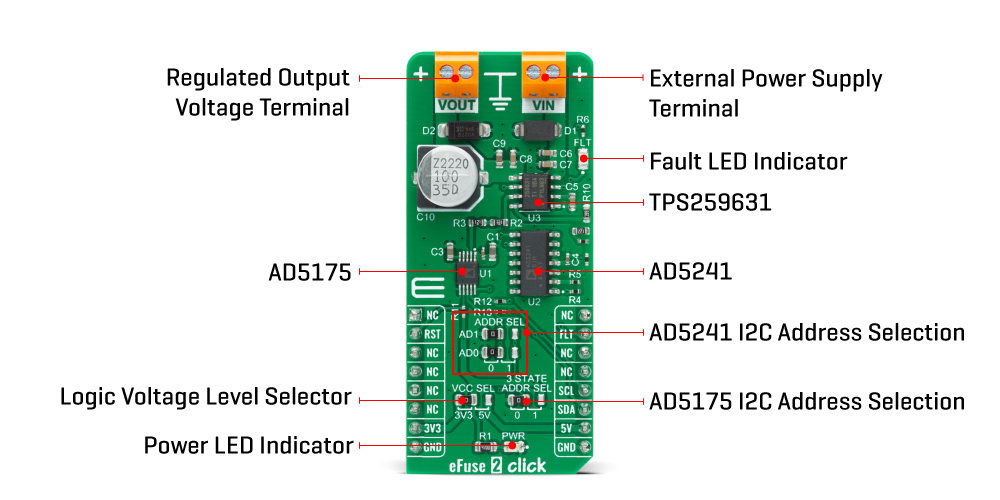
The eFuse 2 Click Board™ provides a simple solution for current limiting, inrush current control, and supervision of power rails for a wide range of applications operating from 2.7 V to 19 V external power supply and delivering up to 2A. Besides, the eFuse 2 Click board™ monitors the input supply the entire time and comes up with a user-adjustable UVLO and OVLO ... mechanism through an I2C compatible digital potentiometer, the AD5241 from Analog Devices, to ensure that the load is powered up only when the voltage is at a sufficient level.
It is also possible to get an accurate sense of the output load current by measuring the voltage drop across the current limit resistor. By replacing the resistor with a digital rheostat, you can easily program the current limit as performed on this Click board™. For this purpose, the AD5175 single-channel 1024-position digital rheostat from Analog Devices that communicate with the MCU through the I2C serial interface is used to program the current limit. The TPS259631 regulates the current to the set current limit value within the nominal overcurrent response time and exits current limiting when the load current falls below the current limit value.
The eFuse 2 Click Board™ allows the choice of the least significant bit (LSB) of the I2C slave addresses for both AD5241 and AD5175. This can be performed by positioning the SMD jumper labelled as ADDR SEL to its appropriate position. Additional functionality such as hardware reset for AD5175 and fault indication interrupt is provided and routed at RST and INT pins of the mikroBUS™ socket labelled as RST and FLT. This open-drain fault output is associated with a red color LED indicator, marked as the FLT that will be pulled low when a fault is detected.
The eFuse 2 Click Board™ is designed to be operated with both 3.3V and 5V logic voltage levels that can be selected via VCC SEL jumper. This allows for both 3.3V and 5V capable MCUs to use the I2C communication lines properly. However, this Click board™ comes equipped with a library that contains easy to use functions and an example code that can be used as a reference for further development.
SPECIFICATIONS
| Type |
Power Switch |
| Applications |
Can be used for hot-swapping and power rail protection applications. |
| On-board modules |
The eFuse 2 Click Board™ is based on the TPS259631, an integrated eFuse device that is used to manage load voltage and load current from Texas Instruments. |
| Key Features |
Adjustable current limit with load current monitor, overtemperature protection, fault indication, overvoltage protection, and adjustable under-voltage lockout, wide input voltage range, and more. |
| Interface |
I2C |
| Compatibility |
mikroBUS |
| Click board size |
L (57.15 x 25.4 mm) |
| Input Voltage |
3.3V or 5V |
PINOUT DIAGRAM
This table shows how the pinout of the eFuse 2 Click Board™ corresponds to the pinout on the mikroBUS™ socket (the latter shown in the two middle columns).
| Notes |
Pin |
 |
Pin |
Notes |
| NC |
1 |
AN |
PWM |
16 |
NC |
| Reset |
RST |
2 |
RST |
INT |
15 |
FLT |
Fault Indication |
| NC |
3 |
CS |
RX |
14 |
NC |
| NC |
4 |
SCK |
TX |
13 |
NC |
| NC |
5 |
MISO |
SCL |
12 |
SCL |
I2C Clock |
| NC |
6 |
MOSI |
SDA |
11 |
SDA |
I2C Data |
| Power Supply |
3.3V |
7 |
3.3V |
5V |
10 |
5V |
Power Supply |
| Ground |
GND |
8 |
GND |
GND |
9 |
GND |
Ground |
ONBOARD SETTINGS AND INDICATORS
| Label |
Name |
Default |
Description |
| LD1 |
PWR |
- |
Power LED Indicator |
| LD2 |
FLT |
- |
Fault LED Indicator |
| JP1 |
VCC SEL |
Left |
Power Supply Voltage Selection 3V3/5V: Left position 3V3, Right position 5V |
| JP2-JP3 |
ADDR SEL |
Left |
AD5241 I2C Address Selection: Left position 0, Right position 1 |
| JP4 |
3 STATE ADDR SEL |
Left |
AD5175 I2C Address Selection: Left position 0, Right position 1 |
EFUSE 2 CLICK ELECTRICAL SPECIFICATIONS
| Description |
Min |
Typ |
Max |
Unit |
| Supply Voltage |
2.7 |
- |
19 |
V |
| Current Limit |
0.13 |
- |
2 |
A |
| I2C Clock Frequency |
- |
- |
400 |
kHz |
| Operating Temperature Range |
-40 |
- |
+125 |
°C |
- description_tag: The eFuse 2 Click Board™ is a compact add-on board that contains an integrated FET hot-swap device. This board features the TPS259631, a highly integrated circuit protection and power management solution from Texas Instruments. Available from Debug Store UK.
- title_tag: MikroE eFuse 2 Click Board™ (MIKROE-4335)
- manufacturer: Mikroelektronika d.o.o.
- warranty: 12 months
- amazon_enable: TRUE
- amazon_title: EFuse 2 Click Board
- amazon_product_type: computercomponent
- amazon_block: FALSE
- amazon_prime_enable: FALSE
- amazon_search: MikroElektronika Microelectronica MIKROE-1100
- amazon_uk_price: 19.36
- amazon_uk_currency: GBP
- amazon_de_currency: EUR
- amazon_de_price: 21.8768
- amazon_fr_currency: EUR
- amazon_fr_price: 21.8768
- amazon_es_currency: EUR
- amazon_es_price: 21.8768
- amazon_nl_currency: EUR
- amazon_nl_price: 21.8768
- amazon_it_currency: EUR
- amazon_it_price: 21.8768
- amazon_se_curency: SEK
- amazon_se_price: 220.704
- amazon_product_id: 8606027380969
- amazon_product_id_type: EAN
- amazon_update: Update
- amazon_short_description: The eFuse 2 Click Board™ is a compact add-on board that contains an integrated FET hot-swap device. This board features the TPS259631, a highly integrated circuit protection and power management solution from Texas Instruments. It provides multiple protection modes against overloads, short circuits, voltage surges, and excessive inrush current. Also, it is possible to get an accurate sense of the output load current by measuring the voltage drop across digital rheostat that can set the output current limit level. The device also uses an in-built thermal shutdown mechanism to protect itself during these fault events. This Click board™ is typically used for hot-swapping and power rail protection applications.eFuse 2 Click is supported by a mikroSDK compliant library, which includes functions that simplify software development. This Click board™ comes as a fully tested product, ready to be used on a system equipped with the mikroBUS™ socket.
- amazon_long_description: The 1-Wire I2C Click Board™ carries DS28E17 1-Wire-to-I2C master bridge from Maxim Integrated. The Click runs on a 3.3V power supply.It communicates with the target microcontroller over 1-Wire.
- amazon_main_image: https://www.thedebugstore.com/images/product/lg-efuse-2-click-front.jpg
- amazon_other_image_1: https://www.thedebugstore.com/images/product/lg-efuse-2-click-back.jpg
- amazon_other_image_2: https://www.thedebugstore.com/images/product/lg-efuse-2-click-fusion.jpg
- amazon_other_image_3: https://www.thedebugstore.com/images/product/lg-efuse-2-click-shuttle.jpg
- amazon_other_image_4: https://www.thedebugstore.com/images/product/lg-efuse-2-click-clicker.jpg
- amazon_other_image_5: https://www.thedebugstore.com/images/product/lg-efuse-2-click-breadboard.jpg
- amazon_browse_node: 428655031
- related_products: MIKROE-1892,MIKROE-3340
- mpn: MIKROE-4335
- backorder_label: If no stock shown above, check availability
- google_product_category: 2082
- condition: new
- custom_product: false
- mpn: MIKROE-4335
- google_product_category: Electronics
- custom_label_0: Click Board
- examples:
We provide a library for the eFuse 2 Click Board™ on our LibStock page, as well as a demo application (example), developed using MikroElektronika compilers. The demo can run on all the main MikroElektronika development boards.
Library Description
The library covers all the necessary functions to control the eFuse 2 Click Board™. Library performs a standard I2C interface communication.
Key Functions
float *min_voltage, float *max_voltage ) - Set operating voltage function.void efuse2_set_operating_current ( float current ) - Set operating current function.void efuse2_operating_mode ( uint8_t mode ) - Set operating mode function.
Example Description
The application is composed of three sections :
- System Initialization - Initializes I2C, set RST pin as an output, set INT pin as input and start to write log.
- Application Initialization - Initialization driver enables - I2C, AD5175: enable write, set the normal operating mode and operating current to the 1,2 A; AD5241: set operating voltage to the 12,0 V; display diagnostic states and temperature.
- Application Task - (code snippet) This is an example that demonstrate the use of the eFuse 2 Click Board™. The eFuse 2 Click Board™ uses USB UART log to display operating voltage, OVLO, UVLO and current limit condition. This firmware provides the functions to set the operating voltage and current limiting conditions in order to provide the threshold of the fault conditions. When one of the fault conditions is met, the microcontroller is notified via INT pin which is checked by the app to initiate a shutdown mode. All data logs write on USB UART changes every 2000 milliseconds.
void application_task ( )
{
 if ( efuse2_get_fault( ) == EFUSE2_FAULT )
 {
 efuse2_operating_mode( EFUSE2_AD5175_SHUTDOWN_MODE );
 Delay_ms( 1000 );
 mikrobus_logWrite( " Shutdown Mode ", _LOG_LINE );
 mikrobus_logWrite( "-----------------------------", _LOG_LINE );
 for ( ; ; );
 }
 FloatToStr( op_voltage, log_text );
 mikrobus_logWrite( " Oper. Voltage : ", _LOG_TEXT );
 mikrobus_logWrite( log_text, _LOG_TEXT );
 mikrobus_logWrite( " V", _LOG_LINE );
 FloatToStr( min_voltage, log_text );
 mikrobus_logWrite( " Undervoltage : ", _LOG_TEXT );
 mikrobus_logWrite( log_text, _LOG_TEXT );
 mikrobus_logWrite( " V", _LOG_LINE );
 FloatToStr( max_voltage, log_text );
 mikrobus_logWrite( " Overvoltage : ", _LOG_TEXT );
 mikrobus_logWrite( log_text, _LOG_TEXT );
 mikrobus_logWrite( " V", _LOG_LINE );
 FloatToStr( op_current, log_text );
 mikrobus_logWrite( " Current Limit : ", _LOG_TEXT );
 mikrobus_logWrite( log_text, _LOG_TEXT );
 mikrobus_logWrite( " A", _LOG_LINE );
 mikrobus_logWrite( "-----------------------------", _LOG_LINE );
 Delay_ms( 2000 );
}
The full application code, and ready to use projects can be found on our LibStock page.
Other mikroE Libraries used in the example:
Additional Notes and Information
Depending on the development board you are using, you may need USB UART Click Board™, USB UART 2 Click Board™ or RS232 Click Board™ to connect to your PC, for development systems with no UART to USB interface available on the board. The terminal available in all MikroElektronika compilers, or any other terminal application of your choice, can be used to read the message.
MIKROSDK
The eFuse 2 Click Board™ is supported with mikroSDK - MikroElektronika Software Development Kit. To ensure proper operation of mikroSDK compliant Click board™ demo applications, mikroSDK should be downloaded from the LibStock and installed for the compiler you are using.
- attachments: [{"download_file":[{"download_file":"eFuse 2 Click Board™ Schematic"}],"download_filetype":[{"download_filetype":"pdf"}]},{"download_file":[{"download_file":"Texas Instruments TPS259631 Power Management Datasheet"}],"download_filetype":[{"download_filetype":"pdf"}]},{"download_file":[{"download_file":"Analog Devices AD5175 Digital Rheostat Datasheet"}],"download_filetype":[{"download_filetype":"pdf"}]},{"download_file":[{"download_file":"Analog Devices AD5241 Digital Potentiometer Datasheet"}],"download_filetype":[{"download_filetype":"pdf"}]}]
- device_vendor: Texas Instruments
- device_type: TPS259631DDAR
- warranty: 12 months
- brand: MikroE
- key_feature_1: Electronic Fuse
- manufacturer: Mikroelektronika d.o.o.
- badge: No reviews
- widget:
- target_keyword: eFuse 2 Click Board
- brands: gid://shopify/Metaobject/56256004319
- breadcrumbs: ["gid://shopify/Collection/447955239135","gid://shopify/Collection/241680580797","gid://shopify/Collection/241545478333"]
- customhs_code: 847330
- detailed_description: {"type":"root","children":[{"type":"heading","level":3,"children":[{"type":"text","value":"How Does The eFuse 2 Click Board™ Work?"}]},{"type":"paragraph","children":[{"type":"text","value":"The "},{"type":"text","value":"eFuse 2 Click Board™","bold":true,"italic":true},{"type":"text","value":" is based on the TPS259631, an integrated eFuse device that is used to manage load voltage and load current from Texas Instruments. The TPS259631 provides various factory-programmed settings and user manageable settings, which allow device configuration for handling different transient and steady-state supply and load fault conditions, thereby protecting the input supply and the downstream circuits connected to the device. The device also uses an in-built thermal shutdown mechanism to shield itself during these fault events."}]},{"type":"paragraph","children":[{"type":"text","value":""}]},{"type":"paragraph","children":[{"type":"text","value":"The "},{"type":"text","value":"eFuse 2 Click Board™","bold":true},{"type":"text","value":" provides a simple solution for current limiting, inrush current control, and supervision of power rails for a wide range of applications operating from 2.7 V to 19 V external power supply and delivering up to 2A. Besides, the eFuse 2 Click board™ monitors the input supply the entire time and comes up with a user-adjustable UVLO and OVLO ... mechanism through an I2C compatible digital potentiometer, the AD5241 from Analog Devices, to ensure that the load is powered up only when the voltage is at a sufficient level."}]},{"type":"paragraph","children":[{"type":"text","value":"It is also possible to get an accurate sense of the output load current by measuring the voltage drop across the current limit resistor. By replacing the resistor with a digital rheostat, you can easily program the current limit as performed on this Click board™. For this purpose, the AD5175 single-channel 1024-position digital rheostat from Analog Devices that communicate with the MCU through the I2C serial interface is used to program the current limit. The TPS259631 regulates the current to the set current limit value within the nominal overcurrent response time and exits current limiting when the load current falls below the current limit value."}]},{"type":"paragraph","children":[{"type":"text","value":"The "},{"type":"text","value":"eFuse 2 Click Board™","bold":true},{"type":"text","value":" allows the choice of the least significant bit (LSB) of the I2C slave addresses for both AD5241 and AD5175. This can be performed by positioning the SMD jumper labelled as ADDR SEL to its appropriate position. Additional functionality such as hardware reset for AD5175 and fault indication interrupt is provided and routed at RST and INT pins of the mikroBUS™ socket labelled as RST and FLT. This open-drain fault output is associated with a red color LED indicator, marked as the FLT that will be pulled low when a fault is detected."}]},{"type":"paragraph","children":[{"type":"text","value":"The "},{"type":"text","value":"eFuse 2 Click Board™","bold":true},{"type":"text","value":" is designed to be operated with both 3.3V and 5V logic voltage levels that can be selected via VCC SEL jumper. This allows for both 3.3V and 5V capable MCUs to use the I2C communication lines properly. However, this Click board™ comes equipped with a library that contains easy to use functions and an example code that can be used as a reference for further development."}]},{"type":"heading","level":3,"children":[{"type":"text","value":"SPECIFICATIONS"}]},{"type":"paragraph","children":[{"type":"text","value":"Type\nPower Switch\nApplications\nCan be used for hot-swapping and power rail protection applications.\nOn-board modules\nThe eFuse 2 Click Board™ is based on the TPS259631, an integrated eFuse device that is used to manage load voltage and load current from Texas Instruments.\nKey Features\nAdjustable current limit with load current monitor, overtemperature protection, fault indication, overvoltage protection, and adjustable under-voltage lockout, wide input voltage range, and more.\nInterface\nI2C\nCompatibility\nmikroBUS\nClick board size\nL (57.15 x 25.4 mm)\nInput Voltage\n3.3V or 5V"}]},{"type":"heading","level":3,"children":[{"type":"text","value":"PINOUT DIAGRAM"}]},{"type":"paragraph","children":[{"type":"text","value":"This table shows how the pinout of the "},{"type":"text","value":"eFuse 2 Click Board™","bold":true},{"type":"text","value":" corresponds to the pinout on the mikroBUS™ socket (the latter shown in the two middle columns)."}]},{"type":"paragraph","children":[{"type":"text","value":"Notes\nPin\nPin\nNotes\nNC\n1\nAN\nPWM\n16\nNC\nReset\nRST\n2\nRST\nINT\n15\nFLT\nFault Indication\nNC\n3\nCS\nRX\n14\nNC\nNC\n4\nSCK\nTX\n13\nNC\nNC\n5\nMISO\nSCL\n12\nSCL\nI2C Clock\nNC\n6\nMOSI\nSDA\n11\nSDA\nI2C Data\nPower Supply\n3.3V\n7\n3.3V\n5V\n10\n5V\nPower Supply\nGround\nGND\n8\nGND\nGND\n9\nGND\nGround"}]},{"type":"heading","level":3,"children":[{"type":"text","value":"ONBOARD SETTINGS AND INDICATORS"}]},{"type":"paragraph","children":[{"type":"text","value":"Label\nName\nDefault\nDescription\nLD1\nPWR\n-\nPower LED Indicator\nLD2\nFLT\n-\nFault LED Indicator\nJP1\nVCC SEL\nLeft\nPower Supply Voltage Selection 3V3/5V: Left position 3V3, Right position 5V\nJP2-JP3\nADDR SEL\nLeft\nAD5241 I2C Address Selection: Left position 0, Right position 1\nJP4\n3 STATE ADDR SEL\nLeft\nAD5175 I2C Address Selection: Left position 0, Right position 1"}]},{"type":"heading","level":3,"children":[{"type":"text","value":"EFUSE 2 CLICK ELECTRICAL SPECIFICATIONS"}]},{"type":"paragraph","children":[{"type":"text","value":"Description\nMin\nTyp\nMax\nUnit\nSupply Voltage\n2.7\n-\n19\nV\nCurrent Limit\n0.13\n-\n2\nA\nI2C Clock Frequency\n-\n-\n400\nkHz\nOperating Temperature Range\n-40\n-\n+125\n°C"}]},{"type":"heading","level":3,"children":[{"type":"text","value":" "}]}]}
- summary: The eFuse 2 Click Board™ is a compact add-on board that contains an integrated FET hot-swap device. This board features the TPS259631, a highly integrated circuit protection and power management solution from Texas Instruments. It provides multiple protection modes against overloads, short circuits, voltage surges, and excessive inrush current. Also, it is possible to get an accurate sense of the output load current by measuring the voltage drop across digital rheostat that can set the output current limit level. The device also uses an in-built thermal shutdown mechanism to protect itself during these fault events. This Click Board™ is typically used for hot-swapping and power rail protection applications.
The eFuse 2 Click Board™ is supported by a mikroSDK compliant library, which includes functions that simplify software development. This Click Board™ comes as a fully tested product, ready to be used on a system equipped with the mikroBUS™ socket.