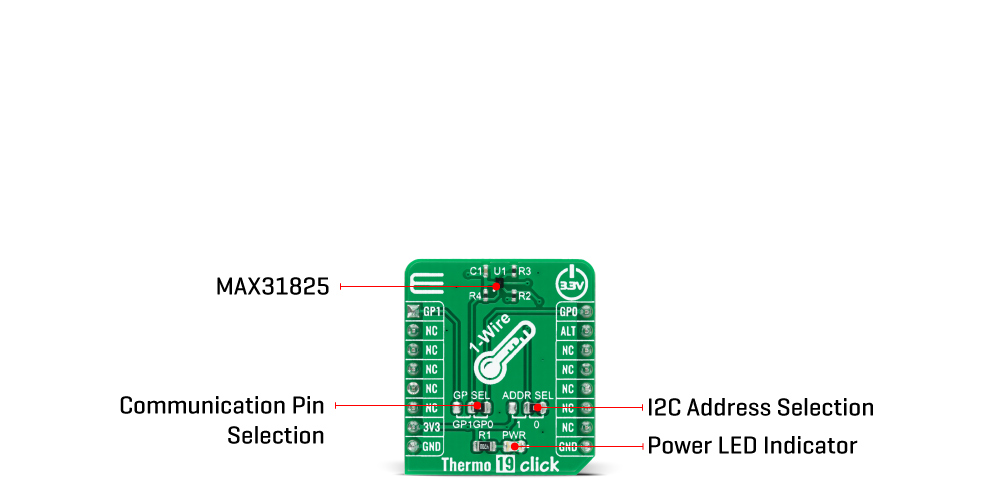
The Thermo 19 Click Board™ is based on the MAX31825, a digital thermometer that provides 12-bit temperature measurements and communicates over a 1-Wire interface from Maxim Integrated. The sensor provides 8-bit to 12-bit temperature measurements from -45°C to +145°C with better that ±1.75°C accuracy, and better than ±1°C accuracy from 0°C to +70°C. Temperature measurements are sent to the MCU using the 1-Wire interface that requires only one data line that can also be used to parasitically power the sensor. Besides, it includes two address input pins that allow one of 64 different addresses to be selected to identify the sensor's physical location, and an interrupt that represents an alarm output for detection of temperature measurement faults.
The transaction sequence for accessing the device MAX31825 through the 1-Wire interface consists of additional steps:
NOTE: It is very important to follow this sequence every time the MAX31825 is accessed, as the MAX31825 does not respond if any steps in the sequence are missing or out of order.
The Thermo 19 Click communicates with MCU using the 1-Wire interface that, by definition, requires only one data line (and ground) for communication with MCU. The 1-Wire communication line is routed to the SMD jumper labeled as GP SEL, which allows routing of the 1-Wire communication either to the PWM pin or to the AN pin of the mikroBUS™ socket. These pins are labeled as GP0 and GP1 respectively, the same as the SMD jumper positions, making the selection of the desired pin simple and straightforward.
The MAX31825 possesses an interrupt output that represents alarm output with user-definable settings for temperature fault detection routed to the INT pin on the mikroBUS™ socket, labeled as ALT. It also includes two address pins (ADD0 and ADD1). ADD0 is connected to an external resistor whose value is measured by the MAX31825 in response to the Convert Location command, resulting in five location address bits (A4:A0) stored in the Status register. In addition to ADD0, the ADD1 input can be connected to GND or VDD, labeled as 0 and 1, which can be performed by using the SMD jumper labeled as ADDR SEL.
The Thermo 19 Click Board™ is designed to be operated only with a 3.3V logic voltage level. A proper logic voltage level conversion should be performed before the Click board™ is used with MCUs with different logic levels.
| Type | Temperature & humidity |
| Applications | Can be used for industrial control, in communication and data center equipment, or in any other temperature measurement applications. |
| On-board modules | Thermo 19 Click is based on the MAX31825, a digital thermometer that provides 12-bit temperature measurements and communicates over a 1-Wire interface from Maxim Integrated. |
| Key Features | Better accuracy, alarm function for detection of temperature faults, selectable temperature resolution, wide temperature measurement range, can be powered from the data line, and more. |
| Interface | 1-Wire |
| Compatibility | mikroBUS |
| Click board size | S (28.6 x 25.4 mm) |
| Input Voltage | 3.3V |
This table shows how the pinout on the Thermo 19 Click Board™ corresponds to the pinout on the mikroBUS™ socket (the latter shown in the two middle columns).
| Notes | Pin |  |
Pin | Notes | |||
|---|---|---|---|---|---|---|---|
| 1-Wire Data IN/OUT | GP1 | 1 | AN | PWM | 16 | GP | 1-Wire Data IN/OUT |
| NC | 2 | RST | INT | 15 | ALT | Alarm Output | |
| NC | 3 | CS | RX | 14 | NC | ||
| NC | 4 | SCK | TX | 13 | NC | ||
| NC | 5 | MISO | SCL | 12 | NC | ||
| NC | 6 | MOSI | SDA | 11 | NC | ||
| Power Supply | 3.3V | 7 | 3.3V | 5V | 10 | NC | |
| Ground | GND | 8 | GND | GND | 9 | GND | Ground |
| Label | Name | Default | Description |
|---|---|---|---|
| LD1 | PWR | - | Power LED Indicator |
| JP1 | GP SEL | Right | 1-Wire Data Communication Pin Selection: Left position GP1, Right position GP0 |
| JP2 | ADDR SEL | Right | Communication interface selection: Left position 0, Right position 1 |
| Description | Min | Typ | Max | Unit |
|---|---|---|---|---|
| Supply Voltage | -0.3 | 3.3 | 4 | V |
| Temperature Measurement Error | -1.75 | ±0.3 | 1.75 | °C |
| Temperature Resolution | 8 | - | 12 | bits |
| Operating Temperature Range | -45 | - | +145 | °C |
We provide a library for the Thermo 19 Click Board™ on our LibStock page, as well as a demo application (example), developed using MikroElektronika compilers. The demo can run on all the main MikroElektronika development boards.
Library holds function that checks the state of the "Alarm" pin.
uint8_t thermo19_alarm_chk ( ); - Function is used to check if an Alarm has occured.The application is composed of three sections :
void application_task ( )
{
 temperature = thermo19_get_temperature( );
 FloatToStr( temperature, log_txt );
 Ltrim( log_txt );
 mikrobus_logWrite( " Temperature : ", _LOG_TEXT );
 mikrobus_logWrite( log_txt, _LOG_TEXT );
 mikrobus_logWrite( deg_cel, _LOG_LINE );
}
Additional Functions :
The full application code, and ready to use projects can be found on our LibStock page.
Other mikroE Libraries used in the example:
Depending on the development board you are using, you may need USB UART click, USB UART 2 click or RS232 click to connect to your PC, for development systems with no UART to USB interface available on the board. The terminal available in all MikroElektronika compilers, or any other terminal application of your choice, can be used to read the message.
The Thermo 19 Click Board™ is supported with mikroSDK - MikroElektronika Software Development Kit. To ensure proper operation of mikroSDK compliant Click board™ demo applications, mikroSDK should be downloaded from the LibStock and installed for the compiler you are using.
- condition: new - custom_product: false - mpn: MIKROE-4295 - google_product_category: Electronics - custom_label_0: Click Board - device_vendor: Maxim Integrated - device_type: MAX31825ANT+ - warranty: 12 months - brand: MikroE - key_feature_1: Measures Temperature from -45°C to +145°C - manufacturer: Mikroelektronika d.o.o. - target_keyword: Thermo 19 Click Board - brands: gid://shopify/Metaobject/56256004319 - breadcrumbs: ["gid://shopify/Collection/447955239135","gid://shopify/Collection/241680580797","gid://shopify/Collection/241545969853"] - customhs_code: 847330 - detailed_description: {"type":"root","children":[{"type":"heading","level":3,"children":[{"type":"text","value":"How Does The Thermo 19 Click Board™ Work?"}]},{"type":"paragraph","children":[{"type":"text","value":"The "},{"type":"text","value":"Thermo 19 Click Board™","bold":true,"italic":true},{"type":"text","value":" is based on the MAX31825, a digital thermometer that provides 12-bit temperature measurements and communicates over a 1-Wire interface from Maxim Integrated. The sensor provides 8-bit to 12-bit temperature measurements from -45°C to +145°C with better that ±1.75°C accuracy, and better than ±1°C accuracy from 0°C to +70°C. Temperature measurements are sent to the MCU using the 1-Wire interface that requires only one data line that can also be used to parasitically power the sensor. Besides, it includes two address input pins that allow one of 64 different addresses to be selected to identify the sensor's physical location, and an interrupt that represents an alarm output for detection of temperature measurement faults."}]},{"type":"paragraph","children":[{"type":"text","value":""}]},{"type":"paragraph","children":[{"type":"text","value":"The transaction sequence for accessing the device MAX31825 through the 1-Wire interface consists of additional steps:"}]},{"type":"list","listType":"unordered","children":[{"type":"list-item","children":[{"type":"text","value":"Initialization sequence","bold":true},{"type":"text","value":" - It consists of a reset pulse transmitted by the MCU followed by the presence pulse transmitted by the MAX31825, which gives the MCU information that the MAX31825 is on the bus and is ready to operate."}]},{"type":"list-item","children":[{"type":"text","value":"ROM Command","bold":true},{"type":"text","value":" - Once the MCU has detected a presence, it can issue one of the four 8-bit long ROM commands that the MAX31825 support."}]},{"type":"list-item","children":[{"type":"text","value":"Function Command","bold":true},{"type":"text","value":" - Commands that allows the MCU to read from the MAX31825 scratchpad memory, and initiate temperature conversions."}]},{"type":"list-item","children":[{"type":"text","value":"Transaction/Data","bold":true},{"type":"text","value":" - The idle state for the 1-Wire bus is high. If for any reason a transaction needs to be suspended, the bus MUST be left in the idle state if the transaction is to resume. Infinite recovery time can occur between bits so long as the 1-Wire bus is in the inactive (high) state during the recovery period. If the bus is held low for more than 480μs, all components on the bus are reset."}]}]},{"type":"paragraph","children":[{"type":"text","value":"NOTE: It is very important to follow this sequence every time the MAX31825 is accessed, as the MAX31825 does not respond if any steps in the sequence are missing or out of order.","bold":true}]},{"type":"paragraph","children":[{"type":"text","value":"The Thermo 19 Click communicates with MCU using the 1-Wire interface that, by definition, requires only one data line (and ground) for communication with MCU. The 1-Wire communication line is routed to the SMD jumper labeled as GP SEL, which allows routing of the 1-Wire communication either to the PWM pin or to the AN pin of the mikroBUS™ socket. These pins are labeled as GP0 and GP1 respectively, the same as the SMD jumper positions, making the selection of the desired pin simple and straightforward."}]},{"type":"paragraph","children":[{"type":"text","value":"The MAX31825 possesses an interrupt output that represents alarm output with user-definable settings for temperature fault detection routed to the INT pin on the mikroBUS™ socket, labeled as ALT. It also includes two address pins (ADD0 and ADD1). ADD0 is connected to an external resistor whose value is measured by the MAX31825 in response to the Convert Location command, resulting in five location address bits (A4:A0) stored in the Status register. In addition to ADD0, the ADD1 input can be connected to GND or VDD, labeled as 0 and 1, which can be performed by using the SMD jumper labeled as ADDR SEL."}]},{"type":"paragraph","children":[{"type":"text","value":"The "},{"type":"text","value":"Thermo 19 Click Board™","bold":true},{"type":"text","value":" is designed to be operated only with a 3.3V logic voltage level. A proper logic voltage level conversion should be performed before the Click board™ is used with MCUs with different logic levels."}]},{"type":"heading","level":3,"children":[{"type":"text","value":"SPECIFICATIONS"}]},{"type":"paragraph","children":[{"type":"text","value":"Type\nTemperature & humidity\nApplications\nCan be used for industrial control, in communication and data center equipment, or in any other temperature measurement applications.\nOn-board modules\nThermo 19 Click is based on the MAX31825, a digital thermometer that provides 12-bit temperature measurements and communicates over a 1-Wire interface from Maxim Integrated.\nKey Features\nBetter accuracy, alarm function for detection of temperature faults, selectable temperature resolution, wide temperature measurement range, can be powered from the data line, and more.\nInterface\n1-Wire\nCompatibility\nmikroBUS\nClick board size\nS (28.6 x 25.4 mm)\nInput Voltage\n3.3V"}]},{"type":"heading","level":3,"children":[{"type":"text","value":"PINOUT DIAGRAM"}]},{"type":"paragraph","children":[{"type":"text","value":"This table shows how the pinout on the "},{"type":"text","value":"Thermo 19 Click Board™","bold":true},{"type":"text","value":" corresponds to the pinout on the mikroBUS™ socket (the latter shown in the two middle columns)."}]},{"type":"paragraph","children":[{"type":"text","value":"Notes\nPin\nPin\nNotes\n1-Wire Data IN/OUT\nGP1\n1\nAN\nPWM\n16\nGP\n1-Wire Data IN/OUT\nNC\n2\nRST\nINT\n15\nALT\nAlarm Output\nNC\n3\nCS\nRX\n14\nNC\nNC\n4\nSCK\nTX\n13\nNC\nNC\n5\nMISO\nSCL\n12\nNC\nNC\n6\nMOSI\nSDA\n11\nNC\nPower Supply\n3.3V\n7\n3.3V\n5V\n10\nNC\nGround\nGND\n8\nGND\nGND\n9\nGND\nGround"}]},{"type":"heading","level":3,"children":[{"type":"text","value":"ONBOARD SETTINGS AND INDICATORS"}]},{"type":"paragraph","children":[{"type":"text","value":"Label\nName\nDefault\n Description\nLD1\nPWR\n-\nPower LED Indicator\nJP1\nGP SEL\nRight\n1-Wire Data Communication Pin Selection: Left position GP1, Right position GP0\nJP2\nADDR SEL\nRight\nCommunication interface selection: Left position 0, Right position 1"}]},{"type":"heading","level":3,"children":[{"type":"text","value":"THERMO 19 CLICK ELECTRICAL SPECIFICATIONS"}]},{"type":"paragraph","children":[{"type":"text","value":"Description\nMin\nTyp\nMax\nUnit\nSupply Voltage\n-0.3\n3.3\n4\nV\nTemperature Measurement Error\n-1.75\n±0.3\n1.75\n°C\nTemperature Resolution\n8\n-\n12\nbits\nOperating Temperature Range\n-45\n-\n+145\n°C"}]},{"type":"heading","level":3,"children":[{"type":"text","value":" "}]}]} - summary:The Thermo 19 Click Board™ is a compact add-on board that provides an accurate temperature measurement. This board features the MAX31825, a temperature sensor that provides 8-bit to 12-bit Celsius temperature measurements with better than ±1.75°C from -45°C to +145°C from Maxim Integrated. It has a unique 64-bit serial code stored in an on-chip ROM, an alarm output for detection of temperature faults, temperature resolution selection from 8 to 12 bits, and it allows temperature conversion to 10-bit digital word in a period of 80ms (max). The Thermo 19 Click makes a perfect choice for industrial control, in communication and data centre equipment, or in any other temperature measurement applications.
The Thermo 19 Click is supported by a mikroSDK compliant library, which includes functions that simplify software development. This Click Board™ comes as a fully tested product, ready to be used on a system equipped with the mikroBUS™ socket.