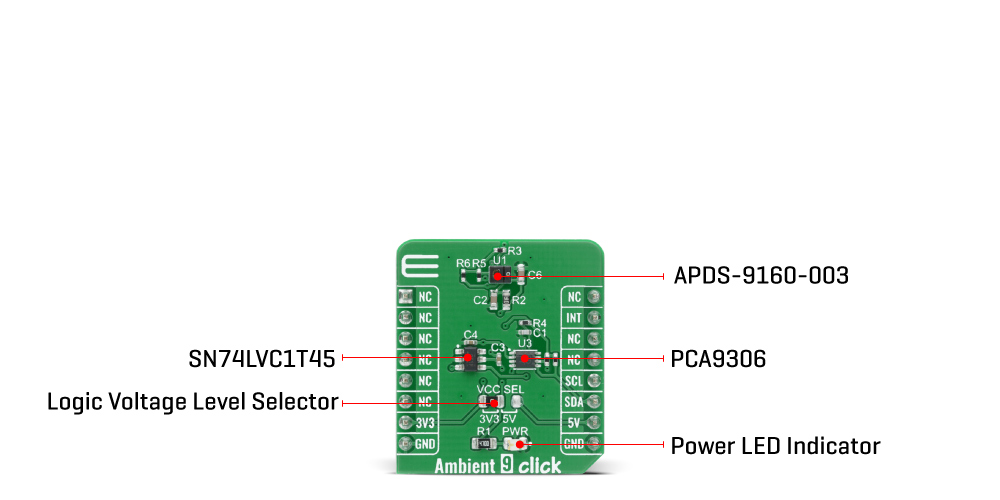
The Ambient 9 Click Board™ is based on the APDS-9160-003, digital proximity, and ambient light sensing sensor from Broadcom Limited. The ambient light sensor provides a photopic response to light intensity in low light conditions or behind a darkened glass. It approximates the response of the human eye providing a direct readout where the output count is proportional to the ambient light level. The proximity detection also operates well from bright sunlight to dark rooms. Additionally, the device can be put into a low-power standby mode providing a very low average power consumption.
In a proximity sensing system, the included IR LED can be pulsed with more than 100 mA of rapidly switching current. The number of LED pulses can be configured by using the pulse step, and the LED modulation frequency can be set from 60 kHz to 100 kHz in 5 steps. Proximity sensing resolution can vary from 8 to 11 bits, and the measurement rate can vary from 6.25 ms to 400 ms. This Click board™ is easy to program and read data because it does not require an overly demanding configuration. In order to read ambient or proximity data, it is only necessary to enable certain registers which can also be seen in an example code that contains easy to use functions that may be used as a reference for further development.
The Ambient 9 Click Board™ communicates with the MCU using the standard I2C 2-wire interface. Standard (100 kHz) and Fast (400 kHz) I2C communication modes are available with the device. The I2C bus lines are routed to the dual bidirectional PCA9306 voltage-level translator from Texas Instruments, which allows interfacing with both 3.3V and 5V MCUs. It also generates flexible ambient and proximity programmable interrupt signals routed on the INT pin of the mikroBUS™, which are triggered if upper or lower threshold values are crossed. It is also possible to deactivate a sensor after a certain interrupt event occurred.
The Ambient 9 Click Board™ is designed to be operated with both 3.3V and 5V logic levels that can be selected via a VCC SEL jumper. This allows for both 3.3V and 5V capable MCUs to use the I2C communication lines properly.
| Type | Optical |
| Applications | Can be used for display management to extend battery life and provide optimum viewing in diverse lighting conditions. |
| On-board modules | Ambient 9 Click is based on the APDS-9160-003, digital proximity, and ambient light sensing sensor from Broadcom Limited. |
| Key Features | Low power consumption, high precision, programmable interrupt, high sensitivity in low lux condition, and more. |
| Interface | I2C |
| Compatibility | mikroBUS |
| Click board size | S (28.6 x 25.4 mm) |
| Input Voltage | 3.3V or 5V |
This table shows how the pinout on the Ambient 9 Click Board™ corresponds to the pinout on the mikroBUS™ socket (the latter shown in the two middle columns).
| Notes | Pin |  |
Pin | Notes | |||
|---|---|---|---|---|---|---|---|
| NC | 1 | AN | PWM | 16 | NC | ||
| NC | 2 | RST | INT | 15 | INT | Interrupt | |
| NC | 3 | CS | RX | 14 | NC | ||
| NC | 4 | SCK | TX | 13 | NC | ||
| NC | 5 | MISO | SCL | 12 | SCL | I2C Clock | |
| NC | 6 | MOSI | SDA | 11 | SDA | I2C Data | |
| Power Supply | 3.3V | 7 | 3.3V | 5V | 10 | 5V | Power Supply |
| Ground | GND | 8 | GND | GND | 9 | GND | Ground |
| Label | Name | Default | Description |
|---|---|---|---|
| LD1 | PWR | - | Power LED Indicator |
| JP1 | VCC SEL | Left | Power Supply Voltage Selection 3V3/5V: Left position 3V3, Right position 5V |
| Description | Min | Typ | Max | Unit |
|---|---|---|---|---|
| Supply Voltage | - | - | 3.63 | V |
| Peak Wavelength | - | 940 | - | nm |
| Output Resolution | - | 18 | - | bit |
| Operating Temperature Range | -40 | - | +85 | °C |
We provide a library for the Ambient 9 Click Board™ on our LibStock page, as well as a demo application (example), developed using MikroElektronika compilers. The demo can run on all the main MikroElektronika development boards.
Library provides functions for basic reading and writing to the device. There are some specific functions for enabling sensors and reading data from previously enabled sensors.
void ambient9_enable_data ( uint8_t als_ps ) - Enable one of sensorsuint32_t ambient9_als_data ( void ) - Read ALS datauint16_t ambient9_proxy_data ( void ) - Read proximity dataThe application is composed of three sections :
void application_task ( )
{
    uint16_t proxy_data;
    uint32_t als_data;

    if ( AMBIENT9_ALS == dev_mode )
    {
        als_data = ambient9_als_data(  );
        LongWordToStr( als_data, demo_txt );
        mikrobus_logWrite( " - ALS data: ", _LOG_TEXT );
        mikrobus_logWrite( demo_txt, _LOG_LINE );
    }
    else if ( AMBIENT9_PROXY == dev_mode )
    {
        proxy_data = ambient9_proxy_data(  );
        WordToStr( proxy_data, demo_txt );
        mikrobus_logWrite( " - Proximity data: ", _LOG_TEXT );
        mikrobus_logWrite( demo_txt, _LOG_LINE );
    }
    Delay_ms( 100 );
}
The full application code, and ready to use projects can be found on our LibStock page.
Other mikroE Libraries used in the example:
Depending on the development board you are using, you may need a USB UART click, USB UART 2 click or RS232 click to connect to your PC, for development systems with no UART to USB interface available on the board. The terminal available in all MikroElektronika compilers, or any other terminal application of your choice, can be used to read the message.
The Ambient 9 Click Board™ is supported with mikroSDK - MikroElektronika Software Development Kit. To ensure proper operation of mikroSDK compliant Click board™ demo applications, mikroSDK should be downloaded from the LibStock and installed for the compiler you are using.
- attachments: [{"download_file":[{"download_file":"Ambient 9 Click Board™ Schematic"}],"download_filetype":[{"download_filetype":"pdf"}]},{"download_file":[{"download_file":"Broadcom APDS-9160-003 Ambient and IR Sensor Datasheet"}],"download_filetype":[{"download_filetype":"pdf"}]},{"download_file":[{"download_file":"Texas Instruments SN74VC1T45 Dual Supply Bus Transceiver Datasheet"}],"download_filetype":[{"download_filetype":"pdf"}]},{"download_file":[{"download_file":"Texas Instruments PCA9306 Voltage Translater Datasheet"}],"download_filetype":[{"download_filetype":"pdf"}]}] - condition: new - custom_product: false - mpn: MIKROE-4197 - google_product_category: Electronics - custom_label_0: Click Board - device_vendor: Broadcom Limited, Texas Instruments - device_type: APDS-9160-003, PCA9306DCUR - warranty: 12 months - brand: MikroE - key_feature_1: Ambient Light Detector - manufacturer: Mikroelektronika d.o.o. - target_keyword: Ambient 9 Click Board - brands: gid://shopify/Metaobject/56256004319 - breadcrumbs: ["gid://shopify/Collection/447955239135","gid://shopify/Collection/241680580797","gid://shopify/Collection/241545969853"] - customhs_code: 847330 - detailed_description: {"type":"root","children":[{"type":"heading","level":3,"children":[{"type":"text","value":"How Does The Ambient 9 Click Board™ Work?"}]},{"type":"paragraph","children":[{"type":"text","value":"The "},{"type":"text","value":"Ambient 9 Click Board™","bold":true,"italic":true},{"type":"text","value":" is based on the APDS-9160-003, digital proximity, and ambient light sensing sensor from Broadcom Limited. The ambient light sensor provides a photopic response to light intensity in low light conditions or behind a darkened glass. It approximates the response of the human eye providing a direct readout where the output count is proportional to the ambient light level. The proximity detection also operates well from bright sunlight to dark rooms. Additionally, the device can be put into a low-power standby mode providing a very low average power consumption."}]},{"type":"paragraph","children":[{"type":"text","value":""}]},{"type":"paragraph","children":[{"type":"text","value":"In a proximity sensing system, the included IR LED can be pulsed with more than 100 mA of rapidly switching current. The number of LED pulses can be configured by using the pulse step, and the LED modulation frequency can be set from 60 kHz to 100 kHz in 5 steps. Proximity sensing resolution can vary from 8 to 11 bits, and the measurement rate can vary from 6.25 ms to 400 ms. This Click board™ is easy to program and read data because it does not require an overly demanding configuration. In order to read ambient or proximity data, it is only necessary to enable certain registers which can also be seen in an example code that contains easy to use functions that may be used as a reference for further development."}]},{"type":"paragraph","children":[{"type":"text","value":"The "},{"type":"text","value":"Ambient 9 Click Board™","bold":true},{"type":"text","value":" communicates with the MCU using the standard I2C 2-wire interface. Standard (100 kHz) and Fast (400 kHz) I2C communication modes are available with the device. The I2C bus lines are routed to the dual bidirectional PCA9306 voltage-level translator from Texas Instruments, which allows interfacing with both 3.3V and 5V MCUs. It also generates flexible ambient and proximity programmable interrupt signals routed on the INT pin of the mikroBUS™, which are triggered if upper or lower threshold values are crossed. It is also possible to deactivate a sensor after a certain interrupt event occurred."}]},{"type":"paragraph","children":[{"type":"text","value":"The "},{"type":"text","value":"Ambient 9 Click Board™","bold":true},{"type":"text","value":" is designed to be operated with both 3.3V and 5V logic levels that can be selected via a VCC SEL jumper. This allows for both 3.3V and 5V capable MCUs to use the I2C communication lines properly."}]},{"type":"heading","level":3,"children":[{"type":"text","value":"SPECIFICATIONS"}]},{"type":"paragraph","children":[{"type":"text","value":"Type\nOptical\nApplications\nCan be used for display management to extend battery life and provide optimum viewing in diverse lighting conditions.\nOn-board modules\nAmbient 9 Click is based on the APDS-9160-003, digital proximity, and ambient light sensing sensor from Broadcom Limited.\nKey Features\nLow power consumption, high precision, programmable interrupt, high sensitivity in low lux condition, and more.\nInterface\nI2C\nCompatibility\nmikroBUS\nClick board size\nS (28.6 x 25.4 mm)\nInput Voltage\n3.3V or 5V"}]},{"type":"heading","level":3,"children":[{"type":"text","value":"PINOUT DIAGRAM"}]},{"type":"paragraph","children":[{"type":"text","value":"This table shows how the pinout on the "},{"type":"text","value":"Ambient 9 Click Board™","bold":true},{"type":"text","value":" corresponds to the pinout on the mikroBUS™ socket (the latter shown in the two middle columns)."}]},{"type":"paragraph","children":[{"type":"text","value":"Notes\nPin\nPin\nNotes\nNC\n1\nAN\nPWM\n16\nNC\nNC\n2\nRST\nINT\n15\nINT\nInterrupt\nNC\n3\nCS\nRX\n14\nNC\nNC\n4\nSCK\nTX\n13\nNC\nNC\n5\nMISO\nSCL\n12\nSCL\nI2C Clock\nNC\n6\nMOSI\nSDA\n11\nSDA\nI2C Data\nPower Supply\n3.3V\n7\n3.3V\n5V\n10\n5V\nPower Supply\nGround\nGND\n8\nGND\nGND\n9\nGND\nGround"}]},{"type":"heading","level":3,"children":[{"type":"text","value":"ONBOARD SETTINGS AND INDICATORS"}]},{"type":"paragraph","children":[{"type":"text","value":"Label\nName\nDefault\n Description\nLD1\nPWR\n-\nPower LED Indicator\nJP1\nVCC SEL\nLeft\nPower Supply Voltage Selection 3V3/5V: Left position 3V3, Right position 5V"}]},{"type":"heading","level":3,"children":[{"type":"text","value":"AMBIENT 9 CLICK ELECTRICAL SPECIFICATIONS"}]},{"type":"paragraph","children":[{"type":"text","value":"Description\nMin\nTyp\nMax\nUnit\nSupply Voltage\n-\n-\n3.63\nV\nPeak Wavelength\n-\n940\n-\nnm\nOutput Resolution\n-\n18\n-\nbit\nOperating Temperature Range\n-40\n-\n+85\n°C"}]},{"type":"heading","level":3,"children":[{"type":"text","value":" "}]}]} - summary:The Ambient 9 Click Board™ is a compact add-on board that contains an integrated ambient light sensing and proximity detector with IR LED in an optical module. This board features the APDS-9160-003, digital ALS, and IR sensing, an IR LED, and a complete proximity sensing solution from Broadcom Limited, that is fit to be used under a small aperture of the device's window cover. It has a wide dynamic range, the proximity detection feature operates well from bright sunlight to dark rooms, and both the PS and ALS functions independently provides maximum flexibility in applications. The Ambient 9 Click Board™ is suitable for display management to extend battery life and provide optimum viewing in diverse lighting conditions.
The Ambient 9 Click Board™ is supported by a mikroSDK compliant library, which includes functions that simplify software development. This Click Board™ comes as a fully tested product, ready to be used on a system equipped with the mikroBUS™ socket.