# Title: Terminal Click Board™
## Description: The Terminal Click Board™ can be especially interesting for the development systems that are equipped with mikroBUS™ slots only, or a small number of GPIO pins available, such as the Clicker family of development systems. Using Terminal click on such a system will greatly improve its usability, and yet it will remain small, compact and manageable. Thanks to the standard-pitch (2.54mm) header, it is easy to connect a wire jumper, a probe of an oscilloscope for example, or maybe some additional electronic circuit. That way, Terminal click makes it easy to monitor signals in real-time, while the click board is present in the system. How Does The Terminal Click Board™ Work? The Terminal Click Board™ consists of a high-quality PCB that can be connected to the mikroBUS™ as any other click board. On the top of the Terminal click, a 2x8 pin header is placed. Each of the header pins is corresponding to a pin on the mikroBUS™ being used. These are simply wired in parallel. Thanks to the stacking headers, the connection with the Click Board™ remain firm and stable. Besides, having this kind of stacking topology, allows for easy pin access and manipulation of the stacked click boards™, retaining a perfect connection quality at all times. When there's a need to attach external equipment to the development system, the desired mikroBUS™ socket can be populated with Terminal click, allowing even more connections. This makes the stacking capacity almost unlimited. However, attention should be paid not to make the lines attached to the mikroBUS™ too long. In situations like this, the frequency of the communication might need to be stepped down a bit, in order to compensate for the longer mikroBUS™ signal lines. Lines of the mikroBUS™ to which Terminal click is attached, are shared through the top 16-pin header, which mirrors pins of the connected mikroBUS™. Therefore, care should be taken when working with the Terminal click and connecting an external device to it, because the same pins on the mikroBUS™ are shared, either for the communication (SPI, UART, I2C) or for some other purpose (RST, INT, or other pins used as GPIO). Since all the stacked click boards™ share the same power rails, a Terminal click also shares the power rails, which makes it compatible with any click board™ and development systems. Click board™ product range The union of Terminal click with the other click boards™ allows you to reach an unlimited number of possibilities when it comes to combining different functionalities and adding external connectivity. You just need to choose the ones you want from our ever-growing range: environmental sensors, LEDs, speech recognition, heart rate sensors, motor control, GSM, GPS, WiFi, analogue to digital converters, movement sensors. More than 1000 Click Boards™ that can be stacked and integrated in a simple and convenient way are at your disposal. Specifications Type Adapter Applications Provides easy, secure and reliable stacking of up to four additional boards per mikroBUS™ socket. On-board modules None Key Features mikroBUS™ socket expansion board, which provides an easy and elegant solution for adding the external connection capability to the click board™ Interface GPIO Compatibility mikroBUS Click board size L (57.15 x 25.4 mm) Input Voltage 3.3V,5V Pinout diagram This table shows how the pinout on Terminal Click corresponds to the pinout on the mikroBUS™ socket (the latter shown in the two middle columns). Notes Pin Pin Notes Analog Input AN 1 AN PWM 16 PWM PWM Output Reset RST 2 RST INT 15 INT Hardware Interrupt SPI Chip Enable CS 3 CS RX 14 TX UART Transmit SPI Clock SCK 4 SCK TX 13 RX UART Receive SPI Slave Data Out SDO 5 MISO SCL 12 SCL I2C Clock SPI Slave Data In SDI 6 MOSI SDA 11 SDA I2C Data Power Supply 3V3 7 3.3V 5V 10 5V Power Supply Ground GND 8 GND GND 9 GND Ground Onboard settings and indicators Label Name Default Description LD1 PWR - Power LED Indicator J1 HM2X8 - J1 Connector (2.54mm pitch, male header) has 16 pins, one for every mikroBUS™ pin.
## Product type: Click Board
## Vendor: Mikroelektronika d.o.o.
## Tags: Adapter, Click Board, Interface, MikroE, Serial Interface, Test
## Price range: 5.6 - 5.6 GBP
## Link: https://thedebugstore.com/products/mikroe-3745-terminal-click-uk
## Compare-at price range: 8.0 - 8.0 GBP
## Options
- Title: Default Title
## Collections
- [New Products](https://thedebugstore.com/a/llms/collections/new-products-debug-store)
- [Mikroelektronika d.o.o. (MikroE)](https://thedebugstore.com/a/llms/collections/mikroelektronika-catalogue-uk)
- [Serial Interface Click Boards™](https://thedebugstore.com/a/llms/collections/serial-interface-click-boards-catalogue)
- [MikroE Click Boards™](https://thedebugstore.com/a/llms/collections/mikroe-click-boards-catalogue-uk)
- [Google Shopping - invalid product](https://thedebugstore.com/a/llms/collections/google-shopping-valid-products)
- [Test Interface Click Boards™](https://thedebugstore.com/a/llms/collections/test-interface-click-boards-catalogue)
- [Interface Click Boards™](https://thedebugstore.com/a/llms/collections/interface-click-boards-catalogue)
- [Adapter Click Boards™](https://thedebugstore.com/a/llms/collections/adapter-click-boards-catalogue)
- [Click Boards™ Summer Sale](https://thedebugstore.com/a/llms/collections/inventory-sale)
- [MikroE Sale](https://thedebugstore.com/a/llms/collections/mikroe-sale)
- [MIKROE Stock](https://thedebugstore.com/a/llms/collections/mikroe-products-in-stock-sale)
## Variants
- Default Title, SKU: MIKROE-3745, Available: yes, Inventory: 9
## Metafields
- full_description: The Terminal Click Board™ can be especially interesting for the development systems that are equipped with mikroBUS™ slots only, or a small number of GPIO pins available, such as the Clicker family of development systems. Using Terminal click on such a system will greatly improve its usability, and yet it will remain small, compact and manageable. Thanks to the standard-pitch (2.54mm) header, it is easy to connect a wire jumper, a probe of an oscilloscope for example, or maybe some additional electronic circuit. That way, Terminal click makes it easy to monitor signals in real-time, while the click board is present in the system.
How Does The Terminal Click Board™ Work?
The Terminal Click Board™ consists of a high-quality PCB that can be connected to the mikroBUS™ as any other click board. On the top of the Terminal click, a 2x8 pin header is placed. Each of the header pins is corresponding to a pin on the mikroBUS™ being used. These are simply wired in parallel. Thanks to the stacking headers, the connection with the Click Board™ remain firm and stable. Besides, having this kind of stacking topology, allows for easy pin access and manipulation of the stacked click boards™, retaining a perfect connection quality at all times.
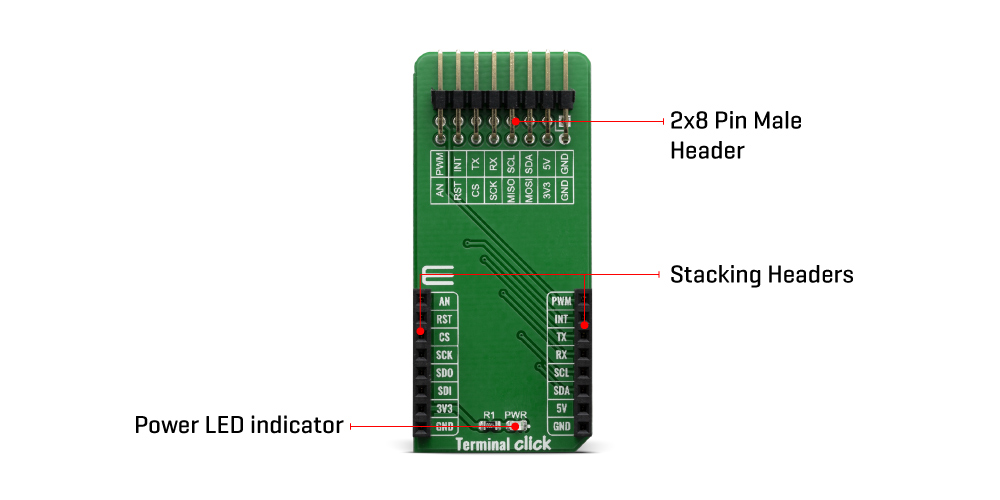
When there's a need to attach external equipment to the development system, the desired mikroBUS™ socket can be populated with Terminal click, allowing even more connections. This makes the stacking capacity almost unlimited. However, attention should be paid not to make the lines attached to the mikroBUS™ too long. In situations like this, the frequency of the communication might need to be stepped down a bit, in order to compensate for the longer mikroBUS™ signal lines.
Lines of the mikroBUS™ to which Terminal click is attached, are shared through the top 16-pin header, which mirrors pins of the connected mikroBUS™. Therefore, care should be taken when working with the Terminal click and connecting an external device to it, because the same pins on the mikroBUS™ are shared, either for the communication (SPI, UART, I2C) or for some other purpose (RST, INT, or other pins used as GPIO).
Since all the stacked click boards™ share the same power rails, a Terminal click also shares the power rails, which makes it compatible with any click board™ and development systems.
Click board™ product range
The union of Terminal click with the other click boards™ allows you to reach an unlimited number of possibilities when it comes to combining different functionalities and adding external connectivity. You just need to choose the ones you want from our ever-growing range: environmental sensors, LEDs, speech recognition, heart rate sensors, motor control, GSM, GPS, WiFi, analogue to digital converters, movement sensors.
More than 1000 Click Boards™ that can be stacked and integrated in a simple and convenient way are at your disposal.
Specifications
| Type |
Adapter |
| Applications |
Provides easy, secure and reliable stacking of up to four additional boards per mikroBUS™ socket. |
| On-board modules |
None |
| Key Features |
mikroBUS™ socket expansion board, which provides an easy and elegant solution for adding the external connection capability to the click board™ |
| Interface |
GPIO |
| Compatibility |
mikroBUS |
| Click board size |
L (57.15 x 25.4 mm) |
| Input Voltage |
3.3V,5V |
Pinout diagram
This table shows how the pinout on Terminal Click corresponds to the pinout on the mikroBUS™ socket (the latter shown in the two middle columns).
| Notes |
Pin |
 |
Pin |
Notes |
| Analog Input |
AN |
1 |
AN |
PWM |
16 |
PWM |
PWM Output |
| Reset |
RST |
2 |
RST |
INT |
15 |
INT |
Hardware Interrupt |
| SPI Chip Enable |
CS |
3 |
CS |
RX |
14 |
TX |
UART Transmit |
| SPI Clock |
SCK |
4 |
SCK |
TX |
13 |
RX |
UART Receive |
| SPI Slave Data Out |
SDO |
5 |
MISO |
SCL |
12 |
SCL |
I2C Clock |
| SPI Slave Data In |
SDI |
6 |
MOSI |
SDA |
11 |
SDA |
I2C Data |
| Power Supply |
3V3 |
7 |
3.3V |
5V |
10 |
5V |
Power Supply |
| Ground |
GND |
8 |
GND |
GND |
9 |
GND |
Ground |
Onboard settings and indicators
| Label |
Name |
Default |
Description |
| LD1 |
PWR |
- |
Power LED Indicator |
| J1 |
HM2X8 |
- |
J1 Connector (2.54mm pitch, male header) has 16 pins, one for every mikroBUS™ pin. |
- description_tag: Unlock MikroBus potential with the Terminal Click Board™. Seamlessly analyze signals, enhance connectivity, and elevate your projects. Get yours now!
- title_tag: MikroE Terminal Click Board™ (MIKROE-3745)
- manufacturer: Mikroelektronika d.o.o.
- warranty: 12 months
- amazon_enable: TRUE
- amazon_title: Terminal Click Board
- amazon_product_type: computercomponent
- amazon_block: FALSE
- amazon_prime_enable: FALSE
- amazon_search: MikroElektronika Microelectronica MIKROE-1100
- amazon_uk_price: 6.16
- amazon_uk_currency: GBP
- amazon_de_currency: EUR
- amazon_de_price: 6.9608
- amazon_fr_currency: EUR
- amazon_fr_price: 6.9608
- amazon_es_currency: EUR
- amazon_es_price: 6.9608
- amazon_nl_currency: EUR
- amazon_nl_price: 6.9608
- amazon_it_currency: EUR
- amazon_it_price: 6.9608
- amazon_se_curency: SEK
- amazon_se_price: 70.224
- amazon_product_id: 8606018716937
- amazon_product_id_type: EAN
- amazon_update: Update
- amazon_short_description: The Terminal Click Board™ is perfect to tapping into MikroBus signals, such as the I2C and SPI interfaces.This allows a Bus Analyser such as the Total Phase Beagle I2C/SPI Sniffer to be connected. It also allows Click Board™ Boards to be driven by a PC Host Adapter such as the Total Phase Aardvark or Cheetah.
- amazon_long_description: Terminal Click Board™
- amazon_main_image: https://www.thedebugstore.com/images/product/lg-terminal-click-3745-front_1.jpg
- amazon_other_image_1: https://www.thedebugstore.com/images/product/lg-terminal-click-3745-back_1.jpg
- amazon_other_image_2: https://www.thedebugstore.com/images/product/lg-terminal-click-3745-fusion_1.jpg
- amazon_other_image_3: https://www.thedebugstore.com/images/product/lg-terminal-click-3745-fusion_1.jpg
- amazon_browse_node: 428655031
- related_products: TP280121,TP240141,TP320121
- mpn: MIKROE-3745
- backorder_label: If no stock shown above, check availability
- badge: 1 review
- widget:
A very useful board to access the Mikroe bus for testing This board is really helpful as it sits between the development board bus socket and the click board being used to provide test points for attaching test equipment to monitor the interface signals such as the SPI bus.
Hi Spectric
Thank you for helping our customers by providing your feedback.
John
- google_product_category: 285
- attachments: [{"download_file":[{"download_file":"Terminal Click Board™ Schematic"}],"download_filetype":[{"download_filetype":"pdf"}]}]
- condition: new
- custom_product: false
- mpn: MIKROE-3745
- google_product_category: Electronics
- custom_label_0: Click Board
- warranty: 12 months
- brand: MikroE
- key_feature_1: Breakout Board for MikroBus Signals
- key_feature_2: mikroBUS™ socket expansion board, which provides an easy and elegant solution for adding the external connection capability to the click board™
- key_feature_4: Provides easy, secure and reliable stacking of up to four additional boards per mikroBUS™ socket.
- manufacturer: Mikroelektronika d.o.o.
- key_feature_5: mikroBUS: I2C, SPI, PWM and GPIO Interfaces
- rating: {"scale_min":"1.0","scale_max":"5.0","value":"5.0"}
- rating_count: 1
- target_keyword: Terminal Click Board
- brands: gid://shopify/Metaobject/56256004319
- breadcrumbs: ["gid://shopify/Collection/447955239135","gid://shopify/Collection/241680580797","gid://shopify/Collection/277618426045"]
- review_snippet_widget:
- customhs_code: 847330
- detailed_description: {"type":"root","children":[{"type":"paragraph","children":[{"type":"text","value":"The T"},{"type":"text","value":"erminal Click Board™","bold":true,"italic":true},{"type":"text","value":" can be especially interesting for the development systems that are equipped with mikroBUS™ slots only, or a small number of GPIO pins available, such as the Clicker family of development systems. Using Terminal click on such a system will greatly improve its usability, and yet it will remain small, compact and manageable. Thanks to the standard-pitch (2.54mm) header, it is easy to connect a wire jumper, a probe of an oscilloscope for example, or maybe some additional electronic circuit. That way, Terminal click makes it easy to monitor signals in real-time, while the click board is present in the system."}]},{"type":"heading","level":3,"children":[{"type":"text","value":"How Does The Terminal Click Board™ Work?"}]},{"type":"paragraph","children":[{"type":"text","value":"The "},{"type":"text","value":"Terminal Click Board™","bold":true},{"type":"text","value":" consists of a high-quality PCB that can be connected to the mikroBUS™ as any other click board. On the top of the Terminal click, a 2x8 pin header is placed. Each of the header pins is corresponding to a pin on the mikroBUS™ being used. These are simply wired in parallel. Thanks to the stacking headers, the connection with the Click Board™ remain firm and stable. Besides, having this kind of stacking topology, allows for easy pin access and manipulation of the stacked click boards™, retaining a perfect connection quality at all times."}]},{"type":"paragraph","children":[{"type":"text","value":""}]},{"type":"paragraph","children":[{"type":"text","value":"When there's a need to attach external equipment to the development system, the desired mikroBUS™ socket can be populated with Terminal click, allowing even more connections. This makes the stacking capacity almost unlimited. However, attention should be paid not to make the lines attached to the mikroBUS™ too long. In situations like this, the frequency of the communication might need to be stepped down a bit, in order to compensate for the longer mikroBUS™ signal lines."}]},{"type":"paragraph","children":[{"type":"text","value":"Lines of the mikroBUS™ to which Terminal click is attached, are shared through the top 16-pin header, which mirrors pins of the connected mikroBUS™. Therefore, care should be taken when working with the Terminal click and connecting an external device to it, because the same pins on the mikroBUS™ are shared, either for the communication (SPI, UART, I2C) or for some other purpose (RST, INT, or other pins used as GPIO)."}]},{"type":"paragraph","children":[{"type":"text","value":"Since all the stacked click boards™ share the same power rails, a Terminal click also shares the power rails, which makes it compatible with any click board™ and development systems."}]},{"type":"heading","level":3,"children":[{"type":"text","value":"Click board™ product range"}]},{"type":"paragraph","children":[{"type":"text","value":"The union of Terminal click with the other click boards™ allows you to reach an unlimited number of possibilities when it comes to combining different functionalities and adding external connectivity. You just need to choose the ones you want from our ever-growing range: environmental sensors, LEDs, speech recognition, heart rate sensors, motor control, GSM, GPS, WiFi, analogue to digital converters, movement sensors."}]},{"type":"paragraph","children":[{"type":"text","value":"More than 1000 Click Boards™ that can be stacked and integrated in a simple and convenient way are at your disposal."}]},{"type":"heading","level":3,"children":[{"type":"text","value":"Specifications"}]},{"type":"paragraph","children":[{"type":"text","value":" "}]},{"type":"paragraph","children":[{"type":"text","value":"Type\nAdapter\nApplications\nProvides easy, secure and reliable stacking of up to four additional boards per mikroBUS™ socket.\nOn-board modules\nNone\nKey Features\nmikroBUS™ socket expansion board, which provides an easy and elegant solution for adding the external connection capability to the click board™\nInterface\nGPIO\nCompatibility\nmikroBUS\nClick board size\nL (57.15 x 25.4 mm)\nInput Voltage\n3.3V,5V"}]},{"type":"paragraph","children":[{"type":"text","value":" "}]},{"type":"heading","level":3,"children":[{"type":"text","value":"Pinout diagram"}]},{"type":"paragraph","children":[{"type":"text","value":"This table shows how the pinout on Terminal Click corresponds to the pinout on the mikroBUS™ socket (the latter shown in the two middle columns)."}]},{"type":"paragraph","children":[{"type":"text","value":"Notes\nPin\nPin\nNotes\nAnalog Input\nAN\n1\nAN\nPWM\n16\nPWM\nPWM Output\nReset\nRST\n2\nRST\nINT\n15\nINT\nHardware Interrupt\nSPI Chip Enable\nCS\n3\nCS\nRX\n14\nTX\nUART Transmit\nSPI Clock\nSCK\n4\nSCK\nTX\n13\nRX\nUART Receive\nSPI Slave Data Out\nSDO\n5\nMISO\nSCL\n12\nSCL\nI2C Clock\nSPI Slave Data In\nSDI\n6\nMOSI\nSDA\n11\nSDA\nI2C Data\nPower Supply\n3V3\n7\n3.3V\n5V\n10\n5V\nPower Supply\nGround\nGND\n8\nGND\nGND\n9\nGND\nGround"}]},{"type":"heading","level":3,"children":[{"type":"text","value":"Onboard settings and indicators"}]},{"type":"paragraph","children":[{"type":"text","value":"Label\nName\nDefault\n Description\nLD1\nPWR\n-\nPower LED Indicator\nJ1\nHM2X8\n-\nJ1 Connector (2.54mm pitch, male header) has 16 pins, one for every mikroBUS™ pin."}]}]}
- summary: The Ultimate Solution for MikroBus Signal Access: The Terminal Click Board™
Unlock the true potential of your MikroBus signals with the innovative Terminal Click Board™! Whether you're looking to harness the power of I2C or SPI interfaces, this cutting-edge solution is tailor-made for the task.
Why Choose the Terminal Click Board™?
Revolutionize the way you interact with MikroBus signals using our state-of-the-art Terminal Click Board™. With its seamless compatibility, you can seamlessly integrate a Bus Analyzer like the renowned Total Phase Beagle I2C/SPI Sniffer. This means you'll have unparalleled insight into your bus operations, leading to enhanced efficiency and error detection.
Unleash the Power of Connectivity
The Terminal Click Board™ doesn't stop at signal analysis — it's also your gateway to driving Click Board™ Boards from a PC Host Adapter. Imagine the possibilities with the exceptional Total Phase Aardvark or the lightning-fast Cheetah adapter. This combination unlocks new horizons for your projects, offering you the control and versatility you've always craved.
Features at a Glance
- Seamless integration with MikroBus signals
- Full compatibility with I2C and SPI interfaces
- Connectivity with Total Phase Beagle I2C/SPI Sniffer for in-depth analysis
- Empower Click Board™ Boards with PC Host Adapters like Total Phase Aardvark or Cheetah
Upgrade Your Signal Access Today!
Don't miss out on the opportunity to supercharge your MikroBus signal utilization. The Terminal Click Board™ is your ticket to streamlined analysis and unmatched connectivity. Get ready to take your projects to new heights — order your Terminal Click Board™ now!