# Title: Microwave Click Board™
## Description: The Microwave Click Board™ detects movement, thanks to the PD-V11 a 24GHz microwave motion sensor. The typical use for Microwave click is a proximity or motion detector in various applications and devices. The Microwave Click Board™ can detect movement or proximity by using the Doppler effect. The onboard microwave motions sensor transmits waves, and picks them back as they hit an object, with their frequency changed. Microwave Click Board™ does not need optical visibility to work, and the waves can penetrate many kinds of barriers and obstacles. What's on the Microwave Click Board™? How Does The Microwave Click Board™ Work? The Microwave Click Board™ detects movement of objects utilizing Doppler effect. When the PD-V11 microwave sensor is powered on, it starts transmitting radio waves of fixed frequency. As the waves hit a moving object they are reflected back toward PD-V11 microwave motion sensor, with their frequency changed, depending on speed and direction of object's movement. The Doppler effect - a change in frequency of a wave for the observer and object move closer or further apart from one another. A typical example of the Doppler effect is when a vehicle with siren passes and you hear the pitch drop of the siren. The PD-V11 microwave motion sensor low power consumption, low noise, and a low wireless power output. See the datasheet to learn more. The PD-V11 microwave motion sensor picks up reflected waves and converts them to a voltage signal. This signal has the magnitude of several hundred microvolts, so it's sent to the MCP6022 which amplifies the signal, in order to make it readable over the Analog pin on the mikroBUS™. This signal is amplified up to 3.3V. Once amplified, the signal is routed to the Analog pin (OUT) on the mikroBUS™ line. The proximity of the object can be determined by measuring the amplitude of this signal, and speed/direction by determining its frequency. The range at which the Microwave Click Board™ can detect movement depends on the way the algorithm is written (see the Software Support section). SPECIFICATIONS Type Motion Applications ideal solution for building safety and security applications, entrance and exit management applications, and other applications that rely on a reliable moving object detection On-board modules PD-V11 a 24GHz microwave motion sensor which detect motions using doppler effect Key Features PD-V11 microwave motion sensor has low power consumption, low noise, and a low wireless power output Interface Analog Compatibility mikroBUS Click board size L (57.15 x 25.4 mm) Input Voltage 5V PINOUT DIAGRAM This table shows how the pinout of the Microwave Click Board™ corresponds to the pinout on the mikroBUS™ socket (the latter shown in the two middle columns). Notes Pin Pin Notes Amplified sensed signal output OUT 1 AN PWM 16 NC NC 2 RST INT 15 NC NC 3 CS TX 14 NC NC 4 SCK RX 13 NC NC 5 MISO SCL 12 NC NC 6 MOSI SDA 11 NC NC 7 3.3V 5V 10 +5V Power supply Ground GND 8 GND GND 9 GND Ground ONBOARD SETTINGS AND INDICATORS Label Name Default Description PWR Power - Power LED, lights green when the power supply is established properly.
## Product type: Click Board
## Vendor: Mikroelektronika d.o.o.
## Tags: Click Board, Microchip, MikroE, Motion, Sensor
## Price range: 21.0 - 21.0 GBP
## Link: https://thedebugstore.com/products/mikroe-2781-microwave-click-board-uk
## Compare-at price range: 30.0 - 30.0 GBP
## Options
- Title: Default Title
## Collections
- [New Products](https://thedebugstore.com/a/llms/collections/new-products-debug-store)
- [Mikroelektronika d.o.o. (MikroE)](https://thedebugstore.com/a/llms/collections/mikroelektronika-catalogue-uk)
- [Microchip Device Support: Development Boards and Tools | Debug Store](https://thedebugstore.com/a/llms/collections/microchip-device-support)
- [Sensor Click Boards™](https://thedebugstore.com/a/llms/collections/sensor-click-boards-catalogue)
- [MikroE Click Boards™](https://thedebugstore.com/a/llms/collections/mikroe-click-boards-catalogue-uk)
- [Motion Sensor Click Boards™](https://thedebugstore.com/a/llms/collections/motion-sensor-click-boards-catalogue)
- [Click Boards™ Summer Sale](https://thedebugstore.com/a/llms/collections/inventory-sale)
- [MikroE Sale](https://thedebugstore.com/a/llms/collections/mikroe-sale)
- [MIKROE Stock](https://thedebugstore.com/a/llms/collections/mikroe-products-in-stock-sale)
## Variants
- Default Title, SKU: MIKROE-2781, Available: yes, Inventory: 1
## Metafields
- full_description: The Microwave Click Board™ detects movement, thanks to the PD-V11 a 24GHz microwave motion sensor. The typical use for Microwave click is a proximity or motion detector in various applications and devices.
The Microwave Click Board™ can detect movement or proximity by using the Doppler effect. The onboard microwave motions sensor transmits waves, and picks them back as they hit an object, with their frequency changed.
Microwave Click Board™ does not need optical visibility to work, and the waves can penetrate many kinds of barriers and obstacles.
What's on the Microwave Click Board™?
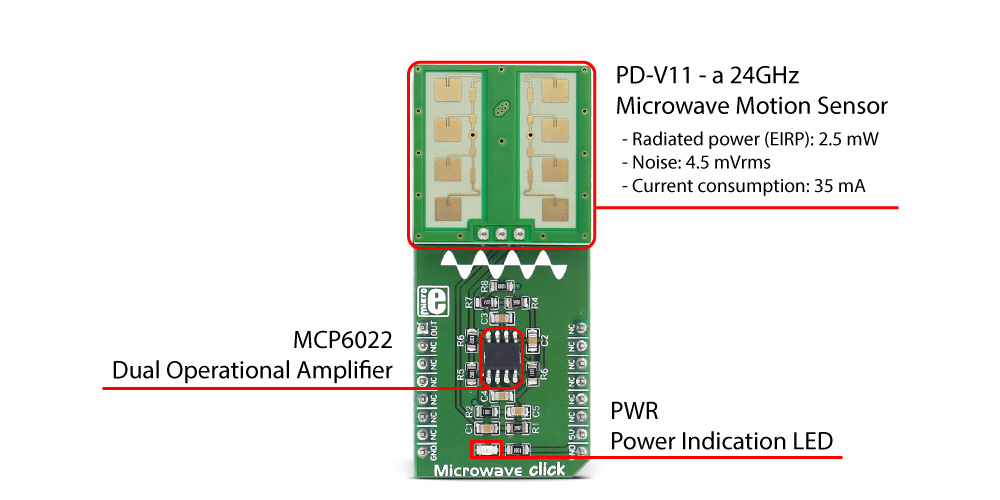
How Does The Microwave Click Board™ Work?
The Microwave Click Board™ detects movement of objects utilizing Doppler effect. When the PD-V11 microwave sensor is powered on, it starts transmitting radio waves of fixed frequency. As the waves hit a moving object they are reflected back toward PD-V11 microwave motion sensor, with their frequency changed, depending on speed and direction of object's movement.
The Doppler effect - a change in frequency of a wave for the observer and object move closer or further apart from one another. A typical example of the Doppler effect is when a vehicle with siren passes and you hear the pitch drop of the siren.
.jpg)
The PD-V11 microwave motion sensor low power consumption, low noise, and a low wireless power output. See the datasheet to learn more.
The PD-V11 microwave motion sensor picks up reflected waves and converts them to a voltage signal. This signal has the magnitude of several hundred microvolts, so it's sent to the MCP6022 which amplifies the signal, in order to make it readable over the Analog pin on the mikroBUS™. This signal is amplified up to 3.3V.
Once amplified, the signal is routed to the Analog pin (OUT) on the mikroBUS™ line. The proximity of the object can be determined by measuring the amplitude of this signal, and speed/direction by determining its frequency.
The range at which the Microwave Click Board™ can detect movement depends on the way the algorithm is written (see the Software Support section).
SPECIFICATIONS
| Type |
Motion |
| Applications |
ideal solution for building safety and security applications, entrance and exit management applications, and other applications that rely on a reliable moving object detection |
| On-board modules |
PD-V11 a 24GHz microwave motion sensor which detect motions using doppler effect |
| Key Features |
PD-V11 microwave motion sensor has low power consumption, low noise, and a low wireless power output |
| Interface |
Analog |
| Compatibility |
mikroBUS |
| Click board size |
L (57.15 x 25.4 mm) |
| Input Voltage |
5V |
PINOUT DIAGRAM
This table shows how the pinout of the Microwave Click Board™ corresponds to the pinout on the mikroBUS™ socket (the latter shown in the two middle columns).
| Notes |
Pin |
 |
Pin |
Notes |
| Amplified sensed signal output |
OUT |
1 |
AN |
PWM |
16 |
NC |
| NC |
2 |
RST |
INT |
15 |
NC |
| NC |
3 |
CS |
TX |
14 |
NC |
| NC |
4 |
SCK |
RX |
13 |
NC |
| NC |
5 |
MISO |
SCL |
12 |
NC |
| NC |
6 |
MOSI |
SDA |
11 |
NC |
| NC |
7 |
3.3V |
5V |
10 |
+5V |
Power supply |
| Ground |
GND |
8 |
GND |
GND |
9 |
GND |
Ground |
ONBOARD SETTINGS AND INDICATORS
| Label |
Name |
Default |
Description |
| PWR |
Power |
- |
Power LED, lights green when the power supply is established properly. |
- description_tag: The Microwave Click Board™ detects movement, thanks to the PD-V11 a 24GHz microwave motion sensor. The typical use for Microwave Click Board™ is a proximity or motion detector in various applications and devices. Available from Debug Store UK.
- title_tag: MikroE Microwave Click Board™ (MIKROE-2781)
- manufacturer: Mikroelektronika d.o.o.
- warranty: 12 months
- amazon_enable: TRUE
- amazon_title: Microwave Click Board
- amazon_product_type: computercomponent
- amazon_block: FALSE
- amazon_prime_enable: FALSE
- amazon_search: MikroElektronika Microelectronica MIKROE-1100
- amazon_uk_price: 22
- amazon_uk_currency: GBP
- amazon_de_currency: EUR
- amazon_de_price: 24.86
- amazon_fr_currency: EUR
- amazon_fr_price: 24.86
- amazon_es_currency: EUR
- amazon_es_price: 24.86
- amazon_nl_currency: EUR
- amazon_nl_price: 24.86
- amazon_it_currency: EUR
- amazon_it_price: 24.86
- amazon_se_curency: SEK
- amazon_se_price: 250.8
- amazon_product_id: 8606018711628
- amazon_product_id_type: EAN
- amazon_update: Update
- amazon_short_description: The Microwave Click Board™ detects movement, thanks to the PD-V11 a 24GHz microwave motion sensor. The typical use for Microwave Click Board™ is a proximity or motion detector in various applications and devices.The Microwave Click Board™ can detect movement or proximity by using the Doppler effect. The on-board microwave motions sensor transmits waves, and picks them back as they hit an object, with their frequency changed.Microwave Click Board™ does not need optical visibility to work, and the waves can penetrate many kinds of barriers and obstacles.
- amazon_long_description: The Microwave Click Board™ detects movement, thanks to the PD-V11 a 24GHz microwave motion sensor. The typical use for Microwave Click is a proximity or motion detector in various applications and devices.
The Microwave Click can detect movement or proximity by using the Doppler effect. The on-board microwave motions sensor transmits waves, and picks them back as they hit an object, with their frequency changed.
Microwave Click does not need optical visibility to work, and the waves can penetrate many kinds of barriers and obstacles.
What's on the Microwave Click
 .
.
How the Microwave Click Works
Microwave Click detects movement of objects utilising Doppler effect. When the PD-V11 microwave sensor is powered on, it starts transmitting radio waves of fixed frequency. As the waves hit a moving object they are reflected back toward PD-V11 microwave motion sensor, with their frequency changed, depending on speed and direction of object's movement.
The Doppler effect - a change in frequency of a wave for the observer and object move closer or further apart from one another. A typical example of the Doppler effect is when a vehicle with siren passes and you hear the pitch drop of the siren.
 .
.
The PD-V11 microwave motion sensor low power consumption, low noise, and a low wireless power output. See the datasheet to learn more.The PD-V11 microwave motion sensor picks up reflected waves and converts them to a voltage signal. This signal has the magnitude of several hundred microvolts, so it's sent to the MCP6022 which amplifies the signal, in order to make it readable over the Analog pin on the mikroBUS. This signal is amplified up to 3.3V.
Once amplified, the signal is routed to the Analog pin (OUT) on the mikroBUS line. The proximity of the object can be determined by measuring the amplitude of this signal, and speed/direction by determining its frequency.The range at which Microwave Click can detect movement depends on the way the algorithm is written (see the Software Support section).
- amazon_main_image: https://www.thedebugstore.com/images/product/lg-microwave-click-board.jpg
- amazon_browse_node: 428655031
- mpn: MIKROE-2781
- backorder_label: If no stock shown above, check availability
- condition: new
- custom_product: false
- mpn: MIKROE-2781
- google_product_category: Electronics
- custom_label_0: Click Board
- examples:
We provide a demo application for the Microwave click on LibStock, as well as a demo application (example), developed using MikroElektronika compilers. The demo application can run on all the main MikroElektronika development boards with minimal change to the code depending on the
microcontroller used.
Examples Description
The application is composed of three sections :
- System Initialization - GPIO, UART, and MCU ADC module initialization
- Application Initialization - Measurement of initial reference ADC value used for comparison and movement calculation
- Application Task - (code snippet) Sequential operation:
- Takes exact amount of samples
- Calculation of difference between taken samples and reference ADC value
- Reports movement if difference is greater than threshold value
void applicationTask()
{
 char txt[ 50 ];
 uint16_t counter = 0;
 uint16_t single = 0;
 uint16_t sampler = 0;
 uint32_t sum = 0;
 uint16_t detector = 0;
// SAMPLING
 for (sampler = 0; sampler < _SAMPLES_COUNT; sampler++ )
 {
 single = ADC1_Get_Sample( 8 );
 if (single < reference)
 {
 sum += single;
 counter++;
 }
 }
 LATD = 0x00; // Turn off D port before next measurement
// CALCULATION
 if (0 != counter)
 {
 detector = sum / counter;
// REPORTING
 if ((detector + _THRESHOLD) < reference)
 {
 WordToStr( detector, txt );
 UART2_Write_Text( "rnMOVE " );
 UART2_Write_Text( txt );
 LATD = 0xFF; // Turn on D port to report movement
 Delay_1ms();
 }
 }
}
The threshold value and number of samples taken per sequence can be easy adjusted by
changing the _SAMPLES_COUNT and _THRESHOLD constants.
Setting the samples count to values greater than 500 may slow down your application. The optimal value for this kind of application is 100.
The optimal threshold value depends on the resolution of the MCU's internal ADC module. A small threshold will make the application more sensitive and extend the range of the detection.
This example demonstrates how the click board™ can detect human movement up to 1,5m.
Note that this is a simple demonstration - a more accurate movement detection requires real digital signal processing. The board used for this demo must be still during the initialization process (power on).
The full application code, and ready to use projects can be found on LibStock.
Other mikroE Libraries used in the example:
Additional Notes and Information
Depending on the development board you are using, you may need USB UART click, USB UART 2 click or RS232 click to connect to your PC, for development systems with no UART to USB interface available on the board. The terminal available in all MikroElektronika compilers, or any other terminal application of your choice, can be used to read the message.
- attachments: [{"download_file":[{"download_file":"Microwave Click Board™ Schematic"}],"download_filetype":[{"download_filetype":"pdf"}]},{"download_file":[{"download_file":"pdlux PD-V11 Microwave Motion Sensor Datasheet"}],"download_filetype":[{"download_filetype":"pdf"}]}]
- device_vendor: Microchip Technology, Pdlux
- device_type: MCP6022-I/SN, PD-V11
- warranty: 12 months
- brand: MikroE
- manufacturer: Mikroelektronika d.o.o.
- badge: No reviews
- widget:
- brands: gid://shopify/Metaobject/56256004319
- breadcrumbs: ["gid://shopify/Collection/447955239135","gid://shopify/Collection/241680580797","gid://shopify/Collection/241545969853"]
- customhs_code: 847330
- detailed_description: {"type":"root","children":[{"type":"paragraph","children":[{"type":"text","value":"The "},{"type":"text","value":"Microwave Click Board™","bold":true,"italic":true},{"type":"text","value":" detects movement, thanks to the PD-V11 a 24GHz microwave motion sensor. The typical use for Microwave click is a proximity or motion detector in various applications and devices."}]},{"type":"paragraph","children":[{"type":"text","value":"The "},{"type":"text","value":"Microwave Click Board™","bold":true},{"type":"text","value":" can detect movement or proximity by using the Doppler effect. The onboard microwave motions sensor transmits waves, and picks them back as they hit an object, with their frequency changed."}]},{"type":"paragraph","children":[{"type":"text","value":"Microwave Click Board™","bold":true},{"type":"text","value":" does not need optical visibility to work, and the waves can penetrate many kinds of barriers and obstacles."}]},{"type":"heading","level":3,"children":[{"type":"text","value":"What's on the Microwave Click Board™?"}]},{"type":"paragraph","children":[{"type":"text","value":""}]},{"type":"heading","level":3,"children":[{"type":"text","value":"How Does The Microwave Click Board™ Work?"}]},{"type":"paragraph","children":[{"type":"text","value":"The "},{"type":"text","value":"Microwave Click Board™","bold":true},{"type":"text","value":" detects movement of objects utilizing Doppler effect. When the PD-V11 microwave sensor is powered on, it starts transmitting radio waves of fixed frequency. As the waves hit a moving object they are reflected back toward PD-V11 microwave motion sensor, with their frequency changed, depending on speed and direction of object's movement."},{"type":"text","value":""},{"type":"text","value":""},{"type":"text","value":""},{"type":"text","value":"The Doppler effect - a change in frequency of a wave for the observer and object move closer or further apart from one another. A typical example of the Doppler effect is when a vehicle with siren passes and you hear the pitch drop of the siren."},{"type":"text","value":""},{"type":"text","value":""},{"type":"text","value":""},{"type":"text","value":""},{"type":"text","value":""},{"type":"text","value":""},{"type":"text","value":""},{"type":"text","value":""},{"type":"text","value":"The PD-V11 microwave motion sensor low power consumption, low noise, and a low wireless power output. See the datasheet to learn more."},{"type":"text","value":""},{"type":"text","value":""},{"type":"text","value":""},{"type":"text","value":"The PD-V11 microwave motion sensor picks up reflected waves and converts them to a voltage signal. This signal has the magnitude of several hundred microvolts, so it's sent to the MCP6022 which amplifies the signal, in order to make it readable over the Analog pin on the mikroBUS™. This signal is amplified up to 3.3V."}]},{"type":"paragraph","children":[{"type":"text","value":"Once amplified, the signal is routed to the Analog pin (OUT) on the mikroBUS™ line. The proximity of the object can be determined by measuring the amplitude of this signal, and speed/direction by determining its frequency."},{"type":"text","value":""},{"type":"text","value":""},{"type":"text","value":""},{"type":"text","value":"The range at which the "},{"type":"text","value":"Microwave Click Board™","bold":true},{"type":"text","value":" can detect movement depends on the way the algorithm is written (see the Software Support section)."}]},{"type":"heading","level":3,"children":[{"type":"text","value":"SPECIFICATIONS"}]},{"type":"paragraph","children":[{"type":"text","value":"Type\nMotion\nApplications\nideal solution for building safety and security applications, entrance and exit management applications, and other applications that rely on a reliable moving object detection\nOn-board modules\nPD-V11 a 24GHz microwave motion sensor which detect motions using doppler effect\nKey Features\nPD-V11 microwave motion sensor has low power consumption, low noise, and a low wireless power output\nInterface\nAnalog\nCompatibility\nmikroBUS\nClick board size\nL (57.15 x 25.4 mm)\nInput Voltage\n5V"}]},{"type":"heading","level":3,"children":[{"type":"text","value":"PINOUT DIAGRAM"}]},{"type":"paragraph","children":[{"type":"text","value":"This table shows how the pinout of the "},{"type":"text","value":"Microwave Click Board™","bold":true},{"type":"text","value":" corresponds to the pinout on the mikroBUS™ socket (the latter shown in the two middle columns)."}]},{"type":"paragraph","children":[{"type":"text","value":"Notes\nPin\nPin\nNotes\nAmplified sensed signal output\nOUT\n1\nAN\nPWM\n16\nNC\nNC\n2\nRST\nINT\n15\nNC\nNC\n3\nCS\nTX\n14\nNC\nNC\n4\nSCK\nRX\n13\nNC\nNC\n5\nMISO\nSCL\n12\nNC\nNC\n6\nMOSI\nSDA\n11\nNC\nNC\n7\n3.3V\n5V\n10\n+5V\nPower supply\nGround\nGND\n8\nGND\nGND\n9\nGND\nGround"}]},{"type":"heading","level":3,"children":[{"type":"text","value":""},{"type":"text","value":"ONBOARD SETTINGS AND INDICATORS"}]},{"type":"paragraph","children":[{"type":"text","value":"Label\nName\nDefault\nDescription\nPWR\nPower\n-\nPower LED, lights green when the power supply is established properly."}]},{"type":"heading","level":3,"children":[{"type":"text","value":" "}]}]}
- summary: The Microwave Click Board™ detects movement, thanks to the PD-V11 a 24GHz microwave motion sensor. The typical use for Microwave Click Board™ is a proximity or motion detector in various applications and devices.
The Microwave Click Board™ can detect movement or proximity by using the Doppler effect. The onboard microwave motions sensor transmits waves and picks them back as they hit an object, with their frequency changed.
The board does not need optical visibility to work, and the waves can penetrate many kinds of barriers and obstacles.
 .
. .
.