# Title: OLED B Click Board™
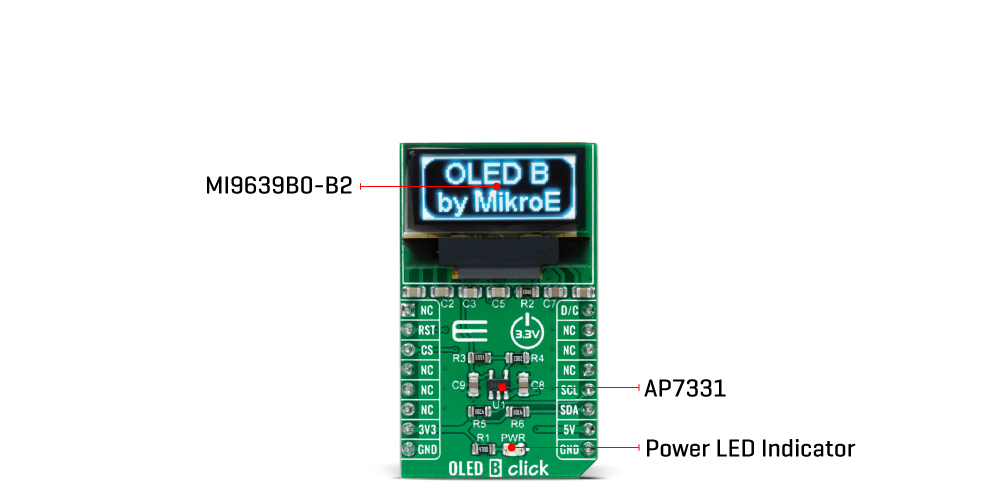
## Description: How Does The OLED B Click Board™ Work? The OLED B Click Board™ as its foundation uses the MI9639BO-B2, a 19.3x7.8mm 96x39px light blue monochrome passive matrix OLED display from Multi-Inno Technology. The MI9639BO-B2 display features an SSD1306, a 128x64 dot-matrix OLED/PLED segment/common driver with a controller. The controller has built-in functionalities like contrast control (256-step brightness control), normal or inverse image display, vertical and horizontal scrolling functions, and much more accessible through the I2C serial interface. OLEDs are emissive and don't require a separate backlight as LCD technology does, reducing the OLED display's overall power consumption compared to LCDs. It also does not suffer from loss of contrast due to bleed-through of the backlight in the "off" pixels. OLEDs, being emissive, have a consistent contrast ratio greater than 100:1 with no limitation in viewing angle. In addition, they don't suffer from temperature-related response time delays and contrast changes. Like any OLED display, the MI9639BO-B2 is made from a thin film of an organic compound that emits light when exposed to a current. A small monochrome display like this one represents an ideal solution for displaying text or icons. The MI9639BO-B2 display is bright, has a wide viewing angle, and low power consumption. In addition to the display's main power supply, taken from the +3.3V microBUS™ power rail, the MI9639BO-B2 has another power pin, more precisely the power supply for DC/DC converter circuit. This pin is the power supply pin for the internal buffer of the DC/DC voltage converter. Therefore, for this pin, the Click board™ uses a low dropout linear regulator AP7331 from Diodes Incorporated, providing a 3.6V power supply out of 5V mikroBUS™ rail. The OLED B Click Board™ communicates with MCU using the standard I2C 2-Wire interface to read data and configure settings. It provides the possibility of the communication-enable feature routed to the CS pin of the mikroBUS™ socket, enabling the OLED B Click for MCU communication only when the CS pin is pulled to a low logic state. In addition, it has two more pins. First is related to the reset function, routed to the RST pin on the mikroBUS™ socket (when the pin is in a low logic state, the initialization of the chip is executed), and the second labelled as D/C and routed to the PWM pin on the mikroBUS™ socket is I2C slave address selection pin. NOTE: If the noise accidentally occurs at the displaying window during the operation, please reset the display to recover the display function. The OLED B Click Board™ is designed to be operated only with a 3.3V logic voltage level, while 5V is used as a supply voltage of the AP7331 LDO. The board must perform appropriate logic voltage level conversion before use with MCUs with different logic levels. However, the Click board™ comes equipped with a library containing easy-to-use functions and an example code that can be used, as a reference, for further development. SPECIFICATIONS Type OLED Applications The OLED B Click Board™ is Ideal for displaying bright and crisp blue text or icons On-board modules SSD1306 controller, 96 x 39px blue monochrome passive matrix OLED display Key Features 96 x 39px resolution, 19.3 x 7.8mm active area Interface GPIO,I2C,SPI Compatibility mikroBUS Click board size M (42.9 x 25.4 mm) Input Voltage 3.3V,5V PINOUT DIAGRAM This table shows how the pinout of the OLED B Click Board™ corresponds to the pinout on the mikroBUS™ socket (the latter shown in the two middle columns). Notes Pin Pin Notes NC 1 AN PWM 16 D/C I2C Slave Address Selection Reset RST 2 RST INT 15 NC Communication Enable CS 3 CS RX 14 NC NC 4 SCK TX 13 NC NC 5 MISO SCL 12 SCL I2C Clock NC 6 MOSI SDA 11 SDA I2C Data Power Supply 3.3V 7 3.3V 5V 10 5V Power Supply Ground GND 8 GND GND 9 GND Ground ONBOARD SETTINGS AND INDICATORS Label Name Default Description LD1 PWR - Power LED Indicator OLED B CLICK ELECTRICAL SPECIFICATIONS Description Min Typ Max Unit Receiver inputs voltage range 3.3 - 5 V Receiver inputs voltage range - 96(H) x 39(V) - px Receiver inputs voltage range -40 +25 +70 °C
## Product type: Click Board
## Vendor: Mikroelektronika d.o.o.
## Tags: Click Board, Display, Display Interface, MikroE, Multi-Inno, OLED
## Price range: 20.3 - 20.3 GBP
## Link: https://thedebugstore.com/products/mikroe-1650-oled-b-click-board-uk
## Compare-at price range: 29.0 - 29.0 GBP
## Options
- Title: Default Title
## Collections
- [New Products](https://thedebugstore.com/a/llms/collections/new-products-debug-store)
- [Mikroelektronika d.o.o. (MikroE)](https://thedebugstore.com/a/llms/collections/mikroelektronika-catalogue-uk)
- [Display & Interface Click Boards™](https://thedebugstore.com/a/llms/collections/display-interface-click-boards-catalogue)
- [MikroE Click Boards™](https://thedebugstore.com/a/llms/collections/mikroe-click-boards-catalogue-uk)
- [Displays](https://thedebugstore.com/a/llms/collections/displays-catalogue-uk)
- [Boards](https://thedebugstore.com/a/llms/collections/circuit-boards-catalogue)
- [OLED Displays Click Boards™](https://thedebugstore.com/a/llms/collections/oled-display-click-boards-catalogue)
- [Click Boards™ Summer Sale](https://thedebugstore.com/a/llms/collections/inventory-sale)
- [Multi-Inno Technology Co., Ltd. Device Support: Boards & Tools | Debug Store](https://thedebugstore.com/a/llms/collections/multi-inno-technology-co-ltd-device-support)
- [MikroE Sale](https://thedebugstore.com/a/llms/collections/mikroe-sale)
- [MIKROE Stock](https://thedebugstore.com/a/llms/collections/mikroe-products-in-stock-sale)
## Variants
- Default Title, SKU: MIKROE-1650, Available: yes, Inventory: 3
## Metafields
- full_description:
How Does The OLED B Click Board™ Work?
The OLED B Click Board™ as its foundation uses the MI9639BO-B2, a 19.3x7.8mm 96x39px light blue monochrome passive matrix OLED display from Multi-Inno Technology. The MI9639BO-B2 display features an SSD1306, a 128x64 dot-matrix OLED/PLED segment/common driver with a controller. The controller has built-in functionalities like contrast control (256-step brightness control), normal or inverse image display, vertical and horizontal scrolling functions, and much more accessible through the I2C serial interface.
OLEDs are emissive and don't require a separate backlight as LCD technology does, reducing the OLED display's overall power consumption compared to LCDs. It also does not suffer from loss of contrast due to bleed-through of the backlight in the "off" pixels. OLEDs, being emissive, have a consistent contrast ratio greater than 100:1 with no limitation in viewing angle. In addition, they don't suffer from temperature-related response time delays and contrast changes.
Like any OLED display, the MI9639BO-B2 is made from a thin film of an organic compound that emits light when exposed to a current. A small monochrome display like this one represents an ideal solution for displaying text or icons. The MI9639BO-B2 display is bright, has a wide viewing angle, and low power consumption.
In addition to the display's main power supply, taken from the +3.3V microBUS™ power rail, the MI9639BO-B2 has another power pin, more precisely the power supply for DC/DC converter circuit. This pin is the power supply pin for the internal buffer of the DC/DC voltage converter. Therefore, for this pin, the Click board™ uses a low dropout linear regulator AP7331 from Diodes Incorporated, providing a 3.6V power supply out of 5V mikroBUS™ rail.
The OLED B Click Board™ communicates with MCU using the standard I2C 2-Wire interface to read data and configure settings. It provides the possibility of the communication-enable feature routed to the CS pin of the mikroBUS™ socket, enabling the OLED B Click for MCU communication only when the CS pin is pulled to a low logic state. In addition, it has two more pins. First is related to the reset function, routed to the RST pin on the mikroBUS™ socket (when the pin is in a low logic state, the initialization of the chip is executed), and the second labelled as D/C and routed to the PWM pin on the mikroBUS™ socket is I2C slave address selection pin.
NOTE: If the noise accidentally occurs at the displaying window during the operation, please reset the display to recover the display function.
The OLED B Click Board™ is designed to be operated only with a 3.3V logic voltage level, while 5V is used as a supply voltage of the AP7331 LDO. The board must perform appropriate logic voltage level conversion before use with MCUs with different logic levels. However, the Click board™ comes equipped with a library containing easy-to-use functions and an example code that can be used, as a reference, for further development.
SPECIFICATIONS
| Type |
OLED |
| Applications |
The OLED B Click Board™ is Ideal for displaying bright and crisp blue text or icons |
| On-board modules |
SSD1306 controller, 96 x 39px blue monochrome passive matrix OLED display |
| Key Features |
96 x 39px resolution, 19.3 x 7.8mm active area |
| Interface |
GPIO,I2C,SPI |
| Compatibility |
mikroBUS |
| Click board size |
M (42.9 x 25.4 mm) |
| Input Voltage |
3.3V,5V |
PINOUT DIAGRAM
This table shows how the pinout of the OLED B Click Board™ corresponds to the pinout on the mikroBUS™ socket (the latter shown in the two middle columns).
| Notes |
Pin |
 |
Pin |
Notes |
| NC |
1 |
AN |
PWM |
16 |
D/C |
I2C Slave Address Selection |
| Reset |
RST |
2 |
RST |
INT |
15 |
NC |
| Communication Enable |
CS |
3 |
CS |
RX |
14 |
NC |
| NC |
4 |
SCK |
TX |
13 |
NC |
| NC |
5 |
MISO |
SCL |
12 |
SCL |
I2C Clock |
| NC |
6 |
MOSI |
SDA |
11 |
SDA |
I2C Data |
| Power Supply |
3.3V |
7 |
3.3V |
5V |
10 |
5V |
Power Supply |
| Ground |
GND |
8 |
GND |
GND |
9 |
GND |
Ground |
ONBOARD SETTINGS AND INDICATORS
| Label |
Name |
Default |
Description |
| LD1 |
PWR |
- |
Power LED Indicator |
OLED B CLICK ELECTRICAL SPECIFICATIONS
| Description |
Min |
Typ |
Max |
Unit |
| Receiver inputs voltage range |
3.3 |
- |
5 |
V |
| Receiver inputs voltage range |
- |
96(H) x 39(V) |
- |
px |
| Receiver inputs voltage range |
-40 |
+25 |
+70 |
°C |
- description_tag: The OLED B Click Board™ is a display board with a blue monochrome passive-matrix OLED display. Available from Debug Store UK.
- title_tag: MikroE OLED B Click Board™ (MIKROE-1650)
- manufacturer: Mikroelektronika d.o.o.
- warranty: 12 months
- amazon_enable: TRUE
- amazon_title: OLED B Click Board
- amazon_product_type: computercomponent
- amazon_block: FALSE
- amazon_prime_enable: FALSE
- amazon_search: MikroElektronika Microelectronica MIKROE-1100
- amazon_uk_price: 21.12
- amazon_uk_currency: GBP
- amazon_de_currency: EUR
- amazon_de_price: 23.8656
- amazon_fr_currency: EUR
- amazon_fr_price: 23.8656
- amazon_es_currency: EUR
- amazon_es_price: 23.8656
- amazon_nl_currency: EUR
- amazon_nl_price: 23.8656
- amazon_it_currency: EUR
- amazon_it_price: 23.8656
- amazon_se_curency: SEK
- amazon_se_price: 240.768
- amazon_product_id: 8606015075556
- amazon_product_id_type: EAN
- amazon_update: Update
- amazon_short_description: The OLED B Click Board™ is a display board with a white monochrome passive-matrix OLED display. This bright and clear 96x39 pixel display is designed to be viewable from wide angles. Controlled by SSD1306 controller, OLED B Click Board™ offers a range of functionalities, including horizontal and vertical scrolling, contrast control, normal or inverse image display and more. The Click Board™ uses SPI or I2C MikroBUS lines to communicate with the target board microcontroller. The interface outputs can be chosen by resoldering three jumpers to the appropriate position. In spite of a sharp, high-contrast display, OLED B Click Board™ operates on low power consumption. It is an ideal choice for displaying lines of text or icons. This module uses a 3.3V power supply only.
- amazon_long_description: Small but Bright and Crisp Display
The OLED B Click Board™ features a passive matrix monochrome OLED display featuring small (19.3 x 7.8mm) active display area with a bright and crisp 96 x 39px resolution. The wide viewing angle allows the user to watch your display from any position without losing sight .
.
on-board SSD1306 Controller
SSD1306 is a single-chip CMOS OLED driver that embeds with contrast control, display RAM and oscillator, which reduces the number of external components and power consumption. The controller provides horizontal and vertical scrolling functions, contrast control, normal or inverse image display, and more.
Other OLED Displays
Just like OLED B Click (for blue text), OLED W Click (for white text) is also a member of the monochrome OLED display family. The only difference between these two OLED displays is the colour in which the text is displayed.
- amazon_main_image: https://www.thedebugstore.com/images/product/lg-mikroe-click-oled-b_1_1.jpg
- amazon_browse_node: 428655031
- mpn: MIKROE-1650
- backorder_label: If no stock shown above, check availability
- google_product_category: 222
- condition: new
- custom_product: false
- mpn: MIKROE-1650
- google_product_category: Electronics
- custom_label_0: Click Board
- examples:
We provide a library for the OLED B Click Board™ as well as a demo application (example), developed using MikroElektronika compilers. The demo can run on all the main MikroElektronika development boards.
The package can be downloaded/installed directly from NECTO Studio The package Manager (recommended), downloaded from our LibStock™ or found on MikroE Github account.
Library Description
This library contains API for the OLED B Click Board™.
Key Functions
oledb_cfg_setup - Config Object Initialization function.oledb_init - Initialization function.
Example Description
This example demonstrates the use (control) of the OLED B Click Board™.
The demo application is composed of two sections:
void application_init ( void ) {
    log_cfg_t log_cfg;  /**< Logger config object. */
    oledb_cfg_t oledb_cfg;  /**< Click config object. */

    // Logger initialization.
    LOG_MAP_USB_UART( log_cfg );
    log_cfg.level = LOG_LEVEL_DEBUG;
    log_cfg.baud = 115200;
    log_init( &logger, &log_cfg );
    Delay_ms( 100 );
    log_info( &logger, " Application Init " );

    // Click initialization.
    oledb_cfg_setup( &oledb_cfg );
    OLEDB_MAP_MIKROBUS( oledb_cfg, MIKROBUS_1 );
    err_t init_flag  = oledb_init( &oledb, &oledb_cfg );
    if ( ( I2C_MASTER_ERROR == init_flag ) || ( SPI_MASTER_ERROR == init_flag ) ) {
        log_error( &logger, " Application Init Error. " );
        log_info( &logger, " Please, run program again... " );

        for ( ; ; );
    }

    oledb_default_cfg ( &oledb );
    log_info( &logger, " Application Task " );
}
The full application code, and ready to use projects can be installed directly from NECTO Studio The package Manager (recommended), downloaded from our LibStock™ or found on MikroE Github account.
Other MikroE Libraries used in the example:
- MikroSDK.Board
- MikroSDK.Log
- Click.OLEDB
Additional Notes and Information
Depending on the development board you are using, you may need a USB UART click, USB UART 2 click or RS232 click to connect to your PC, for development systems with no UART to USB interface available on the board. The terminal available in all MikroElektronika compilers, or any other terminal application of your choice, can be used to read the message.
MIKROSDK
The OLED B Click Board™ is supported with mikroSDK - MikroElektronika Software Development Kit. To ensure proper operation of mikroSDK compliant Click board™ demo applications, mikroSDK should be downloaded from the LibStock and installed for the compiler you are using.
- attachments: [{"download_file":[{"download_file":"OLED B Click Board™ User Manual"}],"download_filetype":[{"download_filetype":"pdf"}]},{"download_file":[{"download_file":"OLED B Click Board™ Schematic"}],"download_filetype":[{"download_filetype":"pdf"}]},{"download_file":[{"download_file":"Multi-Inno Technology MI9639BO-B2 Passive OLED Display Datasheet"}],"download_filetype":[{"download_filetype":"pdf"}]},{"download_file":[{"download_file":"Solomon Systech SSD1306 OLED Driver Datasheet"}],"download_filetype":[{"download_filetype":"pdf"}]}]
- device_vendor: Multi-Inno Technology Co., Ltd.
- device_type: MI9639BO-B
- warranty: 12 months
- brand: MikroE
- manufacturer: Mikroelektronika d.o.o.
- badge: No reviews
- widget:
- brands: gid://shopify/Metaobject/56256004319
- breadcrumbs: ["gid://shopify/Collection/447955239135","gid://shopify/Collection/241680580797","gid://shopify/Collection/241544822973"]
- customhs_code: 847330
- detailed_description: {"type":"root","children":[{"type":"heading","level":3,"children":[{"type":"text","value":""}]},{"type":"heading","level":3,"children":[{"type":"text","value":"How Does The OLED B Click Board™ Work?"}]},{"type":"paragraph","children":[{"type":"text","value":"The "},{"type":"text","value":"OLED B Click Board™","bold":true,"italic":true},{"type":"text","value":" as its foundation uses the MI9639BO-B2, a 19.3x7.8mm 96x39px light blue monochrome passive matrix OLED display from Multi-Inno Technology. The MI9639BO-B2 display features an SSD1306, a 128x64 dot-matrix OLED/PLED segment/common driver with a controller. The controller has built-in functionalities like contrast control (256-step brightness control), normal or inverse image display, vertical and horizontal scrolling functions, and much more accessible through the I2C serial interface."}]},{"type":"paragraph","children":[{"type":"text","value":""}]},{"type":"paragraph","children":[{"type":"text","value":"OLEDs are emissive and don't require a separate backlight as LCD technology does, reducing the OLED display's overall power consumption compared to LCDs. It also does not suffer from loss of contrast due to bleed-through of the backlight in the \"off\" pixels. OLEDs, being emissive, have a consistent contrast ratio greater than 100:1 with no limitation in viewing angle. In addition, they don't suffer from temperature-related response time delays and contrast changes."}]},{"type":"paragraph","children":[{"type":"text","value":"Like any OLED display, the MI9639BO-B2 is made from a thin film of an organic compound that emits light when exposed to a current. A small monochrome display like this one represents an ideal solution for displaying text or icons. The MI9639BO-B2 display is bright, has a wide viewing angle, and low power consumption."}]},{"type":"paragraph","children":[{"type":"text","value":"In addition to the display's main power supply, taken from the +3.3V microBUS™ power rail, the MI9639BO-B2 has another power pin, more precisely the power supply for DC/DC converter circuit. This pin is the power supply pin for the internal buffer of the DC/DC voltage converter. Therefore, for this pin, the Click board™ uses a low dropout linear regulator AP7331 from Diodes Incorporated, providing a 3.6V power supply out of 5V mikroBUS™ rail."}]},{"type":"paragraph","children":[{"type":"text","value":"The "},{"type":"text","value":"OLED B Click Board™","bold":true},{"type":"text","value":" communicates with MCU using the standard I2C 2-Wire interface to read data and configure settings. It provides the possibility of the communication-enable feature routed to the CS pin of the mikroBUS™ socket, enabling the OLED B Click for MCU communication only when the CS pin is pulled to a low logic state. In addition, it has two more pins. First is related to the reset function, routed to the RST pin on the mikroBUS™ socket (when the pin is in a low logic state, the initialization of the chip is executed), and the second labelled as D/C and routed to the PWM pin on the mikroBUS™ socket is I2C slave address selection pin."}]},{"type":"paragraph","children":[{"type":"text","value":"NOTE: ","bold":true},{"type":"text","value":" If the noise accidentally occurs at the displaying window during the operation, please reset the display to recover the display function."}]},{"type":"paragraph","children":[{"type":"text","value":"The "},{"type":"text","value":"OLED B Click Board™","bold":true},{"type":"text","value":" is designed to be operated only with a 3.3V logic voltage level, while 5V is used as a supply voltage of the AP7331 LDO. The board must perform appropriate logic voltage level conversion before use with MCUs with different logic levels. However, the Click board™ comes equipped with a library containing easy-to-use functions and an example code that can be used, as a reference, for further development."}]},{"type":"heading","level":3,"children":[{"type":"text","value":"SPECIFICATIONS"}]},{"type":"paragraph","children":[{"type":"text","value":"Type\nOLED\nApplications\nThe OLED B Click Board™ is Ideal for displaying bright and crisp blue text or icons\nOn-board modules\nSSD1306 controller, 96 x 39px blue monochrome passive matrix OLED display\nKey Features\n96 x 39px resolution, 19.3 x 7.8mm active area\nInterface\nGPIO,I2C,SPI\nCompatibility\nmikroBUS\nClick board size\nM (42.9 x 25.4 mm)\nInput Voltage\n3.3V,5V"}]},{"type":"heading","level":3,"children":[{"type":"text","value":"PINOUT DIAGRAM"}]},{"type":"paragraph","children":[{"type":"text","value":"This table shows how the pinout of the "},{"type":"text","value":"OLED B Click Board™","bold":true},{"type":"text","value":" corresponds to the pinout on the mikroBUS™ socket (the latter shown in the two middle columns)."}]},{"type":"paragraph","children":[{"type":"text","value":"Notes\nPin\nPin\nNotes\nNC\n1\nAN\nPWM\n16\nD/C\nI2C Slave Address Selection\nReset\nRST\n2\nRST\nINT\n15\nNC\nCommunication Enable\nCS\n3\nCS\nRX\n14\nNC\nNC\n4\nSCK\nTX\n13\nNC\nNC\n5\nMISO\nSCL\n12\nSCL\nI2C Clock\nNC\n6\nMOSI\nSDA\n11\nSDA\nI2C Data\nPower Supply\n3.3V\n7\n3.3V\n5V\n10\n5V\nPower Supply\nGround\nGND\n8\nGND\nGND\n9\nGND\nGround"}]},{"type":"heading","level":3,"children":[{"type":"text","value":"ONBOARD SETTINGS AND INDICATORS"}]},{"type":"paragraph","children":[{"type":"text","value":"Label\nName\nDefault\nDescription\nLD1\nPWR\n-\nPower LED Indicator"}]},{"type":"heading","level":3,"children":[{"type":"text","value":"OLED B CLICK ELECTRICAL SPECIFICATIONS"}]},{"type":"paragraph","children":[{"type":"text","value":"Description\nMin\nTyp\nMax\nUnit\nReceiver inputs voltage range\n3.3\n-\n5\nV\nReceiver inputs voltage range\n-\n96(H) x 39(V)\n-\npx\nReceiver inputs voltage range\n-40\n+25\n+70\n°C"}]},{"type":"heading","level":3,"children":[{"type":"text","value":" "}]}]}
- summary: The OLED B Click Board™ is a display board with a blue monochrome passive-matrix OLED display. This bright and clear 96x39 pixel display is designed to be viewable from wide angles. Controlled by SSD1306 controller, OLED B Click Board™ offers a range of functionalities, including horizontal and vertical scrolling, contrast control, normal or inverse image display and more. The Click Board™ uses SPI or I2C MikroBUS lines to communicate with the target board microcontroller. The interface outputs can be chosen by resoldering three jumpers to the appropriate position. In spite of a sharp, high-contrast display,
The OLED B Click Board™ operates on low power consumption. It is an ideal choice for displaying lines of text or icons. This module uses a 3.3V power supply only.