# Title: Lineeye SI-60-E LAN to RS-232C Interface Converter
## Description: ■Block Chart RS-232C connector pin arrangement Pin *1 Signal I/O *2 DTE DCE 1 FG - - 2 SD Out In 3 RD In Out 4 RS (RTS) Out In 5 CS (CTS) In Out 6 DR (DSR) *3 In In 7 GND - - 9 +DC IN *4 - - 20 ER (DTR) *3 In In *1: Pins not listed here are not connected. *2: The DTE/DCE selector switch changes In and Out. *3: Pins 6 and 20 are internally connected in this unit. *4: Power can be supplied from this pin when the AC adapter is not used. ■Example of SI-60 Connection Attached software (COM port Redirector TM ) controls the RS-232C device as if it is connecting directly to the serial port (COM1 to n) of PC. This reduces the modification of communication programs. Also, you can transmit/receive RS-232C serial data directly using the TCP/IP socket communication method. ■Locate RS-232C devices to further place using LAN cable 2sets of SI-60 makes it possible to locate the RS-232C devices in the far place using LAN cable. One set of SI-60 has to be in Server mode (or Server and Client mode) and the other one has to be in Client mode (or Server and Client) mode. ■Connection with LINEEYE analyzer By connecting the LINEEYE analyzers to LAN (Ethernet) using SI-60, you can analyze the data on a PC in the office far from the workplace in real time, continuously measuring the data between the device A and B. ■Space-saving Able to install the device on the 35mm DIN rail using Optional DIN plate (SI-DIN70), and to install it on the wall using the optional wall bracket (SI-WM1). DIN Rail Installation Example Optional "Metal Fitting for Wall" ■2 kinds of power input Able to supply the power from attached AC adapter. Supplying power from Dsub 9pin of device via RS-232C device eliminates the use of AC adapter and saves space. ■A Useful Tool for Multiple Operation SILANIOinit is a configuration tool for LINEEYE products embedded WiPort-NR. It is useful and saves time to rewrite the WiPort-NR configuration file (Setup Record) . [ Functions ] Searches the device on the Network. Displays the MAC address. Reads and saves the configuration (set-up record) of converter. Writes to the set-up record of selected converter. Sets the IP address of selected converter. Configuration tool (SILANIOinit)
## Product type: Interface Converter
## Vendor: Lineeye Co Ltd
## Tags: Comms Analyser Accessory, Lineeye, lineeye-co-ltd
## Price range: 270.0 - 270.0 GBP
## Link: https://thedebugstore.com/products/lineeye-si-60-e-interface-converter-lan-rs-232c-uk
## Options
- Title: Default Title
## Collections
- [New Products](https://thedebugstore.com/a/llms/collections/new-products-debug-store)
- [Lineeye Co Ltd](https://thedebugstore.com/a/llms/collections/lineeye-co-ltd-catalogue)
- [Admin: No Inventory](https://thedebugstore.com/a/llms/collections/no-inventory)
- [Communication Analysers Accesories](https://thedebugstore.com/a/llms/collections/communication-analyser-accessories)
## Variants
- Default Title, SKU: SI-60-E, Available: yes, Inventory: 0
## Metafields
- manufacturer: Lineeye Co Ltd
- warranty: 12 months
- amazon_enable: FALSE
- amazon_title: Interface converter (LANnRS-232C)(Dsub 25pin)
- amazon_product_type: computercomponent
- amazon_block: FALSE
- amazon_prime_enable: FALSE
- amazon_search: Lineeye
- amazon_uk_currency: GBP
- amazon_de_currency: EUR
- amazon_de_price: 0
- amazon_fr_currency: EUR
- amazon_fr_price: 0
- amazon_es_currency: EUR
- amazon_es_price: 0
- amazon_nl_currency: EUR
- amazon_nl_price: 0
- amazon_it_currency: EUR
- amazon_it_price: 0
- amazon_se_curency: SEK
- amazon_se_price: 0
- amazon_product_id_type: EAN
- amazon_update: Update
- amazon_browse_node: 428655031
- mpn: SI-60-E
- backorder_label: If no stock is shown above, order now and we'll ship within 10 working days.
- title_tag: Lineeye LAN to RS-232C Converter (SI-60-E
- badge: No reviews
- widget:
- description_tag: The Lineeye SI-60 is an interface converter to connect factory automation equipment and analyzers, which only have the RS-232C serial communication port, to LAN. Available from Debug Store UK.
- full_description: ■Block Chart
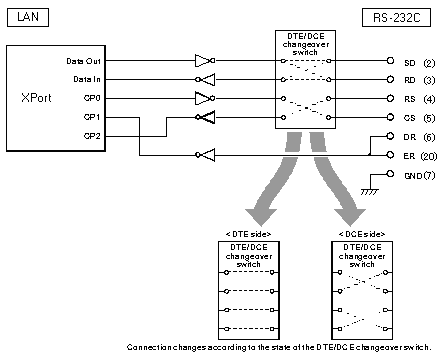
RS-232C connector pin arrangement
| Pin *1 |
Signal |
I/O *2 |
| DTE |
DCE |
| 1 |
FG |
- |
- |
| 2 |
SD |
Out |
In |
| 3 |
RD |
In |
Out |
| 4 |
RS (RTS) |
Out |
In |
| 5 |
CS (CTS) |
In |
Out |
| 6 |
DR (DSR) *3 |
In |
In |
| 7 |
GND |
- |
- |
| 9 |
+DC IN *4 |
- |
- |
| 20 |
ER (DTR) *3 |
In |
In |
*1: Pins not listed here are not connected. *2: The DTE/DCE selector switch changes In and Out. *3: Pins 6 and 20 are internally connected in this unit. *4: Power can be supplied from this pin when the AC adapter is not used.
■Example of SI-60 Connection
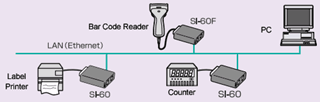
Attached software (COM port Redirector TM ) controls the RS-232C device as if it is connecting directly to the serial port (COM1 to n) of PC. This reduces the modification of communication programs. Also, you can transmit/receive RS-232C serial data directly using the TCP/IP socket communication method.
■Locate RS-232C devices to further place using LAN cable
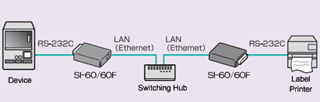
2sets of SI-60 makes it possible to locate the RS-232C devices in the far place using LAN cable. One set of SI-60 has to be in Server mode (or Server and Client mode) and the other one has to be in Client mode (or Server and Client) mode.
■Connection with LINEEYE analyzer
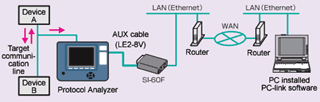
By connecting the LINEEYE analyzers to LAN (Ethernet) using SI-60, you can analyze the data on a PC in the office far from the workplace in real time, continuously measuring the data between the device A and B.
■Space-saving
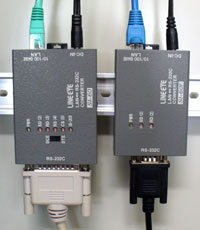
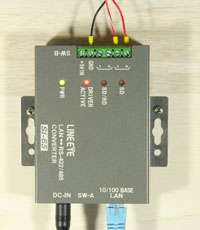
Able to install the device on the 35mm DIN rail using Optional DIN plate (SI-DIN70), and to install it on the wall using the optional wall bracket (SI-WM1).
DIN Rail Installation Example
Optional "Metal Fitting for Wall"
■2 kinds of power input
Able to supply the power from attached AC adapter. Supplying power from Dsub 9pin of device via RS-232C device eliminates the use of AC adapter and saves space.
■A Useful Tool for Multiple Operation
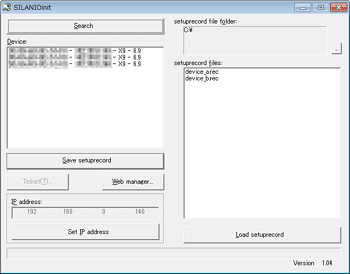
SILANIOinit is a configuration tool for LINEEYE products embedded WiPort-NR. It is useful and saves time to rewrite the WiPort-NR configuration file (Setup Record) .
[ Functions ]
- Searches the device on the Network. Displays the MAC address.
- Reads and saves the configuration (set-up record) of converter.
- Writes to the set-up record of selected converter.
- Sets the IP address of selected converter.
Configuration tool (SILANIOinit)
- attachments: [{"download_file":[{"download_file":"Lineeye SI-60-E LAN to RS-232C Interface Converter User Manual"}],"download_filetype":[{"download_filetype":"pdf"}]}]
- condition: new
- custom_product: false
- mpn: SI-60-E
- google_product_category: Electronics
- custom_label_0: Protocol Analyser Accessory
- warranty: 12 months
- brand: Lineeye
- manufacturer: Lineeye Co Ltd
- brands: gid://shopify/Metaobject/56254988511
- customhs_code: 903089
- detailed_description: {"type":"root","children":[{"type":"heading","level":5,"children":[{"type":"text","value":"■Block Chart"}]},{"type":"paragraph","children":[{"type":"text","value":""}]},{"type":"heading","level":6,"children":[{"type":"text","value":"RS-232C connector pin arrangement"}]},{"type":"paragraph","children":[{"type":"text","value":"Pin *1\nSignal\nI/O *2\nDTE\nDCE\n1\nFG\n-\n-\n2\nSD\nOut\nIn\n3\nRD\nIn\nOut\n4\nRS (RTS)\nOut\nIn\n5\nCS (CTS)\nIn\nOut\n6\nDR (DSR) *3\nIn\nIn\n7\nGND\n-\n-\n9\n+DC IN *4\n-\n-\n20\nER (DTR) *3\nIn\nIn"}]},{"type":"paragraph","children":[{"type":"text","value":"*1: Pins not listed here are not connected. *2: The DTE/DCE selector switch changes In and Out. *3: Pins 6 and 20 are internally connected in this unit. *4: Power can be supplied from this pin when the AC adapter is not used."}]},{"type":"heading","level":5,"children":[{"type":"text","value":"■Example of SI-60 Connection"}]},{"type":"paragraph","children":[{"type":"text","value":"Attached software (COM port Redirector "},{"type":"text","value":"TM "},{"type":"text","value":") controls the RS-232C device as if it is connecting directly to the serial port (COM1 to n) of PC. This reduces the modification of communication programs. Also, you can transmit/receive RS-232C serial data directly using the TCP/IP socket communication method."}]},{"type":"paragraph","children":[{"type":"text","value":""}]},{"type":"heading","level":5,"children":[{"type":"text","value":"■Locate RS-232C devices to further place using LAN cable"}]},{"type":"paragraph","children":[{"type":"text","value":"2sets of SI-60 makes it possible to locate the RS-232C devices in the far place using LAN cable. One set of SI-60 has to be in Server mode (or Server and Client mode) and the other one has to be in Client mode (or Server and Client) mode."}]},{"type":"paragraph","children":[{"type":"text","value":""}]},{"type":"heading","level":5,"children":[{"type":"text","value":"■Connection with LINEEYE analyzer"}]},{"type":"paragraph","children":[{"type":"text","value":"By connecting the LINEEYE analyzers to LAN (Ethernet) using SI-60, you can analyze the data on a PC in the office far from the workplace in real time, continuously measuring the data between the device A and B."}]},{"type":"paragraph","children":[{"type":"text","value":""}]},{"type":"heading","level":5,"children":[{"type":"text","value":"■Space-saving"}]},{"type":"paragraph","children":[{"type":"text","value":"Able to install the device on the 35mm DIN rail using Optional DIN plate (SI-DIN70), and to install it on the wall using the optional wall bracket (SI-WM1)."}]},{"type":"paragraph","children":[{"type":"text","value":"DIN Rail Installation Example"},{"type":"text","value":""},{"type":"text","value":""},{"type":"text","value":""}]},{"type":"paragraph","children":[{"type":"text","value":"Optional \"Metal Fitting for Wall\""},{"type":"text","value":""},{"type":"text","value":""},{"type":"text","value":""}]},{"type":"heading","level":5,"children":[{"type":"text","value":"■2 kinds of power input"}]},{"type":"paragraph","children":[{"type":"text","value":"Able to supply the power from attached AC adapter. Supplying power from Dsub 9pin of device via RS-232C device eliminates the use of AC adapter and saves space."}]},{"type":"heading","level":5,"children":[{"type":"text","value":"■A Useful Tool for Multiple Operation"}]},{"type":"paragraph","children":[{"type":"text","value":" "}]},{"type":"paragraph","children":[{"type":"text","value":"SILANIOinit is a configuration tool for LINEEYE products embedded WiPort-NR. It is useful and saves time to rewrite the WiPort-NR configuration file (Setup Record) ."}]},{"type":"heading","level":6,"children":[{"type":"text","value":"[ Functions ]"}]},{"type":"list","listType":"unordered","children":[{"type":"list-item","children":[{"type":"text","value":"Searches the device on the Network. Displays the MAC address."}]},{"type":"list-item","children":[{"type":"text","value":"Reads and saves the configuration (set-up record) of converter."}]},{"type":"list-item","children":[{"type":"text","value":"Writes to the set-up record of selected converter."}]},{"type":"list-item","children":[{"type":"text","value":"Sets the IP address of selected converter."}]}]},{"type":"paragraph","children":[{"type":"text","value":"Configuration tool (SILANIOinit)"},{"type":"text","value":""},{"type":"text","value":""},{"type":"text","value":""}]}]}
- summary: The Lineeye SI-60-E is an interface converter to connect factory automation equipment and analyzers, which only have the RS-232C serial communication port, to LAN. The built-in Lantronix Xport® on the LAN interface converts RS-232C data into LAN protocol (TCP/IP). The device supports a 35mm DIN rail and a wide range of operating temperatures. Therefore, you can use it for factory automation without worry.