# Title: Lineeye LE-3500XR(V2)-E Handheld Multi-Protocol Serial Analyser
## Description: Smaller and Lighter With Full Communication Analysis Functionality The LE-3500XR(V2)-E is smaller and lighter than the conventional models while fully equipped with the online monitor function which records and displays communication data without affecting the communication line, the simulation function which performs transmit/receive test as a communication partner, and the bit error rate test (BERT) function. Equipped With a Colour LCD The LE-3500XR-E has a 4.3-inch colour touch display with a wide viewing angle. The communication data which can be displayed on one screen has increased compared to the conventional model, and the color monitor makes the line monitor display easier to see. In particular, the visibility of the line state signal display and error data display has dramatically improved. Time Stamp Display Date/time unit "year/month/day hour:minute", "month/day hour:minute:second", "day hour:minute:second.10msec", etc. can be specified. Idle Time Display Time resolution 100msec, 10msec, 1msec can be specified Error and Specific Data Display Hybrid operation of capacitive touch panel and Physical Key Switch The capacitive touch panel offers intuitive touch selection and swipe operations like a smartphone. it supports key switch operation for when wearing gloves. The key operation similar to the conventional model is inherited as the shortcut key operation Swipe to scroll monitored communciation data up/down/left/right Efficient text input by using the full keyboard displayed on the screen Shortcut keys example [MENU] and [0] Configuration display[MENU] and [2] Trigger display[MENU] and [4] Waveform monitor setting[MENU] and [9] Data table selection display[MENU] and [F] Program edit display of the PROGRAM mode Key operation is useful for some functions In the MANUAL simulation mode, in which communication test data is assigned to the keys and the communication response of the device under test is checked on the screen while the test data is sent by key operation, the key operations is useful as the monitor display screen can be widely used. Supports Multiple Communication Protocols and Interfaces This model supports measurement of RS-232C, RS-422/485, and TTL (1.8V-5V system) signal level UART communication, I2C, and SPI. A wide range of options are available to extend the measurement function to legacy ports such as X.20/21 and V.35, current loop communication, and in-vehicle communication such as CAN, CAN FD, LIN, and CXPI. The TTL measurement port supports external trigger input/output This external trigger input/output terminal can be used for 1.8V/2.5V/3.3V/5V signal level UART communication, I2C, SPI measurement and measurement linked with an external measuring instrument. *1: 2.54mm pitch, HIF3FC-10PA-2.54DS(71) Hirose Electric equivalent*2: Output during simulation, but SS and SCK are input during SPI slave*3: Output the specified voltage of TTL port during simulation (maximum 30mA) It can be used for connection of TTL communication signals and external trigger signals.If you use both at the same time, please purchase extra. The RS-422/485 measurement port is removable terminal block The RS-422/485 cable can be directly connected to the port. When you temporarily need to disconnect the analyzer from the monitor line, you do not need to screw off the cable, you just need to detach the terminal. Supports DSUB 9-pin and DSUB 25-pin of RS-232C as standard The RS-232C measurement port adopts the DSUB25 pin where the transmission/reception synchronization clock signal is arranged. As the produt includes a DSUB 25-pin monitor cable, DSUB 25-pin to 9-pin conversion adapter, and DSUB 9-pin monitor cable, it can be connected to both DSUB 25-pin and DSUB 9-pin of a RS-232C device. Various Line Monitor Displays According to the Communication Protocol Flexible support for ASYNC asynchronous communication from legacy to present It can monitor asynchronous communciation in which one data consists of a start bit, data bits (5 to 8 bits), parity bit (none, odd number, even, mark, space, or multiprocessor bit definition MP), and stop bit (1, 2 bits).The MSB first transfer of the legacy protocol can be selected, and the suppress (removal) of the flag character is supported by the ASYNC-PPP protocol. Bit synchronous communication such as character synchronous communication and HDLC BSC communication synchronized with the SYNC character and HDLC/SDLC synchronized with the flag bit can be measured. It supports BCC/FCS (block check code/frame check sequence) judgment and HDLC address filters. NRZ, NRZI, FM0, FM1 data modulation formats can be selected. Support Modbus, a fieldbus protocol, as a standard Even in high-speed Modbus communication, it can accurately detect the idle time (silent interval) for 3.5 characters and then separate and measure the communication frames. It supports Modbus-ASCII and Modbus-RTU data formats, and the LRC/CRC frame check is automatically performed according to the data format, thus error judgment display and error trigger are available. You can easily monitor SPI and I2C of TTL level communication You can easily monitor I2C and SPI communication used in sensor modules, AD conversion ICs, memory ICs, etc. Also, transmission/reception tests can be performed on the master side or slave side. 2C monitoring example> Logic analyzer function and signal voltage measurement function The analzyer has a logic analyzer function which can measure the timing of communication lines with a time resolution of up to 50 nsec. It also has a function to measure RS-232C signals and TTL voltage amplitude which are difficult for testers to hit. Statistical Analysis Function Statistics of the number of transmitted/received data, the number of frames, and the number of times the trigger condition is satisfied are displayed in a graph in units of 1 to 240 minutes. You can see the communication traffic (line usage rate) and error occurrence tendency for each time zone. Smoothly swipe and display long-term trend recording data Mega-speed measurement, arbitrary speed can be set with 4 significant figures It supports half-duplex/full-duplex line monitors up to 2.048 Mbps, simulation transmission test, and BERT measurement. As it has a high-precision DPLL circuit, you can set any communication speed (baud rate) of 50 bps to 2.048 Mbps separately for transmission and reception with 4 significant digits. Therefore, it is possible to support devices with special communication speeds, and it is also possible to intentionally send test data with slightly different communication speeds from this analyzer to evaluate the speed margin of the device under test. Long time recording by AUTO SAVE function By using the auto save function, you can save communication data to SDHC card or USB memory continuously for a long time. As the data is saved in multiple log files of the specified size (#nnnnnnn.DT: n is a sequential number in the order of saving), you can narrow down the communication logs of before and after the failure from the time stamp of the file in the time zone when the communication failure occurred. Safely records measured communication files even if the battery runs out suddenly In the conventional model, if the power is turned off while recording the communication log file, the file may be damaged and communication data cannot be analyzed. With this model, even if the internal battery is exhausted after a bus power failure, the communication status up to that point can be safely saved in a file. *: When you use an extremely depleted battery, the file protection process for right before the battery run out may not be in time and the file may be damaged. Target Line Speed (bps)*1 Main memory only Using 8GB external memory*2 Using 32GB external memory*2 9600bps Approx. 6hrs. Approx. 20days Approx. 80days 115.2Kbps Approx. 28min. Approx. 37hrs. Approx. 6.5days 1Mbps Approx. 200sec. Approx. 5hrs. Approx. 20hrs. *1: When 1 kilobyte data is repeatedly transmitted by full duplex with intervals of 1m second idle time for each. Both transmission and reception data consume 4 byte of memory for each capture. *2: When using SD-8GX and SD-32GX (optional) Saving the captured data to USB flash or SD card External memory up to 32GB Supports optional SD card (such as SD-32GX) or USB flash Added a mode to prevent overwriting of communication log files Besides the Restart mode - the communication log files are recorded up to the specified number of files, the communication log file with the smallest file number is deleted and the communication data is endlessly recorded in a new communication log file - and the Append mode - measurement starts from the continuation of the existing communication log file -, the MAX stop mode - automatically stops the measurement after recording the specified number of communication log files - has been added. AUTO RUN automatic measurement function - convenient for unattended measurement It can automatically execute a measurement for the specified period by specifying the date and time of measurement start and end. 6 Simulation Modes The analyzer has 6-mode simulation function in which it performs transmission and reception tests as a communication partner of the device under test. MANUAL mode You can send the test data registered in the transmission data table of [0] to [F] of 10 groups by pressing the [0] to [F] keys. In this mode, you can easily test the communication procedure by key operation while on the monitor screen checking the response from the target device in development. FLOW mode In this mode, flow control procedures such as X-on/off or RTS-CTS of asynchronous communication are simulated on the transmitting side or the receiving side. You can check whether the device under test is operating correctly in response to the transmission interruption request. ECHO mode In this mode, the received data is returned inside the unit and returned. It can be used for a communication test with a terminal in echo back mode and as a BERT loopback point. POLLING mode In this mode, the analyzer operates for simulation as a slave side or a master side in the multi-drop (1:N connection) polling communication procedure. You can test the procedure including error checking process without writing a program. BUFFER mode In this mode, you can select the send side or receive side from the send/receive data captured in the capture memory using the line monitor function and send the data as is. It can be used for a reproduction test of communication data captured on site. PROGRAM mode In this mode, you can flexibly simulate a communication protocol with condition judgment by creating a program of dedicated commands. Explanation of the example000: Label 000001: Send the string "ABC"002: Wait for receive frame from the test target003: If there is a character string "OK" in the received frame, go to label 000004: Buzzer a sound if the string "OK" is not included005: Program end PROGRAM Mode Commands Command Operation SEND CHR □□□□□□□□ Sends max. 8 data sets. SEND REG □ Sends data registered in transmission table under specified REG No. SEND TBL □ Sends specified transmission data table. SEND BRK Sends break signals (only for ASYNC) WAIT CHR □□□□□□□□ Waits until receiving specified data (max. 8 data sets). WAIT FRM Waits until receiving 1 frame. WAIT TM □□□□ Waits for specified amount of time. GOTO L□□□ Jumps to specified label No. CALL L□□□ Jumps to subroutine of specified label No. IF CHR□□□□□□□□ L□□□ Branched if specified data in reception buffer. IF LN □=□ L□□□ Branches if interface line is specified logic. SET REG □ □□□□□□ Sets or increases/decreases value of specified REG No. SET TM □□□□□□□ Controls specified timer and sets to specified value. INT TRG 0 L□□□ Interrupts specified label when trigger 0 condition is satisfied. Equipped With BERT Function - Comparable to a Dedicated Machine It is equipped with a bit error rate test function that can measure the communication error rate with parameters compliant with ITU-T Recommendation G.821, and can evaluate the quality of the communication line and isolate fault points. Full use of measurement data by PC connection The PC link software is attached By using the included PC link software LE-PC300R (light), you can utilize the measurement data on your PC.>> PC link software "LE-PC300R" ■ Offline data display/text conversion By connecting an SDHC card or USB memory (in which measurement data files are saved) to a PC, you can open and display multiple data files on the PC at the same time or convert the file to .text / .CSV file. Of course, you can also analyze the data file sent by email from another department. >> Text conversion example>> CSV conversion example ■ Records measurement data on PC via remote connection By connect the analyzer to a PC with USB or Wi-Fi, you can remotely control the communication analyzer from the PC or remotely monitor the measured data of the communication analyzer. When connecting via Wi-Fi, you can select the station mode (when connecting via an external Wi-Fi access point) or the access point mode (when connecting directly to tthe analyzer which acts as a W-Fi access point). *: Wi-Fi function is available only in Japan, USA, Canada, and EU nations where the product is needed to be compliant with RE directive (2014/53/EU). Obtain the communication log file while continuing measurement By using the LE file downloader (lefiledownload.exe) which can be downloaded free of charge from the LINEEYE website, you can connect the analyzer and a PC via Wi-Fi and obtain the communication log file (saved in the storage device inserted to the analyzer) to the PC. The imported communication log file can be opened and displayed by PC link software for analysis. *: The communication log file in saveing process by the auto save function cannot be downloaded. Firmware update The latest firmware with new features and improvements will be posted on our website. If you download it to your computer, you can easily update it to the latest version via a USB cable. Improved Measurement Efficiency Auto Configuration Function It analyzes the received communication data and can automatically sets basic measurement conditions such as communication speed, character framing, data code, synchronization character, BCC/FCS, etc. * Automatic setting is available only for ASYNC, SYNC/BSC, HDLC/SDLC. If the communication data volume is small or the data has many errors, it may not be able to configure correctly. * The maximum supported speed of automatic setting is 460.8kbps. The trigger function supports an external trigger Trigger function that can specify up to 4 sets of conditions such as transmission and reception of specific data and measurement action after the condition is satisfied. It is very useful for investigating an intermittent failures often found in communication systems. As you can spcify the meet of a trigger condition as the other trigger condition, you can analyze the complex event involving sequence-like condition determination. Using the external trigger input/output, you can use the analyzer in combination with external device contacts and external measuring instruments such as oscilloscopes for various situations. When the switch is turned on (external trigger input is L), the character string ABC is sent, and when the character string 123 is received as a response, the trigger signal (external trigger output 2) is supplied to the oscilloscope.Trigger 0 and 1 are enabled, external trigger input 0 of line state is set for both factors, trigger 2 is enabled by trigger 0 action, and data transmission is set for trigger 1 action. Set the detection of the character string 123 to the trigger 2 factor and the OT2 pulse output to the trigger 2 action.Set it to the simulation MANUAL mode and register the character string ABC in the send data table. Offline Analysis and Data Search The measured data can be freely scrolled by swiping the screen. You can mark the data you want to read, scroll the display, and then return to the mark position with one touch. The powerful search function can display and count error data, specific character strings, time stamp data in a specified range, etc. Auto backup function In addition to 100 MB of capture memory, it has a built-in battery-backed SRAM area. At the end of measurement, the latest measurement data of approximately 512 Kbytes is automatically backed up in this SRAM area and automatically loaded to the capture memory when the power is turned on. This allows you to use it as if you were using an old model in which the measured data did not disappear when the power was turned off. PC Compatible File Management The analyzer setting data and measurement data can be saved in the SDHC card or USB memory as a FAT management format file compatible with a PC. Of course, since files can be used interchangeably between each model, you can use the measurement data saved by a LE-2500XR on site and analyze it in detail by the LE-3500XR in the development department. * Measurement data files can be used mutually between LE-3500XR(A)/LE-3500(XR/R)/LE-2500(XR/R)/LE-1500(R). However, some files and data may not be available when using a file saved by a higher model on a lower model and when using a file saved on a new model on a conventional model . Also, files saved with extended options with different firmware cannot be used because the data is incompatible. You can check the type, name, size, and creation date/time of the saved file by switching the storage device for file operation. File type Measured data (.DT), Trigger save data (TG SAVEnn.DT), Auto save ata (#nnnnnnn.DT), Setting data (.SU) File operation Normal file display, filter display and sorting display by specified type, save, load, delete This screen shows the setting to display only the files automatically saved by the auto save function from 0:00 January 10, 2020 to 23:59 February 25, 2020. Bus-Powered. Lithium-Ion Battery is Built-In. You can power the analyzer by bus power from the micro USB connector and charge the built-in lithium-ion battery. The battery can be operated continuously for 7 hours, thus there is no need to worry even in places where AC power is difficult to use.
## Product type: Protocol Analyser
## Vendor: Lineeye Co Ltd
## Tags: Analyser, Communications, Data Logger, I2C, Lineeye, lineeye-co-ltd, Serial Interface Analyser, SPI
## Price range: 1670.0 - 1670.0 GBP
## Link: https://thedebugstore.com/products/lineeye-le-3500xr-v2-e-multi-protocol-serial-analyser-uk
## Options
- Title: Default Title
## Collections
- [New Products](https://thedebugstore.com/a/llms/collections/new-products-debug-store)
- [Lineeye Co Ltd](https://thedebugstore.com/a/llms/collections/lineeye-co-ltd-catalogue)
- [Communication Analysers](https://thedebugstore.com/a/llms/collections/communications-analysers-catalogue)
- [Admin: No Inventory](https://thedebugstore.com/a/llms/collections/no-inventory)
- [Data Loggers](https://thedebugstore.com/a/llms/collections/data-loggers-catalogue-uk)
- [Analysers](https://thedebugstore.com/a/llms/collections/analysers-catalogue)
- [I2C Bus Analysers](https://thedebugstore.com/a/llms/collections/i2c-bus-analysers-catalogue)
- [Communications Data Loggers](https://thedebugstore.com/a/llms/collections/communications-data-loggers-catalogue)
- [Serial Interface Analysers](https://thedebugstore.com/a/llms/collections/serial-interface-analysers)
## Variants
- Default Title, SKU: LE-3500XR(V2)-E, Available: yes, Inventory: -1
## Metafields
- title_tag: Lineeye LE-3500XR(V2)-E Multi-Protocol Serial Analyser | Debug Store
- manufacturer: Lineeye Co Ltd
- warranty: 12 months
- amazon_enable: TRUE
- amazon_title: Multi protocol analyzer
- amazon_product_type: computercomponent
- amazon_block: FALSE
- amazon_prime_enable: TRUE
- amazon_search: Lineeye
- amazon_uk_price: 2117.5
- amazon_uk_currency: GBP
- amazon_de_currency: EUR
- amazon_de_price: 2392.775
- amazon_fr_currency: EUR
- amazon_fr_price: 2392.775
- amazon_es_currency: EUR
- amazon_es_price: 2392.775
- amazon_nl_currency: EUR
- amazon_nl_price: 2392.775
- amazon_it_currency: EUR
- amazon_it_price: 2392.775
- amazon_se_curency: SEK
- amazon_se_price: 24139.5
- amazon_product_id: 5055383628841
- amazon_product_id_type: EAN
- amazon_update: Update
- amazon_main_image: https://www.thedebugstore.com/images/product/lg-lineeye-le-3500xr_swipe.jpg
- amazon_other_image_1: https://www.thedebugstore.com/images/product/lg-lineeye-le-3500xr-rs232-9.jpg
- amazon_other_image_2: https://www.thedebugstore.com/images/product/lg-lineeye-le-3500xr-rs232-25.jpg
- amazon_other_image_3: https://www.thedebugstore.com/images/product/lg-lineeye-le-3500xr-rs485-in-use.jpg
- amazon_other_image_4: https://www.thedebugstore.com/images/product/lg-lineeye-le-3500xr-ttl-in-use.jpg
- amazon_other_image_5: https://www.thedebugstore.com/images/product/lg-lineeye-le-3500xr_rear.jpg
- amazon_other_image_6: https://www.thedebugstore.com/images/product/lg-lineeye-le-3500xr_rear.jpg
- amazon_browse_node: 428655031
- mpn: LE-3500XR-E
- backorder_label: If no stock is shown above, order now and we'll ship within 10 working days.
- google_product_category: 2082
- description_tag: Handheld RS-232/422/485 & TTL analyser with simulation, BERT, logging and Wi-Fi. Expand to CAN/CAN-FD/CXPI. Buy LE-3500XR-E at Debug Store today.
- attachments: [{"download_file":[{"download_file":"Lineeye LE-3500XR Datasheet"}]},{"download_file":[{"download_file":"Lineeye LE-3500XR User Manual"}]}]
- condition: new
- custom_product: false
- mpn: LE-3500XR-E
- google_product_category: Electronics
- custom_label_0: Protocol Analyser
- full_description:
Smaller and Lighter With Full Communication Analysis Functionality
The LE-3500XR-E is smaller and lighter than the conventional models while fully equipped with the online monitor function which records and displays communication data without affecting the communication line, the simulation function which performs transmit/receive test as a communication partner, and the bit error rate test (BERT) function.
Equipped With a Colour LCD
The LE-3500XR-E has a 4.3-inch colour touch display with a wide viewing angle. The communication data which can be displayed on one screen has increased compared to the conventional model, and the color monitor makes the line monitor display easier to see. In particular, the visibility of the line state signal display and error data display has dramatically improved.
Time Stamp Display
Date/time unit "year/month/day hour:minute", "month/day hour:minute:second", "day hour:minute:second.10msec", etc. can be specified.
Idle Time Display
Time resolution 100msec, 10msec, 1msec can be specified
Error and Specific Data Display
Hybrid operation of capacitive touch panel and Physical Key Switch
The capacitive touch panel offers intuitive touch selection and swipe operations like a smartphone. it supports key switch operation for when wearing gloves. The key operation similar to the conventional model is inherited as the shortcut key operation
Swipe to scroll monitored communciation data up/down/left/right
Efficient text input by using the full keyboard displayed on the screen
Shortcut keys example
[MENU] and [0] Configuration display
[MENU] and [2] Trigger display
[MENU] and [4] Waveform monitor setting
[MENU] and [9] Data table selection display
[MENU] and [F] Program edit display of the PROGRAM mode
Key operation is useful for some functions
In the MANUAL simulation mode, in which communication test data is assigned to the keys and the communication response of the device under test is checked on the screen while the test data is sent by key operation, the key operations is useful as the monitor display screen can be widely used.
Supports Multiple Communication Protocols and Interfaces
This model supports measurement of RS-232C, RS-422/485, and TTL (1.8V-5V system) signal level UART communication, I2C, and SPI. A wide range of options are available to extend the measurement function to legacy ports such as X.20/21 and V.35, current loop communication, and in-vehicle communication such as CAN, CAN FD, LIN, and CXPI.
The TTL measurement port supports external trigger input/output
This external trigger input/output terminal can be used for 1.8V/2.5V/3.3V/5V signal level UART communication, I2C, SPI measurement and measurement linked with an external measuring instrument.
*1: 2.54mm pitch, HIF3FC-10PA-2.54DS(71) Hirose Electric equivalent
*2: Output during simulation, but SS and SCK are input during SPI slave
*3: Output the specified voltage of TTL port during simulation (maximum 30mA)
It can be used for connection of TTL communication signals and external trigger signals.
If you use both at the same time, please purchase extra.
The RS-422/485 measurement port is removable terminal block
The RS-422/485 cable can be directly connected to the port. When you temporarily need to disconnect the analyzer from the monitor line, you do not need to screw off the cable, you just need to detach the terminal.
Supports DSUB 9-pin and DSUB 25-pin of RS-232C as standard
The RS-232C measurement port adopts the DSUB25 pin where the transmission/reception synchronization clock signal is arranged. As the produt includes a DSUB 25-pin monitor cable, DSUB 25-pin to 9-pin conversion adapter, and DSUB 9-pin monitor cable, it can be connected to both DSUB 25-pin and DSUB 9-pin of a RS-232C device.
Various Line Monitor Displays According to the Communication Protocol
Flexible support for ASYNC asynchronous communication from legacy to present
It can monitor asynchronous communciation in which one data consists of a start bit, data bits (5 to 8 bits), parity bit (none, odd number, even, mark, space, or multiprocessor bit definition MP), and stop bit (1, 2 bits).
The MSB first transfer of the legacy protocol can be selected, and the suppress (removal) of the flag character is supported by the ASYNC-PPP protocol.
Bit synchronous communication such as character synchronous communication and HDLC
BSC communication synchronized with the SYNC character and HDLC/SDLC synchronized with the flag bit can be measured. It supports BCC/FCS (block check code/frame check sequence) judgment and HDLC address filters. NRZ, NRZI, FM0, FM1 data modulation formats can be selected.
Support Modbus, a fieldbus protocol, as a standard
Even in high-speed Modbus communication, it can accurately detect the idle time (silent interval) for 3.5 characters and then separate and measure the communication frames. It supports Modbus-ASCII and Modbus-RTU data formats, and the LRC/CRC frame check is automatically performed according to the data format, thus error judgment display and error trigger are available.
You can easily monitor SPI and I2C of TTL level communication
You can easily monitor I2C and SPI communication used in sensor modules, AD conversion ICs, memory ICs, etc. Also, transmission/reception tests can be performed on the master side or slave side.
2C monitoring example>
Logic analyzer function and signal voltage measurement function
The analzyer has a logic analyzer function which can measure the timing of communication lines with a time resolution of up to 50 nsec. It also has a function to measure RS-232C signals and TTL voltage amplitude which are difficult for testers to hit.
Statistical Analysis Function
Statistics of the number of transmitted/received data, the number of frames, and the number of times the trigger condition is satisfied are displayed in a graph in units of 1 to 240 minutes. You can see the communication traffic (line usage rate) and error occurrence tendency for each time zone.
Smoothly swipe and display long-term trend recording data
Mega-speed measurement, arbitrary speed can be set with 4 significant figures
It supports half-duplex/full-duplex line monitors up to 2.048 Mbps, simulation transmission test, and BERT measurement. As it has a high-precision DPLL circuit, you can set any communication speed (baud rate) of 50 bps to 2.048 Mbps separately for transmission and reception with 4 significant digits. Therefore, it is possible to support devices with special communication speeds, and it is also possible to intentionally send test data with slightly different communication speeds from this analyzer to evaluate the speed margin of the device under test.
Long time recording by AUTO SAVE function
By using the auto save function, you can save communication data to SDHC card or USB memory continuously for a long time. As the data is saved in multiple log files of the specified size (#nnnnnnn.DT: n is a sequential number in the order of saving), you can narrow down the communication logs of before and after the failure from the time stamp of the file in the time zone when the communication failure occurred.
Safely records measured communication files even if the battery runs out suddenly
In the conventional model, if the power is turned off while recording the communication log file, the file may be damaged and communication data cannot be analyzed. With this model, even if the internal battery is exhausted after a bus power failure, the communication status up to that point can be safely saved in a file.
*: When you use an extremely depleted battery, the file protection process for right before the battery run out may not be in time and the file may be damaged.
Target Line Speed (bps)*1
Main memory only
Using 8GB external memory*2
Using 32GB external memory*2
9600bps
Approx. 6hrs.
Approx. 20days
Approx. 80days
115.2Kbps
Approx. 28min.
Approx. 37hrs.
Approx. 6.5days
1Mbps
Approx. 200sec.
Approx. 5hrs.
Approx. 20hrs.
*1: When 1 kilobyte data is repeatedly transmitted by full duplex with intervals of 1m second idle time for each. Both transmission and reception data consume 4 byte of memory for each capture. *2: When using SD-8GX and SD-32GX (optional)
Saving the captured data to USB flash or SD card
External memory up to 32GB
Supports optional SD card (such as SD-32GX) or USB flash
Added a mode to prevent overwriting of communication log files
Besides the Restart mode - the communication log files are recorded up to the specified number of files, the communication log file with the smallest file number is deleted and the communication data is endlessly recorded in a new communication log file - and the Append mode - measurement starts from the continuation of the existing communication log file -, the MAX stop mode - automatically stops the measurement after recording the specified number of communication log files - has been added.
AUTO RUN automatic measurement function - convenient for unattended measurement
It can automatically execute a measurement for the specified period by specifying the date and time of measurement start and end.
With the settings on this screen, measurement starts every day at 12:30 and automatically ends at 13:00.
6 Simulation Modes
The analyzer has 6-mode simulation function in which it performs transmission and reception tests as a communication partner of the device under test.
MANUAL mode
You can send the test data registered in the transmission data table of [0] to [F] of 10 groups by pressing the [0] to [F] keys. In this mode, you can easily test the communication procedure by key operation while on the monitor screen checking the response from the target device in development.
FLOW mode
In this mode, flow control procedures such as X-on/off or RTS-CTS of asynchronous communication are simulated on the transmitting side or the receiving side. You can check whether the device under test is operating correctly in response to the transmission interruption request.
ECHO mode
In this mode, the received data is returned inside the unit and returned. It can be used for a communication test with a terminal in echo back mode and as a BERT loopback point.
POLLING mode
In this mode, the analyzer operates for simulation as a slave side or a master side in the multi-drop (1:N connection) polling communication procedure. You can test the procedure including error checking process without writing a program.
BUFFER mode
In this mode, you can select the send side or receive side from the send/receive data captured in the capture memory using the line monitor function and send the data as is. It can be used for a reproduction test of communication data captured on site.
PROGRAM mode
In this mode, you can flexibly simulate a communication protocol with condition judgment by creating a program of dedicated commands.
Explanation of the example
000: Label 000
001: Send the string "ABC"
002: Wait for receive frame from the test target
003: If there is a character string "OK" in the received frame, go to label 000
004: Buzzer a sound if the string "OK" is not included
005: Program end
PROGRAM Mode Commands
Command
Operation
SEND CHR □□□□□□□□
Sends max. 8 data sets.
SEND REG □
Sends data registered in transmission table under specified REG No.
SEND TBL □
Sends specified transmission data table.
SEND BRK
Sends break signals (only for ASYNC)
WAIT CHR □□□□□□□□
Waits until receiving specified data (max. 8 data sets).
WAIT FRM
Waits until receiving 1 frame.
WAIT TM □□□□
Waits for specified amount of time.
GOTO L□□□
Jumps to specified label No.
CALL L□□□
Jumps to subroutine of specified label No.
IF CHR□□□□□□□□ L□□□
Branched if specified data in reception buffer.
IF LN □=□ L□□□
Branches if interface line is specified logic.
SET REG □ □□□□□□
Sets or increases/decreases value of specified REG No.
SET TM □□□□□□□
Controls specified timer and sets to specified value.
INT TRG 0 L□□□
Interrupts specified label when trigger 0 condition is satisfied.
Equipped With BERT Function - Comparable to a Dedicated Machine
It is equipped with a bit error rate test function that can measure the communication error rate with parameters compliant with ITU-T Recommendation G.821, and can evaluate the quality of the communication line and isolate fault points.
Full use of measurement data by PC connection
The PC link software is attached
By using the included PC link software LE-PC300R (light), you can utilize the measurement data on your PC.
>> PC link software "LE-PC300R"
■ Offline data display/text conversion
By connecting an SDHC card or USB memory (in which measurement data files are saved) to a PC, you can open and display multiple data files on the PC at the same time or convert the file to .text / .CSV file. Of course, you can also analyze the data file sent by email from another department.
>> Text conversion example
>> CSV conversion example
■ Records measurement data on PC via remote connection
By connect the analyzer to a PC with USB or Wi-Fi, you can remotely control the communication analyzer from the PC or remotely monitor the measured data of the communication analyzer. When connecting via Wi-Fi, you can select the station mode (when connecting via an external Wi-Fi access point) or the access point mode (when connecting directly to tthe analyzer which acts as a W-Fi access point).
Multiple analyzers can be controlled at the same time from one PC to which the PC link software is installed. You can also access the analyzer from a desktop computer connected to an external Wi-Fi access point connected to the LAN.
The computer and analyzer have a 1:1 connection, which is convenient when an external Wi-Fi access point cannot be used.
*: Wi-Fi function is available only in Japan, USA, Canada, and EU nations where the product is needed to be compliant with RE directive (2014/53/EU).
Obtain the communication log file while continuing measurement
By using the LE file downloader (lefiledownload.exe) which can be downloaded free of charge from the LINEEYE website, you can connect the analyzer and a PC via Wi-Fi and obtain the communication log file (saved in the storage device inserted to the analyzer) to the PC. The imported communication log file can be opened and displayed by PC link software for analysis.
*: The communication log file in saveing process by the auto save function cannot be downloaded.
Firmware update
The latest firmware with new features and improvements will be posted on our website. If you download it to your computer, you can easily update it to the latest version via a USB cable.
Improved Measurement Efficiency
Auto Configuration Function
It analyzes the received communication data and can automatically sets basic measurement conditions such as communication speed, character framing, data code, synchronization character, BCC/FCS, etc.
* Automatic setting is available only for ASYNC, SYNC/BSC, HDLC/SDLC. If the communication data volume is small or the data has many errors, it may not be able to configure correctly. * The maximum supported speed of automatic setting is 460.8kbps.
The trigger function supports an external trigger
Trigger function that can specify up to 4 sets of conditions such as transmission and reception of specific data and measurement action after the condition is satisfied. It is very useful for investigating an intermittent failures often found in communication systems. As you can spcify the meet of a trigger condition as the other trigger condition, you can analyze the complex event involving sequence-like condition determination. Using the external trigger input/output, you can use the analyzer in combination with external device contacts and external measuring instruments such as oscilloscopes for various situations.
When the switch is turned on (external trigger input is L), the character string ABC is sent, and when the character string 123 is received as a response, the trigger signal (external trigger output 2) is supplied to the oscilloscope.
Trigger 0 and 1 are enabled, external trigger input 0 of line state is set for both factors, trigger 2 is enabled by trigger 0 action, and data transmission is set for trigger 1 action. Set the detection of the character string 123 to the trigger 2 factor and the OT2 pulse output to the trigger 2 action.
Set it to the simulation MANUAL mode and register the character string ABC in the send data table.
Offline Analysis and Data Search
The measured data can be freely scrolled by swiping the screen. You can mark the data you want to read, scroll the display, and then return to the mark position with one touch. The powerful search function can display and count error data, specific character strings, time stamp data in a specified range, etc.
Auto backup function
In addition to 100 MB of capture memory, it has a built-in battery-backed SRAM area. At the end of measurement, the latest measurement data of approximately 512 Kbytes is automatically backed up in this SRAM area and automatically loaded to the capture memory when the power is turned on. This allows you to use it as if you were using an old model in which the measured data did not disappear when the power was turned off.
PC Compatible File Management
The analyzer setting data and measurement data can be saved in the SDHC card or USB memory as a FAT management format file compatible with a PC. Of course, since files can be used interchangeably between each model, you can use the measurement data saved by a LE-2500XR on site and analyze it in detail by the LE-3500XR in the development department.
* Measurement data files can be used mutually between LE-3500XR(A)/LE-3500(XR/R)/LE-2500(XR/R)/LE-1500(R). However, some files and data may not be available when using a file saved by a higher model on a lower model and when using a file saved on a new model on a conventional model . Also, files saved with extended options with different firmware cannot be used because the data is incompatible.
You can check the type, name, size, and creation date/time of the saved file by switching the storage device for file operation.
File type
Measured data (.DT), Trigger save data (TG SAVEnn.DT), Auto save ata (#nnnnnnn.DT), Setting data (.SU)
File operation
Normal file display, filter display and sorting display by specified type, save, load, delete
When many files are saved, you can specify the file type you want to display on the file operation screen at the file filter setting screen.
This screen shows the setting to display only the files automatically saved by the auto save function from 0:00 January 10, 2020 to 23:59 February 25, 2020.
Bus-Powered. Lithium-Ion Battery is Built-In.
You can power the analyzer by bus power from the micro USB connector and charge the built-in lithium-ion battery. The battery can be operated continuously for 7 hours, thus there is no need to worry even in places where AC power is difficult to use.
You can extend the battery life by using a commercially available 5V mobile battery.
(With a 13,000mAh mobile battery it can operate for more than 30 hours continuously)
- warranty: 12 months
- brand: Lineeye
- key_feature_1: Stand-alone RS-232/422/485 & TTL analyser with simulation, BERT, logging and Wi-Fi PC link.
- manufacturer: Lineeye Co Ltd
- badge:
- brands: gid://shopify/Metaobject/56254988511
- breadcrumbs: ["gid://shopify/Collection/267180769469","gid://shopify/Collection/241171497149"]
- customhs_code: 903040
- detailed_description: {"type":"root","children":[{"type":"heading","level":2,"children":[{"type":"text","value":"Smaller and Lighter With Full Communication Analysis Functionality"}]},{"type":"paragraph","children":[{"type":"text","value":"The"},{"type":"text","value":" LE-3500XR-E","bold":true},{"type":"text","value":" is smaller and lighter than the conventional models while fully equipped with the online monitor function which records and displays communication data without affecting the communication line, the simulation function which performs transmit/receive test as a communication partner, and the bit error rate test (BERT) function."}]},{"type":"paragraph","children":[{"type":"text","value":""}]},{"type":"heading","level":3,"children":[{"type":"text","value":"Equipped With a Colour LCD"}]},{"type":"paragraph","children":[{"type":"text","value":"The "},{"type":"text","value":" LE-3500XR-E","bold":true},{"type":"text","value":" has a 4.3-inch colour touch display with a wide viewing angle. The communication data which can be displayed on one screen has increased compared to the conventional model, and the color monitor makes the line monitor display easier to see. In particular, the visibility of the line state signal display and error data display has dramatically improved."}]},{"type":"paragraph","children":[{"type":"text","value":""}]},{"type":"paragraph","children":[{"type":"text","value":" "}]},{"type":"paragraph","children":[{"type":"text","value":""}]},{"type":"paragraph","children":[{"type":"text","value":""}]},{"type":"paragraph","children":[{"type":"text","value":" "}]},{"type":"paragraph","children":[{"type":"text","value":""}]},{"type":"paragraph","children":[{"type":"text","value":" "}]},{"type":"heading","level":3,"children":[{"type":"text","value":"Time Stamp Display"}]},{"type":"paragraph","children":[{"type":"text","value":"Date/time unit \"year/month/day hour:minute\", \"month/day hour:minute:second\", \"day hour:minute:second.10msec\", etc. can be specified."}]},{"type":"heading","level":3,"children":[{"type":"text","value":"Idle Time Display"}]},{"type":"paragraph","children":[{"type":"text","value":"Time resolution 100msec, 10msec, 1msec can be specified"}]},{"type":"heading","level":3,"children":[{"type":"text","value":"Error and Specific Data Display"}]},{"type":"paragraph","children":[{"type":"text","value":""}]},{"type":"heading","level":3,"children":[{"type":"text","value":"Hybrid operation of capacitive touch panel and Physical Key Switch"}]},{"type":"paragraph","children":[{"type":"text","value":"The capacitive touch panel offers intuitive touch selection and swipe operations like a smartphone. it supports key switch operation for when wearing gloves. The key operation similar to the conventional model is inherited as the shortcut key operation"}]},{"type":"heading","level":6,"children":[{"type":"text","value":"Swipe to scroll monitored communciation data up/down/left/right"}]},{"type":"paragraph","children":[{"type":"text","value":""},{"type":"text","value":" "}]},{"type":"paragraph","children":[{"type":"text","value":" "}]},{"type":"heading","level":6,"children":[{"type":"text","value":"Efficient text input by using the full keyboard displayed on the screen"}]},{"type":"paragraph","children":[{"type":"text","value":""}]},{"type":"heading","level":6,"children":[{"type":"text","value":"Shortcut keys example"}]},{"type":"paragraph","children":[{"type":"text","value":"[MENU] and [0] Configuration display"},{"type":"text","value":""},{"type":"text","value":"[MENU] and [2] Trigger display"},{"type":"text","value":""},{"type":"text","value":"[MENU] and [4] Waveform monitor setting"},{"type":"text","value":""},{"type":"text","value":"[MENU] and [9] Data table selection display"},{"type":"text","value":""},{"type":"text","value":"[MENU] and [F] Program edit display of the PROGRAM mode"}]},{"type":"heading","level":6,"children":[{"type":"text","value":"Key operation is useful for some functions"}]},{"type":"paragraph","children":[{"type":"text","value":"In the MANUAL simulation mode, in which communication test data is assigned to the keys and the communication response of the device under test is checked on the screen while the test data is sent by key operation, the key operations is useful as the monitor display screen can be widely used."}]},{"type":"paragraph","children":[{"type":"text","value":""}]},{"type":"paragraph","children":[{"type":"text","value":" "}]},{"type":"heading","level":3,"children":[{"type":"text","value":"Supports Multiple Communication Protocols and Interfaces"}]},{"type":"paragraph","children":[{"type":"text","value":"This model supports measurement of RS-232C, RS-422/485, and TTL (1.8V-5V system) signal level UART communication, I2C, and SPI. A wide range of options are available to extend the measurement function to legacy ports such as X.20/21 and V.35, current loop communication, and in-vehicle communication such as CAN, CAN FD, LIN, and CXPI."}]},{"type":"paragraph","children":[{"type":"text","value":""}]},{"type":"heading","level":5,"children":[{"type":"text","value":"The TTL measurement port supports external trigger input/output"}]},{"type":"paragraph","children":[{"type":"text","value":"This external trigger input/output terminal can be used for 1.8V/2.5V/3.3V/5V signal level UART communication, I2C, SPI measurement and measurement linked with an external measuring instrument."}]},{"type":"paragraph","children":[{"type":"text","value":""}]},{"type":"paragraph","children":[{"type":"text","value":" "}]},{"type":"paragraph","children":[{"type":"text","value":""}]},{"type":"paragraph","children":[{"type":"text","value":""}]},{"type":"paragraph","children":[{"type":"text","value":""}]},{"type":"paragraph","children":[{"type":"text","value":"*1: 2.54mm pitch, HIF3FC-10PA-2.54DS(71) Hirose Electric equivalent"},{"type":"text","value":""},{"type":"text","value":"*2: Output during simulation, but SS and SCK are input during SPI slave"},{"type":"text","value":""},{"type":"text","value":"*3: Output the specified voltage of TTL port during simulation (maximum 30mA)"}]},{"type":"paragraph","children":[{"type":"link","url":"#","children":[{"type":"text","value":""},{"type":"text","value":""},{"type":"text","value":""}]}]},{"type":"paragraph","children":[{"type":"text","value":"It can be used for connection of TTL communication signals and external trigger signals."},{"type":"text","value":""},{"type":"text","value":"If you use both at the same time, please purchase extra."}]},{"type":"heading","level":5,"children":[{"type":"text","value":"The RS-422/485 measurement port is removable terminal block"}]},{"type":"paragraph","children":[{"type":"text","value":"The RS-422/485 cable can be directly connected to the port. When you temporarily need to disconnect the analyzer from the monitor line, you do not need to screw off the cable, you just need to detach the terminal."}]},{"type":"paragraph","children":[{"type":"text","value":""},{"type":"text","value":" "},{"type":"text","value":""},{"type":"text","value":" "},{"type":"text","value":" "}]},{"type":"heading","level":5,"children":[{"type":"text","value":"Supports DSUB 9-pin and DSUB 25-pin of RS-232C as standard"}]},{"type":"paragraph","children":[{"type":"text","value":"The RS-232C measurement port adopts the DSUB25 pin where the transmission/reception synchronization clock signal is arranged. As the produt includes a DSUB 25-pin monitor cable, DSUB 25-pin to 9-pin conversion adapter, and DSUB 9-pin monitor cable, it can be connected to both DSUB 25-pin and DSUB 9-pin of a RS-232C device."}]},{"type":"paragraph","children":[{"type":"text","value":""},{"type":"text","value":" "},{"type":"text","value":""},{"type":"text","value":" "},{"type":"text","value":""}]},{"type":"heading","level":3,"children":[{"type":"text","value":"Various Line Monitor Displays According to the Communication Protocol"}]},{"type":"heading","level":5,"children":[{"type":"text","value":"Flexible support for ASYNC asynchronous communication from legacy to present"}]},{"type":"paragraph","children":[{"type":"text","value":"It can monitor asynchronous communciation in which one data consists of a start bit, data bits (5 to 8 bits), parity bit (none, odd number, even, mark, space, or multiprocessor bit definition MP), and stop bit (1, 2 bits)."},{"type":"text","value":""},{"type":"text","value":"The MSB first transfer of the legacy protocol can be selected, and the suppress (removal) of the flag character is supported by the ASYNC-PPP protocol."}]},{"type":"paragraph","children":[{"type":"text","value":""},{"type":"text","value":" "},{"type":"text","value":""}]},{"type":"heading","level":5,"children":[{"type":"text","value":"Bit synchronous communication such as character synchronous communication and HDLC"}]},{"type":"paragraph","children":[{"type":"text","value":"BSC communication synchronized with the SYNC character and HDLC/SDLC synchronized with the flag bit can be measured. It supports BCC/FCS (block check code/frame check sequence) judgment and HDLC address filters. NRZ, NRZI, FM0, FM1 data modulation formats can be selected."}]},{"type":"paragraph","children":[{"type":"text","value":""},{"type":"text","value":" "},{"type":"text","value":""}]},{"type":"heading","level":5,"children":[{"type":"text","value":"Support Modbus, a fieldbus protocol, as a standard"}]},{"type":"paragraph","children":[{"type":"text","value":"Even in high-speed Modbus communication, it can accurately detect the idle time (silent interval) for 3.5 characters and then separate and measure the communication frames. It supports Modbus-ASCII and Modbus-RTU data formats, and the LRC/CRC frame check is automatically performed according to the data format, thus error judgment display and error trigger are available."}]},{"type":"paragraph","children":[{"type":"text","value":""}]},{"type":"paragraph","children":[{"type":"text","value":" "}]},{"type":"paragraph","children":[{"type":"text","value":""}]},{"type":"paragraph","children":[{"type":"text","value":""}]},{"type":"paragraph","children":[{"type":"text","value":" "}]},{"type":"paragraph","children":[{"type":"text","value":""}]},{"type":"heading","level":5,"children":[{"type":"text","value":"You can easily monitor SPI and I"},{"type":"text","value":"2"},{"type":"text","value":"C of TTL level communication"}]},{"type":"paragraph","children":[{"type":"text","value":"You can easily monitor I"},{"type":"text","value":"2"},{"type":"text","value":"C and SPI communication used in sensor modules, AD conversion ICs, memory ICs, etc. Also, transmission/reception tests can be performed on the master side or slave side."}]},{"type":"paragraph","children":[{"type":"text","value":"2C monitoring example>","italic":true},{"type":"text","value":"","italic":true}]},{"type":"paragraph","children":[{"type":"text","value":" "}]},{"type":"paragraph","children":[{"type":"text","value":""}]},{"type":"heading","level":5,"children":[{"type":"text","value":"Logic analyzer function and signal voltage measurement function"}]},{"type":"paragraph","children":[{"type":"text","value":"The analzyer has a logic analyzer function which can measure the timing of communication lines with a time resolution of up to 50 nsec. It also has a function to measure RS-232C signals and TTL voltage amplitude which are difficult for testers to hit."}]},{"type":"paragraph","children":[{"type":"text","value":""}]},{"type":"paragraph","children":[{"type":"text","value":" "}]},{"type":"paragraph","children":[{"type":"text","value":""}]},{"type":"heading","level":3,"children":[{"type":"text","value":"Statistical Analysis Function"}]},{"type":"paragraph","children":[{"type":"text","value":"Statistics of the number of transmitted/received data, the number of frames, and the number of times the trigger condition is satisfied are displayed in a graph in units of 1 to 240 minutes. You can see the communication traffic (line usage rate) and error occurrence tendency for each time zone."}]},{"type":"paragraph","children":[{"type":"text","value":""}]},{"type":"paragraph","children":[{"type":"text","value":" "}]},{"type":"paragraph","children":[{"type":"text","value":""},{"type":"text","value":""},{"type":"text","value":"Smoothly swipe and display long-term trend recording data"}]},{"type":"heading","level":5,"children":[{"type":"text","value":"Mega-speed measurement, arbitrary speed can be set with 4 significant figures"}]},{"type":"paragraph","children":[{"type":"text","value":"It supports half-duplex/full-duplex line monitors up to 2.048 Mbps, simulation transmission test, and BERT measurement. As it has a high-precision DPLL circuit, you can set any communication speed (baud rate) of 50 bps to 2.048 Mbps separately for transmission and reception with 4 significant digits. Therefore, it is possible to support devices with special communication speeds, and it is also possible to intentionally send test data with slightly different communication speeds from this analyzer to evaluate the speed margin of the device under test."}]},{"type":"paragraph","children":[{"type":"text","value":""}]},{"type":"paragraph","children":[{"type":"text","value":" "}]},{"type":"paragraph","children":[{"type":"text","value":""}]},{"type":"heading","level":3,"children":[{"type":"text","value":"Long time recording by AUTO SAVE function"}]},{"type":"paragraph","children":[{"type":"text","value":"By using the auto save function, you can save communication data to SDHC card or USB memory continuously for a long time. As the data is saved in multiple log files of the specified size (#nnnnnnn.DT: n is a sequential number in the order of saving), you can narrow down the communication logs of before and after the failure from the time stamp of the file in the time zone when the communication failure occurred."}]},{"type":"heading","level":5,"children":[{"type":"text","value":"Safely records measured communication files even if the battery runs out suddenly"}]},{"type":"paragraph","children":[{"type":"text","value":"In the conventional model, if the power is turned off while recording the communication log file, the file may be damaged and communication data cannot be analyzed. With this model, even if the internal battery is exhausted after a bus power failure, the communication status up to that point can be safely saved in a file."}]},{"type":"paragraph","children":[{"type":"text","value":"*: When you use an extremely depleted battery, the file protection process for right before the battery run out may not be in time and the file may be damaged."}]},{"type":"paragraph","children":[{"type":"text","value":"Target Line Speed (bps)*1\nMain memory only\nUsing 8GB external memory*2\nUsing 32GB external memory*2\n9600bps\nApprox. 6hrs.\nApprox. 20days\nApprox. 80days\n115.2Kbps\nApprox. 28min.\nApprox. 37hrs.\nApprox. 6.5days\n1Mbps\nApprox. 200sec.\nApprox. 5hrs.\nApprox. 20hrs."}]},{"type":"paragraph","children":[{"type":"text","value":"*1: When 1 kilobyte data is repeatedly transmitted by full duplex with intervals of 1m second idle time for each. Both transmission and reception data consume 4 byte of memory for each capture. *2: When using SD-8GX and SD-32GX (optional)"}]},{"type":"paragraph","children":[{"type":"text","value":"Saving the captured data to USB flash or SD card\nExternal memory up to 32GB\nSupports optional SD card (such as SD-32GX) or USB flash"}]},{"type":"heading","level":5,"children":[{"type":"text","value":"Added a mode to prevent overwriting of communication log files"}]},{"type":"paragraph","children":[{"type":"text","value":"Besides the Restart mode - the communication log files are recorded up to the specified number of files, the communication log file with the smallest file number is deleted and the communication data is endlessly recorded in a new communication log file - and the Append mode - measurement starts from the continuation of the existing communication log file -, the MAX stop mode - automatically stops the measurement after recording the specified number of communication log files - has been added."}]},{"type":"paragraph","children":[{"type":"text","value":""}]},{"type":"heading","level":3,"children":[{"type":"text","value":"AUTO RUN automatic measurement function - convenient for unattended measurement"}]},{"type":"paragraph","children":[{"type":"text","value":"It can automatically execute a measurement for the specified period by specifying the date and time of measurement start and end."}]},{"type":"paragraph","children":[{"type":"text","value":"With the settings on this screen, measurement starts every day at 12:30 and automatically ends at 13:00."}]},{"type":"heading","level":3,"children":[{"type":"text","value":"6 Simulation Modes"}]},{"type":"paragraph","children":[{"type":"text","value":"The analyzer has 6-mode simulation function in which it performs transmission and reception tests as a communication partner of the device under test."}]},{"type":"paragraph","children":[{"type":"text","value":""}]},{"type":"paragraph","children":[{"type":"text","value":" "}]},{"type":"paragraph","children":[{"type":"text","value":""}]},{"type":"heading","level":6,"children":[{"type":"text","value":"MANUAL mode"}]},{"type":"paragraph","children":[{"type":"text","value":"You can send the test data registered in the transmission data table of [0] to [F] of 10 groups by pressing the [0] to [F] keys. In this mode, you can easily test the communication procedure by key operation while on the monitor screen checking the response from the target device in development."}]},{"type":"heading","level":6,"children":[{"type":"text","value":"FLOW mode"}]},{"type":"paragraph","children":[{"type":"text","value":"In this mode, flow control procedures such as X-on/off or RTS-CTS of asynchronous communication are simulated on the transmitting side or the receiving side. You can check whether the device under test is operating correctly in response to the transmission interruption request."}]},{"type":"heading","level":6,"children":[{"type":"text","value":"ECHO mode"}]},{"type":"paragraph","children":[{"type":"text","value":"In this mode, the received data is returned inside the unit and returned. It can be used for a communication test with a terminal in echo back mode and as a BERT loopback point."}]},{"type":"heading","level":6,"children":[{"type":"text","value":"POLLING mode"}]},{"type":"paragraph","children":[{"type":"text","value":"In this mode, the analyzer operates for simulation as a slave side or a master side in the multi-drop (1:N connection) polling communication procedure. You can test the procedure including error checking process without writing a program."}]},{"type":"heading","level":6,"children":[{"type":"text","value":"BUFFER mode"}]},{"type":"paragraph","children":[{"type":"text","value":"In this mode, you can select the send side or receive side from the send/receive data captured in the capture memory using the line monitor function and send the data as is. It can be used for a reproduction test of communication data captured on site."}]},{"type":"heading","level":6,"children":[{"type":"text","value":"PROGRAM mode"}]},{"type":"paragraph","children":[{"type":"text","value":"In this mode, you can flexibly simulate a communication protocol with condition judgment by creating a program of dedicated commands."}]},{"type":"paragraph","children":[{"type":"text","value":""}]},{"type":"paragraph","children":[{"type":"text","value":" "}]},{"type":"paragraph","children":[{"type":"text","value":"Explanation of the example","bold":true},{"type":"text","value":""},{"type":"text","value":"000: Label 000"},{"type":"text","value":""},{"type":"text","value":"001: Send the string \"ABC\""},{"type":"text","value":""},{"type":"text","value":"002: Wait for receive frame from the test target"},{"type":"text","value":""},{"type":"text","value":"003: If there is a character string \"OK\" in the received frame, go to label 000"},{"type":"text","value":""},{"type":"text","value":"004: Buzzer a sound if the string \"OK\" is not included"},{"type":"text","value":""},{"type":"text","value":"005: Program end"}]},{"type":"heading","level":3,"children":[{"type":"text","value":"PROGRAM Mode Commands"}]},{"type":"paragraph","children":[{"type":"text","value":"Command\nOperation\nSEND CHR □□□□□□□□\nSends max. 8 data sets.\nSEND REG □\nSends data registered in transmission table under specified REG No.\nSEND TBL □\nSends specified transmission data table.\nSEND BRK\nSends break signals (only for ASYNC)\nWAIT CHR □□□□□□□□\nWaits until receiving specified data (max. 8 data sets).\nWAIT FRM\nWaits until receiving 1 frame.\nWAIT TM □□□□\nWaits for specified amount of time.\nGOTO L□□□\nJumps to specified label No.\nCALL L□□□\nJumps to subroutine of specified label No.\nIF CHR□□□□□□□□ L□□□\nBranched if specified data in reception buffer.\nIF LN □=□ L□□□\nBranches if interface line is specified logic.\nSET REG □ □□□□□□\nSets or increases/decreases value of specified REG No.\nSET TM □□□□□□□\nControls specified timer and sets to specified value.\nINT TRG 0 L□□□\nInterrupts specified label when trigger 0 condition is satisfied."}]},{"type":"heading","level":3,"children":[{"type":"text","value":"Equipped With BERT Function - Comparable to a Dedicated Machine"}]},{"type":"paragraph","children":[{"type":"text","value":"It is equipped with a bit error rate test function that can measure the communication error rate with parameters compliant with ITU-T Recommendation G.821, and can evaluate the quality of the communication line and isolate fault points."}]},{"type":"paragraph","children":[{"type":"text","value":""}]},{"type":"paragraph","children":[{"type":"text","value":" "}]},{"type":"paragraph","children":[{"type":"text","value":""}]},{"type":"paragraph","children":[{"type":"text","value":""}]},{"type":"paragraph","children":[{"type":"text","value":" "}]},{"type":"paragraph","children":[{"type":"text","value":""}]},{"type":"paragraph","children":[{"type":"text","value":""}]},{"type":"heading","level":3,"children":[{"type":"text","value":"Full use of measurement data by PC connection"}]},{"type":"heading","level":5,"children":[{"type":"text","value":"The PC link software is attached"}]},{"type":"paragraph","children":[{"type":"text","value":"By using the included PC link software LE-PC300R (light), you can utilize the measurement data on your PC."},{"type":"text","value":""},{"type":"text","value":">> PC link software \"LE-PC300R\""}]},{"type":"heading","level":6,"children":[{"type":"text","value":"■ Offline data display/text conversion"}]},{"type":"paragraph","children":[{"type":"text","value":"By connecting an SDHC card or USB memory (in which measurement data files are saved) to a PC, you can open and display multiple data files on the PC at the same time or convert the file to .text / .CSV file. Of course, you can also analyze the data file sent by email from another department."}]},{"type":"paragraph","children":[{"type":"text","value":""}]},{"type":"paragraph","children":[{"type":"text","value":""},{"type":"text","value":""},{"type":"text","value":""},{"type":"text","value":""},{"type":"text","value":""},{"type":"text","value":""},{"type":"text","value":""},{"type":"text","value":">> Text conversion example"},{"type":"text","value":""},{"type":"text","value":">> CSV conversion example"}]},{"type":"heading","level":6,"children":[{"type":"text","value":"■ Records measurement data on PC via remote connection"}]},{"type":"paragraph","children":[{"type":"text","value":"By connect the analyzer to a PC with USB or Wi-Fi, you can remotely control the communication analyzer from the PC or remotely monitor the measured data of the communication analyzer. When connecting via Wi-Fi, you can select the station mode (when connecting via an external Wi-Fi access point) or the access point mode (when connecting directly to tthe analyzer which acts as a W-Fi access point)."}]},{"type":"paragraph","children":[{"type":"text","value":"Multiple analyzers can be controlled at the same time from one PC to which the PC link software is installed. You can also access the analyzer from a desktop computer connected to an external Wi-Fi access point connected to the LAN."}]},{"type":"paragraph","children":[{"type":"text","value":" "}]},{"type":"paragraph","children":[{"type":"text","value":"The computer and analyzer have a 1:1 connection, which is convenient when an external Wi-Fi access point cannot be used."}]},{"type":"paragraph","children":[{"type":"text","value":"*: Wi-Fi function is available only in Japan, USA, Canada, and EU nations where the product is needed to be compliant with RE directive (2014/53/EU)."}]},{"type":"paragraph","children":[{"type":"text","value":""}]},{"type":"paragraph","children":[{"type":"text","value":" "}]},{"type":"paragraph","children":[{"type":"text","value":""}]},{"type":"paragraph","children":[{"type":"text","value":""}]},{"type":"paragraph","children":[{"type":"text","value":" "}]},{"type":"paragraph","children":[{"type":"text","value":""}]},{"type":"heading","level":5,"children":[{"type":"text","value":"Obtain the communication log file while continuing measurement"}]},{"type":"paragraph","children":[{"type":"text","value":"By using the LE file downloader (lefiledownload.exe) which can be downloaded free of charge from the LINEEYE website, you can connect the analyzer and a PC via Wi-Fi and obtain the communication log file (saved in the storage device inserted to the analyzer) to the PC. The imported communication log file can be opened and displayed by PC link software for analysis."}]},{"type":"paragraph","children":[{"type":"text","value":""},{"type":"text","value":" "},{"type":"text","value":""},{"type":"text","value":" *: The communication log file in saveing process by the auto save function cannot be downloaded."}]},{"type":"heading","level":5,"children":[{"type":"text","value":"Firmware update"}]},{"type":"paragraph","children":[{"type":"text","value":"The latest firmware with new features and improvements will be posted on our website. If you download it to your computer, you can easily update it to the latest version via a USB cable."}]},{"type":"heading","level":3,"children":[{"type":"text","value":"Improved Measurement Efficiency"}]},{"type":"heading","level":5,"children":[{"type":"text","value":"Auto Configuration Function"}]},{"type":"paragraph","children":[{"type":"text","value":"It analyzes the received communication data and can automatically sets basic measurement conditions such as communication speed, character framing, data code, synchronization character, BCC/FCS, etc."}]},{"type":"paragraph","children":[{"type":"text","value":"* Automatic setting is available only for ASYNC, SYNC/BSC, HDLC/SDLC. If the communication data volume is small or the data has many errors, it may not be able to configure correctly. * The maximum supported speed of automatic setting is 460.8kbps."}]},{"type":"paragraph","children":[{"type":"text","value":""}]},{"type":"paragraph","children":[{"type":"text","value":" "}]},{"type":"paragraph","children":[{"type":"text","value":""}]},{"type":"heading","level":5,"children":[{"type":"text","value":"The trigger function supports an external trigger"}]},{"type":"paragraph","children":[{"type":"text","value":"Trigger function that can specify up to 4 sets of conditions such as transmission and reception of specific data and measurement action after the condition is satisfied. It is very useful for investigating an intermittent failures often found in communication systems. As you can spcify the meet of a trigger condition as the other trigger condition, you can analyze the complex event involving sequence-like condition determination. Using the external trigger input/output, you can use the analyzer in combination with external device contacts and external measuring instruments such as oscilloscopes for various situations."}]},{"type":"paragraph","children":[{"type":"text","value":""}]},{"type":"paragraph","children":[{"type":"text","value":" "}]},{"type":"paragraph","children":[{"type":"text","value":""}]},{"type":"paragraph","children":[{"type":"text","value":""}]},{"type":"paragraph","children":[{"type":"text","value":" "}]},{"type":"paragraph","children":[{"type":"text","value":""}]},{"type":"paragraph","children":[{"type":"text","value":"When the switch is turned on (external trigger input is L), the character string ABC is sent, and when the character string 123 is received as a response, the trigger signal (external trigger output 2) is supplied to the oscilloscope."},{"type":"text","value":""},{"type":"text","value":"Trigger 0 and 1 are enabled, external trigger input 0 of line state is set for both factors, trigger 2 is enabled by trigger 0 action, and data transmission is set for trigger 1 action. Set the detection of the character string 123 to the trigger 2 factor and the OT2 pulse output to the trigger 2 action."},{"type":"text","value":""},{"type":"text","value":"Set it to the simulation MANUAL mode and register the character string ABC in the send data table."}]},{"type":"heading","level":3,"children":[{"type":"text","value":"Offline Analysis and Data Search"}]},{"type":"paragraph","children":[{"type":"text","value":"The measured data can be freely scrolled by swiping the screen. You can mark the data you want to read, scroll the display, and then return to the mark position with one touch. The powerful search function can display and count error data, specific character strings, time stamp data in a specified range, etc."}]},{"type":"paragraph","children":[{"type":"text","value":""}]},{"type":"paragraph","children":[{"type":"text","value":" "}]},{"type":"paragraph","children":[{"type":"text","value":""}]},{"type":"heading","level":5,"children":[{"type":"text","value":"Auto backup function"}]},{"type":"paragraph","children":[{"type":"text","value":"In addition to 100 MB of capture memory, it has a built-in battery-backed SRAM area. At the end of measurement, the latest measurement data of approximately 512 Kbytes is automatically backed up in this SRAM area and automatically loaded to the capture memory when the power is turned on. This allows you to use it as if you were using an old model in which the measured data did not disappear when the power was turned off."}]},{"type":"paragraph","children":[{"type":"text","value":""}]},{"type":"heading","level":3,"children":[{"type":"text","value":"PC Compatible File Management"}]},{"type":"paragraph","children":[{"type":"text","value":"The analyzer setting data and measurement data can be saved in the SDHC card or USB memory as a FAT management format file compatible with a PC. Of course, since files can be used interchangeably between each model, you can use the measurement data saved by a LE-2500XR on site and analyze it in detail by the LE-3500XR in the development department."}]},{"type":"paragraph","children":[{"type":"text","value":"* Measurement data files can be used mutually between LE-3500XR(A)/LE-3500(XR/R)/LE-2500(XR/R)/LE-1500(R). However, some files and data may not be available when using a file saved by a higher model on a lower model and when using a file saved on a new model on a conventional model . Also, files saved with extended options with different firmware cannot be used because the data is incompatible."}]},{"type":"paragraph","children":[{"type":"text","value":""}]},{"type":"paragraph","children":[{"type":"text","value":" "}]},{"type":"paragraph","children":[{"type":"text","value":""}]},{"type":"paragraph","children":[{"type":"text","value":"You can check the type, name, size, and creation date/time of the saved file by switching the storage device for file operation."}]},{"type":"paragraph","children":[{"type":"text","value":"File type\nMeasured data (.DT), Trigger save data (TG SAVEnn.DT), Auto save ata (#nnnnnnn.DT), Setting data (.SU)\nFile operation\nNormal file display, filter display and sorting display by specified type, save, load, delete"}]},{"type":"paragraph","children":[{"type":"text","value":"When many files are saved, you can specify the file type you want to display on the file operation screen at the file filter setting screen."}]},{"type":"paragraph","children":[{"type":"text","value":"This screen shows the setting to display only the files automatically saved by the auto save function from 0:00 January 10, 2020 to 23:59 February 25, 2020."}]},{"type":"heading","level":3,"children":[{"type":"text","value":"Bus-Powered. Lithium-Ion Battery is Built-In."}]},{"type":"paragraph","children":[{"type":"text","value":"You can power the analyzer by bus power from the micro USB connector and charge the built-in lithium-ion battery. The battery can be operated continuously for 7 hours, thus there is no need to worry even in places where AC power is difficult to use."}]},{"type":"paragraph","children":[{"type":"text","value":""}]},{"type":"paragraph","children":[{"type":"text","value":" "}]},{"type":"paragraph","children":[{"type":"text","value":"You can extend the battery life by using a commercially available 5V mobile battery.(With a 13,000mAh mobile battery it can operate for more than 30 hours continuously)"}]}]}
- summary:
Overview
The Lineeye LE-3500XR-E is a stand-alone, battery-powered multi-protocol serial analyser for RS-232C, RS-422/RS-485 and TTL-level UART. It combines online monitoring, protocol translation, simulation modes and bit-error-rate testing in a compact handheld unit with a colour touch screen and hard keys. Data can be logged continuously to SD card or USB storage with 10 ms time-stamping, supporting long-duration troubleshooting in the field.
Expand As Requirements Grow
Optional boards extend capability to in-vehicle and legacy interfaces. Add CAN, CAN FD and CXPI with the OP-SB7XC or CAN/LIN with the OP-SB7XL. RS-530 and other datacom standards are enabled by the OP-SB10N. High-speed testing on supported links is available via the OP-FW10XR firmware. For board-level probing, the LE-5LS TTL cable provides convenient access.
Series & Compatible Models
The LE-3500XR-E sits above the LE-2500XR-E and alongside the newer LE-3500XR(V2) models. For USB protocol work, consider the LE-650H2-A USB 2.0 analyser as a complementary tool.
Why Consider This Instrument?
Unlike PC-tethered analysers, the LE-3500XR-E captures, decodes and simulates traffic without a laptop, reducing setup time on the factory floor or at customer sites. Its rugged I/O, protocol options and reliable long-term logging make it a practical choice for engineers maintaining Modbus and other serial systems.
- key_feature_2: Stand-Alone Handheld Operation
- key_feature_2_tooltip: {"type":"root","children":[{"type":"paragraph","children":[{"type":"text","value":"Capture, decode and simulate on device—no laptop, drivers or external power required."}]}]}
- key_feature_3: RS-232/422/485 & TTL Coverage
- key_feature_3_tooltip: {"type":"root","children":[{"type":"paragraph","children":[{"type":"text","value":"Analyse field buses and board-level UART traffic with the same tool."}]}]}
- key_feature_4: Long-Term AUTO SAVE Logging
- key_feature_4_tooltip: {"type":"root","children":[{"type":"paragraph","children":[{"type":"text","value":"Record days of traffic to SD/USB with 10 ms time stamps."}]}]}
- key_feature_5: Built-In Simulation & BERT
- key_feature_5_tooltip: {"type":"root","children":[{"type":"paragraph","children":[{"type":"text","value":"Transmit test frames and run BERT tests for link-quality verification."}]}]}
- key_feature_6: Triggering & Search Tools
- key_feature_6_tooltip: {"type":"root","children":[{"type":"paragraph","children":[{"type":"text","value":"Isolate faults fast with flexible triggers, marks, filters and retrieval."}]}]}
- key_feature_7: Wi-Fi PC Link (XR)
- key_feature_7_tooltip: {"type":"root","children":[{"type":"paragraph","children":[{"type":"text","value":"Remote monitor/control and pull captures to a PC over Wi-Fi."}]}]}
- key_feature_8_tooltip: {"type":"root","children":[{"type":"paragraph","children":[{"type":"text","value":"Add CAN/CAN-FD/CXPI, RS-530, X.21, V.35 and more via options."}]}]}
- key_feature_8: Expandable Protocol Options
- why_people_choose_3_title: Expandable Platform
- why_people_choose_2_title: Robust Logging
- why_people_choose_1_title: Field-Ready & Efficient
- why_people_choose_1: Stand-alone capture, simulation and BERT reduce site time, eliminating PCs, drivers and cabling for faster diagnoses in difficult locations.
- why_people_choose_3: Add automotive and datacom options as needs evolve, protecting budgets while covering CAN-FD, CXPI, RS-530 and legacy links.
- why_people_choose_2: AUTO SAVE to SD/USB with precise time-stamps enables reliable long-duration captures that expose intermittent serial and Modbus issues.
- 1568203: Can I add CAN, CAN-FD or CXPI later?***SIMP***Yes. The platform accepts plug-in automotive bus expansions for CAN, CAN-FD and CXPI, enabling future projects without replacing your handheld analyser.
- 1568204: Does it work without a PC?***SIMP***Yes. LE-3500XR-E operates completely stand-alone with colour display, battery, storage and controls; optional Wi-Fi provides convenient remote viewing and transfers.
- 1568205: Is LIN also supported?***SIMP***Yes. A LIN-capable expansion board adds LIN transceiver support and decoding, so the LE-3500XR-E can troubleshoot mixed CAN/LIN automotive networks efficiently.
- 1568206: How do I capture very long sessions?***SIMP***Use AUTO SAVE to continuously record traffic to SD card or USB storage, timestamped, ideal for catching intermittent faults over days.
- 1568208: What’s the practical maximum speed?***SIMP***With the optional high-speed firmware and applicable half-duplex conditions, the analyser measures serial links up to approximately 3.15 megabits per second.
- 1568209: How does this compare to high-end, PC-based analysers?***SIMP***Unlike premium PC-based solutions requiring probes, drivers and laptops, the LE-3500XR-E is field-ready, stand-alone, faster to deploy, and battery powered.
- 1568210: Can it simulate devices as well as monitor?***SIMP***Yes. Manual and buffered transmit modes generate scripted frames, while BERT verifies link quality, expediting commissioning and fault isolation on site.
- 1568212: Can I probe board-level UART easily?***SIMP***Yes. A simple TTL probe lead connects to the analyser’s TTL port, letting you observe 3.3/5-volt UART signals safely and conveniently.
- 1568214: Is there an upgrade path to newer models?***SIMP***Yes. LE-3500XR(V2) adds refinements such as a USB Type-C device port and accessory compatibility, preserving your workflow and captured data.
- 1568215: Where can I add high-speed test capability?***SIMP***Purchase the optional high-speed firmware package for the LE-3500XR-E to unlock enhanced measurement conditions and extended maximum speeds when appropriate.


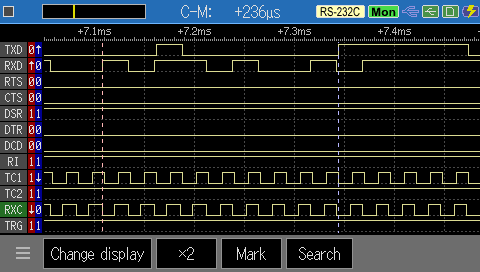


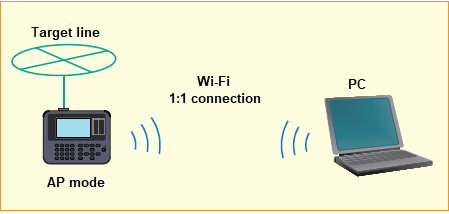


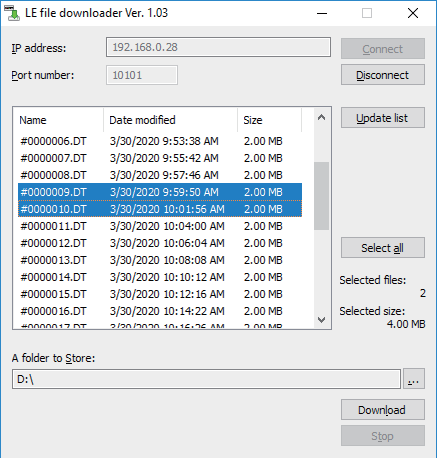 *: The communication log file in saveing process by the auto save function cannot be downloaded.


