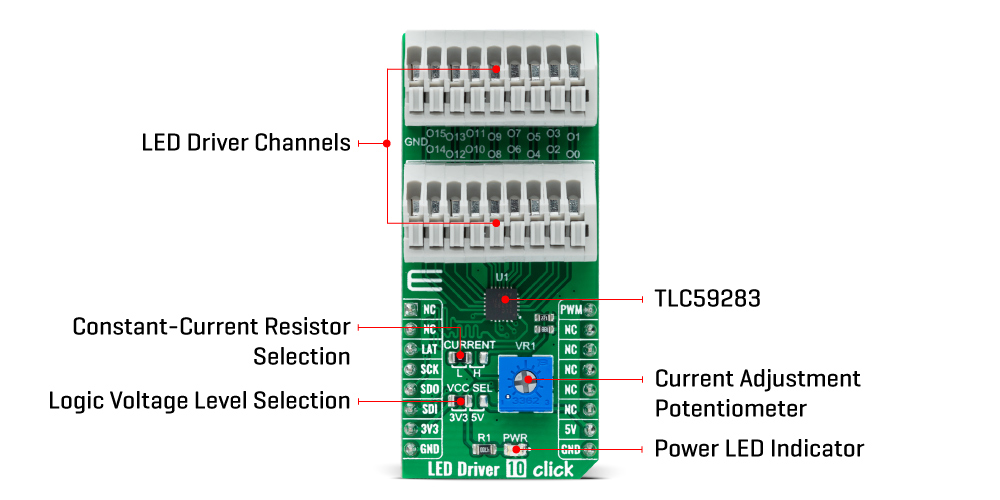
The LED Driver 10 Click Board™ as its foundation uses the TLC59283, an SPI bus controlled, 16-channel, constant-current sink light-emitting diode (LED) driver with pre-charge FET from Texas Instruments. It operates within a VCC supply voltage range where its outputs are 10V tolerant. Each LED output, 16 LED drivers presented on two nine position spring terminals, with a maximum output current of +50mA per channel, is programmable at OFF and ON state with a programmable individual LED brightness.
The internal pre-charge FET prevents the ghosting of multiplexed LED modules. One cause of this phenomenon is the parasitic capacitance charging current of the constant-current outputs and PCB wiring connected to LED pins of the TLC59283 through the external LED.
The TLC59283 communicates with MCU using the standard SPI serial interface with a maximum frequency of 35MHz. It has a 16-bit shift register and an output ON/OFF data latch. The shift register and data latch are 16 bits long and used to turn the constant-current outputs ON/OFF. When the serial data buffer is loaded, a LAT pin of the mikroBUS™ socket rising edge transfers the data to the LED outputs. When the TLC59283 is initially powered on, the data in the 16-bit shift register and output ON/OFF data latch are not set to default values. Therefore, the output ON/OFF data must be written to the data latch before turning ON the LED output.
PWM pin of the mikroBUS™ socket should be set to a high logic state when powered on because the constant-current may be turned on due to random data in the output ON/OFF data latch. When the PWM pin is in a low logic state, the corresponding LED output is turned ON if data in the ON/OFF control data-latch are '1' and remains off if the data are '0'. When the PWM pin is high, all LED outputs are forced OFF.
The LED Driver 10 Click Board™ also possesses the adjustable potentiometer labeled as VR1 that adjusts the constant-current value of all 16 channels. The constant-current value of all 16 channels is set by a single external resistor placed between the IREF pin, the constant-current value setting pin of the TLC59283, and the ground. Selection can be performed by onboard SMD jumper labeled as CURRENT to an appropriate position marked as L and H.
The LED Driver 10 Click Board™ can operate with both 3.3V and 5V logic voltage levels selected via the VCC SEL jumper. This way, it is allowed for both 3.3V and 5V capable MCUs to use the SPI communication lines properly. However, the Click board™ comes equipped with a library containing easy-to-use functions and an example code that can be used, as a reference, for further development.
| Type | LED Drivers |
| Applications | Can be used for color mixing and backlight application for amusement products, LED status signalization, home automation projects, and many more |
| On-board modules | TLC59283 - SPI bus controlled, 16-channel, constant-current sink light-emitting diode (LED) driver with pre-charge FET from Texas Instruments |
| Key Features | Low power consumption, 16 channels, ON/OFF LED channels control, pre-charge FET for ghosting reduction, switching delay for noise reduction, channel-current setting, and more |
| Interface | SPI |
| Compatibility | mikroBUS |
| Click board size | L (57.15 x 25.4 mm) |
| Input Voltage | 3.3V or 5V |
This table shows how the pinout on the LED Driver 10 Click Board™ corresponds to the pinout on the mikroBUS™ socket (the latter shown in the two middle columns).
| Notes | Pin |  |
Pin | Notes | |||
|---|---|---|---|---|---|---|---|
| NC | 1 | AN | PWM | 16 | PWM | ON/OFF LED Channel Control | |
| NC | 2 | RST | INT | 15 | NC | ||
| SPI Chip Select | LAT | 3 | CS | RX | 14 | NC | |
| SPI Clock | SCK | 4 | SCK | TX | 13 | NC | |
| SPI Data OUT | SDO | 5 | MISO | SCL | 12 | NC | |
| SPI Data IN | SDI | 6 | MOSI | SDA | 11 | NC | |
| Power Supply | 3.3V | 7 | 3.3V | 5V | 10 | 5V | Power Supply |
| Ground | GND | 8 | GND | GND | 9 | GND | Ground |
| Label | Name | Default | Description |
|---|---|---|---|
| LD1 | PWR | - | Power LED Indicator |
| JP1 | VCC SEL | Left | Logic Level Voltage Selection 3V3/5V: Left position 3V3, Right position 5V |
| JP2 | CURRENT | Left | Constant-Current Resistor Selection L/H: Left position L, Right position H |
| VR1 | VR1 | - | Current Adjustment Potentiometer |
| Description | Min | Typ | Max | Unit |
|---|---|---|---|---|
| Supply Voltage | 3.3 | - | 5 | V |
| Maximum LED Channel Output Voltage | - | - | 10 | V |
| Maximum LED Channel Output Current | - | - | 45 | mA |
| Operating Temperature Range | -40 | +25 | +85 | °C |
We provide a library for the LED Driver 10 Click Board™ as well as a demo application (example), developed using MikroElektronika compilers. The demo can run on all the main MikroElektronika development boards.
The package can be downloaded/installed directly from NECTO Studio Package Manager(recommended way), downloaded from our LibStock™ or found on Mikroe github account.
This library contains API for LED Driver 10 Click driver.
leddriver10_cfg_setup - This function initializes click configuration structure to initial values.leddriver10_init - This function initializes all necessary pins and peripherals used for this click board.leddriver10_pwm_start - This function starts the PWM module output.This example demonstrates the use of LED Driver 10 Click board.
The demo application is composed of two sections :
void application_task ( void ){ static int16_t duty_cnt = 1; static int8_t duty_inc = 1; float duty = duty_cnt / 10.0; leddriver10_set_duty_cycle ( &leddriver10, duty ); log_printf( &logger, "> Duty: %u%%rn", ( uint16_t )( duty_cnt * 10 ) ); Delay_ms( 500 ); if ( 10 == duty_cnt ) { duty_inc = -1; } else if ( 0 == duty_cnt ) { duty_inc = 1; } duty_cnt += duty_inc;}
The full application code, and ready to use projects can be installed directly from NECTO Studio Package Manager(recommended way), downloaded from our LibStock™ or found on Mikroe github account.
Other Mikroe Libraries used in the example:
We provide a library for the LED Driver 10 Click Board™ as well as a demo application (example), developed using MikroElektronika compilers. The demo can run on all the main MikroElektronika development boards.
The package can be downloaded/installed directly from NECTO Studio Package Manager(recommended way), downloaded from our LibStock™ or found on Mikroe github account.
This library contains API for LED Driver 10 Click driver.
leddriver10_cfg_setup - This function initializes click configuration structure to initial values.leddriver10_init - This function initializes all necessary pins and peripherals used for this click board.leddriver10_pwm_start - This function starts the PWM module output.This example demonstrates the use of LED Driver 10 Click board.
The demo application is composed of two sections :
void application_task ( void )
{
    static int16_t duty_cnt = 1;
    static int8_t duty_inc = 1;
    float duty = duty_cnt / 10.0;

    leddriver10_set_duty_cycle ( &leddriver10, duty );
    log_printf( &logger, "> Duty: %u%%rn", ( uint16_t )( duty_cnt * 10 ) );

    Delay_ms( 500 );

    if ( 10 == duty_cnt )
    {
        duty_inc = -1;
    }
    else if ( 0 == duty_cnt )
    {
        duty_inc = 1;
    }
    duty_cnt += duty_inc;
}
The full application code, and ready to use projects can be installed directly from NECTO Studio Package Manager(recommended way), downloaded from our LibStock™ or found on Mikroe github account.
Other Mikroe Libraries used in the example:
Depending on the development board you are using, you may need USB UART click, USB UART 2 click or RS232 click to connect to your PC, for development systems with no UART to USB interface available on the board. The terminal available in all MikroElektronika compilers, or any other terminal application of your choice, can be used to read the message.
The LED Driver 10 Click Board™ is supported with mikroSDK - MikroElektronika Software Development Kit. To ensure proper operation of mikroSDK compliant Click board™ demo applications, mikroSDK should be downloaded from the LibStock and installed for the compiler you are using.
Depending on the development board you are using, you may need USB UART click, USB UART 2 click or RS232 click to connect to your PC, for development systems with no UART to USB interface available on the board. The terminal available in all MikroElektronika compilers, or any other terminal application of your choice, can be used to read the message.
The LED Driver 10 Click Board™ is supported with mikroSDK - MikroElektronika Software Development Kit. To ensure proper operation of mikroSDK compliant Click board™ demo applications, mikroSDK should be downloaded from the LibStock and installed for the compiler you are using.
- manufacturer: Mikroelektronika d.o.o. - backorder_label: If no stock shown above, check availability - warranty: 12 months - mpn: MIKROE-4787 - attachments: [{"download_file":[{"download_file":"LED Driver 10 Click Board™ Schematic"}],"download_filetype":[{"download_filetype":"pdf"}]},{"download_file":[{"download_file":"Texas Instruments TLC59283 16-Channel LED Driver Datasheet"}],"download_filetype":[{"download_filetype":"pdf"}]}] - condition: new - custom_product: false - mpn: MIKROE-4787 - google_product_category: Electronics - custom_label_0: Click Board - device_vendor: Rochester Electronics, LLC - device_type: TLC59283RGER - warranty: 12 months - brand: MikroE - manufacturer: Mikroelektronika d.o.o. - target_keyword: LED Driver 10 Click Board - brands: gid://shopify/Metaobject/56256004319 - breadcrumbs: ["gid://shopify/Collection/447955239135","gid://shopify/Collection/241680580797","gid://shopify/Collection/241544822973"] - customhs_code: 847330 - detailed_description: {"type":"root","children":[{"type":"heading","level":3,"children":[{"type":"text","value":"How Does The LED Driver 10 Click Board™ Work?"}]},{"type":"paragraph","children":[{"type":"text","value":"The "},{"type":"text","value":"LED Driver 10 Click Board™","bold":true,"italic":true},{"type":"text","value":" as its foundation uses the TLC59283, an SPI bus controlled, 16-channel, constant-current sink light-emitting diode (LED) driver with pre-charge FET from Texas Instruments. It operates within a VCC supply voltage range where its outputs are 10V tolerant. Each LED output, 16 LED drivers presented on two nine position spring terminals, with a maximum output current of +50mA per channel, is programmable at OFF and ON state with a programmable individual LED brightness."}]},{"type":"paragraph","children":[{"type":"text","value":""}]},{"type":"paragraph","children":[{"type":"text","value":"The internal pre-charge FET prevents the ghosting of multiplexed LED modules. One cause of this phenomenon is the parasitic capacitance charging current of the constant-current outputs and PCB wiring connected to LED pins of the TLC59283 through the external LED."}]},{"type":"paragraph","children":[{"type":"text","value":"The TLC59283 communicates with MCU using the standard SPI serial interface with a maximum frequency of 35MHz. It has a 16-bit shift register and an output ON/OFF data latch. The shift register and data latch are 16 bits long and used to turn the constant-current outputs ON/OFF. When the serial data buffer is loaded, a LAT pin of the mikroBUS™ socket rising edge transfers the data to the LED outputs. When the TLC59283 is initially powered on, the data in the 16-bit shift register and output ON/OFF data latch are not set to default values. Therefore, the output ON/OFF data must be written to the data latch before turning ON the LED output."}]},{"type":"paragraph","children":[{"type":"text","value":"PWM pin of the mikroBUS™ socket should be set to a high logic state when powered on because the constant-current may be turned on due to random data in the output ON/OFF data latch. When the PWM pin is in a low logic state, the corresponding LED output is turned ON if data in the ON/OFF control data-latch are '1' and remains off if the data are '0'. When the PWM pin is high, all LED outputs are forced OFF."}]},{"type":"paragraph","children":[{"type":"text","value":"The "},{"type":"text","value":"LED Driver 10 Click Board™","bold":true},{"type":"text","value":" also possesses the adjustable potentiometer labeled as VR1 that adjusts the constant-current value of all 16 channels. The constant-current value of all 16 channels is set by a single external resistor placed between the IREF pin, the constant-current value setting pin of the TLC59283, and the ground. Selection can be performed by onboard SMD jumper labeled as CURRENT to an appropriate position marked as L and H."}]},{"type":"paragraph","children":[{"type":"text","value":"The "},{"type":"text","value":"LED Driver 10 Click Board™","bold":true},{"type":"text","value":" can operate with both 3.3V and 5V logic voltage levels selected via the VCC SEL jumper. This way, it is allowed for both 3.3V and 5V capable MCUs to use the SPI communication lines properly. However, the Click board™ comes equipped with a library containing easy-to-use functions and an example code that can be used, as a reference, for further development."}]},{"type":"heading","level":3,"children":[{"type":"text","value":"Specifications"}]},{"type":"paragraph","children":[{"type":"text","value":" "}]},{"type":"paragraph","children":[{"type":"text","value":"Type\nLED Drivers\nApplications\nCan be used for color mixing and backlight application for amusement products, LED status signalization, home automation projects, and many more\nOn-board modules\nTLC59283 - SPI bus controlled, 16-channel, constant-current sink light-emitting diode (LED) driver with pre-charge FET from Texas Instruments\nKey Features\nLow power consumption, 16 channels, ON/OFF LED channels control, pre-charge FET for ghosting reduction, switching delay for noise reduction, channel-current setting, and more\nInterface\nSPI\nCompatibility\nmikroBUS\nClick board size\nL (57.15 x 25.4 mm)\nInput Voltage\n3.3V or 5V"}]},{"type":"paragraph","children":[{"type":"text","value":" "}]},{"type":"heading","level":3,"children":[{"type":"text","value":"Pinout diagram"}]},{"type":"paragraph","children":[{"type":"text","value":"This table shows how the pinout on the "},{"type":"text","value":"LED Driver 10 Click Board™","bold":true},{"type":"text","value":" corresponds to the pinout on the mikroBUS™ socket (the latter shown in the two middle columns)."}]},{"type":"paragraph","children":[{"type":"text","value":"Notes\nPin\nPin\nNotes\nNC\n1\nAN\nPWM\n16\nPWM\nON/OFF LED Channel Control\nNC\n2\nRST\nINT\n15\nNC\nSPI Chip Select\nLAT\n3\nCS\nRX\n14\nNC\nSPI Clock\nSCK\n4\nSCK\nTX\n13\nNC\nSPI Data OUT\nSDO\n5\nMISO\nSCL\n12\nNC\nSPI Data IN\nSDI\n6\nMOSI\nSDA\n11\nNC\nPower Supply\n3.3V\n7\n3.3V\n5V\n10\n5V\nPower Supply\nGround\nGND\n8\nGND\nGND\n9\nGND\nGround"}]},{"type":"heading","level":3,"children":[{"type":"text","value":"Onboard settings and indicators"}]},{"type":"paragraph","children":[{"type":"text","value":"Label\nName\nDefault\nDescription\nLD1\nPWR\n-\nPower LED Indicator\nJP1\nVCC SEL\nLeft\nLogic Level Voltage Selection 3V3/5V: Left position 3V3, Right position 5V\nJP2\nCURRENT\nLeft\nConstant-Current Resistor Selection L/H: Left position L, Right position H\nVR1\nVR1\n-\nCurrent Adjustment Potentiometer"}]},{"type":"heading","level":3,"children":[{"type":"text","value":"LED Driver 10 Click electrical specifications"}]},{"type":"paragraph","children":[{"type":"text","value":"Description\nMin\nTyp\nMax\nUnit\nSupply Voltage\n3.3\n-\n5\nV\nMaximum LED Channel Output Voltage\n-\n-\n10\nV\nMaximum LED Channel Output Current\n-\n-\n45\nmA\nOperating Temperature Range\n-40\n+25\n+85\n°C"}]}]} - summary:The LED Driver 10 Click Board™ is a compact add-on board that simplifies the control of multiple LEDs. This board features the TLC59283, a 16-channel, constant-current sink light-emitting diode (LED) driver with pre-charge FET from Texas Instruments. Each LED channel can be individually controlled with a simple SPI serial communication protocol compatible with both 3.3V or 5V logic levels. Each constant-current output has a pre-charge field-effect transistor that can reduce ghosting on the multiplexing drive LED display. It has additional features such as switching off all outputs via just one mikroBUS™ pin and setting the constant-current values on all 16 channels via one onboard potentiometer.
This LED Driver 10 Click Board™ is suitable for colour mixing and backlight application for amusement products, LED status signalization, home automation projects, and many more.