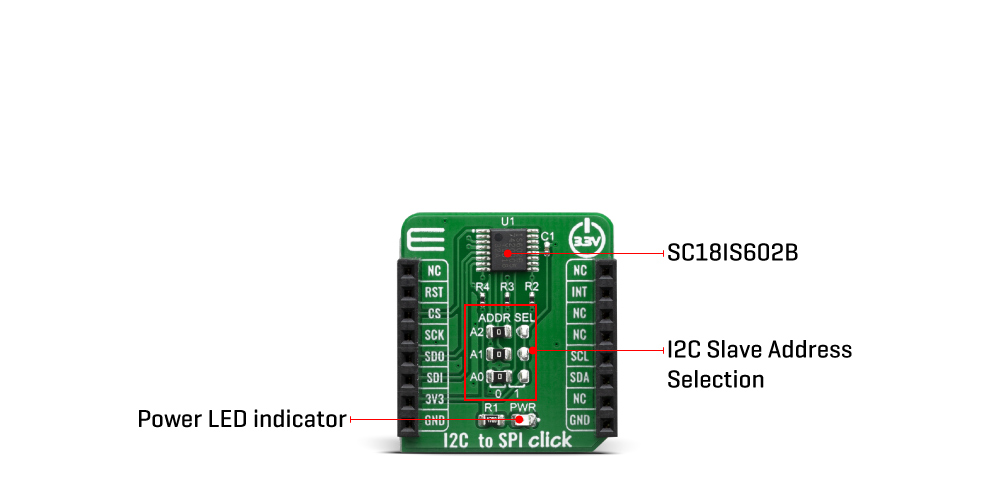
When it comes to communicating between chips on a printed circuit board, two protocols are extremely popular: Serial Peripheral Interface (SPI) and Inter-Integrated Circuit (IIC or I2C). They are both serial protocols with a shared bus supporting multiple devices, but they multiplex their lines very differently. However, both of them are extremely popular, as they are easy to implement, requiring few components and little code, over the other communication protocols. Both rely on serial communication to pass data and support multiple devices on one bus. Many microcontrollers, sensors, and peripherals rely on SPI and I2C to talk to each other. The I2C to SPI Click Board™ is a perfect solution for numerous needs, such as hand-held and portable equipment, PDAs, palmtops, digital cameras, and other devices that support I2C interface, offering the ability to communicate directly with SPI devices through its I2C-bus.
The design of the I2C to SPI Click Board™ is based around two SC18IS602B, an I2C-bus to SPI bridge from NXP. This IC bridges the data communication between the two interfaces, offering many additional features, such as the programmable I/O, internal oscillator option, active low interrupt output, low power mode, and more. The SC18IS602B operates as an I2C-bus slave-transmitter or slave-receiver and an SPI master. The SC18IS602B controls all the SPI bus-specific sequences, protocol, and timing. It also has its own internal oscillator, and it supports SPI chip select output that may be configured as GPIO when not used. This allows the software to be easily written or ported from another platform.
The I2C to SPI Click Board™ provides a byte-oriented I2C-bus interface that supports data transfers up to 400 kHz. When the I2C-bus master is reading data from the click board™, the device will be a slave-transmitter. It also can be a slave-receiver when the I2C-bus master is sending data. The SC18IS602B acts as an I2C-bus master at no time. However, it does have the ability to hold the SCL line LOW between bytes to complete its internal processes.
A slave address of the SC18IS602B is comprised of a fixed and a programmable part. The programmable part of the slave address enables the maximum possible number of such devices to be connected to the I2C-bus. Since the SC18IS602B has three programmable address bits (defined by the A2, A1, and A0 pins), it is possible to have eight of these devices on the same bus. Therefore, this Click board™ is equipped with three SMD jumpers, grouped under the ADDR SEL label, used to select the I2C slave address. By moving the jumpers at the desired position, the user can select the address used for the communication with the host MCU.
The #RESET pin performs the hardware reset of the SC18IS602B IC. The #RESET pin is routed to the mikroBUS™ RST pin and it is active LOW. The #INT allows the host MCU to receive an interrupt from the SC18IS602B IC. An interrupt is generated by the SC18IS602B after any SPI transmission has been completed. Therefore, the #INT of the SC18IS602B is routed to the INT pin of the mikroBUS™ socket. The interrupt can be cleared (INT pin HIGH) by sending a 'Clear Interrupt' command, although It is not necessary. This allows more optimized software (firmware) to be written, as the host MCU does not have to continuously poll the LSR register to see if any interrupt needs to be serviced.
The datasheet of the SC18IS602B offers more information about using and configuring the SC18IS602B IC. However, the Click board™ is supported by a mikroSDK library, offering functions that simplify the prototyping and firmware development.
The I2C to SPI Click Board™ is operated by 3.3V only. To be able to use it with MCUs that use 5V logic level on their communication lines, a proper level-translation circuit should be used.
| Type | Port expander,RS232 |
| Applications | The I2C to SPI Click Board™ is a perfect solution for numerous needs, such as hand-held and portable equipment, PDAs, palmtops, digital cameras, and other devices that support I2C interface, offering the ability to communicate directly with SPI devices through its I2C-bus. |
| On-board modules | SC18IS602B, an I2C/SPI to UART interface, 64 bytes of transmit and receive FIFOs, and IrDA SIR built-in support, from NXP; MAX3237 IC, a low-power, true RS-232 transceiver, from Maxim Integrated |
| Key Features | It supports both I2C and SPI interfaces, bridging them to UART, supports a lot of other features including Line-Break generation and detection, programmable special character detection, auto flow control (software and hardware), 15kV ESD protection, onboard RS-232 connector, etc. |
| Interface | I2C,SPI,UART |
| Compatibility | mikroBUS |
| Click board size | S (28.6 x 25.4 mm) |
| Input Voltage | 3.3V |
This table shows how the pinout on the I2C to SPI Click Board™ corresponds to the pinout on the mikroBUS™ socket (the latter shown in the two middle columns).
| Notes | Pin |  |
Pin | Notes | |||
|---|---|---|---|---|---|---|---|
| NC | 1 | AN | PWM | 16 | NC | ||
| Reset | RST | 2 | RST | INT | 15 | INT | Interrupt |
| Chip Select / A0 | CS | 3 | CS | RX | 14 | NC | |
| SPI Clock | SCK | 4 | SCK | TX | 13 | NC | |
| SPI Data OUT | SDO | 5 | MISO | SCL | 12 | SCL | I2C Clock |
| SPI Data IN | SDI | 6 | MOSI | SDA | 11 | SDA | I2C Data |
| Power Supply | 3.3V | 7 | 3.3V | 5V | 10 | NC | |
| Ground | GND | 8 | GND | GND | 9 | GND | Ground |
| Label | Name | Default | Description |
|---|---|---|---|
| LD1 | PWR | - | Power LED Indicator |
| JP1-JP3 | ADDR SELL | Left | Communication interface selection: left position 0, right position 1 |
I2C to SPI Click Board™
- amazon_main_image: https://www.thedebugstore.com/images/product/lg-i2c-to-spi-click-3743-back_1.jpg - amazon_other_image_1: https://www.thedebugstore.com/images/product/lg-i2c-to-spi-click-3743-front_1.jpg - amazon_other_image_2: https://www.thedebugstore.com/images/product/lg-i2c-to-spi-click-3743-fusion_1.jpg - amazon_other_image_3: https://www.thedebugstore.com/images/product/lg-i2c-to-spi-click-3743-fusion_1.jpg - amazon_browse_node: 428655031 - mpn: MIKROE-3743 - backorder_label: If no stock shown above, check availability - badge: - widget:We provide a library for the I2C to SPI Click Board™ on our LibStock page, as well as a demo application (example), developed using MikroElektronika compilers. The demo can run on all the main MikroElektronika development boards.
The library covers all the necessary functions to control the I2C to SPI Click Board™. Library performs interface between a standard I2C-bus of a microcontroller and an SPI bus.
void i2ctospi_spiWriteByte( uint8_t slaveDevice, uint8_t functionId, uint8_t regAddr, uint8_t writeData ) - Generic SPI write the byte of data to data buffer function.uint8_t i2ctospi_spiReadByte( uint8_t slaveDevice, uint8_t functionId, uint8_t regAddr ) - Generic SPI read the byte of data from data buffer function.void i2ctospi_configSPI( uint8_t configData ) - Configure SPI Interface function.The application is composed of three sections :
void applicationTask()
{
    timeSeconds = _rtc5GetTimeSeconds();
    Delay_1ms();
    timeMinutes = _rtc5GetTimeMinutes();
    Delay_1ms();
    timeHours = _rtc5GetTimeHours();
    Delay_1ms();

    if ( timeSecondsNew != timeSeconds )
    {
        mikrobus_logWrite( " Time :  ", _LOG_TEXT );

        _displayLogUart( timeHours );
        mikrobus_logWrite( ":", _LOG_TEXT );

        _displayLogUart( timeMinutes );
        mikrobus_logWrite( ":", _LOG_TEXT );

        _displayLogUart( timeSeconds );
        mikrobus_logWrite( "", _LOG_LINE );

        mikrobus_logWrite( "------------------", _LOG_LINE );

        timeSecondsNew = timeSeconds;
    }

    Delay_1ms();
}
Additional Functions :
void _displayLogUart( uint8_t value ) - Write the value of time or date as a two-digit number.void _rtc5Clear() - Clear RTCC and SRAM memory of RTC 5 click.void _rtc5SetTimeSeconds( uint8_t seconds ) - Set the seconds and enable counting.uint8_t _rtc5GetTimeSeconds() - Get the seconds.void _rtc5SetTimeMinutes( uint8_t minutes ) - Set the minutes.uint8_t _rtc5GetTimeMinutes() - Get the minutes.void _rtc5SetTimeHours( uint8_t hours ) - Set the hours.uint8_t _rtc5GetTimeHours() - Get the hours.The full application code, and ready to use projects can be found on our LibStock page.
Other mikroE Libraries used in the example:
Additional notes and informations
Depending on the development board you are using, you may need a USB UART click, USB UART 2 click or RS232 click to connect to your PC, for development systems with no UART to USB interface available on the board. The terminal available in all MikroElektronika compilers, or any other terminal application of your choice, can be used to read the message.
The I2C to SPI Click Board™ is supported with mikroSDK - MikroElektronika Software Development Kit. To ensure proper operation of mikroSDK compliant Click board™ demo applications, mikroSDK should be downloaded from the LibStock and installed for the compiler you are using.
- attachments: [{"download_file":[{"download_file":"I2C to SPI Click Board™ Schematic"}],"download_filetype":[{"download_filetype":"pdf"}]},{"download_file":[{"download_file":"NXP SC18IS602B I2C to SPI Bridge Datasheet"}],"download_filetype":[{"download_filetype":"pdf"}]}] - condition: new - custom_product: false - mpn: MIKROE-3743 - google_product_category: Electronics - custom_label_0: Click Board - device_vendor: NXP USA Inc. - device_type: SC18IS602BIPW/S8HP - warranty: 12 months - brand: MikroE - manufacturer: Mikroelektronika d.o.o. - target_keyword: I2C to SPI Click Board - brands: gid://shopify/Metaobject/56256004319 - breadcrumbs: ["gid://shopify/Collection/447955239135","gid://shopify/Collection/241680580797","gid://shopify/Collection/241546100925"] - customhs_code: 847330 - detailed_description: {"type":"root","children":[{"type":"paragraph","children":[{"type":"text","value":"When it comes to communicating between chips on a printed circuit board, two protocols are extremely popular: Serial Peripheral Interface (SPI) and Inter-Integrated Circuit (IIC or I2C). They are both serial protocols with a shared bus supporting multiple devices, but they multiplex their lines very differently. However, both of them are extremely popular, as they are easy to implement, requiring few components and little code, over the other communication protocols. Both rely on serial communication to pass data and support multiple devices on one bus. Many microcontrollers, sensors, and peripherals rely on SPI and I2C to talk to each other. The "},{"type":"text","value":"I2C to SPI Click Board™","bold":true,"italic":true},{"type":"text","value":" is a perfect solution for numerous needs, such as hand-held and portable equipment, PDAs, palmtops, digital cameras, and other devices that support I2C interface, offering the ability to communicate directly with SPI devices through its I2C-bus."}]},{"type":"heading","level":3,"children":[{"type":"text","value":"How Does The I2C to SPI Click Board™ Work?"}]},{"type":"paragraph","children":[{"type":"text","value":"The design of the "},{"type":"text","value":"I2C to SPI Click Board™ ","bold":true},{"type":"text","value":"is based around two SC18IS602B, an I2C-bus to SPI bridge from NXP. This IC bridges the data communication between the two interfaces, offering many additional features, such as the programmable I/O, internal oscillator option, active low interrupt output, low power mode, and more. The SC18IS602B operates as an I2C-bus slave-transmitter or slave-receiver and an SPI master. The SC18IS602B controls all the SPI bus-specific sequences, protocol, and timing. It also has its own internal oscillator, and it supports SPI chip select output that may be configured as GPIO when not used. This allows the software to be easily written or ported from another platform."}]},{"type":"paragraph","children":[{"type":"text","value":""}]},{"type":"paragraph","children":[{"type":"text","value":"The "},{"type":"text","value":"I2C to SPI Click Board™","bold":true},{"type":"text","value":" provides a byte-oriented I2C-bus interface that supports data transfers up to 400 kHz. When the I2C-bus master is reading data from the click board™, the device will be a slave-transmitter. It also can be a slave-receiver when the I2C-bus master is sending data. The SC18IS602B acts as an I2C-bus master at no time. However, it does have the ability to hold the SCL line LOW between bytes to complete its internal processes."}]},{"type":"paragraph","children":[{"type":"text","value":"A slave address of the SC18IS602B is comprised of a fixed and a programmable part. The programmable part of the slave address enables the maximum possible number of such devices to be connected to the I2C-bus. Since the SC18IS602B has three programmable address bits (defined by the A2, A1, and A0 pins), it is possible to have eight of these devices on the same bus. Therefore, this Click board™ is equipped with three SMD jumpers, grouped under the ADDR SEL label, used to select the I2C slave address. By moving the jumpers at the desired position, the user can select the address used for the communication with the host MCU."}]},{"type":"paragraph","children":[{"type":"text","value":"The #RESET pin performs the hardware reset of the SC18IS602B IC. The #RESET pin is routed to the mikroBUS™ RST pin and it is active LOW. The #INT allows the host MCU to receive an interrupt from the SC18IS602B IC. An interrupt is generated by the SC18IS602B after any SPI transmission has been completed. Therefore, the #INT of the SC18IS602B is routed to the INT pin of the mikroBUS™ socket. The interrupt can be cleared (INT pin HIGH) by sending a 'Clear Interrupt' command, although It is not necessary. This allows more optimized software (firmware) to be written, as the host MCU does not have to continuously poll the LSR register to see if any interrupt needs to be serviced."}]},{"type":"paragraph","children":[{"type":"text","value":"The datasheet of the SC18IS602B offers more information about using and configuring the SC18IS602B IC. However, the Click board™ is supported by a mikroSDK library, offering functions that simplify the prototyping and firmware development."}]},{"type":"paragraph","children":[{"type":"text","value":"The "},{"type":"text","value":"I2C to SPI Click Board™","bold":true},{"type":"text","value":" is operated by 3.3V only. To be able to use it with MCUs that use 5V logic level on their communication lines, a proper level-translation circuit should be used."}]},{"type":"heading","level":3,"children":[{"type":"text","value":"SPECIFICATIONS"}]},{"type":"paragraph","children":[{"type":"text","value":"Type\nPort expander,RS232\nApplications\nThe I2C to SPI Click Board™ is a perfect solution for numerous needs, such as hand-held and portable equipment, PDAs, palmtops, digital cameras, and other devices that support I2C interface, offering the ability to communicate directly with SPI devices through its I2C-bus.\nOn-board modules\nSC18IS602B, an I2C/SPI to UART interface, 64 bytes of transmit and receive FIFOs, and IrDA SIR built-in support, from NXP; MAX3237 IC, a low-power, true RS-232 transceiver, from Maxim Integrated\nKey Features\nIt supports both I2C and SPI interfaces, bridging them to UART, supports a lot of other features including Line-Break generation and detection, programmable special character detection, auto flow control (software and hardware), 15kV ESD protection, onboard RS-232 connector, etc.\nInterface\nI2C,SPI,UART\nCompatibility\nmikroBUS\nClick board size\nS (28.6 x 25.4 mm)\nInput Voltage\n3.3V"}]},{"type":"heading","level":3,"children":[{"type":"text","value":"PINOUT DIAGRAM"}]},{"type":"paragraph","children":[{"type":"text","value":"This table shows how the pinout on the "},{"type":"text","value":"I2C to SPI Click Board™","bold":true},{"type":"text","value":" corresponds to the pinout on the mikroBUS™ socket (the latter shown in the two middle columns)."}]},{"type":"paragraph","children":[{"type":"text","value":"Notes\nPin\nPin\nNotes\nNC\n1\nAN\nPWM\n16\nNC\nReset\nRST\n2\nRST\nINT\n15\nINT\nInterrupt\nChip Select / A0\nCS\n3\nCS\nRX\n14\nNC\nSPI Clock\nSCK\n4\nSCK\nTX\n13\nNC\nSPI Data OUT\nSDO\n5\nMISO\nSCL\n12\nSCL\nI2C Clock\nSPI Data IN\nSDI\n6\nMOSI\nSDA\n11\nSDA\nI2C Data\nPower Supply\n3.3V\n7\n3.3V\n5V\n10\nNC\nGround\nGND\n8\nGND\nGND\n9\nGND\nGround"}]},{"type":"heading","level":3,"children":[{"type":"text","value":"ONBOARD SETTINGS AND INDICATORS"}]},{"type":"paragraph","children":[{"type":"text","value":"Label\nName\nDefault\n Description\nLD1\nPWR\n-\nPower LED Indicator\nJP1-JP3\nADDR SELL\nLeft\nCommunication interface selection: left position 0, right position 1"}]},{"type":"heading","level":3,"children":[{"type":"text","value":" "}]}]} - summary:The I2C to SPI Click Board™ is an all-in-one solution that allows serving as an interface between a standard I2C-bus of a microcontroller and an SPI bus, which allows the microcontroller to communicate directly with SPI devices through its I2C-bus. It is equipped with stacking headers, so it can be easily connected. By offering an I2C-bus slave-transmitter or slave-receiver and an SPI master, this Click Board™ controls all the SPI bus-specific sequences, protocol, and timing. It also has its own internal oscillator, and it supports the SPI chip select output that may be configured as GPIO when not used.
The I2C to SPI Click Board™ is supported by a mikroSDK compliant library, which includes functions that simplify software development. This Click Board™ comes as a fully tested product, ready to be used on a system equipped with the mikroBUS™ socket.