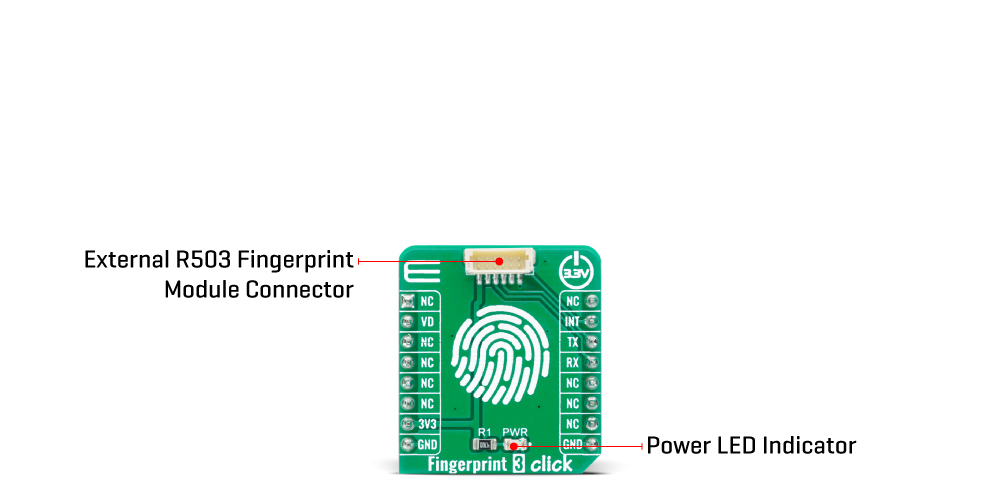
The Fingerprint 3 Click Board™ simplifies the connection of add-on boards to the mikroBUS™ socket. This Click board™ represents a small-size PCB that can be connected to the mikroBUS™ socket like any other Click board™, with a 1x6 1.0mm pitch vertical type wire to board connector placed on itself. Each of the header pins is corresponding to a pin on the mikroBUS™ socket being used such as UART lines (TX, RX), 3V3 power supply, finger detection signal and Ring LED enable for GROW R503 module, and ground. This Click board™ allows easy pin access and manipulation while retaining a perfect connection quality at all times.
Fingerprint processing includes two parts: fingerprint recording and fingerprint matching. The first step is the initialization of all the necessary drivers, peripherals, and pins. At power-on, it takes about 200ms for initialization, and during this period the module can't accept any commands. This is followed by checking the sensor and verifying the module password, after which, if everything is done correctly, the creation of a new fingerprint pattern begins. The user needs to enter the finger two times. The system will process the two-time finger images, generate a template of the finger based on processing results, and store the template. When matching, a user enters the finger through an optical sensor, and the system will generate a template of the finger and compare it with templates of the finger library. In both circumstances, the system will return the matching result, success, or failure. This can also be seen in an example code that contains easy to use functions that may be used as a reference for further development.
The Fingerprint 3 Click Board™ communicates with MCU using the UART interface with the default baud rate of 57600bps for the data transfer, while the GPIO pins on this Click board™ are used for finger detection and ring indicator LED enable. Ring indicator LED light labeled as VD can be enabled by toggling the signal routed to the RST pin on the mikroBUS™, while the signal routed to the INT pin on the mikroBUS™ represents an interrupt and indicates detection of a finger on the module. When the indicator glow with purple color, that means the module is in its Stand-By mode and waits for a finger to be pressed. In addition to purple, the module can also glow blue or red, which indicates the correctness of the fingerprint match (blue indicates that a pair is found, while red indicates that a pair was not found).
This Click board™ is designed to be operated only with a 3.3V logic voltage level. A proper logic voltage level conversion should be performed before the Click board™ is used with MCUs with different logic levels. However, the Click board™ comes equipped with a library that contains easy to use functions and an example code that can be used as a reference for further development.
| Type | Adapter,Fingerprint |
| Applications | The Fingerprint 3 Click Board™ is adapter with socket for the capacitive fingerprint sensor module scanner with a two-color ring indicator. |
| On-board modules | The Fingerprint 3 Click Board™ is adapter with socket for the capacitive fingerprint sensor module scanner with a two-color ring indicator. |
| Key Features | Integrated image collecting, ring indicator, dust resistant, high recognition rate and the flexibility to adapt on different conditions of human finger, and more. |
| Interface | UART |
| Compatibility | mikroBUS |
| Click board size | S (28.6 x 25.4 mm) |
| Input Voltage | 3.3V |
This table shows how the pinout on the Fingerprint 3 Click Board™ corresponds to the pinout on the mikroBUS™ socket (the latter shown in the two middle columns).
| Notes | Pin |  |
Pin | Notes | |||
|---|---|---|---|---|---|---|---|
| NC | 1 | AN | PWM | 16 | NC | ||
| Ring Indicator LED Enable | VD | 2 | RST | INT | 15 | INT | Fingerprint Detection |
| NC | 3 | CS | RX | 14 | RX | UART RX | |
| NC | 4 | SCK | TX | 13 | TX | UART TX | |
| NC | 5 | MISO | SCL | 12 | NC | ||
| NC | 6 | MOSI | SDA | 11 | NC | ||
| Power Supply | 3.3V | 7 | 3.3V | 5V | 10 | NC | |
| Ground | GND | 8 | GND | GND | 9 | GND | Ground |
| Label | Name | Default | Description |
|---|---|---|---|
| LD1 | PWR | - | Power LED Indicator |
This click board features an A-172-MRQ, a 2D capacitive fingerprint sensor with active scanning area of 8.8 x 8x8 mm and resolution of 176 x 176 pixels. The sensor is based on capacitive-contact technology with hardened surface and enhanced ESD immunity. On board Nuvoton M2301 MCU which serves as interface IC and control unit on this board, interface this sensor over high speed SPI interface and comes with built-in fingerprint matching capability while leaving most of the chip resource to application developers. Developers can develop fingerprint-related products based on the communication protocol without the advanced knowledge of fingerprint identification.

The Fingerprint 2 Click has stable performance and simple structure. The simplified functions for faster and easy development include fingerprint comparison, image scanning transmission, search, registered fingerprint storage and system unique internal code protection mechanism. The fingerprint comparison program can register at most 24 fingerprints, the comparison speed is fast and the correct rate is very high.
Thanks to the Nuvoton MCU with the on-chip crypto-accelerator, Cortex-M23 TrustZone, and XOM facilities that is communicating with the fingerprint sensor and providing information to the host, Fingerprint 2 Click board can be interfaced with commands over UART protocol (baud rate 115200) or USB 2.0 full speed.
For proper operation Fingerprint 2 Click board needs to be supplied with 3.3V and 5V. However, note that this board it is designed to be operated only with 3.3V logic levels. Therefore a proper logic voltage level conversion should be performed before the Click board™ is used with MCUs with logic levels of 5V.
For using and controlling Fingerprint 2 Click with PC Application from ByNew you will need first to connect your board to PC by using USB or some TTL converter for UART. After that you can start Utility tool BNQuickick.exe and select the COM port and Baud rate to operate/control this board.
Since this application is simplifying testing our board and acts as MCU host you can use the same commands from Fingerprint 2 Click example to control our board.
- amazon_main_image: https://www.thedebugstore.com/images/product/lg-fingerprint-3-click-front.jpg - amazon_other_image_1: https://www.thedebugstore.com/images/product/lg-fingerprint-3-click-back.jpg - amazon_other_image_2: https://www.thedebugstore.com/images/product/lg-fingerprint-3-click-fusion.jpg - amazon_other_image_3: https://www.thedebugstore.com/images/product/lg-fingerprint-3-click-shuttle.jpg - amazon_other_image_4: https://www.thedebugstore.com/images/product/lg-fingerprint-3-click-clicker.jpg - amazon_other_image_5: https://www.thedebugstore.com/images/product/lg-fingerprint-3-click-breadboard.jpg - amazon_other_image_6: https://www.thedebugstore.com/images/product/lg-fingerprint-3-click-breadboard.jpg - amazon_browse_node: 428655031 - mpn: MIKROE-4265 - backorder_label: If no stock shown above, check availability - badge: - widget:We provide a library for the Fingerprint 3 Click Board™ on our LibStock page, as well as a demo application (example), developed using MikroElektronika compilers. The demo can run on all the main MikroElektronika development boards.
The library covers all the necessary functions to control the Fingerprint 3 Click Board™. A library performs the communication with the device via UART interface.
void fingerprint3_parser_rsp ( fingerprint3_rsp_t *response ) - Response parser function.uint8_t fingerprint3_byte_ready ( void ) - Check for new byte received.void fingerprint3_uart_write ( uint8_t *tx_data, uint8_t n_bytes ) - Uart write function.The application is composed of three sections :
void application_task ( )
{
    if ( fingerprint3_finger_indicator( ) == FINGERPRINT3_DETECT_FINGER )
    {
        fingerprint3_buf_clear( );
        mikrobus_logWrite( "---------------------------------", _LOG_LINE );
        mikrobus_logWrite( " >>> Verification in progress... ", _LOG_LINE );
        Delay_ms( 2000 );

        fingerprint3_uart_write( &gen_img[ 0 ], 12 );
        Delay_ms( 500 );
        fingerprint3_parser_rsp( &rsp );
        Delay_ms( 100 );

        if ( rsp.confirm_code == FINGERPRINT3_OK )
        {
            fingerprint3_uart_write( &img_2_tz_2[ 0 ], 13 );
            Delay_ms( 500 );
            fingerprint3_buf_clear( );
        }

        fingerprint3_uart_write( ®_model[ 0 ], 12 );
        Delay_ms( 100 );
        fingerprint3_buf_clear( );

        fingerprint3_uart_write( &fingerprint_match[ 0 ], 12 );
        Delay_ms( 500 );
        fingerprint3_parser_rsp( &rsp );
        fingerprint3_display_match_score( );
        Delay_ms( 3000 );

        mikrobus_logWrite( "  >>> Comparing Fingerprints <<< ", _LOG_LINE );
        mikrobus_logWrite( "- - - - - - - - - - - - - - - - -", _LOG_LINE );
        mikrobus_logWrite( " Place your finger on the sensor ", _LOG_LINE );
    }
    else
    {
        fingerprint3_uart_write( &aura_led_config_purple[ 0 ], 16 );
        Delay_ms( 2000 );
        fingerprint3_buf_clear( );
    }
}
void fingerprint3_display_rsp ( void ) - Display response function.void fingerprint3_display_match_score ( void ) - Display match score function.void log_write ( uint8_t *str_buf, uint8_t str_type ) - Wrapper mikrobus_logWrite for driver function.void byte_to_str ( uint8_t byte_buf, uint8_t *log_text ) - Wrapper ByteToStr for driver function.void byte_to_hex ( uint8_t byte_buf, uint8_t *log_text ) - Wrapper ByteToHex for driver function.void long_word_to_hex ( uint32_t long_word_buf, uint8_t *log_text ) - Wrapper LongWordToHex for driver function.The full application code, and ready to use projects can be found on our LibStock page.
Other mikroE Libraries used in the example:
Additional notes and informations
Depending on the development board you are using, you may need USB UART click, USB UART 2 click or RS232 click to connect to your PC, for development systems with no UART to USB interface available on the board. The terminal available in all MikroElektronika compilers, or any other terminal application of your choice, can be used to read the message.
The Fingerprint 3 Click Board™ is supported with mikroSDK - MikroElektronika Software Development Kit. To ensure proper operation of mikroSDK compliant Click board™ demo applications, mikroSDK should be downloaded from the LibStock and installed for the compiler you are using.
- attachments: [{"download_file":[{"download_file":"Fingerprint 3 Click Board™ Schematic"}],"download_filetype":[{"download_filetype":"pdf"}]},{"download_file":[{"download_file":"GROW R503 Fingerprint Sensor Datasheet"}],"download_filetype":[{"download_filetype":"pdf"}]}] - condition: new - custom_product: false - mpn: MIKROE-4265 - google_product_category: Electronics - custom_label_0: Click Board - warranty: 12 months - brand: MikroE - key_feature_1: MikroBus Interface For Robust External Sensor - manufacturer: Mikroelektronika d.o.o. - target_keyword: Fingerprint 3 Click Board - brands: gid://shopify/Metaobject/56256004319 - breadcrumbs: ["gid://shopify/Collection/447955239135","gid://shopify/Collection/241680580797","gid://shopify/Collection/241545019581"] - customhs_code: 847330 - detailed_description: {"type":"root","children":[{"type":"heading","level":3,"children":[{"type":"text","value":"How Does The Fingerprint 3 Click Board™ Work?"}]},{"type":"paragraph","children":[{"type":"text","value":"The"},{"type":"text","value":" Fingerprint 3 Click Board™","bold":true,"italic":true},{"type":"text","value":" simplifies the connection of add-on boards to the mikroBUS™ socket. This Click board™ represents a small-size PCB that can be connected to the mikroBUS™ socket like any other Click board™, with a 1x6 1.0mm pitch vertical type wire to board connector placed on itself. Each of the header pins is corresponding to a pin on the mikroBUS™ socket being used such as UART lines (TX, RX), 3V3 power supply, finger detection signal and Ring LED enable for GROW R503 module, and ground. This Click board™ allows easy pin access and manipulation while retaining a perfect connection quality at all times."}]},{"type":"paragraph","children":[{"type":"text","value":""}]},{"type":"paragraph","children":[{"type":"text","value":"Fingerprint processing includes two parts: fingerprint recording and fingerprint matching. The first step is the initialization of all the necessary drivers, peripherals, and pins. At power-on, it takes about 200ms for initialization, and during this period the module can't accept any commands. This is followed by checking the sensor and verifying the module password, after which, if everything is done correctly, the creation of a new fingerprint pattern begins. The user needs to enter the finger two times. The system will process the two-time finger images, generate a template of the finger based on processing results, and store the template. When matching, a user enters the finger through an optical sensor, and the system will generate a template of the finger and compare it with templates of the finger library. In both circumstances, the system will return the matching result, success, or failure. This can also be seen in an example code that contains easy to use functions that may be used as a reference for further development."}]},{"type":"paragraph","children":[{"type":"text","value":"The "},{"type":"text","value":"Fingerprint 3 Click Board™","bold":true},{"type":"text","value":" communicates with MCU using the UART interface with the default baud rate of 57600bps for the data transfer, while the GPIO pins on this Click board™ are used for finger detection and ring indicator LED enable. Ring indicator LED light labeled as VD can be enabled by toggling the signal routed to the RST pin on the mikroBUS™, while the signal routed to the INT pin on the mikroBUS™ represents an interrupt and indicates detection of a finger on the module. When the indicator glow with purple color, that means the module is in its Stand-By mode and waits for a finger to be pressed. In addition to purple, the module can also glow blue or red, which indicates the correctness of the fingerprint match (blue indicates that a pair is found, while red indicates that a pair was not found)."}]},{"type":"paragraph","children":[{"type":"text","value":"This Click board™ is designed to be operated only with a 3.3V logic voltage level. A proper logic voltage level conversion should be performed before the Click board™ is used with MCUs with different logic levels. However, the Click board™ comes equipped with a library that contains easy to use functions and an example code that can be used as a reference for further development."}]},{"type":"heading","level":3,"children":[{"type":"text","value":"SPECIFICATIONS"}]},{"type":"paragraph","children":[{"type":"text","value":"Type\nAdapter,Fingerprint\nApplications\nThe Fingerprint 3 Click Board™ is adapter with socket for the capacitive fingerprint sensor module scanner with a two-color ring indicator.\nOn-board modules\nThe Fingerprint 3 Click Board™ is adapter with socket for the capacitive fingerprint sensor module scanner with a two-color ring indicator.\nKey Features\nIntegrated image collecting, ring indicator, dust resistant, high recognition rate and the flexibility to adapt on different conditions of human finger, and more.\nInterface\nUART\nCompatibility\nmikroBUS\nClick board size\nS (28.6 x 25.4 mm)\nInput Voltage\n3.3V"}]},{"type":"heading","level":3,"children":[{"type":"text","value":"PINOUT DIAGRAM"}]},{"type":"paragraph","children":[{"type":"text","value":"This table shows how the pinout on the "},{"type":"text","value":"Fingerprint 3 Click Board™","bold":true},{"type":"text","value":" corresponds to the pinout on the mikroBUS™ socket (the latter shown in the two middle columns)."}]},{"type":"paragraph","children":[{"type":"text","value":"Notes\nPin\nPin\nNotes\nNC\n1\nAN\nPWM\n16\nNC\nRing Indicator LED Enable\nVD\n2\nRST\nINT\n15\nINT\nFingerprint Detection\nNC\n3\nCS\nRX\n14\nRX\nUART RX\nNC\n4\nSCK\nTX\n13\nTX\nUART TX\nNC\n5\nMISO\nSCL\n12\nNC\nNC\n6\nMOSI\nSDA\n11\nNC\nPower Supply\n3.3V\n7\n3.3V\n5V\n10\nNC\nGround\nGND\n8\nGND\nGND\n9\nGND\nGround"}]},{"type":"heading","level":3,"children":[{"type":"text","value":"ONBOARD SETTINGS AND INDICATORS"}]},{"type":"paragraph","children":[{"type":"text","value":"Label\nName\nDefault\n Description\nLD1\nPWR\n-\nPower LED Indicator"}]}]} - summary:The Fingerprint 3 Click Board™ is an adapter Click Board™, used to interface a compatible Fingerprint Sensor with Two-Color LED Ring with the host MCU. This Click Board™ allows users to secure their projects with a biometric all-in-one fingerprint sensor that will make fingerprint detection and verification super simple. There is a wide range of applications, where Fingerprint 3 Click can be implemented: it can be embedded into a variety of end products such as access control, attendance, or safety deposit box which allows the user to integrate biometric security into its design in the easiest and fastest way.
Fingerprint 3 Click is supported by a mikroSDK compliant library, which includes functions that simplify software development. This Click Board™ comes as a fully tested product, ready to be used on a system equipped with the mikroBUS™ socket.
NOTE: The sensor does not come in the same package as this Click Board™. Please visit the Fingerprint 3 Click bundle page for a complete package.