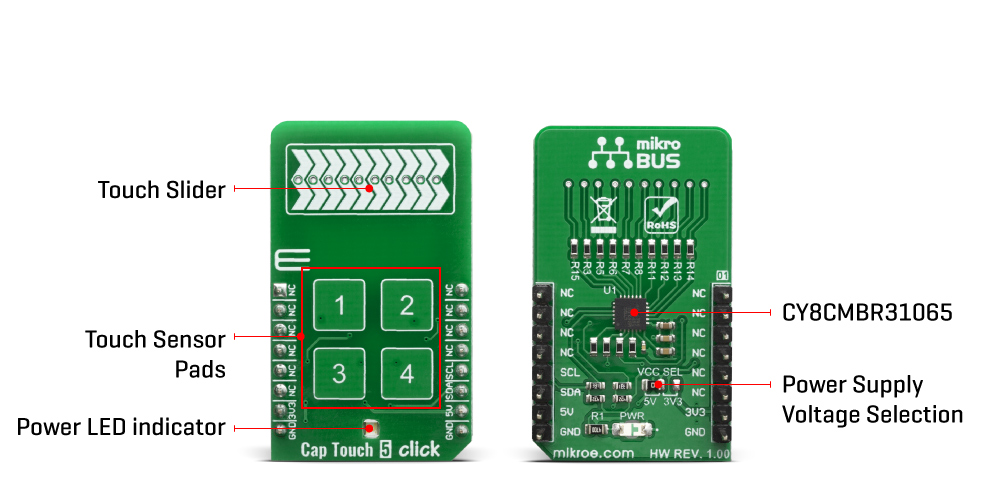
The Cap Touch 5 Click Board™ features the CY8CMBR3106S-LQXI CapSense® Express™ controller which has an advanced analogue sensing channel and the Capacitive Sigma Delta PLUS (CSD PLUS) sensing algorithm, which delivers a signal-to-noise ratio (SNR) of greater than 100:1 to ensure touch accuracy even in extremely noisy environments. This controller is enabled with Cypress's SmartSense™ Auto-tuning algorithm, which compensates for manufacturing variations and dynamically monitors and maintains optimal sensor performance in all environmental conditions. In addition, SmartSense Auto-tuning enables a faster time-to-market by eliminating the time-consuming manual tuning efforts during development and production ramp-up.
Advanced features, such as LED brightness control, proximity sensing, and system diagnostics, save development time. These controllers enable robust liquid-tolerant designs by eliminating false touches due to mist, water droplets, or streaming water. The CapSense controller locks up the user interface in firmware to prevent touch inputs in streaming water.
Additionally, it implements the advanced noise immunity algorithm, EMC, for stable operation in extremely noisy conditions. Besides that, it is also perfectly suited for low-power applications, such as those operated by a battery, when a capacitive sensing controller that has ultra-low average power consumption have to be selected. The CY8CMBR3106S-LQXI controller draws an average current of 22 µA per sensor.
The Cap Touch 5 Click Board™ supports four CapSense buttons. Its sensitivity can be specified individually for each CapSense button and slider. Higher sensitivity values can be used for thick overlays or small button diameters, while lower sensitivity values should be used for large buttons or thin overlays to minimize power consumption. Therefore, this Click board™ comes without the overlay, so it is up to the user to choose the desired application and implementation.
| Type | Capacitive |
| Applications | Ideal for implementing capacitive buttons, sliders, and proximity sensing solutions with minimal development-cycle times. |
| On-board modules | CY8CMBR3106S-LQXI CapSense® Express™ controller |
| Key Features | High sensitivity (0.1 pF), Low-power CapSense, Industrial temperature range: –40 °C to +85 °C, liquid-tolerant |
| Interface | I2C |
| Compatibility | mikroBUS |
| Click board size | M (42.9 x 25.4 mm) |
| Input Voltage | 3.3V or 5V |
This table shows how the pinout on the Cap Touch 5 Click Board™ corresponds to the pinout on the mikroBUS™ socket (the latter shown in the two middle columns).
| Notes | Pin |  |
Pin | Notes | |||
|---|---|---|---|---|---|---|---|
| NC | 1 | AN | PWM | 16 | NC | ||
| NC | 2 | RST | INT | 15 | NC | ||
| NC | 3 | CS | RX | 14 | NC | ||
| NC | 4 | SCK | TX | 13 | NC | ||
| NC | 5 | MISO | SCL | 12 | SCL | I2C Clock | |
| NC | 6 | MOSI | SDA | 11 | SDA | I2C Data | |
| Power Supply | 3.3V | 7 | 3.3V | 5V | 10 | 5V | Power Supply |
| Ground | GND | 8 | GND | GND | 9 | GND | Ground |
| Label | Name | Default | Description |
|---|---|---|---|
| LD1 | PWR | - | Power LED Indicator |
| JP1 | VCC SEL | Left | Power supply voltage selection: left position 3.3V, right position 5V |
Cap Touch 5 Click Board™
- amazon_main_image: https://www.thedebugstore.com/images/product/lg-cap-touch-5-click-3786-angle_1.jpg - amazon_browse_node: 428655031 - mpn: MIKROE-3786 - backorder_label: If no stock shown above, check availability - badge: - widget:We provide a library for the CapTouch 5 Click Board™ on our LibStock page, as well as a demo application (example), developed using MikroElektronika compilers. The demo can run on all the main MikroElektronika development boards.
The library covers all the necessary functions to control the Cap Touch 5 Click Board™.
void captouch5_config_sensors( uint16_t sens_data ) - Function for configuring sensor.void captouch5_config_slider( uint8_t slider_data ) - Function for configuring slider.void captouch5_read_button_status( T_CAPTOUCH5_BUTTONS *buttons ) - Function read button status.The application is composed of three sections :
void applicationTask(  )
{
    uint16_t temp_byte;
    uint16_t last_temp;
    uint8_t error_data;
    uint8_t temp_slider;

    state_check = 0;

    error_data = captouch5_process(  );

    if ( error_data == CAPTOUCH5_ERROR )
    {
        mikrobus_logWrite( "***** ERROR *****", _LOG_LINE );
        mikrobus_logWrite( " ", _LOG_LINE );
        mikrobus_logWrite( " ", _LOG_LINE );
        state_check = 1;
        return;
    }

    temp_byte = captouch5_read_slider_position(  );
    captouch5_read_button_status( &buttons );

    if ( temp_byte != last_temp )
    {
        mikrobus_logWrite( "Slider position value: ", _LOG_TEXT );
        WordToStr( temp_byte, demo_text );
        mikrobus_logWrite( demo_text, _LOG_LINE );
        mikrobus_logWrite( " ", _LOG_LINE );
        mikrobus_logWrite( " ", _LOG_LINE );
        last_temp = temp_byte;
        state_check = 1;
    }

    captouch5_read_buttons(  );

    Delay_ms ( 100 );

    if ( state_check == 1 )
    {
        mikrobus_logWrite( "--- Waiting for command ---", _LOG_LINE );
        mikrobus_logWrite( " ", _LOG_LINE );
        mikrobus_logWrite( " ", _LOG_LINE );
    }
}
Additional Functions :
Note :
The full application code, and ready to use projects can be found on our LibStock page.
Other mikroE Libraries used in the example:
Depending on the development board you are using, you may need a USB UART click, USB UART 2 click or RS232 click to connect to your PC, for development systems with no UART to USB interface available on the board. The terminal available in all MikroElektronika compilers, or any other terminal application of your choice, can be used to read the message.
This Click board™ is supported with mikroSDK - MikroElektronika Software Development Kit. To ensure proper operation of mikroSDK compliant Click board™ demo applications, mikroSDK should be downloaded from the LibStock and installed for the compiler you are using.
- attachments: [{"download_file":[{"download_file":"Cap Touch 5 Click Board™ Schematic"}],"download_filetype":[{"download_filetype":"pdf"}]},{"download_file":[{"download_file":"Cypress CY8CMBR3106S-LQXI CapSense® Express™ Controller Datasheet"}],"download_filetype":[{"download_filetype":"pdf"}]}] - condition: new - custom_product: false - mpn: MIKROE-3786 - google_product_category: Electronics - custom_label_0: Click Board - device_vendor: Cypress Semiconductor Corp - device_type: CY8CMBR3106S-LQXI - warranty: 12 months - brand: MikroE - manufacturer: Mikroelektronika d.o.o. - target_keyword: Cap Touch 5 Click Board - brands: gid://shopify/Metaobject/56256004319 - breadcrumbs: ["gid://shopify/Collection/447955239135","gid://shopify/Collection/241680580797","gid://shopify/Collection/241545019581"] - customhs_code: 847330 - detailed_description: {"type":"root","children":[{"type":"heading","level":3,"children":[{"type":"text","value":"How Does The Cap Touch 5 Click Board™ Work?"}]},{"type":"paragraph","children":[{"type":"text","value":"The "},{"type":"text","value":"Cap Touch 5 Click Board™","bold":true,"italic":true},{"type":"text","value":" features the CY8CMBR3106S-LQXI CapSense® Express™ controller which has an advanced analogue sensing channel and the Capacitive Sigma Delta PLUS (CSD PLUS) sensing algorithm, which delivers a signal-to-noise ratio (SNR) of greater than 100:1 to ensure touch accuracy even in extremely noisy environments. This controller is enabled with Cypress's SmartSense™ Auto-tuning algorithm, which compensates for manufacturing variations and dynamically monitors and maintains optimal sensor performance in all environmental conditions. In addition, SmartSense Auto-tuning enables a faster time-to-market by eliminating the time-consuming manual tuning efforts during development and production ramp-up."}]},{"type":"paragraph","children":[{"type":"text","value":""}]},{"type":"paragraph","children":[{"type":"text","value":"Advanced features, such as LED brightness control, proximity sensing, and system diagnostics, save development time. These controllers enable robust liquid-tolerant designs by eliminating false touches due to mist, water droplets, or streaming water. The CapSense controller locks up the user interface in firmware to prevent touch inputs in streaming water."}]},{"type":"paragraph","children":[{"type":"text","value":"Additionally, it implements the advanced noise immunity algorithm, EMC, for stable operation in extremely noisy conditions. Besides that, it is also perfectly suited for low-power applications, such as those operated by a battery, when a capacitive sensing controller that has ultra-low average power consumption have to be selected. The CY8CMBR3106S-LQXI controller draws an average current of 22 µA per sensor."}]},{"type":"paragraph","children":[{"type":"text","value":"The "},{"type":"text","value":"Cap Touch 5 Click Board™ ","bold":true},{"type":"text","value":"supports four CapSense buttons. Its sensitivity can be specified individually for each CapSense button and slider. Higher sensitivity values can be used for thick overlays or small button diameters, while lower sensitivity values should be used for large buttons or thin overlays to minimize power consumption. Therefore, this Click board™ comes without the overlay, so it is up to the user to choose the desired application and implementation."}]},{"type":"heading","level":3,"children":[{"type":"text","value":"Specifications"}]},{"type":"paragraph","children":[{"type":"text","value":"Type\nCapacitive\nApplications\nIdeal for implementing capacitive buttons, sliders, and proximity sensing solutions with minimal development-cycle times.\nOn-board modules\nCY8CMBR3106S-LQXI CapSense® Express™ controller\nKey Features\nHigh sensitivity (0.1 pF), Low-power CapSense, Industrial temperature range: –40 °C to +85 °C, liquid-tolerant\nInterface\nI2C\nCompatibility\nmikroBUS\nClick board size\nM (42.9 x 25.4 mm)\nInput Voltage\n3.3V or 5V"}]},{"type":"heading","level":3,"children":[{"type":"text","value":"Pinout diagram"}]},{"type":"paragraph","children":[{"type":"text","value":"This table shows how the pinout on the "},{"type":"text","value":"Cap Touch 5 Click Board™ ","bold":true},{"type":"text","value":"corresponds to the pinout on the mikroBUS™ socket (the latter shown in the two middle columns)."}]},{"type":"paragraph","children":[{"type":"text","value":"Notes\nPin\nPin\nNotes\nNC\n1\nAN\nPWM\n16\nNC\nNC\n2\nRST\nINT\n15\nNC\nNC\n3\nCS\nRX\n14\nNC\nNC\n4\nSCK\nTX\n13\nNC\nNC\n5\nMISO\nSCL\n12\nSCL\nI2C Clock\nNC\n6\nMOSI\nSDA\n11\nSDA\nI2C Data\nPower Supply\n3.3V\n7\n3.3V\n5V\n10\n5V\nPower Supply\nGround\nGND\n8\nGND\nGND\n9\nGND\nGround"}]},{"type":"heading","level":3,"children":[{"type":"text","value":"Onboard settings and indicators"}]},{"type":"paragraph","children":[{"type":"text","value":"Label\nName\nDefault\n Description\nLD1\nPWR\n-\nPower LED Indicator\nJP1\nVCC SEL\nLeft\nPower supply voltage selection: left position 3.3V, right position 5V"}]},{"type":"heading","level":3,"children":[{"type":"text","value":" "}]}]} - summary:The Cap Touch 5 Click Board™ is a capacitive touch sensing Click Board™ that features the CY8CMBR3106S-LQXI CapSense® Express™ controller which enables advanced, yet easy-to-implement, capacitive touch sensing user interface solutions. It supports up to 16 capacitive sensing inputs, eliminates time-consuming firmware development. This controller is ideal for implementing capacitive buttons, sliders, and proximity sensing solutions with minimal development-cycle times.
The Cap Touch 5 Click Board™ is supported by a mikroSDK compliant library, which includes functions that simplify software development. This Click Board™ comes as a fully tested product, ready to be used on a system equipped with the mikroBUS™ socket.