# Title: Buggy
## Description: Buggy A motorized development platform 8-bit, 16-bit, 32-bit, ARM, PIC, AVR? With the MikroE Buggy you'll be on your own terrain – it's essentialy a four-wheeled mikromedia or clicker 2 workstation. Once you attach the board of your choice, the Buggy becomes a battery-powered motorized development platform – with plenty options to equip and modify it with additional functionality. You won't get a speeding ticket on the road for it, but when it comes to getting from 0 to prototype, these are the hottest wheels around. Make it unique click boards will make each Buggy unique and different. There are more than a 250 clicks available, and among them are all types of sensors and transceivers. The Buggy has three mikroBUS sockets, plus two more if a clicker 2 board is attached. Click here to get some ideas. Download App and go for a ride If you want to take your Buggy for a spin as soon as possible, attach BLE P click to one of the three mikroBUS sockets, and install the free Buggy Android app on your nearest Bluetooth Low Energy compatible smartphone or tablet. The source code is available for free. Use it to tailor the app for any number of specific uses you intended for the Buggy. If you purchase a Buggy kit with a clicker 2 board, the firmware is preinstalled. What you get? The Buggy comes disassembled in the box. Shown up, in the image gallery, are all the components you need to assemble the Buggy before adding a clicker 2 (or mikromedia) and click boards.
## Product type: Development System
## Vendor: Mikroelektronika d.o.o.
## Tags: MikroE, STEM
## Price range: 100.1 - 100.1 GBP
## Link: https://thedebugstore.com/products/buggy-mikroe-1670-uk
## Compare-at price range: 143.0 - 143.0 GBP
## Options
- Title: Default Title
## Collections
- [New Products](https://thedebugstore.com/a/llms/collections/new-products-debug-store)
- [Mikroelektronika d.o.o. (MikroE)](https://thedebugstore.com/a/llms/collections/mikroelektronika-catalogue-uk)
- [MikroE Sale](https://thedebugstore.com/a/llms/collections/mikroe-sale)
- [MIKROE Stock](https://thedebugstore.com/a/llms/collections/mikroe-products-in-stock-sale)
## Variants
- Default Title, SKU: MIKROE-1670, Available: yes, Inventory: 1
## Metafields
- full_description: Buggy
A motorized development platform
8-bit, 16-bit, 32-bit, ARM, PIC, AVR? With the MikroE Buggy you'll be on your own terrain – it's essentialy a four-wheeled mikromedia or clicker 2 workstation.
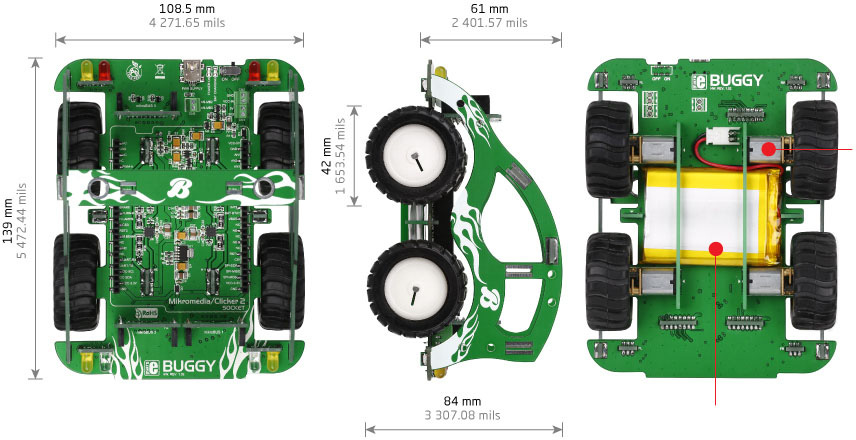
Once you attach the board of your choice, the Buggy becomes a battery-powered motorized development platform – with plenty options to equip and modify it with additional functionality. You won't get a speeding ticket on the road for it, but when it comes to getting from 0 to prototype, these are the hottest wheels around.
Make it unique
click boards will make each Buggy unique and different. There are more than a 250 clicks available, and among them are all types of sensors and transceivers. The Buggy has three mikroBUS sockets, plus two more if a clicker 2 board is attached. Click here to get some ideas.

Download App and go for a ride
If you want to take your Buggy for a spin as soon as possible, attach BLE P click to one of the three mikroBUS sockets, and install the free Buggy Android app on your nearest Bluetooth Low Energy compatible smartphone or tablet. The source code is available for free. Use it to tailor the app for any number of specific uses you intended for the Buggy. If you purchase a Buggy kit with a clicker 2 board, the firmware is preinstalled.
What you get?
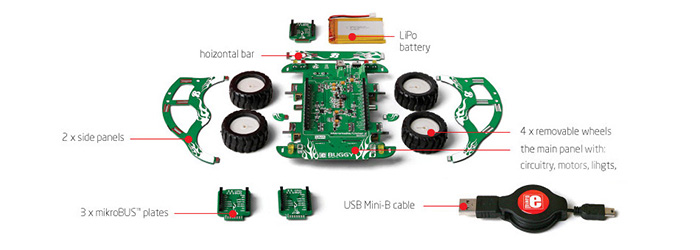
The Buggy comes disassembled in the box. Shown up, in the image gallery, are all the components you need to assemble the Buggy before adding a clicker 2 (or mikromedia) and click boards.
- description_tag: Buy your MikroE Buggy from MikroE's UK specialist. UK Stock with Free Shipping.
- title_tag: MikroE Buggy (MIKROE-1670)
- manufacturer: Mikroelektronika d.o.o.
- warranty: 12 months
- amazon_enable: TRUE
- amazon_title: Buggy
- amazon_product_type: computercomponent
- amazon_block: FALSE
- amazon_prime_enable: FALSE
- amazon_search: MikroElektronika Microelectronica MIKROE-1100
- amazon_uk_price: 104.72
- amazon_uk_currency: GBP
- amazon_de_currency: EUR
- amazon_de_price: 118.3336
- amazon_fr_currency: EUR
- amazon_fr_price: 118.3336
- amazon_es_currency: EUR
- amazon_es_price: 118.3336
- amazon_nl_currency: EUR
- amazon_nl_price: 118.3336
- amazon_it_currency: EUR
- amazon_it_price: 118.3336
- amazon_se_curency: SEK
- amazon_se_price: 1193.808
- amazon_product_id: 8606015077451
- amazon_product_id_type: EAN
- amazon_update: Update
- amazon_short_description: Buggy is a robot rover platform expandable with all sorts of sensors and transceivers. A dream car for hackers and makers. Multiple kits are available.
- amazon_long_description: Buggy
Is a motorised development platform - 8-bit, 16-bit, 32-bit, ARM, PIC, AVR' You choose.
With the MikroE Buggy you'll be on your own terrain it's essentially a four-wheeled mikroMedia™ or Clicker 2 workstation.
 .
.
Once you attach the board of your choice, the Buggy becomes a battery-powered motorised development platform.
with plenty options to equip and modify it with additional functionality. You won't get a speeding ticket on the road for it, but when it comes to getting from 0 to prototype, these are the hottest wheels around.
Make it Unique
Click Board™s will make each Buggy unique and different. There are more than 375 Clicks available, and among them are all types of sensors and transceivers. The Buggy has three mikroBUS sockets, plus two more if a Clicker 2 board is attached.
 .
.
Download App and Go for a Ride
If you want to take your Buggy for a spin as soon as possible, attach BLE P Click to one of the three mikroBUS sockets, and install the free Buggy Android app on your nearest Bluetooth Low Energy compatible smartphone or tablet. The source code is available for free. Use it to tailor the app for any number of specific uses you intended for the Buggy. If you purchase a Buggy kit with a Clicker 2 board, the firmware is preinstalled. Otherwise, download it from here: .
Download Firmware .
Download Android App .
Download App source code .
Read User Manual .
What you Get'
The Buggy comes disassembled in the box. Shown up, in the image gallery, are all the components you need to assemble the Buggy before adding a Clicker 2 (or mikroMedia™) and Click Board™s.
 .
.
- amazon_main_image: https://www.thedebugstore.com/images/product/lg-buggy-package.jpg
- amazon_other_image_1: https://www.thedebugstore.com/images/product/lg-mikroe-buggy-top-01.jpg
- amazon_other_image_2: https://www.thedebugstore.com/images/product/lg-mikroe-buggy-bottom-01.jpg
- amazon_other_image_3: https://www.thedebugstore.com/images/product/lg-mikroe-buggy-bottom-01.jpg
- amazon_browse_node: 428655031
- related_products: MIKROE-1830,MIKROE-1750,MIKROE-1828,MIKROE-1749
- mpn: MIKROE-1670
- backorder_label: If no stock shown above, check availability
- google_product_category: 1253
- condition: new
- custom_product: false
- mpn: MIKROE-1670
- google_product_category: Electronics
- custom_label_0: Development System
- warranty: 12 months
- brand: MikroE
- manufacturer: Mikroelektronika d.o.o.
- badge: No reviews
- widget:
- brands: gid://shopify/Metaobject/56256004319
- customhs_code: 847180
- detailed_description: {"type":"root","children":[{"type":"heading","level":2,"children":[{"type":"text","value":"Buggy"}]},{"type":"paragraph","children":[{"type":"text","value":"A motorized development platform"}]},{"type":"paragraph","children":[{"type":"text","value":"8-bit, 16-bit, 32-bit, ARM, PIC, AVR? With the MikroE Buggy you'll be on your own terrain – it's essentialy a four-wheeled mikromedia or clicker 2 workstation."}]},{"type":"paragraph","children":[{"type":"text","value":""}]},{"type":"paragraph","children":[{"type":"text","value":"Once you attach the board of your choice, the Buggy becomes a battery-powered motorized development platform – with plenty options to equip and modify it with additional functionality. You won't get a speeding ticket on the road for it, but when it comes to getting from 0 to prototype, these are the hottest wheels around."}]},{"type":"heading","level":2,"children":[{"type":"text","value":"Make it unique"}]},{"type":"paragraph","children":[{"type":"text","value":"click boards will make each Buggy unique and different. There are "},{"type":"text","value":"more than a 250 clicks available","bold":true},{"type":"text","value":", and among them are all types of sensors and transceivers. The Buggy has three mikroBUS sockets, plus two more if a clicker 2 board is attached. Click here to get some ideas."}]},{"type":"paragraph","children":[{"type":"text","value":""}]},{"type":"heading","level":2,"children":[{"type":"text","value":"Download App and go for a ride"}]},{"type":"paragraph","children":[{"type":"text","value":"If you want to take your Buggy for a spin as soon as possible, attach BLE P click to one of the three mikroBUS sockets, and install the free Buggy Android app on your nearest Bluetooth Low Energy compatible smartphone or tablet. The source code is available for free. Use it to tailor the app for any number of specific uses you intended for the Buggy. If you purchase a Buggy kit with a clicker 2 board, the firmware is preinstalled. "}]},{"type":"heading","level":3,"children":[{"type":"text","value":"What you get?"}]},{"type":"paragraph","children":[{"type":"text","value":"The Buggy comes disassembled in the box. Shown up, in the image gallery, are all the components you need to assemble the Buggy before adding a clicker 2 (or mikromedia) and click boards."}]},{"type":"paragraph","children":[{"type":"text","value":""}]}]}
- summary: The Buggy is a dream car for makers and hackers. It’s a platform for developing RC or autonomous robots made in the MikroElektronika style of making it simple.
We took advantage of all the innovations we came up with in recent years: the Buggy employs a clicker 2/mikromedia pinout that makes it compatible with a wide range of microcontroller architectures. It can have up to five mikroBUS sockets giving you the choice of over 100 click boards to enhance the four-wheeler and make it your own with various sensors, transceivers, displays and so on.
You’ll be able to build up a robot rover in one evening. Then disassemble it and repurpose it just as easily.
 .
. .
. .
.